useMemo()
memoriaztion 기법으로 불필요한 연산을 최적화하는 React Hook
동일한 연산을 다시 수행해야할 때, 결과값을 메모리에 저장!해서 또 연산할 필요X
사용법
useMemo(()=>{}, [])첫번째 인자 : 콜백함수
두번째 인자 : 의존성 배열(deps)
- deps가 변경되었을 때만, 콜백함수를 실행
- 콜백함수가 반환하는 값을 useMemo가 그대로 다시 반환
- 콜백함수에는 memorization 하고싶은 연산을 넣어주자
- deps가 빈 배열이라면, 최초 렌더링 딱 한 번만 콜백함수가 실행됨
적용
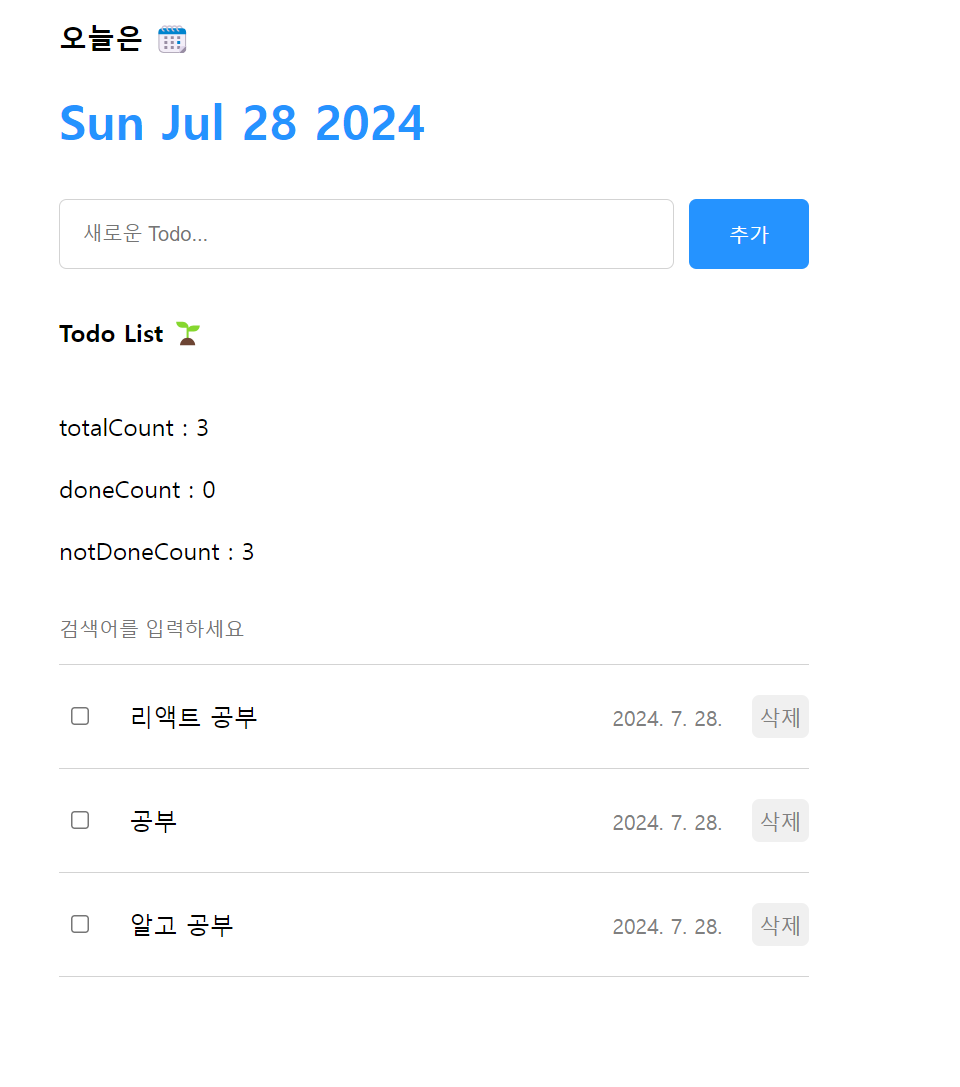
todos배열의 총 갯수를 세는 totalCount
체크된 todo의 갯수를 세는 doneCount
체크되지않은 todo의 갯수를 세는 notdoneCount
특히 doneCount는 filter메서드를 사용하기 때문에 연산이 오래걸림
부모 컴포넌트가 리렌더링 될때마다 List컴포넌트도 리렌더링이 되기때문에
검색어를 입력하는 todos와 상관없는 state가 바뀌어도 계속 리렌더링(다시 연산을 실행) => 불필요
import "./List.css";
import { useState, useMemo } from "react";
import TodoItem from "./TodoItem";

const List = ({ todos, onUpdate, onDelete }) => {
  const [search, setSearch] = useState("");
  const onChangeSearch = (e) => {
    setSearch(e.target.value);
  };

  const getFilterdData = () => {
    if (search === "") {
      return todos;
    }
    // filter 메서드를 호출하고 그 결과값을 반환
    return todos.filter((todo) =>
      // 배열의 모든 todo 아이템을 순회하면서
      // 연산의 결과값이 참이되는값을 모아 배열로 반환
      todo.content.toLowerCase().includes(search.toLowerCase())
    );
  };

  // 리렌더링 될 때마다 이 함수를 호출하게 됨(search가 변할 때마다)
  const filteredTodos = getFilterdData(); // 결과값 저장

  const getAnalyzedData = () => {
    console.log("getAnalyzedData 호출");
    const totalCount = todos.length;
    const doneCount = todos.filter((todo) => todo.isDone).length;
    const notDoneCount = totalCount - doneCount;

    return { totalCount, doneCount, notDoneCount };
  };

  const { totalCount, doneCount, notDoneCount } = getAnalyzedData();

  return (
    <div className="List">
      <h4>Todo List 🌱</h4>
      <div>totalCount : {totalCount}</div>
      <div>doneCount : {doneCount}</div>
      <div>notDoneCount : {notDoneCount}</div>
      <input
        placeholder="검색어를 입력하세요"
        value={search}
        onChange={onChangeSearch}
      />
      <div className="todos_wrapper">
        {/* todos에서 filteredTodos로 */}
        {filteredTodos.map((todo) => (
          // return을 주던가 ()를 써줘야함

          <TodoItem
            key={todo.id}
            id={todo.id}
            content={todo.content}
            date={todo.date}
            isDone={todo.isDone}
            onUpdate={onUpdate}
            onDelete={onDelete}
            // {...todo}로 넘겨줄수도있다. key는 따로 써야함
          />
        ))}
        {/* <TodoItem />
        <TodoItem />
        <TodoItem /> */}
      </div>
    </div>
  );
};

export default List;
그래서 useMemo를 사용해서 todos의 배열이 바뀔때만 실행되게 하자!
=>getAnalyzedData()함수의 연산을 useMemo에 옮겨줌
  const { totalCount, doneCount, notDoneCount } = useMemo(() => {
    console.log("겟에널랄지 호출");
    const totalCount = todos.length;
    const doneCount = todos.filter((todo) => todo.isDone).length;
    const notDoneCount = totalCount - doneCount;

    return { totalCount, doneCount, notDoneCount };
  }, [todos]);
useMemo의 콜백함수가 반환하는 값을 useMemo가 반환하므로 구조분해할당을 이용해서 담아줌
=> todos가 바뀔때만 연산이 실행됨
결론
불필요한 연산을 줄이고 싶을때, 내가 원하는 값이 바뀔때만 연산을 실행시키고 싶을때 useMemo(()=>{연산}, [바뀔때만 실행하고싶은 값])을 작성해준다!
참고 : 한입 크기로 잘라먹는 리액트 강의

조금씩이라도 꾸준하게