이번에는 최소 서버 운용이 가능한 Django 환경을 구축하여 Github Action을 통한 CI/CD Deploy를 진행해 보겠습니다.
1. Django 환경 구축
지난 테스트를 바탕으로 “Hello World!”를 출력해주는 기본 서버를 만들어보자
전체 파일 구성
A. App Tree
D:.
├─index        # index 앱
│  ├─migrations        # django 객체 모델의 버전 정보
│  └─templates         # html template
│     └─index
├─static        # 정적 파일 (css, bootstrap)
│  └─resources
│      ├─bootstrap
│      └─css
├─memorial_test
│  ├─settings.py    # 전체적인 django 설정 파일
│  ├─urls.py    # django App의 url 리스트
│  └─wsgi.py    # 웹서버와 웹 애플리케이션의 인터페이스를 위한 파이썬 프레임워크 설정
│
├─manage.py        # django 시작 파일 ex) python manage.py runserver
├─db.sqlite3        # django 기본 db
├─manifest.yml        # CloudFoundry 배포에 사용되는 메타데이터를 포함하는 파일
├─procfile        # 배포 완료시 실행되는 코드 목록
├─requirements.txt        # python 환경 구축시 설치되는 파이썬 라이브러리 목록
└─runtime.txt        # 파이썬 버전
B. 파일 구성
- {{ Project_name }}/settings.py
# settings.py
import os

...(생략)...

ALLOWED_HOSTS = ['*']
INSTALLED_APPS = [
		...(생략)...
		'index',
    'rest_framework',
]

MIDDLEWARE = [
    'django.middleware.security.SecurityMiddleware',
    'django.contrib.sessions.middleware.SessionMiddleware',
    'django.middleware.common.CommonMiddleware',
    'django.middleware.csrf.CsrfViewMiddleware',
    'django.contrib.auth.middleware.AuthenticationMiddleware',
    'django.contrib.messages.middleware.MessageMiddleware',
    'django.middleware.clickjacking.XFrameOptionsMiddleware',
    'whitenoise.middleware.WhiteNoiseMiddleware',
]

TIME_ZONE = "Asia/Seoul"    # “UTC” : 시간 설정
USE_TZ = "False"    # “True” : Timezone 사용 허용

STATICFILES_STORAGE = 'whitenoise.storage.CompressedStaticFilesStorage'
STATIC_BASE_DIR = os.path.dirname(os.path.abspath(__file__))
STATICFILES_DIRS = (
    os.path.join(STATIC_BASE_DIR, '../static/resources'),
)
→ Django 배포를 위한 설정 변경 ( ALLOWED_HOSTS 주의 )
- manifest.yml
# manifest.yml
---
applications:
  - name: **{{ Project_name }}**
    buildpack: python_buildpack
    memory: **{{ Memory_size }}**
    instances: **{{ Instance_size }}**
→ a. name : 배포 시킬 어플리케이션 이름 b. buildpack : 인스턴스에 설치할 파이썬(Python) 빌드팩 c. memory : 메모리 크기 d. instances : 인스턴스 개수
- Procfile
# Procfile
web: gunicorn {{ Project_name }}.wsgi --log-file -
→ 서버 배포 및 설치 완료 후 실행시킬 명령어를 작성
→ gunicorn : python용 웹 프레임워크인 Django나 flask 를 구동시켜주는 웹서버
- requirements.txt
# requirements.txt
>> pip freeze > requirements.txt
→ 터미널에서 명령어를 통해 사용하는 라이브러리를 requirements로 추출
- runtime.txt
# runtime.txt
python-3.9.5
배포 코드
cf api --skip-ssl-validation **PAAS_TA_URL**
cf login -u **PAAS_TA_USER** -p **PAAS_TA_PASSWORD** -o **PAAS_TA_ORG** -s **PAAS_TA_SPACE**
cf push
2. Github Action
전체 파일 구성
- Dockerfile
FROM alpine:3 AS download
WORKDIR /
RUN apk update \\
 && apk add curl \\
 && curl -sL '<https://packages.cloudfoundry.org/stable?release=linux64-binary&version=6.53.0&source=github-rel>' | tar -xzv \\
 && chmod 0755 cf

FROM alpine:3
COPY --from=download /cf /usr/bin/cf
COPY entrypoint.sh /entrypoint.sh
ENTRYPOINT ["/entrypoint.sh"]- action.yml
name: 'CF Push'
description: Push an application to a Cloud Foundry
inputs:
  manifest:
    description: The path to your CF application manifest
    required: true
  appdir:
    description: Set this parameter if you want to switch the working dir to push an app
    required: true
  api:
    description: The Cloud Foundry API endpoint
    required: true
  username:
    description: Your Cloud Foundry authentication username (or email address)
    required: true
  password:
    description: Your Cloud Foundry authentication password
    required: true
  org:
    description: The name of the Cloud Foundry organization in which to deploy
    required: true
  space:
    description: The name of the Cloud Foundry space in which to deploy
    required: true
  validate:
    description: Whether or not to validate the CF API's TLS certificate
    required: false
    default: true
  debug:
    description: Debug your deploy dir to list all folders
    required: false
    default: false

runs:
  using: docker
image: Dockerfile- entrypoint.sh
#!/bin/sh
set -eu
cf_opts=
if [ "x${INPUT_VALIDATE}" = "xfalse" ]; then
  cf_opts="--skip-ssl-validation"
fi

if [ "x${INPUT_DEBUG}" = "xtrue" ]; then
  echo "Your selected APPDIR : ${INPUT_APPDIR}"
  ls -R
fi

if [ -z ${INPUT_APPDIR+x} ]; then
  echo "WORKDIR is not set. Staying in Root Dir"; else
    echo ${INPUT_APPDIR}
    cd ${INPUT_APPDIR}
fi

cf api ${INPUT_API} ${cf_opts}
CF_USERNAME=${INPUT_USERNAME} CF_PASSWORD=${INPUT_PASSWORD} cf auth
cf target -o ${INPUT_ORG} -s ${INPUT_SPACE}
cf push -f ${INPUT_MANIFEST}
Github Action Code
# .github/workflows/deploy.yml

# This is a basic workflow to help you get started with Actions
name: Production Deploy CI

# Controls when the workflow will run
on:
  # Triggers the workflow on push or pull request events but only for the "main" branch
  push:
    branches: [ "main" ]

  # Allows you to run this workflow manually from the Actions tab
  workflow_dispatch:

jobs:
  deploy:
    runs-on: ubuntu-latest
    steps:
      - name: Checkout
        uses: actions/checkout@v2
      - name : CloudFoundry push application with different directory
        uses: jhunt/cf-push@main
        with:
          appdir:   '.'     # use the appdir option to select a specif folder where the cf app is stored
          api:      ${{ secrets.PAAS_TA_URL }}
          org:      ${{ secrets.PAAS_TA_ORG }}
          space:    ${{ secrets.PAAS_TA_SPACE }}
          username: ${{ secrets.PAAS_TA_USER }}
          password: ${{ secrets.PAAS_TA_PASSWORD }}
          manifest: manifest.yml
          validate: true
→ 현재 main 브랜치에 Push를 진행하면 Action이 동작해 자동배포가 진행됩니다.
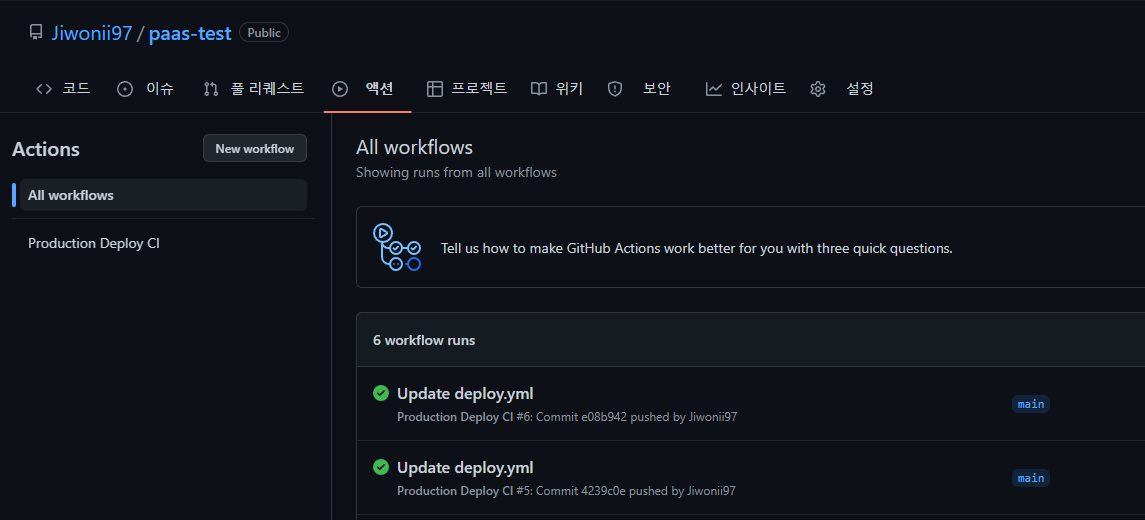
→ 다음은 배포 성공한 캡쳐본
→ 추후 다른 branch를 통해 PR 진행시 CI/CD가 작동하도록 추가적으로 수정할 계획입니다.

함께 도전하고 성장하는 어린 꿀벌, 주니어 개발자 황지원 입니다