💡작업 순서 정리
1. 엑셀로 더미데이터 넣은 캡쳐본 제출
2. ERD 설계 → 캡쳐 제출
3. ERD 기반에 DB 구축 및 테스트 데이터 삽입
💡서비스 요구사항
- 회원 가입
- 판매자, 일반사용자 구분 필요(role enum)
- 상품 등록
- 재고 컬럼은 필수, 판매자가 누군지 기록 필요(FK)
- 주문하기
- 한번에 여러상품을 여러개 주문할수 있는 일반적인 주문서비스
- 한 주문을 조회했을때 어떤 상품들을 주문했는지 조회 가능해야함
- 그외
- 주의사항
- user테이블(사용자), order테이블(주문), product테이블(상품) 등 컬럼, 테이블 설계 추가 자유
- 실제 웹서비스를 제공한다 가정하고 추가(insert), 조회(select) 값에 적절한 테스트 필요
- 각 서비스 단계별로 테스트 쿼리 생성 필요
1. 더미 데이터를 넣은 엑셀 표 만들기
회원 테이블
| user_id(PK) | name | email | password | adress | role |
|---|
| 1 | 이지연 | jiyean@naver.com | jiyean | 경기도 남양주시 | member |
| 2 | 관리자 | admin@gmail.com | 1234 | NULL | admin |
| 3 | 브레드 | bradkim@naver.com | brad1234 | 서울시 동작구 | member |
상품 테이블
| product_id(PK) | name |
|---|
| 1 | 귀여운 티셔츠 |
| 2 | 멋쟁이 바지 |
상품 옵션 테이블
| product_option_id(PK) | product_id(FK refer product) | width | lenght | stock | price |
|---|
| 1 | 1 | 90 | 50 | 10 | 50000 |
| 2 | 1 | 100 | 55 | 10 | 50000 |
| 3 | 1 | 110 | 60 | 15 | 60000 |
| 4 | 2 | 100 | 55 | 10 | 50000 |
| 5 | 2 | 110 | 60 | 10 | 60000 |
주문 테이블
| order_id(PK) | user_id(FK refer user) | order_time |
|---|
| 1 | 1 | 2025-11-25 |
| 2 | 3 | 2025-11-26 |
| 3 | 3 | 2025-11-27 |
주문 내역 테이블
| order_list_id(PK) | product_option_id(FK product_option) | order_quantity | order_id (FK reder order_id) |
|---|
| 1 | 1 | 1 | 1 |
| 2 | 2 | 2 | 1 |
| 3 | 3 | 1 | 1 |
| 4 | 4 | 1 | 2 |
| 5 | 5 | 1 | 2 |
장바구니
| cart_id(PK) | user_id(FK user) | product_option_id(FK product_option) | order_quantity | product_price(FK refer product) | check |
|---|
| 1 | 1 | 1 | 1 | 50000 | T |
| 2 | 1 | 2 | 2 | 50000 | T |
| 3 | 1 | 3 | 1 | 50000 | T |
| 4 | 3 | 4 | 1 | 80000 | F |
| 5 | 3 | 5 | 1 | 80000 | F |
2. ERD 설계
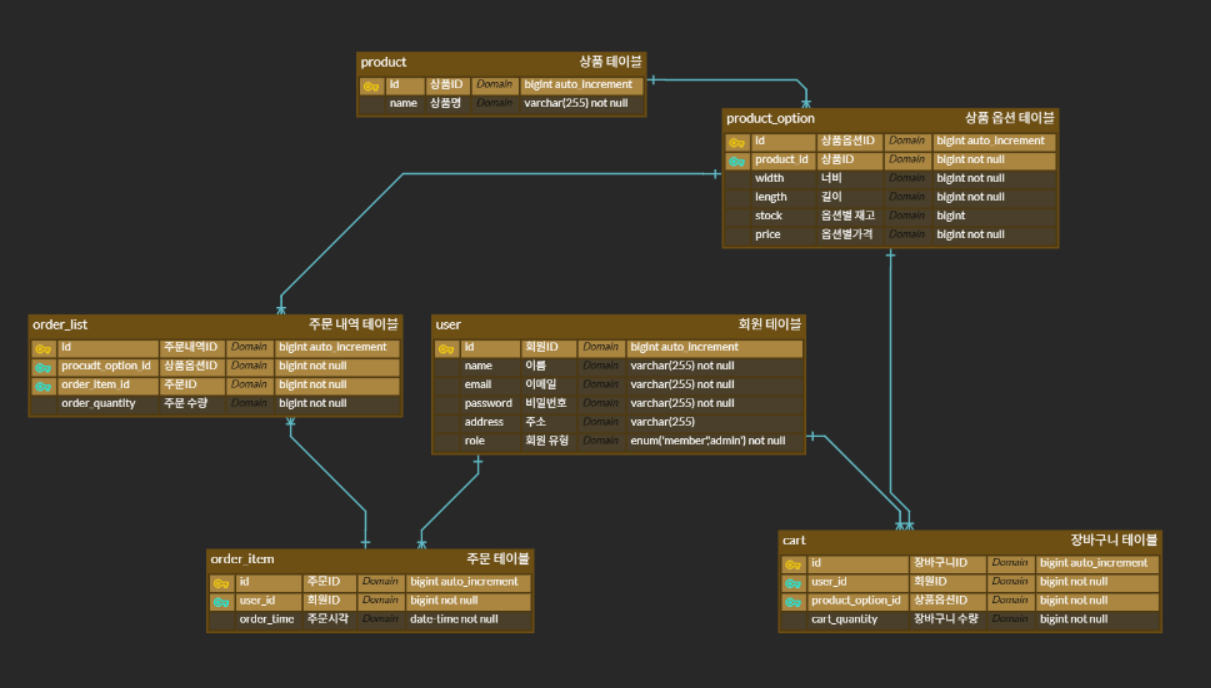
https://www.erdcloud.com/d/E3sofP4nA88K969wY
3. DB 구축
create database shopdb;
use shopdb;
create table user
(
id bigint auto_increment primary key,
name varchar(255) not null,
email varchar(255) not null,
password varchar(255) not null,
role enum ('member', 'admin') default 'member'
);
create table product
(
id bigint auto_increment primary key,
name varchar(255) not null,
price bigint not null
);
create table product_option
(
id bigint auto_increment primary key,
product_id bigint not null,
width bigint not null check ( width > 0 ),
length bigint not null check ( length > 0 ),
stock bigint,
foreign key (product_id) references product (id)
);
create table cart
(
id bigint auto_increment primary key,
user_id bigint not null,
product_option_id bigint not null,
cart_quantity bigint not null check ( cart_quantity > 0 ),
foreign key (user_id) references user (id),
foreign key (product_option_id) references product_option (id)
);
create table order_item
(
id bigint auto_increment primary key,
user_id bigint not null,
order_time datetime not null default current_timestamp(),
foreign key (user_id) references user (id)
);
create table order_list
(
id bigint auto_increment primary key,
product_option_id bigint not null,
order_id bigint not null,
order_quantity bigint not null check ( order_quantity > 0 ),
foreign key (product_option_id) references product_option (id),
foreign key (order_id) references order_item (id)
);
4. 테스트 쿼리 실행
insert into user (name, email, password, role)
values ('이지연', 'jiyean@naver.com', '1234', 'member');
insert into user (name, email, password, role)
values ('관리자', 'admin@shop.db.com', '1234', 'admin');
insert into user (name, email, password, role)
values ('brad', 'bradkim@naver.com', '1234', 'member');
insert into product (name)
values ('귀여운 티셔츠');
insert into product (name)
values ('멋쟁이 셔츠');
insert into product (name)
values ('예쁜 나시');
insert into product_option(product_id, width, length, stock, price)
values (1, 50, 90, 100, 50000);
insert into product_option(product_id, width, length, stock, price)
values (1, 55, 95, 100, 50000);
insert into product_option(product_id, width, length, stock, price)
values (1, 60, 100, 100, 60000);
insert into product_option(product_id, width, length, stock, price)
values (2, 55, 95, 100, 50000);
insert into product_option(product_id, width, length, stock, price)
values (2, 60, 100, 100, 60000);
insert into product_option(product_id, width, length, stock, price)
values (3, 50, 70, 100, 30000);
start transaction;
insert into order_item(user_id)
values (1);
insert into order_list (product_option_id, order_item_id, order_quantity)
values (1,
(select id from order_item order by id desc limit 1),
2);
update product_option
set stock=stock - 2
where id = 1
and stock >= 2;
commit;
start transaction;
insert into order_item(user_id)
values (1);
insert into order_list (product_option_id, order_item_id, order_quantity)
values (2, last_insert_id(), 1);
update product_option
set stock=stock - 1
where id = 2
and stock >= 1;
commit;
start transaction;
insert into order_item(user_id)
values (3);
insert into order_list (product_option_id, order_item_id, order_quantity)
values (4,
(select id from order_item order by id desc limit 1),
1);
update product_option
set stock=stock - 1
where id = 4
and stock >= 1;
commit;
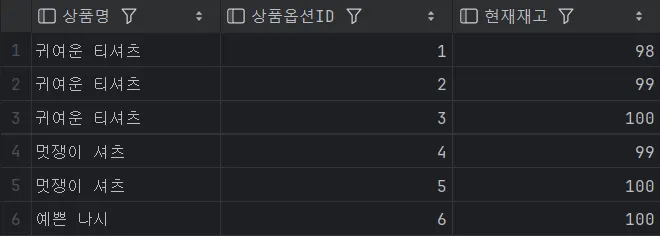
select p.name as '상품명', p_o.id as '상품옵션ID', p_o.stock as '현재재고'
from product_option p_o
inner join product p on p_o.product_id = p.id;
select u.name as '유저이름',
o_i.id as '주문내역번호',
p.name as '상품명',
p_o.id as '상품옵션ID',
o_l.order_quantity as '주문수량',
o_i.order_time as '주문시각'
from order_item o_i
inner join order_list o_l on o_i.id = o_l.order_item_id
inner join product_option p_o on p_o.id = o_l.product_option_id
inner join product p on p.id = p_o.product_id
inner join user u on u.id = o_i.user_id;
- 상품 정보 조회가 원하는대로 수행 된 모습
- 주문 정보 조회가 원하는대로 수행 된 모습

확장 가능한 주요 영역
- 상품 상세 정보 추가
- 상품 설명, 이미지 URL, 카테고리, 브랜드, 할인 정보 등 컬럼 혹은 별도 테이블로 분리 가능
- 예:
product_detail 테이블로 상세 스펙이나 리뷰 수집
- 주소 관리
- 유저의 배송 주소를 여러 개 저장 가능한
address 테이블 생성
- 주문 시 배송지와 연결할 수 있도록 확장
- 결제 정보 및 상태 관리
- 주문 상태(결제 대기, 결제 완료, 배송 중, 배송 완료 등)를 저장할 컬럼 추가
- 결제 테이블(
payment)로 결제 수단, 금액, 결제 시간 저장
- 상품 옵션 및 재고 관리 강화
- 옵션별 가격 변동, 추가 옵션 항목(색상, 재질 등) 관리
- 재고 변경 이력 테이블 추가 가능
- 리뷰와 평점 시스템
- 상품에 대한 사용자 리뷰 및 평점 테이블 생성
- 할인 쿠폰/프로모션 기능
- 쿠폰/프로모션 코드와 적용 이력 관리 테이블 추가
- 로그 및 히스토리 관리
- 사용자 활동, 주문 변경 이력, 장바구니 변경 로그 기록 테이블 추가
| 테이블명 | 목적 |
|---|
| product_detail | 상품 상세 정보(이미지, 설명 등) |
| address | 유저 배송 주소 관리 |
| payment | 결제 내역 및 상태 관리 |
| review | 상품 별 유저 리뷰와 평점 저장 |
| coupon | 쿠폰 코드 및 할인 혜택 등록 |
| inventory_log | 재고 변동 이력 저장 |

Role enum? << 이놈 아저씨를 떠올리게 만드는 향수 가득한 이름입니다.
만약 친구들과 놀이를 한다고 치면?
이놈 아저씨 역할, 바로 role enum 이라고 할 수 있겠습니다.
아. 하. 하 ~