45장 프로미스는 내용이 너무 많아서 두번으로 나누어 정리해보았다.
프로미스(2) - fetch에서는 fetch와 관련된 45.8장의 내용을 담았다.
45.8 fetch
fetch함수 :XMLHttpRequest객체와 마찬가지로 HTTP 요청 전송 기능을 제공하는 클라이언트 사이드 Web APIXMLHttpRequest객체보다 사용법이 간단하고 프로미스를 지원하기 때문에 비동기 처리를 위한 콜백 패턴의 단점에서 자유롭다.- 비교적 최근에 추가된 Web API이다.
- HTTP 요청을 전송할 URL, HTTP 요청 메서드, HTTP 요청 헤더, 페이로드 등을 설정한 객체를 전달한다.
const promise = fetch(url [, options])- HTTP 응답을 나타내는 Response 객체를 래핑한 Promise 객체를 반환한다.
Response 객체
- Response 객체는 HTTP 응답을 나타내는 다양한 프로퍼티를 제공한다.
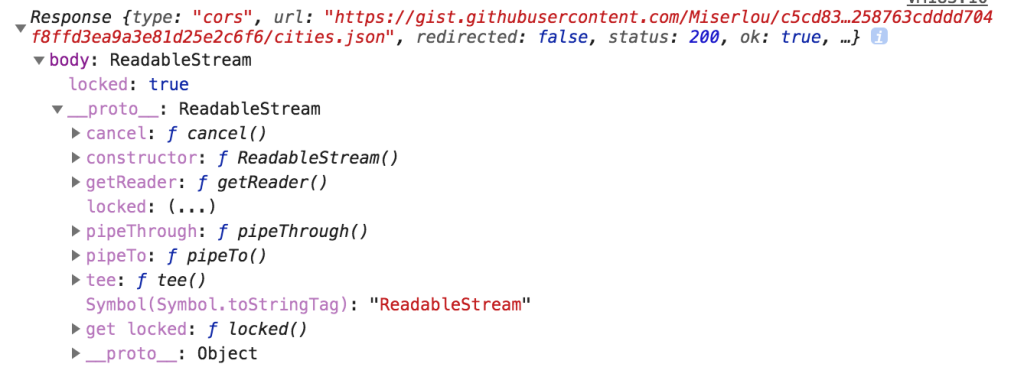
Response.prototype에는 Response 객체에 포함되어 있는 HTTP response body를 위한 다양한 메서드를 제공한다.- ex.
Response.prototype.json-fetch함수가 반환한 프로미스가 래핑하고 있는 MIME 타입이 application/json인 HTTP response body를 취득하여 역직렬화(deserialize)한다.fetch('https://jsonplaceholder.typicode.com/todos/1') // response : HTTP 응답을 나타내는 Response 객체 // json 메서드를 사용하여 Response 객체에서 HTTP response body를 취득하여 역직렬화 .then(response => response.json()) .then(json => console.log(json)); // {userId: 1, id: 1, title: "delectus aut autem", completed: false}
- ex.
fetch 함수의 에러 처리
fetch함수는 에러 처리에 주의해야 한다.
const wrongUrl = 'https://jsonplaceholder.typicode.com/XXX/1';

// 부적절한 URL이 지정되었기 때문에 404 Not Found 에러가 발생
fetch(wrongUrl)
	.then(() => console.log('ok'))
.catch(() => console.log('error'));- 위의 코드에서
‘error’가 출력될 것 같지만‘ok’가 출력된다. fetch함수가 반환하는 프로미스는 HTTP 에러가 발생해도 에러를reject하지 않고 불리언 타입의ok상태를false로 설정한 Response 객체를resolve한다.- 네트워크 장애나 CORS 에러에 의해 요청이 완료되지 못한 경우에만
reject한다.
ok상태를 확인해 명시적으로 에러를 처리해야 한다.const wrongUrl = 'https://jsonplaceholder.typicode.com/XXX/1'; // 부적절한 URL이 지정되었기 때문에 404 Not Found 에러가 발생 fetch(wrongUrl) // response는 HTTP응답을 나타내는 Response 객체 .then(response => { if(!response.ok) throw new Error(response.statusText); return response.json(); }) .then(todo => console.log(todo)) .catch(err => console.error(err));
참고
axios는 모든 HTTP 에러를reject하는 프로미스를 반환한다.- 모든 에러를
catch에서 처리할 수 있어서 편리하다.- 인터셉터, 요청 설정 등
fetch보다 다양한 기능을 지원한다.
fetch 함수로 HTTP 요청 전송하기
const request = {
	get(url) {
		return fetch(url);
	},
	post(url, payload) {
		return fetch(url, {
			method: 'POST',
			headers: { 'content-Type': 'application/json' },
			body: JSON.stringify(payload)
		});
	},
	patch(url, payload) {
		return fetch(url, {
			method: 'PATCH',
			headers: { 'content-Type': 'application/json' },
			body: JSON.stringify(payload)
		});
	},
	delete(url) {
		return fetch(url, { method: 'DELETE' });
	},
};
GET 요청
request.get('https://jsonplaceholder.typicode.com/todos/1')
  .then(response => {
  	 if(!response.ok) throw new Error(response.statusText);
  	 return response.json();
 	 })
  .then(todos => console.log(todos))
  .catch(err => console.error(err));
// {userId: 1, id: 1, title: "delectus aut autem", completed: false}
POST 요청
request.post('https://jsonplaceholder.typicode.com/todos', {
    userId: 1,
    title: 'JavaScript',
    completed: false
}).then(response => {
     if(!response.ok) throw new Error(response.statusText);
     return response.json();
     })
  .then(todos => console.log(todos))
  .catch(err => console.error(err));
// {userId: 1, title: "JavaScript", completed: false, id: 201}
PATCH 요청
request.patch('https://jsonplaceholder.typicode.com/todos/1', {
    completed: true
}).then(response => {
    	if(!response.ok) throw new Error(response.statusText);
    	return response.json();
    	})
  .then(todos => console.log(todos))
  .catch(err => console.error(err));
// {userId: 1, id:1, title: "JavaScript", completed: true}
DELETE 요청
request.delete('https://jsonplaceholder.typicode.com/todos/1')
    .then(response => {
    	if(!response.ok) throw new Error(response.statusText);
    	return response.json();
    	})
    .then(todos => console.log(todos))
    .catch(err => console.error(err));
// {}
간단 정리
fetch도 Web API이다. 근데 사용법이XMLHttpRequest보다 간단하고 무엇보다 프로미스를 지원한다.fetch는 Response 객체를 래핑한 Promise 객체를 반환한다!- response 객체는 프로퍼티도 다양하고 response body를 위한 메서드도 지원한다.
fetch함수의 에러 처리는catch로 안된다.ok에 불리언 타입으로 담겨 있기 때문에 얘로 확인해줘야 한다.
이전에
fetch도 그냥 썼는데.. 그냥 데이터 가져올 때 쓰는 거라고 생각했는데 프로미스랑 밀접한 연관이 있고 프로미스를 제대로 알아야 쓸 수 있는 것이었다.
에러 처리와 관련해서도 헷갈렸는데 (어떤애는catch로 하고 얘는 왜response.ok로 확인하는거지) 이제 확실히 알게 되었다.

Have Fun, Make Fun