웹데이터 분석을 위한 라이브러리
Beautiful Soup 4
- HTML 뿐만 아니라 XML과 같이 태그로 구조화된 언어를 파싱하고 해석 및 검색하는 파이썬 라이브러리
- 웹 스크레이핑 및 데이터 추출과 같은 작업을 쉽게 수행
Beautiful Soup 설치
conda install -c anaconda beautifulsoup4
pip install beautifulsoup4
data
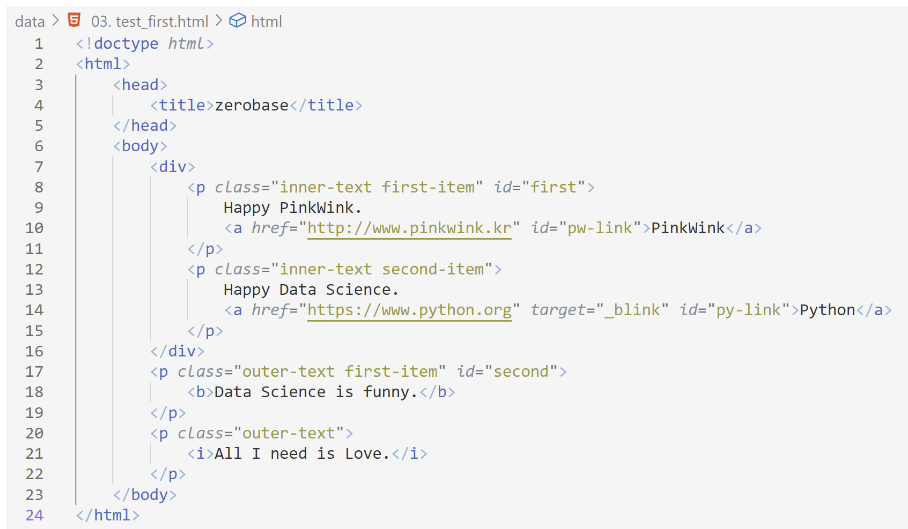
- 3. test_first.html
1. chrome 개발자 도구
- 인터넷에 html을 보기 위한 도구
- 크롬 오른쪽 상단 ... > 도구 더보기 > 개발자 도구 또는 그냥 F12
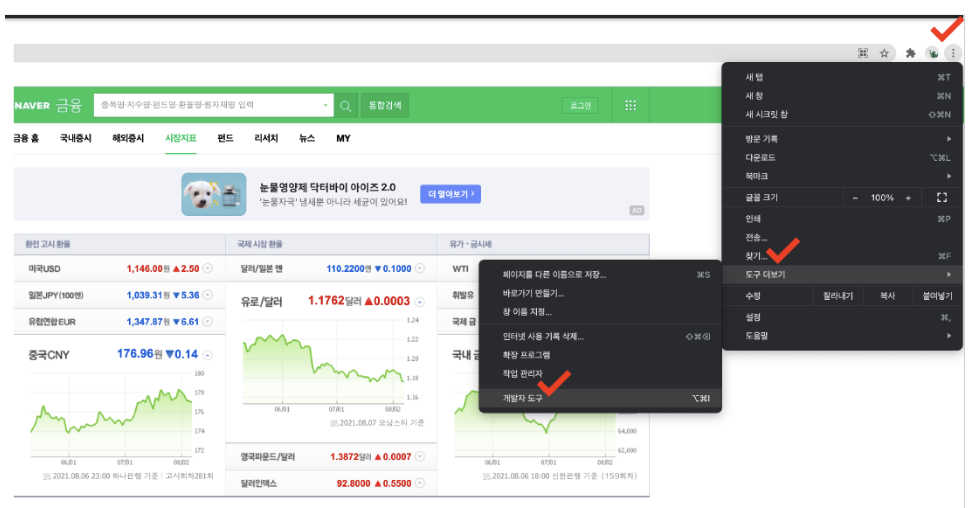
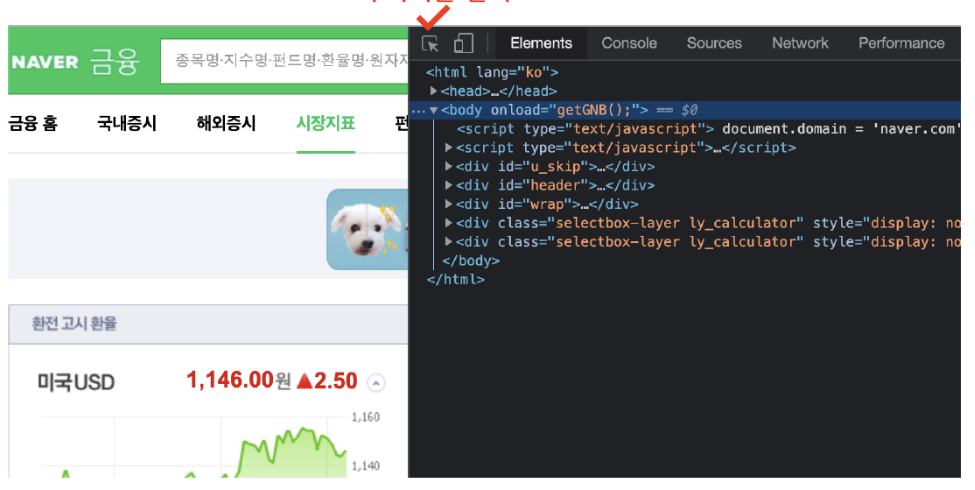
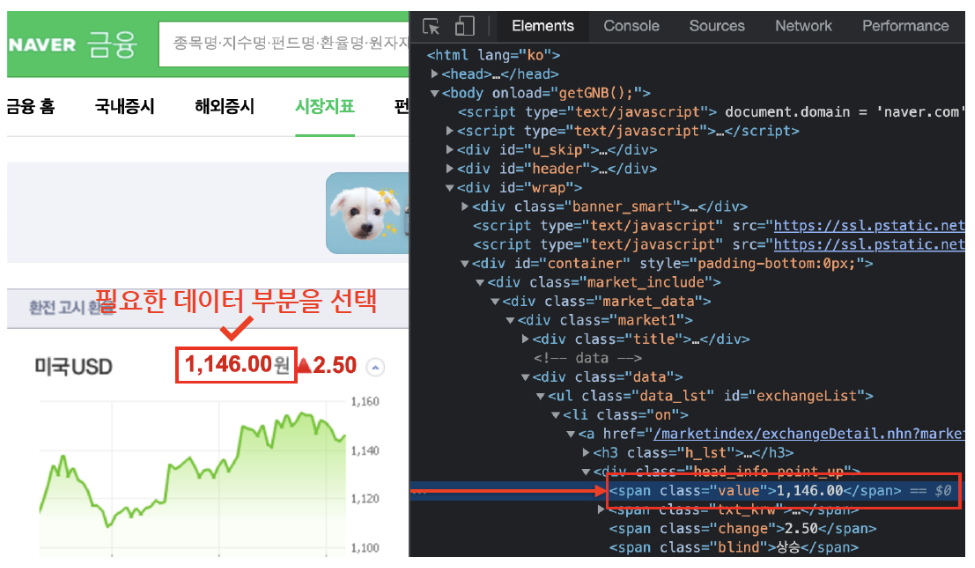
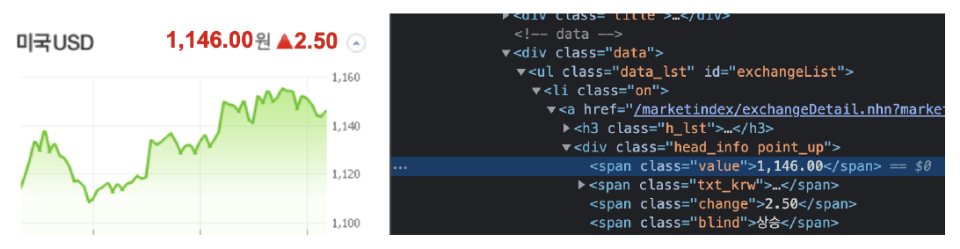
- 원하는 html태그 위치 파악
2. urllib 모듈 - request
- 웹주소(url)에 접근할 때 필요한 모듈
from urllib.request import urlopen
url = "https://finance.naver.com/marketindex/"
page = urlopen(url)
soup = BeautifulSoup(page, "html.parser")
print(soup.prettify( ))
requet 임포트 방법 1
- urlopen(url)
# 방법 1
from urllib.request import urlopen
from bs4 import BeautifulSoup

url = "https://finance.naver.com/"
reponse = urlopen(url)
reponse.status
# 200 이라는 숫자가 정상적으로 요청을 했고, 정상적으로 받았다는 뜻
# http 상태코드라고 한다
# 번호에 따라서 웹페이지의 상태를 나타낸다
# 그 번호에 따라서 나의 잘못인지, 서버오류인지 등을 알 수 있다.

>>
200
request 임포트 방법 2
- requests.get(url)
# 방법 2
import requests
# from urllib.request.Request
# 위 requests 와 기능은 똑같다고는 하는데,
# from urllib.request.Request 는 실행하면 에러남
from bs4 import BeautifulSoup

url = "https://finance.naver.com/marketindex/"
reponse = requests.get(url)
# requests.get()
# requests.post()
# 두가지 방식이 있지만 설명은 안해줌
reponse

>> <Response [200]>
------------------------------------------------------
reponse.text

>> '\n<script language=javascript src="/template/....
------------------------------------------------------- http 상태코드가 200 - 정상
- 401 - 인증오류
- 403 - 사용자 허가 모드 오류
- 404 - 요청한 파일이 존재하지 않음
1. 예제 03) test_first.html
- 파일로 저장된 html파일 읽기
- open : 파일명과 함께 읽기(r) 쓰기(w)속성 지정
- html.parser : Beautiful Soup의 html을 읽는 엔진 중 하나
- prettify( ) : html 출력을 잘 만들어 주는 기능
2. Web page에서 HTML 데이터 가져오기
- computer에 저장된 파일 가져오기
# import
    from bs4 import BeautifulSoup
    import pandas as pd
    page = open("../data/03. test_first.html", "r").read()
    soup = BeautifulSoup(page, "html.parser")
    print(soup.prettify( ))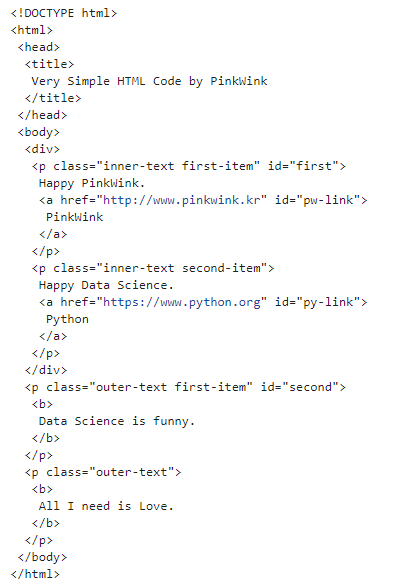
# Head 태그 확인
soup.head
# body 태그 확인
soup.body- Web에서 데이터 가져오기
from urllib.request import urlopen
from bs4 import BeautifulSoup

url = "https://finance.naver.com/"
reponse = urlopen(url)

soup = BeautifulSoup(page, "html.parser")
print(soup.prettify())
3. 원하는 태그/속성 검색
	soup.head  # head tag 확인
    soup.body  # body tag 확인
    soup.title # title tag 확인
    soup.div   # div tag 확인
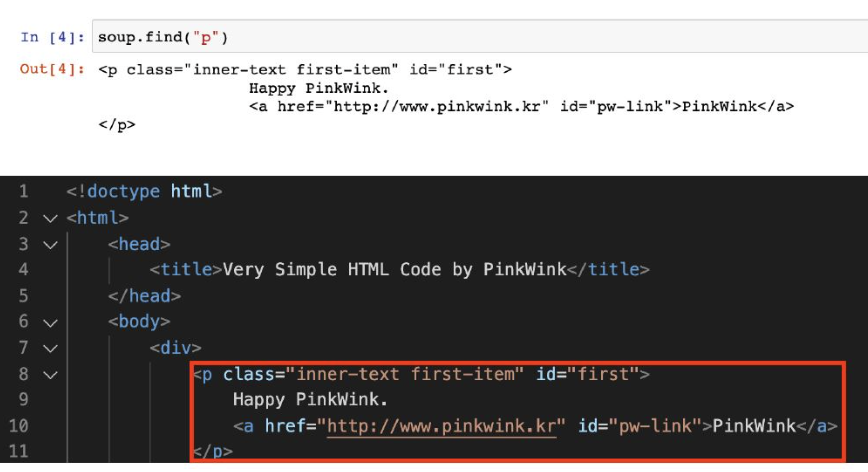
    soup.p     # p tag 확인 (상단 하나만 나타남)
4. p 태그 확인(find, find_all, select)
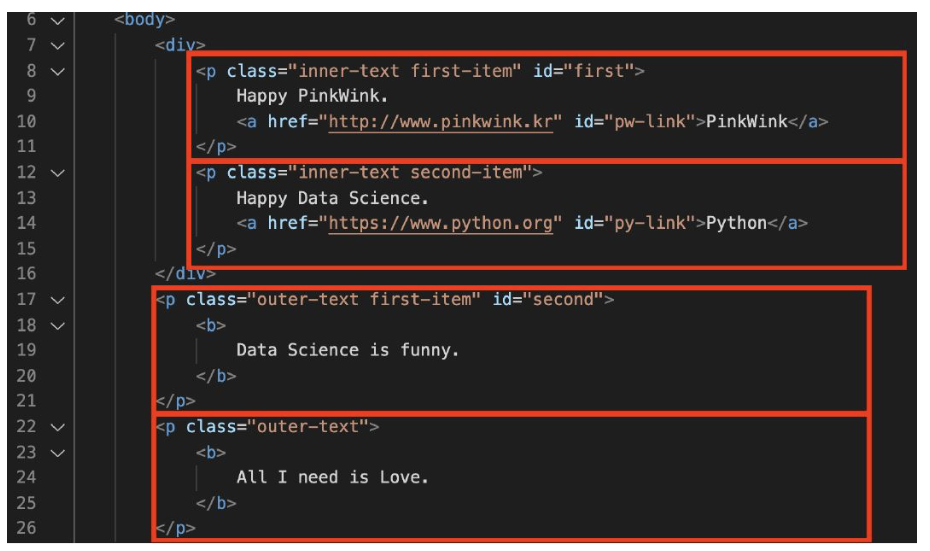
- find( ) - 변수.find('태그')
- 원하는 특정 태그를 검색하는 데 사용- 첫 번째로 일치하는 태그 하나를 찾아 반환
- 사용하는 인자들은 다양하게 조합하여 활용
    soup.find("p")
    # 출력결과
    <p class="inner-text first-item" id="first">
                Happy PinkWink.
                <a href="http://www.pinkwink.kr" id="pw-link">PinkWink</a>
    </p>
# 조건을 좁혀주기
soup.find("p", class_="inner-text first-item")
# 출력결과
<p class="inner-text first-item" id="first">
Happy PinkWink.
<a href="http://www.pinkwink.kr" id="pw-link">PinkWink</a>
</p>
또는

- find_all("p")- 변수.find_all('태그') - 여러개 태그 반환
- 지정된 모든 태그를 검색하는 데 사용- 조건에 맞는 모든 태그를 찾아 리스트로 반환 (soup.find_all(class="outer-text")[0] 이런 형태 가능)
- 반복문을 사용해 각 태그의 텍스트 속성 추출
- 클래스, 아이디, 속성 등을 지정하여 좀 더 구체적으로 원하는 태그를 찾을 수 있게 함
- p태그 중 class가 "outer-text"인 곳 모두 출력
- 특정 태그 확인
soup.find_all(id = "pw-link")
실행결과
[PinkWink]
soup.find_all(id="pw-link")[0].text
실행결과
'PinkWink'
soup.findall("p", class="inner-text second-item")
실행결과
[
Happy Data Science.
Python
print(soup.find_all("p")[0].text)
print(soup.find_all("p")[1].string)
print(soup.find_all("p")[1].get_text())
실행결과
Happy PinkWink.
PinkWink
			None

            Happy Data Science.
            Python
soup.find("p",{"class":"outer-text first-item"}).text.strip()
### 실행결과
5. p 태그 리스트에서 텍스트 속성만 출력
for each_tag in soup.find_all("p"):
    print("=" * 50)
    print(each_tag.text)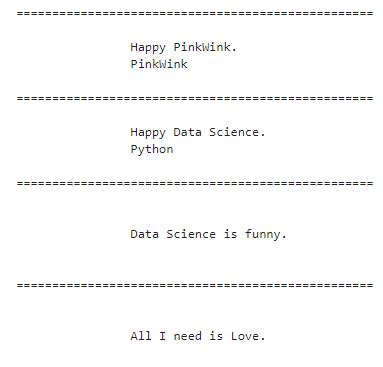
soup.find_all("li","on")(# li 태그의 on 클래스) 와 같은 방법soup.find_all("p")
soup.find_all("p", class_="inner-text second-item")
soup.find_all(class_="outer-text")
soup.find_all(id="first")
soup.find_all(id="pw-link")[0].text
soup.find_all(id="pw-link")[0].string
soup.find_all(id="pw-link")[0].get_text()6. 텍스트만 추출
- .text와 같은 기능 - (.string / .get_text( ))
- 해당 텍스트만 나오도록 함
- strip( ) 은 공백 지우기, 빈칸이 있는 경우에만 넣음
soup.find_all(class_="outer-text")[0].text
soup.find(class_="outer-text").string
soup.find(class_="outer-text").get_text()- 예시
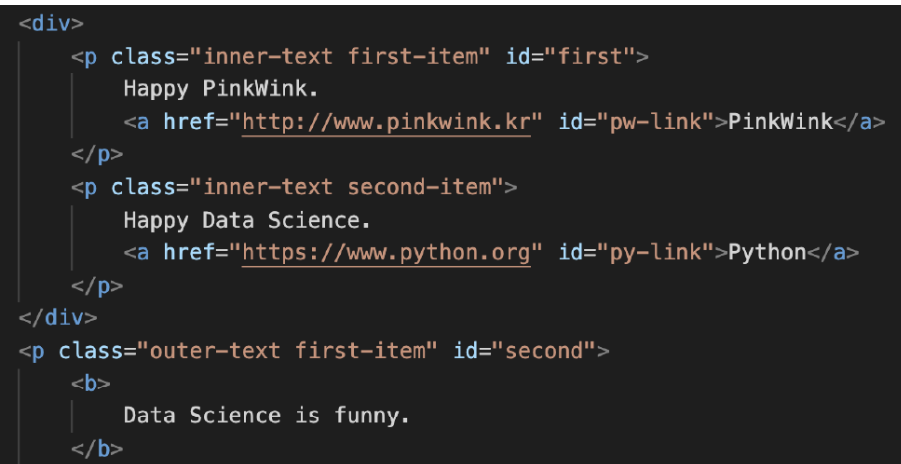
### strip - 공백지우기
soup.find("p", {"class": "outer-text first-item"}).text.strip()

실행결과
>> 'Data Science is Funny.'- 다중조건
- p태그 안에 class 속성값 "inner-text first-item"이면서 id속성값이 "first인 것
soup.find("p", {"class":"inner-text first-item", "id":"first"}).text.strip()### 실행결과
>> 'Happy PinkWink.'
- a 태그에서 href 속성값에 있는 값 추출
links = soup.find_all("a")
links[0].get("href"), links[1]["href"]### 실행결과
('http://www.pinkwink.kr', 'https://www.python.org')
### 실행결과
PinkWink=>http://www.pinkwink.kr
Python=>https://www.python.org
- select_one( ) - 하나 선택
- 하나의 요소를 선택- CSS Selectors나 XPath를 사용해 원하는 요소를 선택하는 데 사용
- 지정된 CSS Selectors나 XPath에 맞는 첫 번째 요소를 선택해 단일 형태로 반환
tag_name    	: 태그 선택
.class      	: 클래스 선택
#id         	: 아이디 선택
>           	: 특정 요소의 자식 요소 선택
(space)     	: 특정 요소의 모든 하위 요소를 선택
[attribute] 	: attribute 속성을 가진 요소 선택
[attribute=value] : attribute 속성 값이 특정 값인 요소 선택
selector1, selector2 : selector1 또는 selector2 요소 선택
selector1 selector2 : selector1 내부의 모든 selector2요소 선택- select( ) - 여러 개 선택
- 여러 요소 선택- 상위 하위로 이동이 좀 더 자유로움
- CSS Selectors나 XPath를 사용해 원하는 요소 선택하는데 사용
- 지정된 CSS Selectors나 XPath에 맞는 모든 요소를 선택해 리스트 형태로 반환
- exchangeList = soup.select("li")
- exchangeList = soup.select("#exchangeList > li")
- #exchangeList > li : id exchangeList 바로 밑에(>) li 태그를 모두 가져 옴
- select 사용 - 클래스는 (.)을 앞에 붙임 / id는 샾(#)을 앞에 붙임
태그
title = exchangeList[0].select_one(".h_lst").text # '미국 USD'
exchange = exchangeList[0].select_one(".value").text # '1,319.00'
change = exchangeList[0].select_one(".change").text
updown = exchangeList[0].select_one("div.head_info.point_dn > .blind").text
exchangeList[0].select_one("a").get("href")
soup.p
7. class 뒤에 언더바 주의
soup.find("p", class_="--")
soup.find("p", {"class":"--"})
위 2가지 모두 가능 (동일 반환값)
또는
soup.find("p", {"class":"--", "id":"--"})
8. 특정 태그 내용 추출
    soup.find("p", {"class": "outer-text first-item"}).text
soup.find("p", {"class": "outer-text first-item"}).get_text()- get( )
- 태그 내 특정 속성값을 가져옴
soup.find_all("a")[0].get("href")9. 외부로 연결되는 링크주소 추출(href)
- a태그에서 href 속성값에 있는 값 추출
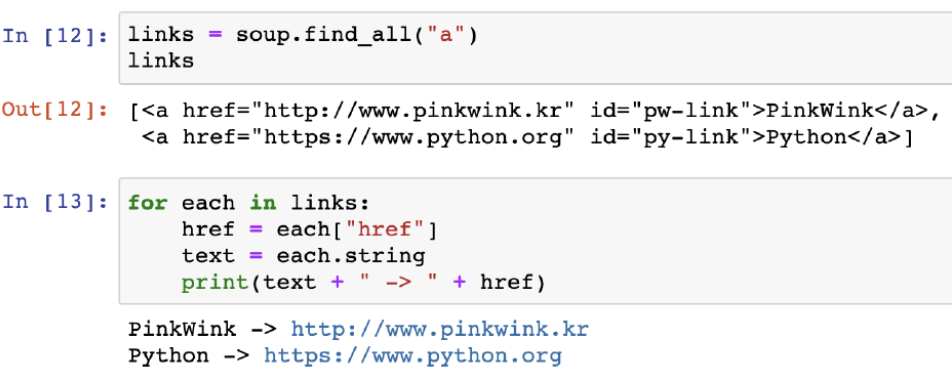
links = soup.find_all("a")

# print(links)
### 실행결과

[<a href="http://www.pinkwink.kr" id="pw-link">PinkWink</a>,<a href="https://www.python.org" id="py-link">Python</a>]
'''

# print(links[0].get("href"), links[1]["href"])

for each in links:
    href = each.get("href") # each["href"]
    text = each.get_text()
    print(text + " => " + href)
Data Science 스터디로그