1. 예외 처리
1.1 목적
- 프로그램 실행 시 발생할 수 있는 오류로 프로그램이
의도치 않게 종료되는 것을 방지하기 위해- 오류가 발생한 부분을 적절히 처리하고 정상적인 실행 흐름을 유지할 수 있음
- 발생한 예외를 적절히 처리하지 못하고 main 메소드가 예외를 던지면, 해당 쓰레드는 종료됨
- 오류의
원인과위치를쉽게 파악하기 위해- 오류가 발생한 클래스, 메소드, 오류 메시지, 오류 코드 등을 로그로 확인할 수 있음
1.2 예외 처리 방법
(1) 메소드 내부에서 try-catch로 처리
try예외가 발생할 수 있는 코드를 작성- 예외 발생 시 뒤에 있는 코드들은 더 이상 실행되지 않고 catch로 흐름이 넘어감
catch- try문에서 해당하는
예외가 발생하면 실행되는 블록- 해당 예외의
자식 예외들도 모두 받을 수 있음
- 해당 예외의
여러 개의 catch문을 작성할 수 있음-
계층 구조로 예외가 잡힘- 부모가 먼저 잡히면 뒤에 자식 예외는 안잡힘
- Exception은 모든 예외의 부모 클래스
- 만약 다른 예외 클래스보다 먼저 catch 한다면 뒤에 오는 자식 클래스가 예외를 잡을 수 없음 (쓰나마나)
- 만약 try문에서 발생한 예외를 catch 할 수 있는 클래스가 없는 경우
- 컴파일 에러가 발생함
-
catch문은 try문에서 어떤 예외가 발생하느냐에 따라 결정됨
- 일반적으로 Exception을 던지는 경우는 별로 없기 때문에 catch(Exception)할 일은 많지 않음
public class CatchExceptionLater {

    public static void main(String[] args) {
        CatchExceptionLater obj = new CatchExceptionLater();
        obj.catchException();
    }

    void catchException() {
        int[] Array = new int[3];
        try {
            Array = null;                                 //null 예외 발생
            Array[5] = 1;
        } catch (NullPointerException e) {
            System.out.println("널 예외 발생");              //NullPointerException 예외 캐치함
        } catch (ArrayIndexOutOfBoundsException e) {
            System.out.println("인덱스 범위 벗어난 예외 발생");  //실행x
        } catch (Exception e) {
            System.out.println("나머지 예외사항 발생");        //실행x
        }
        System.out.println("무조건 실행되는 문장");
    }
}
-
- catch문의 exception
- try문에서 어떤 예외가 발생하느냐에 따라 결정됨
- 일반적으로 Exception을 던지는 경우는 별로 없기 때문에 catch(Exception)할 일은 많지 않음
catch에서 사용하는 변수- 반드시 try 블록 앞에서 선언되어야 함
- try 블록 내에서 선언된 변수는 catch 블록에서 사용하지 못함
- 만약 try 블록 밖에서 선언된 변수가, try 블록 내에서 변경되는 경우
-
catch 블록에서도 변경된 값을 사용함
→ try 블록에서 사용되었다고 해서 catch 블록에 전혀 영향을 줄 수 없다는게 아님!!void printMonth(int number) { int a = 0; try { a = 10; if (number > 12) { throw new Exception("1월에서 12월만 있음"); } System.out.println(number + "월달 입니다."); } catch (Exception e) { System.out.println(a); // 10 출력 e.printStackTrace(); } }
-
- try문에서 해당하는
(2) 예외 떠넘기기 (throws)
- 메소드 선언 시
-
throws를 사용해 예외를 던지는 메소드임을 명시해야 함
public class MonthClass { void printMonth(int number) throws IllArgumentException { if (number > 12) { throw new IllArgumentException("1월에서 12월만 있음"); } System.out.println(number + "월달 입니다."); } } -
예외 발생 시 printMonth()를 호출한 곳에서 예외를 처리해야함
- try-catch로 잡거나
- 또 throws를 쓰거나 → 좋은 습관이 아님
-
(3) 예외를 try-catch로 처리하지 않고 떠넘기는 경우
-
해당 메소드를 사용했을 때 발생할 수 있는
예외를 명시하기 위해 -
예외를 발생시키는
메소드를 간결하게 작성하기 위해 -
현재 메소드 내에서 굳이 예외를 처리할 필요가 없을 때 경우
=
해당 메소드를 사용하는 곳에서 처리하는게 더 좋은 경우
(4) finally
- 예외 발생 여부와 상관없이 항상 실행되는 블록
- 예외 발생으로 쓰레드 종료 시 할당된 자원을 해제 해야함
→ 예외가 발생해도 실행되어야 할 코드가 있을 때 사용
- 예외 발생으로 쓰레드 종료 시 할당된 자원을 해제 해야함
- finally 블록에 코드 작성
-
항상 실행
void printMonth(int number) {
    try {
        if (number > 12) {
            throw new Exception("1월에서 12월만 있음");
        }

        System.out.println(number + "월달 입니다.");
    } catch (Exception e) {
        e.printStackTrace();
				return;
    } finally {
        System.out.println("2022년");
    }
}
-
- try-catch 블록 밖에 코드 작성
-
catch 블록 실행 후 실행됨
void printMonth(int number) {
    try {
        if (number > 12) {
            throw new Exception("1월에서 12월만 있음");
        }

        System.out.println(number + "월달 입니다.");
    } catch (Exception e) {
        e.printStackTrace();
				return;
    }

    System.out.println("2022년");
}
-
finally 블록vstry-catch 블록 밖에 작성한 코드- catch 블록 내부에 return으로 메소드를 끝내는 경우
- finally 블록 → 실행 O
- try-catch 블록 밖에 작성한 코드 → 실행 X
- 메소드가 끝났으므로
⇒ catch 블록에 return문이 있어도 finally 블록은 실행됨!
- catch 블록 내부에 return으로 메소드를 끝내는 경우
- finally 블록에 return문이 있는 경우 →
Anti Pattern-
try문에서
예외가 발생하지 않아도return문이 실행되지 않고finally문의 return문이 실행됨- finally 블록은 예외 발생 여부와 상관없이 항상 실행되므로 (심지어 return이 있어도)
public class AntiPattern {

    int returnInFinally(boolean flag) {
        try {
            System.out.println("try");

            if (flag) {
                throw new RuntimeException();
            }

            return 1;
        } catch (RuntimeException e) {
            System.out.println("catch");
            return 2;
        } finally {
            System.out.println("finally");
            return 3;
        }
    }

    public static void main(String[] args) {
        AntiPattern anti = new AntiPattern();
        System.out.println(anti.returnInFinally(false));    // 예외가 발생하지 않았는데도 return 3
    }
}
-
2. 자바가 제공하는 예외 계층
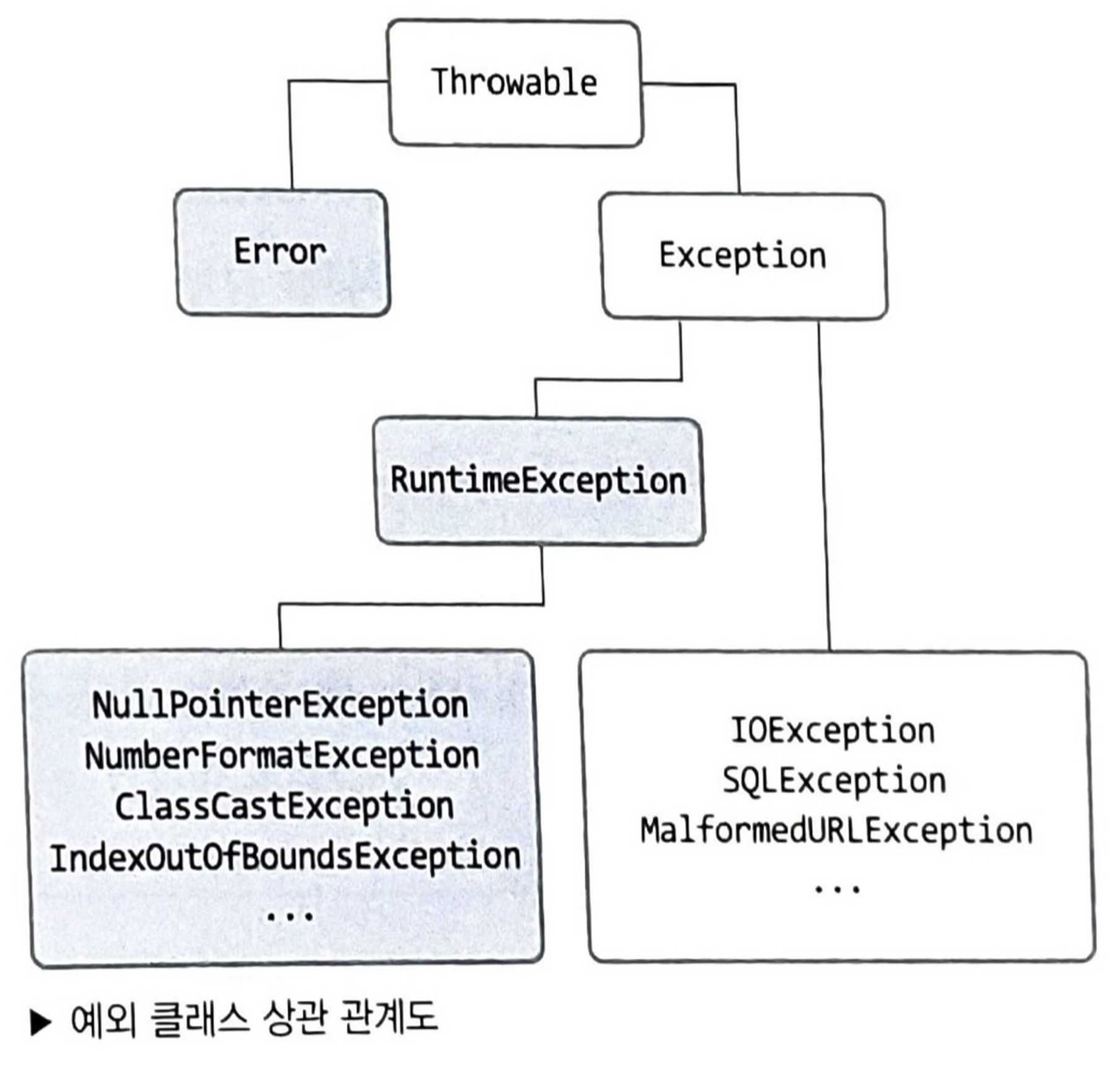
2.1 Throwable
- Error, Exception 클래스의 부모 클래스
- 다양한 메소드가 있고 Exception 클래스에서 여러 메소드를 오버라이딩 했음
2.2 Error
프로그램 밖에서 발생하는 예외
- 프로세스 자체를 멈춤
ex) 서버 디스크 고장, 메인보드 고장 등
- Throwable 클래스의 메소드를 하나도 오버라이딩 하지 않았음
- StackOverflowError, OutOfMemoryError …
2.3 Exception
프로그램 안에서 발생하는 예외
- (예외처리를 하지 않으면) 예외가 발생한 쓰레드를 멈춤
- CheckedException & UncheckedException으로 나뉨
- 오버라이딩한 메소드 - 자주 쓰는 것 3가지
- 공통적으로 예외 메세지를 사용자에게 보여주기 위해 사용
-
getMessage()- 간단히
- String 반환
-
toString()- 자세히
- String 반환
-
printStackTrace()- 더 자세히
- 예외
스택정보 출력
public class ExceptionOverridingMethod {

    public static void main(String[] args) {
        ExceptionOverridingMethod obj = new ExceptionOverridingMethod();
        obj.OverridingMethod3();
    }

    void OverridingMethod3(){
        int[] Array = new int[5];
        try{
            Array[6] = 1;
        } catch (Throwable e){      //exception 캐치함
            System.out.println("---------getMessage/간단히---------");
            System.out.println(e.getMessage()); //String 반환
            System.out.println("---------toString/자세히---------");
            System.out.println(e.toString());   //String 반환
            System.out.println("---------printStackTrace/더 자세히 에러 내용 출력---------");
            e.printStackTrace();                //예외 스택정보 출력
        }
    }
}
<결과>
--------getMessage/간단히---------
Index 6 out of bounds for length 5
---------toString/자세히---------
java.lang.ArrayIndexOutOfBoundsException: Index 6 out of bounds for length 5
---------printStackTrace/더 자세히 에러 내용 출력---------
java.lang.ArrayIndexOutOfBoundsException: Index 6 out of bounds for length 5
at chapter14.ExceptionOverridingMethod.OverridingMethod3(ExceptionOverridingMethod.java:14)
at chapter14.ExceptionOverridingMethod.main(ExceptionOverridingMethod.java:8)
3. CheckedException vs UncheckedException
3.1 UncheckedException
RuntimeException을상속받은 예외- 프로그래머의 실수에 의해 발생할 수 있는 예외
- 클라이언트가 해결할 수 없는 예외
- 복구가 어려운 예외
- 컴파일 시 예외를 체크하지 않고 런타임 시 체크함
→컴파일 에러를 발생시키지 않음
3.2 CheckedException
- UncheckedException을 제외한
나머지 예외 - 프로그램을 사용하는 사용자에 의해 발생할 수 있는 예외
- 부가적인 작업으로 복구가 가능한 예외
컴파일 시 예외 체크를 함
→컴파일 에러를 발생시킬 수 있음
- CheckedException을 발생시킬 수 있는 메소드
- 반드시 예외 처리를 해줘야 함
- try-catch로 처리하던가
- throws로 던지던가
- 반드시 예외 처리를 해줘야 함
4. 커스텀 예외를 만드는 방법
JDK가 제공하는 예외가 있으면 기존것을 사용하는게 좋다. 정말 없어서 만들어야 할 경우에만 만들 것
CheckedException을 만들고 싶은 경우Exception을 상속
UncheckedException을 만들고 싶은 경우RuntimeException을 상속
- 기존 예외를 커스텀 예외로 바꿔서 전달 할 때
-
커스텀 예외가 발생하게 된 cause를 같이 넘겨받아서 사용하기
public class MyException extends RuntimeException{

    public MyException(String message, Throwable cause) {
        super(message, cause);
    }
}
public class ChangeException { public static void main(String[] args) { ChangeException ce = new ChangeException(); try { ce.changeByMyException(); } catch (MyException e) { System.out.println("내가 만든 예외로 던져짐"); System.out.println("원인인 " + e.getCause()); } } void throwIllegalArgumentException() { throw new IllegalArgumentException(); } void changeByMyException() { try { throwIllegalArgumentException(); } catch (IllegalArgumentException e) { throw new MyException("내가 만든 예외로 바꿔서 던지기", e); } } }
-
5. JDK가 제공하는 기본 예외
5.1 UncheckedException
(1) NullPointerException
- 사용하려는 객체가 null인 경우 발생
String nullString = null;
nullString.toString();
(2) ArrayIndexOutOfBoundsException
- 배열의 인덱스를 잘못 접근했을 때 발생
int[] arr = new int[3];
arr[4] = 1;
(3) StringIndexOutOfBoundsException
- string의 인덱스를 잘못 접근했을 때 발생
String a = "0123";
a.charAt(4);
(4) ArithmeticException
-
산술 연산 시 잘못된 연산 조건을 사용할 시 발생
-
overflow
- Math 클래스 메소드 사용 시 발생
int a = 2_100_000_000;  //21억
int b = 2_100_000_000;  //21억
Math.addExact(a, b);
-
divide by zero
int a = 10;
int b = 0;
int c = a / b;
-
(5) ClassCastException
- 부모 클래스에서 자식 클래스로
다운 캐스팅 시- 해당 인스턴스가
캐스팅 될 수 없는 자식 타입으로 캐스팅 될 때발생
- 해당 인스턴스가
class Parent {
}

class Child1 extends Parent {
}

class Child2 extends Parent {
}

public static void main(String args[]) {
	Parent child = new Child1();
	Child2 child2 = (Child2) child;  // 에러 발생
}
(6) IllegalArgumentException
- 메소드의
매개변수로 잘못된 값을 입력할 때 발생
ArrayList<Integer> numbers = new ArrayList<>(-1);
(7) IllegalStatementException
- 메소드의
호출 시점이 잘못된 경우발생- 적절한 예시를 찾지 못해 스프링에서 발생 예시를 찾음
@GetMapping("/add")
public void method1() {}

@GetMapping("/add")
public void method2() {}
5.2 CheckedException
(1) ClassNotFoundException
(2) IOException
(3) SQLException
6. Multicatch Block
여러 개의 catch 블락을 하나로 합칠 수 있는 기능
서로 다른 예외지만처리하는 내용이 같은 경우(catch 블락 내용이 같은 경우) 사용java 7이후로 제공하는 기능public class MultiCatchBlock { void originBlock(int flag) { try { if (flag == 1) { throw new IllegalArgumentException(); } if (flag == 2) { throw new ArithmeticException(); } if (flag == 3) { throw new NullPointerException(); } } catch (IllegalArgumentException e) { System.out.println("예외 발생"); } catch (ArithmeticException e) { System.out.println("예외 발생"); } catch (NullPointerException e) { System.out.println("예외 발생"); } } void useMultiCatch(int flag) { try { if (flag == 1) { throw new IllegalArgumentException(); } if (flag == 2) { throw new ArithmeticException(); } if (flag == 3) { throw new NullPointerException(); } } catch (IllegalArgumentException | ArithmeticException | NullPointerException e) { System.out.println("예외 발생"); } } }- 만약 multicatch로 묶을 때
상속 관계가 있으면?컴파일 에러발생- 어차피 부모로 잡으면 자식 예외는 처리되지 않으므로 의미 없는 코드가 됨
ex) NullPointerException → RuntimeException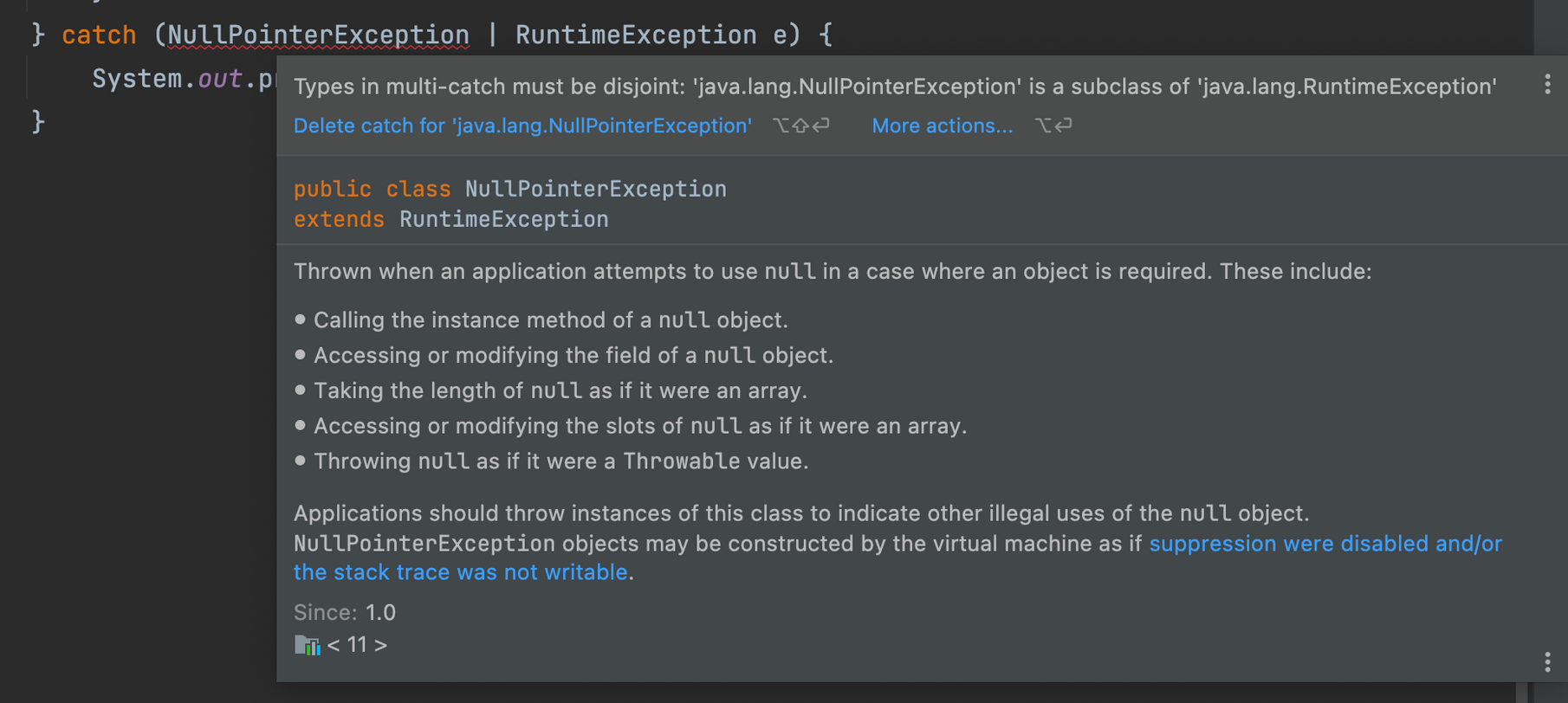
- 어차피 부모로 잡으면 자식 예외는 처리되지 않으므로 의미 없는 코드가 됨
7. ⭐ try-with-resource
예외 처리 시
자원 해제를자동으로 처리해주는 기능
- finally로 리소스를 직접 close하지 않아도 자동으로 close해주는 기능
- finally 블록을 많이 줄일 수 있음
Closeable인터페이스를구현한 클래스만 가능java 7이후로 제공하는 기능- 자원 할당을 해제해야하는 경우 반드시 사용하자!
public class TryWithResource {

    void originMethod() throws IOException {
        BufferedWriter bw = new BufferedWriter(new OutputStreamWriter(System.out));
        BufferedReader br = new BufferedReader(new InputStreamReader(System.in));

        try {
            System.out.println("hi");
        } catch (Exception e) {
            e.printStackTrace();
        } finally {
            System.out.println("반드시 실행되어야 하므로 finally에 작성");
            bw.close();
            br.close();
        }
    }

    void useTryWithResource() {
        try ( -> 소괄호
                BufferedWriter bw = new BufferedWriter(new OutputStreamWriter(System.out));
                BufferedReader br = new BufferedReader(new InputStreamReader(System.in))
        ) { -> 중괄호
            System.out.println("hi");
        } catch (IOException e) {
            e.printStackTrace();
        }
    }
}
8. Chained Exception
하나의 예외가 다른 예외를 발생시키는 경우
- 예외가 발생했을 때 바로 처리하지 않고
다른 예외를 발생시키는 이유는?-
하나의 큰 분류의 예외를 두고 세부적인 예외로 처리하기 위해
public class LoseMoneyException extends RuntimeException {
    private String message = "돈을 잃어버려서 집을 못감";

    @Override
    public String getMessage() {
        return message;
    }
}
public class ShutDownBusException extends RuntimeException{ private String message = "버스가 끊겨서 집을 못감"; @Override public String getMessage() { return message; } }public class ChainedException { public static void main(String[] args) { ChainedException ce = new ChainedException(); Scanner sc = new Scanner(System.in); int cause = sc.nextInt(); try { ce.goHome(cause); } catch (CantGoHomeException e) { System.out.println(e.getCause().getMessage()); } } void goHome(int flag) throws CantGoHomeException { try { if (flag == 1) { throw new LoseMoneyException(); } if (flag == 2) { throw new ShutDownBusException(); } System.out.println("집에 잘 감"); } catch (LoseMoneyException e) { // 원인을 저장 throw new CantGoHomeException(e); } catch (ShutDownBusException e) { throw new CantGoHomeException(e); } } } -
CheckedException → UncheckedException변환- CheckedException인데 당장 처리할 수 없는 경우
RuntimeException으로 감싸서UncheckedException으로 처리
public void chained() { try { throw new IOException(); } catch (IOException e) { throw new RuntimeException(e); } } - CheckedException인데 당장 처리할 수 없는 경우
-
9. 예외 처리 비용
예외 처리로 비지니스 로직을 처리하지 마라!
- 예외는 stack trace를 메모리에 저장하기 때문에 처리 비용이 비쌈
-
Throwable의 fillInStackTrace()가 원인이라고 함
→ 입력값을 조절하거나 if문을 사용하는 등 로직으로 처리할 수 있으면 하는게 좋음
-
Reference
multicatch block, try-with-resource, Chained Exception
커스텀 예외 생성 시 주의 사항
예외 처리 전략
오라클 공식 문서 참고