JPA
- ORM(Object RElational Mapping), RDB데이터 베이스의 정보를
객체지향으로 쉽게 활용할 수 있도록 도와주는 도구- 자바객체와 관계형 db의 맵핑을 통해서 적용
- 쿼리 보다 객체에 집중
Entity
- JPA에서 테이블을 자동으로 생성해주는 기능
DB Table == JPA Entity
| Annotation | 쓰임 |
|---|---|
| @Entity | 해당 클래스가 Entity임을 명시 |
| @Table | DB테이블의 이름을 명시 |
| @Id | primary key 명시 |
| @Column | DB column 명시 |
| @GeneratedValue | Primary key 식별키의 전략 설정 |
package com.example.jpa.model.entity;

import lombok.Data;
import lombok.RequiredArgsConstructor;

import javax.persistence.Entity;
import javax.persistence.Id;
import java.time.LocalDateTime;

@Data
@Entity
@RequiredArgsConstructor
//@AllArgsConstructor  모든 매개변수가 들어가는 생성자
public class User {

    @Id
    private Long id;
//    @Column(name = "account") db와 이름이 같은 변수명으로 선언하면 jpa에서 자동으로 매칭해준다
    private String account;
    private LocalDateTime createdTime; // db에서 created_time인데 jpa에서 자동으로 매칭
    private String updatedTime;
    private String email;

}
public interface UserRepository extends JpaRepository<User, Long>
extends JpaRepository<Entity, primary key type>
entity
package com.example.jpa.model.entity;

import lombok.AllArgsConstructor;
import lombok.Data;
import lombok.NoArgsConstructor;

import javax.persistence.Entity;
import javax.persistence.GeneratedValue;
import javax.persistence.GenerationType;
import javax.persistence.Id;
import java.time.LocalDateTime;

@Data
@Entity
@NoArgsConstructor // 기본생성자
@AllArgsConstructor  //모든 매개변수가 들어가는 생성자
public class User {

   @Id
   @GeneratedValue(strategy = GenerationType.IDENTITY)
   private Long id;
//    @Column(name = "account") db와 이름이 같은 변수명으로 선언하면 jpa에서 자동으로 매칭해준다
   private String account;
   private LocalDateTime createdTime; // db에서 created_time인데 jpa에서 자동으로 매칭
   private String updatedTime;
   private String email;

}
test code
 package com.example.jpa.repository;

import com.example.jpa.JpaApplication;
import com.example.jpa.model.entity.User;
import org.junit.jupiter.api.Test;
import org.springframework.beans.factory.annotation.Autowired;
import org.springframework.boot.test.context.SpringBootTest;

import java.time.LocalDateTime;

@SpringBootTest
public class UserRepositoryTest extends JpaApplication {

    // DI
    @Autowired
    private UserRepository userRepository;

    @Test
    public void create(){
        User user = new User();

        user.setAccount("test01");
        user.setCreatedTime(LocalDateTime.now());
        user.setEmail("test@naver.com");

        System.out.println(user.toString());

        userRepository.save(user);
    }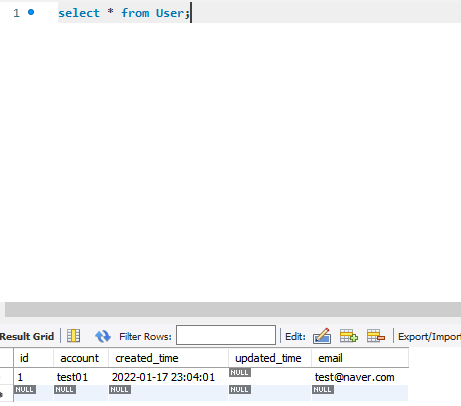
DB에 저장되는 것을 확인할 수 있다.
application.property파일에 spring.jpa.show-sql=true 로 설정하면 실행한 sql문을 콘솔창에서 볼 수 있다.
@Transactional
DB에 쿼리를 실행 시키더라도 마지막에 롤백을 해준다.
쿼리 실행 결과를 확인하고 DB에 적용하지 않을 때 사용할 수 있다.

back end개발자로 성장하기