createPortal
createPortal을 사용하면 컴포넌트의 일부를 다른 DOM에서 렌더링할 수 있다.
예를들어 Modal과 같은 컴포넌트는 body의 최상단에 오는것이 가독성 면에서 좋다.
하지만 만든 Modal을 매번 최상위 컴포넌트에서 호출하는것은 어렵다.
따라서 이러한 경우 portal이 유용하게 사용될 수 있다.
createPortal(children, domNode, key?)기본 형식은 이러하며 다음과 같이 사용할 수 있다.
import { useRef, useState } from "react";
import ResultModal, { HandleDialog } from "./ResultModal";

interface TimerChallengeProps {
  title: string;
  targetTime: number;
}

const TimerChallenge = ({ title, targetTime }: TimerChallengeProps) => {
  const timer = useRef<number>(null);
  const dialog = useRef<HandleDialog>(null);

  const [timeRemaining, setTimeRemaining] = useState(targetTime * 1000);

  const timerActive = timeRemaining > 0 && timeRemaining < targetTime * 1000;

  if (timeRemaining <= 0 && timer.current) {
    clearInterval(timer.current);
    dialog.current?.open();
  }

  const handleReset = () => {
    setTimeRemaining(targetTime * 1000);
  };

  const handleStart = () => {
    timer.current = setInterval(() => {
      setTimeRemaining((prevTime) => prevTime - 10);
    }, 10);
  };

  const handleStop = () => {
    if (timer.current) clearInterval(timer.current);
    dialog.current?.open();
  };

  return (
    <>
      <ResultModal
        ref={dialog}
        remainingTime={timeRemaining}
        onReset={handleReset}
        targetTime={targetTime}
      />
      <section
        className="flex flex-col items-center justify-center p-8 mx-auto my-8 rounded-md shadow-md w-80 text-[#221c18]"
        style={{ background: "linear-gradient(#4df8df, #4df0f8)" }}
      >
        <h2 className="text-2xl tracking-widest m-0 text-center uppercase text-[#221c18]">
          {title}
        </h2>
        <p className="border border-solid border-[#46cebe] rounded py-1 px-2 m-2">
          {targetTime} second{targetTime > 1 ? "s" : ""}
        </p>
        <p>
          <button
            className="mt-4 py-2 px-4 border-none rounded bg-[#12352f] text-[#edfcfa] text-xl cursor-pointer hover:bg-[#051715]"
            onClick={timerActive ? handleStop : handleStart}
          >
            {timerActive ? "Stop" : "Start"} Challenge
          </button>
        </p>
        <p style={timerActive ? { animation: "flash 1s infinite" } : {}}>
          {timerActive ? "Time is running..." : "Timer inactive"}
        </p>
      </section>
    </>
  );
};

export default TimerChallenge;
현재 만든 Modal의 경우 TimerChallenge컴포넌트에서 호출하고 있기 때문에 실제 DOM에서는 다음과 같이 위치하고있다.
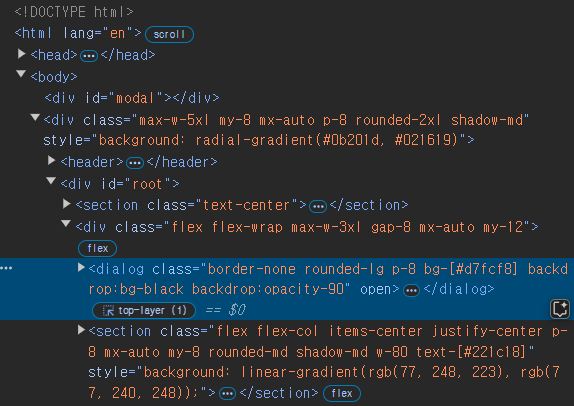
이때 ResultModal컴포넌트에서 createPortal을 사용하여 위치를 위에 보이는 id가 modal인 div의 내부로 이동시키는 것이 가능하다.
import { Ref, useImperativeHandle, useRef } from "react";
import { createPortal } from "react-dom";

interface ResultModalProps {
  ref: Ref<HandleDialog>;
  targetTime: number;
  remainingTime: number;
  onReset: () => void;
}

export interface HandleDialog {
  open: () => void;
}

const ResultModal = ({ targetTime, remainingTime, onReset, ref }: ResultModalProps) => {
  const dialog = useRef<HTMLDialogElement>(null);

  const userLost = remainingTime <= 0;
  const formattedRemainingTime = (remainingTime / 1000).toFixed(2);
  const score = Math.round((1 - remainingTime / (targetTime * 1000)) * 100);

  useImperativeHandle(ref, () => {
    return {
      open() {
        dialog.current?.showModal();
      }
    };
  });

  const modalElement = document.getElementById("modal");

  if (!modalElement) return null;

  return createPortal(
    <dialog
      ref={dialog}
      className="border-none rounded-lg p-8 bg-[#d7fcf8] backdrop:bg-black backdrop:opacity-90"
      onClose={onReset}
    >
      {userLost && (
        <h2 className="font-[Handjet, monospace] m-0 mb-1 text-5xl uppercase">You lost</h2>
      )}
      {!userLost && (
        <h2 className="font-[Handjet, monospace] m-0 mb-1 text-5xl uppercase">
          Your Score: {score}
        </h2>
      )}
      <p className="mx-0 my-2 text-xl">
        The target time was <strong className="text-[#10655b]">{targetTime} seconds.</strong>
      </p>
      <p className="mx-0 my-2 text-xl">
        You stopped the timer with{" "}
        <strong className="text-[#10655b]">{formattedRemainingTime} seconds left.</strong>
      </p>
      <form method="dialog" className="text-right" onSubmit={onReset}>
        <button className="mt-4 py-2 px-4 border-none rounded bg-[#12352f] text-[#edfcfa] text-xl cursor-pointer hover:bg-[#051715]">
          Close
        </button>
      </form>
    </dialog>,
    modalElement
  );
};

export default ResultModal;
이때 index.html파일에서 미리 다음과 같이 id='modal'인 요소를 지정해 주어야 한다.
<!DOCTYPE html>
<html lang="en">
  <head>
    <meta charset="UTF-8" />
    <link rel="icon" type="image/svg+xml" href="/vite.svg" />
    <meta name="viewport" content="width=device-width, initial-scale=1.0" />
    <title>Refs & Portals</title>
  </head>
  <body>
    <div id="modal"></div>
    <div
      class="max-w-5xl my-8 mx-auto p-8 rounded-2xl shadow-md"
      style="background: radial-gradient(#0b201d, #021619)"
    >
      <header>
        <h1>The <em>Almost</em> Final Countdown</h1>
        <p>Stop the timer once you estimate that time is (almost) up</p>
      </header>
      <div id="root"></div>
    </div>
    <script type="module" src="/src/main.tsx"></script>
  </body>
</html>
그 후 결과를 보면 portal을 통해 ResultModal의 DOM에서의 위치가 id='modal'인 div태그의 내부로 이동한 것을 볼 수 있다.
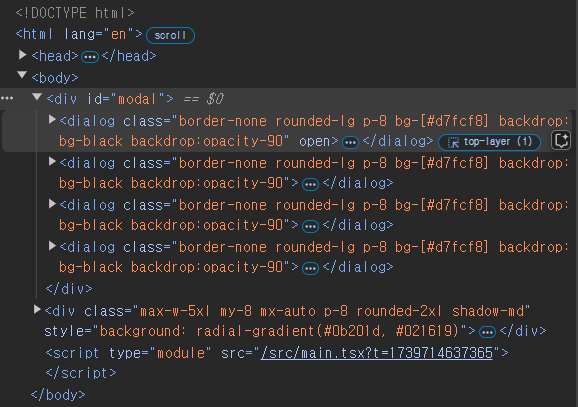

.