
포맷팅과 파싱
- 포맷팅(Formatting)
Date→String- 날짜와 시간 데이터를 원하는 포맷의 문자열로 변경
- 파싱(Parsing)
String→Date- 문자열을 날짜와 시간 데이터로 변경
DateTimeFormatter 클래스
DateTimeFormatter 클래스에는 자주 쓰이는 다양한 형식들을 기본적으로 정의하고 있고, 직접 정의해서 사용할 수도 있다.
공식 사이트: Class DateTimeFormatter
-
상수로 정의된 형식
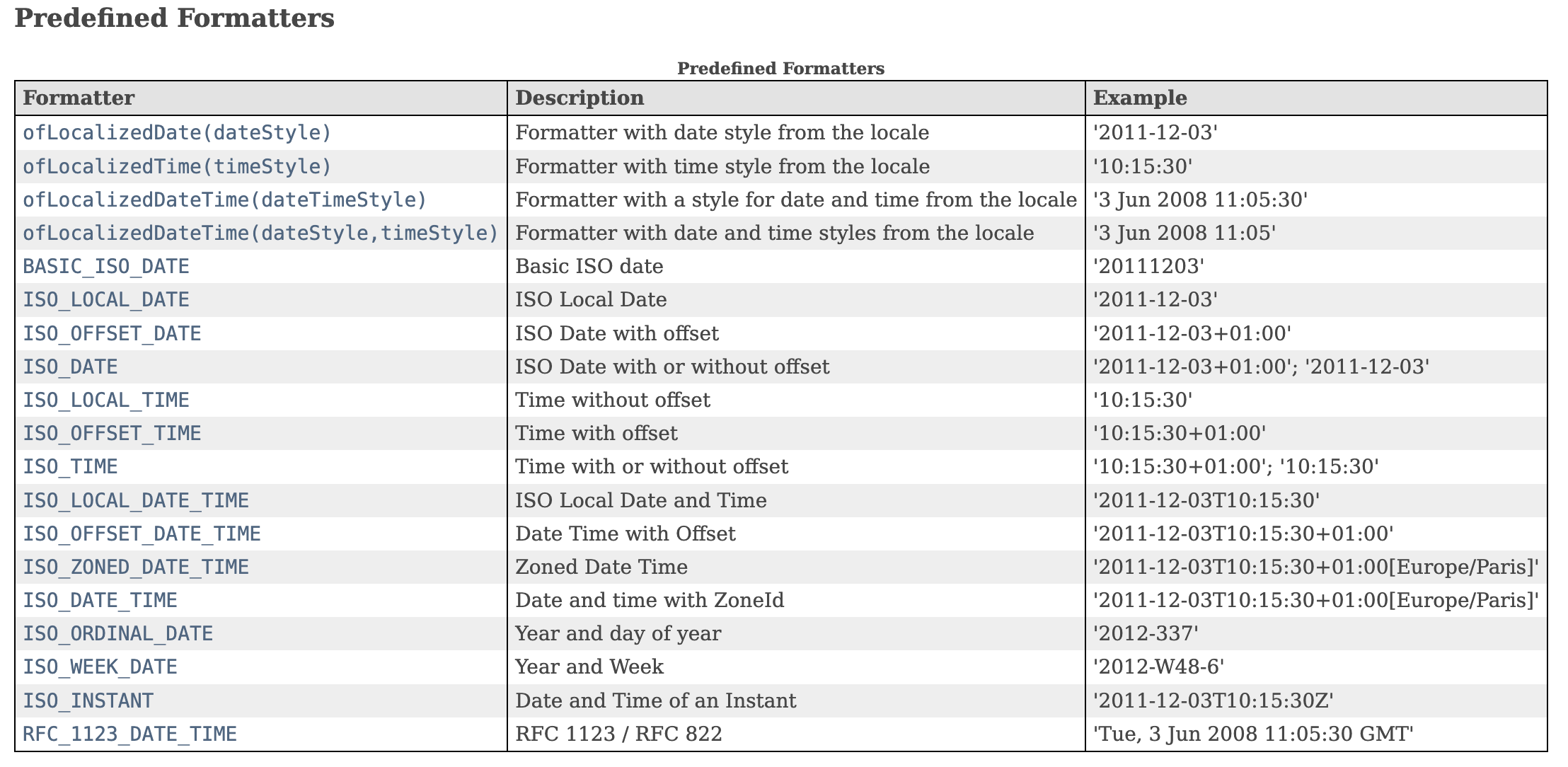
-
패턴 기호
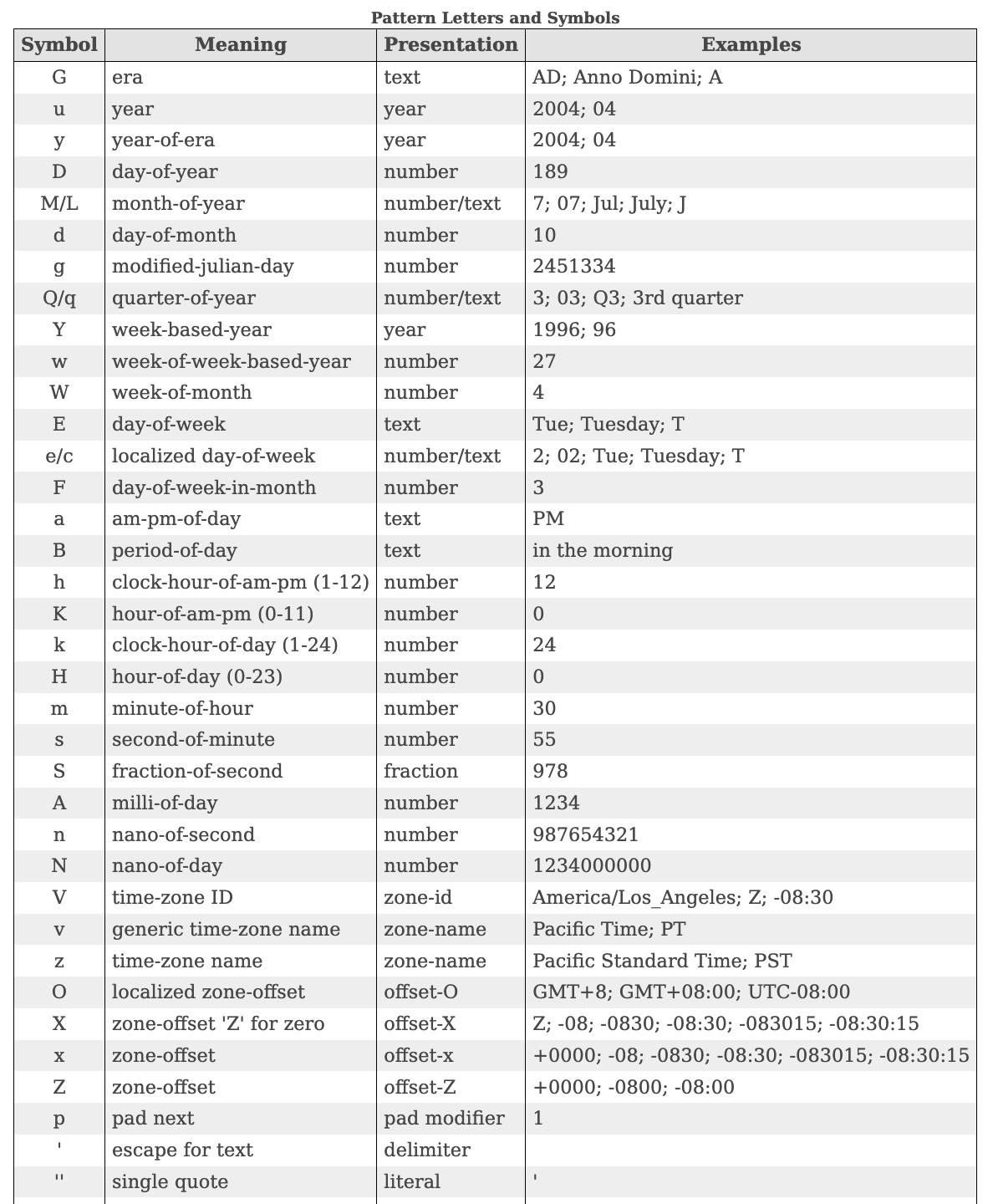
사용해보기
- 포맷팅
public class FormattingMain {
    public static void main(String[] args) {
        // 포맷팅: 날짜 -> 문자열
        // LocalDate
        LocalDate today = LocalDate.of(2024, 6, 23);
        System.out.println("오늘: " + today);
        DateTimeFormatter formatter1 = DateTimeFormatter.ofPattern("yyyy년 MM월 dd일");
        String formattedDate = today.format(formatter1);
        System.out.println("LocalDate 포맷팅: " + formattedDate);

		// LocalDateTime
        LocalDateTime now = LocalDateTime.of(2024, 6, 23, 11, 22, 30);
        DateTimeFormatter formatter2 = DateTimeFormatter.ofPattern("yyyy-MM-dd HH:mm:ss");
        String formattedDateTime = now.format(formatter2);
        System.out.println("LocalDateTime 포맷팅: " + formattedDateTime);
    }
}
오늘: 2024-06-23
LocalDate 포맷팅: 2024년 06월 23일
LocalDateTime 포맷팅: 2024-06-23 11:22:30- 파싱
public class ParsingMain {
    public static void main(String[] args) {
        // 파싱: 문자열 -> 날짜
        LocalDate today = LocalDate.of(2024, 6, 23);
        System.out.println("오늘: " + today);

        // LocalDate
        String input = "2024년 05월 31일";
        LocalDate parsedDate = LocalDate.parse(input, formatter1);
        System.out.println("LocalDate 파싱: " + parsedDate);

		// LocalDateTime
        String dateTimeString = "2024-05-31 11:25:00";
        LocalDateTime parsedDateTime = LocalDateTime.parse(dateTimeString, formatter2);
        System.out.println("LocalDateTime 파싱: " + parsedDateTime);
    }
}
오늘: 2024-06-23
LocalDate 파싱: 2024-05-31
LocalDateTime 파싱: 2024-05-31T11:25
공부 기록