배열
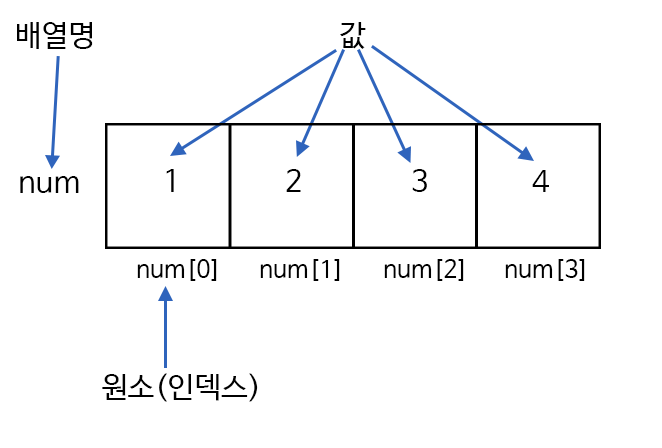
자바스크립트에서 배열은 이름과 인데스로 참조되는 정렬된 값의 집합으로 정의된다. 배열을 구성하는 각각의 값을 배열 요소라고 하며, 배열에서의 위치를 가리키는 숫자를 인덱스(index)라고 한다.
쉽게 말해 여러개의 데이터를 담을 때 100개의 데이터가 있다고 가정해보자 100개의 데이터 변수를 지정해준다면 100개의 변수를 다 지정해줄 것 인가? 이것을 해결하기 위해 하나의 변수로 관련 있는 데이터들을 하나로 묶어서 저장하는 것이 배열이다.
자바스크립트 배열 특징
- 배열 요소의 타입이 고정되어 있지 않으므로, 같은 배열에 있는 배열 요소끼리의 타입이 서로 다를 수 있다.
- 배열 요소의 인덱스가 연속적이지 않아도 된다. 특정 배열 요소가 비어있을 수도 있다.
- 자바스크립트에서 배열은 Array 객체로 다뤄진다.
배열 생성
let arr = [배열요소1, 배열요소2,...];          // 배열 리터럴을 이용하는 방법

let arr = Array(배열요소1, 배열요소2,...);     // Array 객체의 생성자를 이용하는 방법

let arr = new Array(배열요소1, 배열요소2,...); // new 연산자를 이용한 Array 객체 생성 방법
위의 세가지 방법은 모두 같은 결과의 배열을 만들어준다.
배열 선언
let fruit = ["banana", "apple", "mango","grape"];

console.log(fruit);
console.log(fruit[0]); // 0번째에 있는 것을 출력한다. bananalength를 사용하면 배열에 담긴 요소가 몇 개인지도 알 수 있다.
let fruit = ["banana", "apple", "mango","grape"];

console.log(fruit.length); // 4
pop-push와 shift-unshift
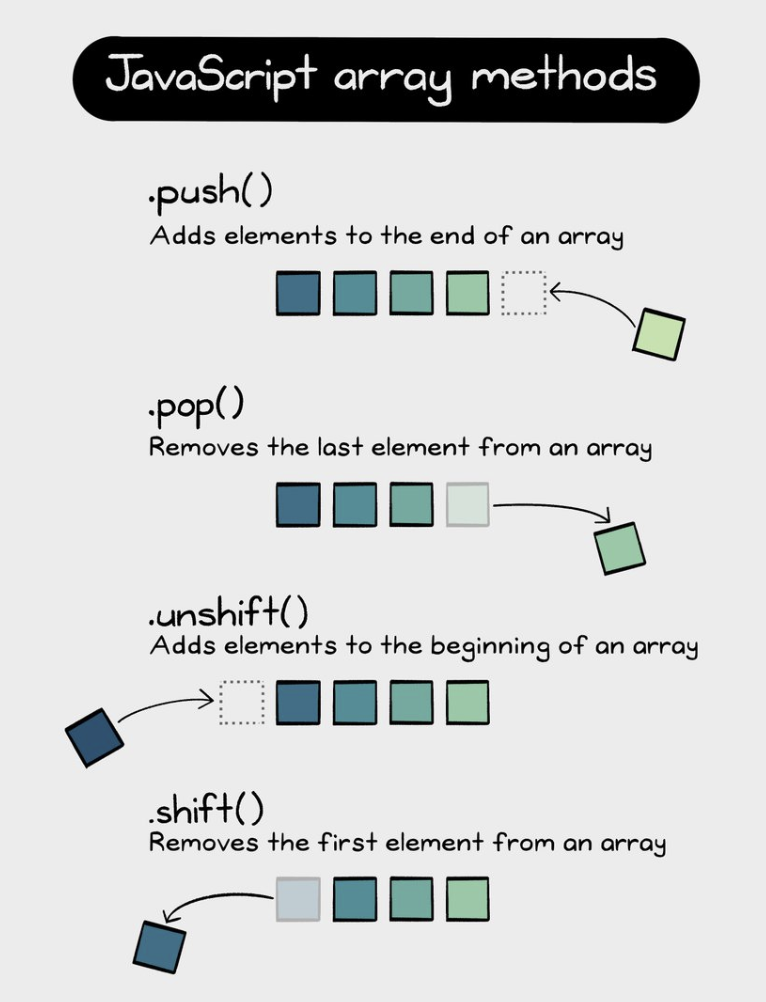
큐(queue)는 배열을 사용해 만들 수 있는 대표적인 자료구조로, 배열과 마찬가지로 순서가 있는 컬렉션을 저장하는데 사용 한다. 큐에서 사용하는 주요 연산은 push와 shift가 있다.
- push : 맨 끝에 요소를 추가한다.
- shift : 제일 앞 요소를 꺼내 제거한 후 남아있는 요소들을 앞으로 밀어준다.
화면에 순차적으로 띄울 메세지를 비축해 놓을 자료 구조를 만들 때 큐를 사용하는 것처럼 큐는 실무에서 상당히 자주 쓰이는 자료 구조이다.
배열은 큐 이외에 자료구조를 구현할 때 쓰는 스택(stack)도 있다. 스택에서 사용하는 연산은 push와 pop이 있다.
- push : 요소를 스택 끝에 집어넣는다.
- pop : 스택 끝 요소를 추출한다.
스택은 한쪽 끝에 요소를 더하거나 뺄 수 있게 해주는 자료구조이다.
스택은 흔히 카드 한벌과 비교된다. 쌓여있는 카드 맨 위에 새로운 카드를 더해주거나 빼는 것 처럼 스택도 한쪽 끝에 요소를 집어넣거나 추출 할 수 있기 때문이다.
스택을 사용하면 가중 나중에 집어넣은 요소가 먼저나온다. 이것을 후입선출(Last-In-First-Out, LIFO)자료구조이고, 큐를 사용하면 먼저 집어넣은 요소가 먼저 나오기 때문에 큐는 선입선출(First-In-First-Out, FIFO) 자료구조라 한다.
배열 함수
- pop
pop 함수는 마지막에 있는 요소를 제거하고 그 요소 값을 리턴한다.
let fruit = ["banana", "apple", "mango", "grape"];

fruit.pop();
console.log(fruit); //['cherry', 'apple', 'mango']- push
push 함수는 배열 끝에 요소를 추가한다.
let fruit = ["banana", "apple", "mango", "grape"];

fruit.push("pineapple");
console.log(fruit); //["banana", "apple", "mango","grape", "pineapple"]- shift
배열 앞 요소를 제거하고 제거한 요소를 리턴한다.
let fruit = ["banana", "apple", "mango", "grape"];

fruit.shift();
console.log(fruit); //["apple", "mango","grape"]- unshift
배열 앞에 요소를 추가한다.
let fruit = ["banana", "apple", "mango", "grape"];

fruit.unshift("strawberry");
console.log(fruit); //["strawberry", "apple", "mango","grape"]- includes
배열에 해당 요소가 포함되어 있는지 확인 후 boolean 값을 리턴한다.
let fruit = ["banana", "apple", "mango", "grape"];

console.log(fruit.includes("apple")); //true- indexOf
배열안에 있는 요소들의 원소번호를 찾아내 리턴한다.
let fruit = ["banana", "apple", "mango", "grape"];

console.log(fruit.indexOf("apple")); // 1- slice
배열의 요소를 잘래내는 역할을 한다. 사용 법은 (시작점, 끝점 - 끝점 미포함) 이다. 끝점은 포함하지 않고 리턴한다.
let fruit = ["banana", "apple", "mango", "grape"];

console.log(fruit.slice(1,3)); // ["apple", "mango"]- splice
시작점부터 개수 만큼 실제 배열에서 요소를 제거한다.
let fruit = ["banana", "apple", "mango", "grape"];

console.log(fruit.splice(1,3)); // ["apple", "mango", "grape"]
배열의 반복문
let fruit = ["banana", "apple", "mango", "grape"];

for (let i = 0; i < fruits.length; i++) {
  console.log(fruits[i]);
}

for (let fruit of fruits) {
  console.log(fruit);
}

fruits.forEach(function (fruit, index, array) {
  console.log(fruit, index, array);
});