
table 스타일
- 표를 만들고자 할때 사용하는 스타일이다
1. 기본 구조
- HTML에서 테이블은 <table> 태그를 사용해 생성된다
헤더셀은 < th >
행(row)은 < tr >
열(column) 은 < td >
💡 헤더셀은 제목이기 때문에 글씨가 굵음체이다
<table>
  <tr>
      <th>Header 1</th>
      <th>Header 2</th>
      <th>Header 3</th>
  </tr>
  <tr>
      <td>Row 1, Cell 1</td>
      <td>Row 1, Cell 2</td>
      <td>Row 1, Cell 3</td>
  </tr>
  <tr>
      <td>Row 2, Cell 1</td>
      <td>Row 2, Cell 2</td>
      <td>Row 2, Cell 3</td>
  </tr>
</table>
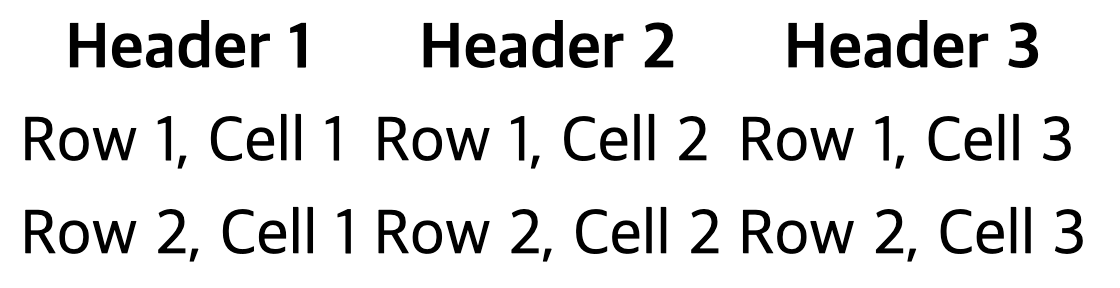
결과 : 아래의 그림같이 테이블요소를 사용하면 행,열 정리만 될뿐 줄이 그어져있지 않다.
2. 테이블에 선을 그어보자!
기본 스타일 속성
- border: 테이블의 테두리를 지정한다
- padding: 셀 내의 여백을 조절한다
- text-align: 셀 내 텍스트의 정렬을 지정한다.
(left, center, right 등) - vertical-align: 셀 내 텍스트의 수직 정렬을 지정한다.
(top, middle, bottom 등) - background-color: 배경 색상을 지정한다.
- color: 텍스트 색상을 지정합니다.
css를 사용한 기본스타일링
table {
    width: 100%;
    border-collapse: collapse;
}

th, td {
    border: 1px solid #ddd;
    padding: 8px;
    text-align: left;
}

th {
    background-color: #f2f2f2;
    color: black;
}
결과 : 아래와 같이 표안에 선이 생겼다

3. 응용버전
- border-collapse: 테이블 셀 간의 테두리를 합치는 옵션.
(collapse, separate)
📌 border-collapse: collapse
동작 방식: 이 옵션을 사용하면 인접한 테이블 셀 간의 테두리가 하나로 합쳐진다. 즉, 셀 간의 경계선이 하나로 표시되며, 중복된 테두리는 합쳐짐.
📌 border-collapse: separate
(기본값으로 설정되며, 아무스타일 지정 안했을때 나오는기본스타일)
동작 방식: 이 옵션을 사용하면 각 테이블 셀 간의 테두리가 개별적으로 표시된다.
즉, 셀 간에 테두리가 분리되어 두 겹의 테두리가 보인다.
 table {
    border-collapse: collapse;
}

  table {
    border-collapse: separate;
}- nth-child와 같은 선택자를 사용하여 특정 행이나 열을 스타일링.
- hover를 사용하여 마우스를 올렸을 때 스타일을 변경.
css를 사용한 기본스타일링
/* 테이블의 전체 테두리 설정 */
table {
    border: 2px solid #333;
    border-collapse: collapse;
}

/* 각 셀의 테두리와 내부 여백 설정 */
th, td {
    border: 1px solid #ccc;
    padding: 10px;
    text-align: center;
}

/* 헤더 셀 스타일 */
th {
    background-color: #4CAF50;
    color: white;
}

/* 짝수 행 배경색 설정 */
tr:nth-child(even) {
    background-color: #f2f2f2;
}

/* 홀수 행 배경색 설정 */
tr:nth-child(odd) {
    background-color: #ffffff;
}

/* 마우스를 올렸을 때 행 배경색 변경 */
tr:hover {
    background-color: #ddd;
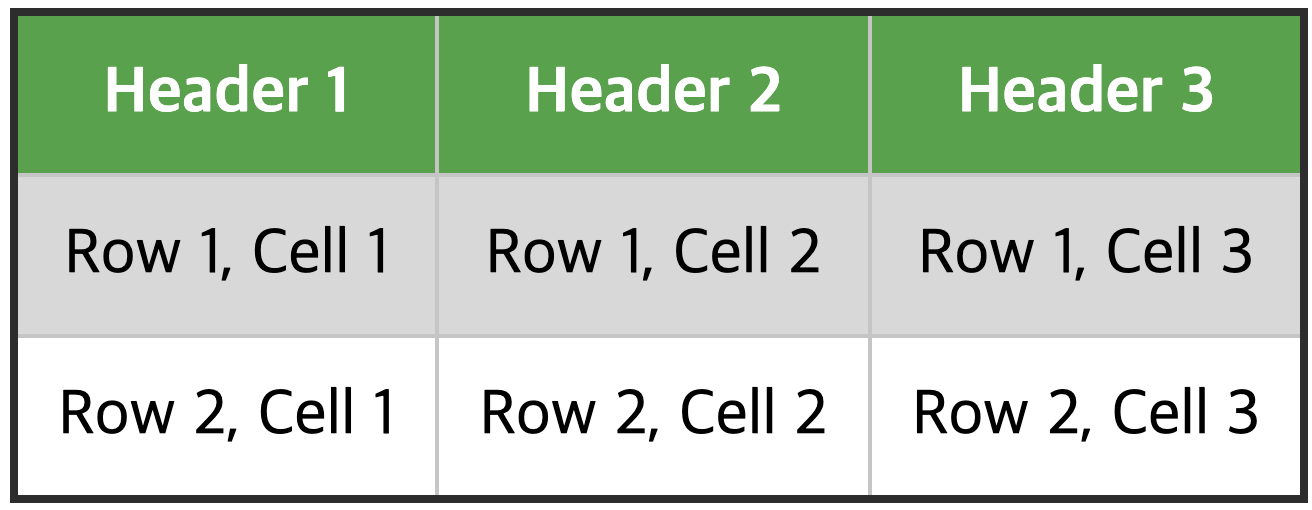
결과 : 마우스를 행에 올릴시 색상변경 확인가능
👩🏻💻 전체 코드
<!DOCTYPE html>
<html lang="en">
<head>
  <meta charset="UTF-8">
  <meta name="viewport" content="width=device-width, initial-scale=1.0">
  <title>Styled Table</title>
  <style>
      table {
          width: 100%;
          border: 2px solid #333;
          border-collapse: collapse;
      }
      th, td {
          border: 1px solid #ccc;
          padding: 10px;
          text-align: center;
      }
      th {
          background-color: #4CAF50;
          color: white;
      }
      tr:nth-child(even) {
          background-color: #f2f2f2;
      }
      tr:nth-child(odd) {
          background-color: #ffffff;
      }
      tr:hover {
          background-color: #ddd;
      }
  </style>
</head>
<body>
  <table>
      <tr>
          <th>Header 1</th>
          <th>Header 2</th>
          <th>Header 3</th>
      </tr>
      <tr>
          <td>Row 1, Cell 1</td>
          <td>Row 1, Cell 2</td>
          <td>Row 1, Cell 3</td>
      </tr>
      <tr>
          <td>Row 2, Cell 1</td>
          <td>Row 2, Cell 2</td>
          <td>Row 2, Cell 3</td>
      </tr>
  </table>
</body>
</html>