HTML 주석
-
HTML 문서에 설명을 제공하기 위해 사용
-
페이지 소스보기에서 주석문에 대한 설명문 제공
-
<!-- -->
<!-- <h2 th:text="설명문-1">HTML 주석문</h2> -->Thymeleaf 주석문(Parser 주석)
-
Thymeleaf 엔진을 사용해 동적으로 HTML 문서를 생성해도 설명을 제공하는 주석문
-
페이지 소스보기에 대한 설명문 미제공
-
<!--/* */-->
<!--/* <h2 th:text="설명문-2">Thymeleaf 주석문(Parser 주석)</h2> */-->Thymeleaf 주석문(Prototype 주석)
-
Thymeleaf 엔진을 사용해 동적으로 HTML 문서를 생성하면 설명이 아닌 태그를 제공하는 주석문
-
<!--/*/ /*/-->
<!--/*/ <h2 th:text="설명문-3">Thymeleaf 주석문(Prototype 주석)</h2> /*/-->if 속성
-
태그의 사용 여부를 설정하기 위한 Thymeleaf 속성
-
속성값으로 false 또는 true 중 하나를 제공받아 [true]인 경우 태그 사용
-
ThymeleafController.java
model.addAttribute("gender", "M"); model.addAttribute("age", 30); -
control.html
<h2 th:if="${gender == 'M'}">남자</h2>
<h2 th:if="${gender == 'W'}">여자</h2>
<h2 th:if="${age < 20}" th:text="미성년자"></h2>
- 미성년자는 안나옴 false 라서
unless 속성
-
태그 사용 여부를 설정하기 위한 Thymeleaf 속성
-
속성값으로 false 또는 true 중 하나를 제공받아 [false]인 경우 태그 사용
-
control.html
<h2 th:unless="${age < 20}" th:text="성인"></h2>
block 태그
- 별도의 HTML 태그를 사용하지 않고 each 속성 또는 if 속성 등을 사용하기 위한 Thymeleaf 태그
switch 속성
- 값을 비교하여 태그를 선택 사용하기 위한 Thymeleaf 속성
case 속성
-
switch 속성값과 값을 비교해 같은 경우 태그를 사용하기 위한 Thymeleaf 속성
-
case 속성값으로 [*]를 설정한 경우 default와 동일한 기능 제공
-
control.html
<th:block th:switch="${gender}">
		<h2 th:case="M">남자</h2>
		<h2 th:case="W">여자</h2>
		<h2 th:case="*">모름</h2>
</th:block>
each 속성
-
태그를 반복 처리하기 위한 Thymeleaf 속성
-
속성값으로 [Scope 속성명 : List 객체]로 설정하여 List 객체의 요소값을 차례대로 Scope 속성명의 속성값으로 제공받아 반복 처리
-
ThymeleafController.java
List<User> userList=new ArrayList<User>(); userList.add(User.builder().id("abc123").name("홍길동").email("abc@itwll.xyz").build()); userList.add(User.builder().id("opq456").name("임꺽정").email("opq@itwll.xyz").build()); userList.add(User.builder().id("xyz789").name("전우치").email("xyz@itwll.xyz").build()); model.addAttribute("userList", userList); -
control.html
<tr th:each="user : ${userList}">
<td th:text="${user.id}">test</td>
<td th:text="${user.name}">테스트</td>
<td th:text="${user.email}">test@aaa.com</td>
</tr>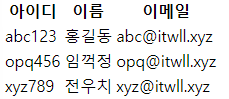
each 속성 > status 속성
-
each 속성에 status 속성값으로 Status 객체를 제공받아 반복 처리시 필요한 값을 사용
-
index, count, size, current, even, odd, first, last 등의 필드명으로 필드값을 제공받아 일괄처리시 사용
-
control.html
<th:block th:each="user, status : ${userList}">
  <h2>
    <th:block th:if="${status.odd}">
		아이디 = <span th:text="${user.id}">test</span>,
		이름 = <span th:text="${user.name}">테스트</span>,
		이메일 = <span th:text="${user.email}">test@aaa.com</span>
    </th:block>
  </h2>
</th:block>