목차
1. MyBatis 프레임워크란?
2. MyBatis 프레임워크의 동작 방식
3. Spring Boot에서 MyBatis 프레임워크 사용하기
4. 최종 결과물
5. 마무리
1. MyBatis 프레임워크란?
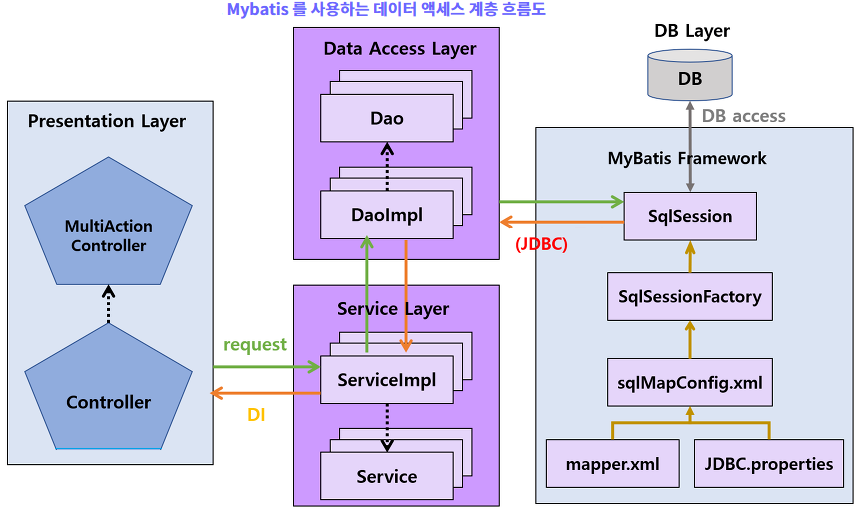
기존 Legacy JDBC나, Spring Boot에서 제공하는 JdbcDaoSupport의 경우에는 query문이 XML이나 Java 코드 안에 존재하여 의존적인 관계를 띄고, 같은 데이터를 가져오더라도 쿼리를 중복해서 여러번 작성해야한다. 또한 상황에따라 Connection Pool, PreparedStatement, Resultset 객체를 여러번 생성해야 할 수도 있다. 그러한 작업은 OOP적으로 적합하지 않다.
Mybatis는 그러한 문제를 해결하기위해 개발된 퍼시스턴스 프레임워크(Persistence Framework) 이며 JDBC의 기능을 자동화했기에 사용하기 쉽고, SQL코드를 분리하여 사용할 수 있어 RDBMS에 엑세스 하는 작업을 캡슐화 할 수 있다. (초기 Mybatis 역시 XML에 의존적인 관계였으나 3.0버전부터는 Class에 어노테이션을 사용하는 방법으로 Query를 분리해서 관리할 수 있다.)
1) 퍼시스턴스 프레임워크(Persistence Framework)는 뭐야?
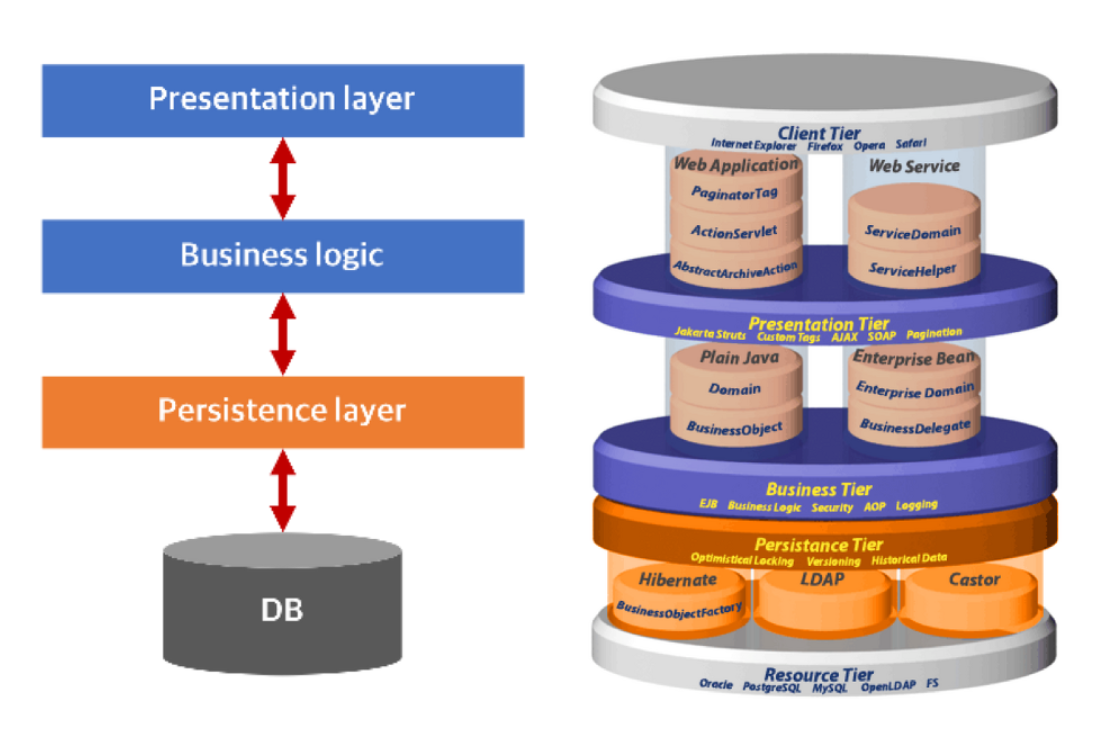
퍼시스턴스 프레임워크를 설명하기 전에 퍼시스턴스(Persistence)가 무엇인지 설명해야 한다. Persistence는 영속성 이라는 뜻으로 DataBase의 주요 기능 중 하나이다. 데이터는 기본적으로 주기억장치(REM)에서 관리되지만 주기억장치의 특징은 휘발성이다. 그러나 해당 데이터를 보조기억장치, 혹은 데이터베이스에 저장함으로 시스템 종료 이후에도 값이 휘발되지 않고 저장되는 특성을 영속성(Persistence)이라고 한다.
영속성에 대한 개념이 이해가 된다면 퍼시스턴스 프레임워크는 쉽게 이해할 수 있다. 퍼시스턴스 프레임워크는 자료를 데이터베이스에 저장하는 과정을 도와주고 자동화하는 소프트웨어이다.
2) MyBatis는 ORM이지 않아?
인터넷을 찾아보면 MyBatis를 설명하는 글들을 많이 있는데, 종종 MyBatis를 ORM(Object Relational Mapping)이라고 소개한다. 그러나 면밀히 말하면 MyBatis는 ORM이 아니고 SQL Mapper이다. 그렇다면 ORM과 SQL Mapper는 무엇일까?
ORM (Object Relational Mapping)
- ORM은 객체(Object)와 관계형 데이터베이스 (RDBMS)를 매핑하여 데이터베이스 테이블을 객체지향적으로 사용하기 위한 기술이다. SQL의 작성없이 매핑하는 설정만으로 DB 테이블 내의 데이터를 객체로 전달 받을 수 있다.
- 예) JPA(인터페이스, 표준명세서), Hibernate, Entity Framework, Django ORM 등...
SQL Mapper
- SQL Mapper는 ORM과 유사해 보이지만 객체와 관계를 매핑하는것이 아닌 SQL문의 결과와 객체를 매핑시켜주는 기술이다. 즉 개발자가 직접 SQL을 작성한 뒤, 실행된 결과를 객체로 매핑한다.
- 예) iBatis, MyBatis, Dapper, Spring JDBC Template 등...
2. MyBatis 프레임워크의 동작방식
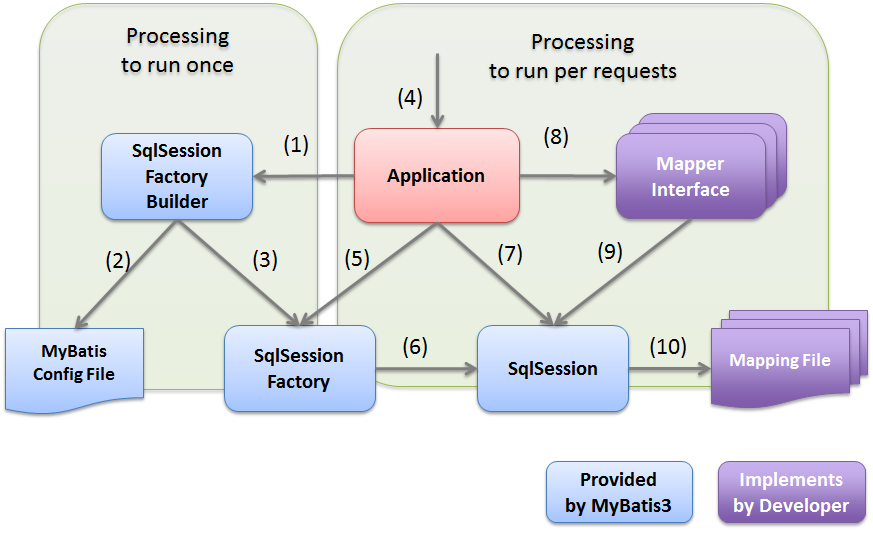
위의 그림은 MyBatis 프레임워크가 동작하는 과정을 잘 설명하고 있다. 처음 어플리케이션이 실행되면 (1), (2), (3) 의 과정이 실행된다. 이 과정에서는 SqlSessionFactoryBuilder 가 MyBatis의 설정 파일을 참고해서 SqlSessionFactory 객체를 생성한다.
이후 유저가 요청할때 (4)번부터 (10)번까지의 과정이 실행되는데 SqlSessionFactory객체를 통해 각각의 요청에 맞는 SqlSession객체를 생성하는데 이때에 SqlSessionFactory가 DB의 정보가 담겨 있는 DataSource를 SqlSession에 전달해줌으로 DB연동이 가능해진다. (SqlSession에는 설정값도 같이 가지고 있다.) 또한 Mapper Interface에 등록된 Query를 실행하여 결과를 받고 SqlSession에 ResultSet 타입으로 담아서 가져온다. MyBatis는 이 ResultSet을 설정된 매핑 규칙에 따라 Java 객체로 변환하여 반환한다.
DataSource는 뭐야?
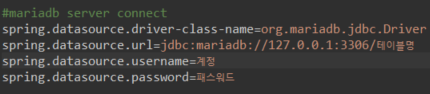
DataSource는 JDBC의 Connection을 처리하는 기능을 가지고 있다. DataSource는 JNDI(Java Naming and Directory Interface) 라는 이름과 디렉토리를 바인딩하는 기술로 DB와 관련된 정보가 담겨 있는데 해당 정보를 기반으로 물리적인 DB에 접근 할 수 있게 한다.
참고 : Oracle - JNDI 자원
3. Spring Boot에서 MyBatis 프레임워크 사용하기
1) 상황 가정하기
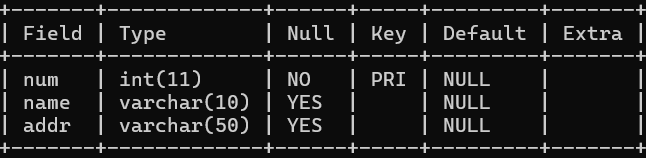 오늘은 num, name, addr 필드만 있는 mem table을 사용해서 CRUD를 구현해 보려고 한다.
2) Mapper Inteface 작성
앞서 MyBatis 프레임워크의 동작 방식 파트에서 설명했듯 MyBatis는 Sql의 쿼리문을 Mapper Interface에 담아 보관하고 할당된 객체를 실행함으로 쿼리의 결과값을 반환하기 때문에 Mapper Interface를 설정해줘야 한다.
Spring Boot에서는 어노테이션을 사용하면 상당히 쉽게 Mapper Interface를 지정할수 있는데 @mapper 어노테이션을 사용하면 된다.
이후 쿼리의 성격에 따라 @Select, @Insert, @Update, @Delete와 세부 쿼리를 작성해 주면 된다.
package pack.model;

import java.util.List;

import org.apache.ibatis.annotations.Delete;
import org.apache.ibatis.annotations.Insert;
import org.apache.ibatis.annotations.Mapper;
import org.apache.ibatis.annotations.Select;
import org.apache.ibatis.annotations.Update;

import pack.controller.MemBean;

@Mapper
public interface MemMapperInter {

	@Select("SELECT num, name, addr FROM mem")
	List<MemDto> getAll();

	@Select("SELECT num, name, addr FROM mem WHERE num=#{num}")
	MemDto getPart(String num);

	@Insert("INSERT INTO mem(num, name, addr) VALUES(#{num}, #{name}, #{addr})")
	int insertData(MemBean bean);

	@Update("UPDATE mem SET name=#{name}, addr=#{addr} WHERE num=#{num}")
	int updateData(MemBean bean);

	@Delete("DELETE FROM mem WHERE num=#{num}")
	int deleteData(String num);
}
3) VIEW 작성
Update
Thymeleaf에서 제공하는 th:field를 사용하면 server side에서 render시에 해당 값으로 name과 value, id 속성으로 변환되어 client side로 전송된다.
<!DOCTYPE html>
<html xmlns:th="http://www.thymeleaf.org">
<head>
<meta charset="UTF-8">
<title>Insert title here</title>
</head>
<body>
<form th:action="@{/update}" method="post" th:object="${dto}">
번호 : <input type="text" name="num" readonly="readonly" th:field="*{num}"><br/>
이름 : <input type="text" name="name" th:field="*{name}"><br/>
주소 : <input type="text" name="addr" th:field="*{addr}"><br/>
<button>등록</button>
</form>
</body>
</html>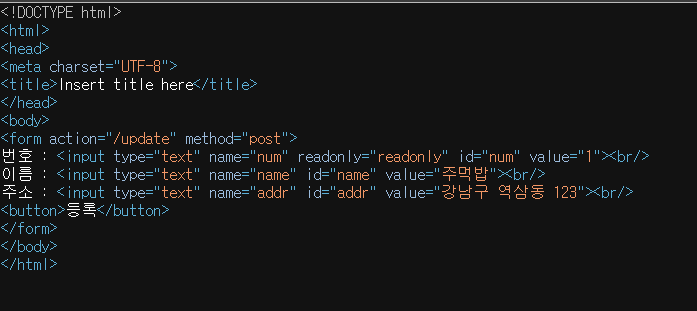
Select
<!DOCTYPE html>
<html xmlns:th="http://www.thymeleaf.org">
<head>
<meta charset="UTF-8">
<title>Insert title here</title>
</head>
<body>
	<h3>멤버 목록</h3>
	<a th:href="@{/insert}">멤버 추가</a>
	<table border="1">
		<tr>
			<th>번호</th>
			<th>이름</th>
			<th>주소</th>
			<th>수정 / 삭제</th>
		</tr>
		<th:block th:if="${datas.size} >0">
			<tr th:each="dto:${datas}">
				<td>[[${dto.num}]]</td>
				<td>[[${dto.name}]]</td>
				<td>[[${dto.addr}]]</td>
				<td><a th:href="@{/update(num=${dto.num})}">수정</a> / <a th:href="@{/delete(num=${dto.num})}">삭제</a></td>
			</tr>
			<tr>
				<td colspan="5" style="text-align: center; font-weight: bold">[[|총
					멤버 수 : ${datas.size}|]]</td>
			</tr>
		</th:block>
	</table>
	<a th:href="@{/}">메인으로 돌아가기</a>

</body>
</html>
4) CONTROLLER 작성
package pack.controller;

import java.util.ArrayList;

import org.springframework.beans.factory.annotation.Autowired;
import org.springframework.stereotype.Controller;
import org.springframework.ui.Model;
import org.springframework.web.bind.annotation.GetMapping;
import org.springframework.web.bind.annotation.PostMapping;
import org.springframework.web.bind.annotation.RequestParam;

import pack.model.MemDao;
import pack.model.MemDto;

@Controller
public class MemController {

	@Autowired
	private MemDao memDao;

	@GetMapping("/")
	public String mainPage() {
		return "index";
	}

	@GetMapping("/memlist")
	public String listProcess(Model model) {
		ArrayList<MemDto> list = (ArrayList<MemDto>) memDao.getDataAll();
		model.addAttribute("datas", list);
		return "list";
	}

	@GetMapping("/insert")
	public String ins() {
		return "insert";
	}

	@PostMapping("/insert")
	public String ins(Model model, MemBean bean) {
		boolean b = memDao.insertData(bean);
		System.out.println(b);
		if(b) return "redirect:/memlist";
		else return "redirect:/error";
	}

	@GetMapping("/error")
	public String err() {
		return "error";
	}

	@GetMapping("/update")
	public String update(Model model, MemBean bean) {
		MemDto dto = memDao.getData(bean.getNum());
		model.addAttribute("dto", dto);
		return "update";
	}
	@PostMapping("/update")
	public String processUpdate(Model model, MemBean bean) {
		boolean b = memDao.updateData(bean);
		if(b) return "redirect:/memlist";
		else return "redirect:/error";
	}

	@GetMapping("/delete")
	public String deleteProcess(Model model, @RequestParam("num") String num) {
		boolean b = memDao.deleteData(num);
		if(b) return "redirect:/memlist";
		else return "redirect:/error";
	}
}
4) MODEL 작성
package pack.model;

import java.util.List;

import org.springframework.beans.factory.annotation.Autowired;
import org.springframework.stereotype.Repository;
import org.springframework.web.bind.annotation.RequestParam;

import pack.controller.MemBean;

@Repository
public class MemDao {

	@Autowired
	private MemMapperInter mapperInter;

	// 전체 데이터 찾기
	public List<MemDto> getDataAll() {
		List<MemDto> list = mapperInter.getAll();
		return list;
	}

	// 수정 삭제 대상 자료 읽기
	public MemDto getData(String num) {
		MemDto dto = mapperInter.getPart(num);
		return dto;
	}

	// 추가
	public boolean insertData(MemBean bean) {
		// 번호 자동 증가 또는 번호 중복 확인 작업 이 꼭 필요하다! : but 이번 프로젝트는 생략
		try {
			int re = mapperInter.insertData(bean);
			if (re > 0) return true;
			else return false;

		} catch (Exception e) {
			System.out.println("insertData : " + e);
			return false;
		}
	}

	// 수정
	public boolean updateData(MemBean bean) {
		try {
			int re = mapperInter.updateData(bean);
			if (re > 0) return true;
			else return false;
		} catch (Exception e) {
			System.out.println("insertData : " + e);
			return false;
		}
	}

	// 삭제
	public boolean deleteData(String num) {
		try {
			int re = mapperInter.deleteData(num);
			if (re > 0) return true;
			else return false;
		} catch (Exception e) {
			System.out.println("insertData : " + e);
			return false;
		}
	}

}
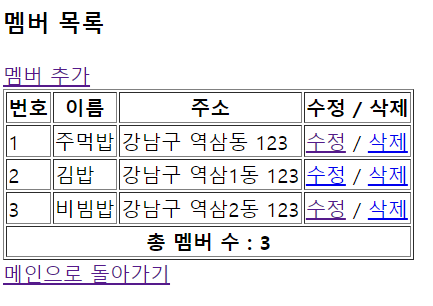
4. 최종 결과물
5. 마무리
- 전에도 MyBatis를 사용해 봤지만 MyBatis가 정확하게 어떤 구조와 어떤 과정을 통해 DB에 접근하고 데이터를 가져오는지에대한 확신은 없었다.
- 이번기회에 해당 내용을 정리하면서 해당 과정에 대한 이해와 Java에서 DB에 접근하는 과정에 대한 이해도가 깊어진것 같았다.
- 오늘 JPA도 일부 공부했는데, 해당 내용은 내일 정리하면서 더 공부해봐야겠다.