1) 공통 파일 추가
(1) head.jspf – 공통 <head> + Tailwind + CSS/JS
경로: /WEB-INF/jsp/common/head.jspf
<%@ page contentType="text/html; charset=UTF-8" pageEncoding="UTF-8" %>

<!-- 공통파일 -->
<link rel="stylesheet" href="/resource/common.css" />
<!-- jquery -->
<script src="https://cdnjs.cloudflare.com/ajax/libs/jquery/3.6.0/jquery.min.js"></script>
<!-- tailwind -->
<link rel="stylesheet" href="https://cdnjs.cloudflare.com/ajax/libs/tailwindcss/2.1.4/tailwind.min.css">
<!-- 폰트어썸 -->
<link rel="stylesheet" href="https://cdnjs.cloudflare.com/ajax/libs/font-awesome/6.7.2/css/all.min.css" />

<script src="/resource/common.js" defer="defer"></script>

<!DOCTYPE html>
<html lang="ko">
<head>
  <meta charset="UTF-8"/>
  <meta name="viewport" content="width=device-width,initial-scale=1"/>
  <title>${pageTitle != null ? pageTitle : "Springfolio JSP"}</title>


</head>
(2) header.jspf – 상단 네비게이션
경로: /WEB-INF/jsp/common/header.jspf
<%@ page contentType="text/html; charset=UTF-8" pageEncoding="UTF-8"%>
<%@ taglib prefix="c" uri="jakarta.tags.core"%>
<header class="border-b bg-white/80 backdrop-blur sticky top-0 z-40 bg-gray-50">
	<div class="max-w-5xl mx-auto px-4 py-3 flex items-center justify-around">
		<!-- LOGO (왼쪽) -->
		<a href="/usr/home/main" class="flex items-center gap-5 h-20 font-bold text-2xl">
			<span class="inline-block w-2.5 h-2.5 rounded-full bg-gray-900"></span>
			<span>Springfolio</span>
		</a>
<nav class="flex-grow"></nav>
		<nav class="flex items-center gap-6 mr-8">
			<a href="/usr/home/main" class="fa-solid fa-house text-4xl hover:bg-gray-200 transition-colors duration-100 p-8 rounded-2xl" data-nav="home"></a>
			<a href="/usr/article/list" class="fa-solid fa-clipboard-list text-4xl hover:bg-gray-200 transition-colors duration-100 p-8 rounded-2xl" data-nav="article"></a>
		</nav>
	</div>
</header>
(3) footer.jspf – 하단 푸터
경로: /WEB-INF/jsp/common/footer.jspf
<%@ page contentType="text/html; charset=UTF-8" pageEncoding="UTF-8" %>
<footer class="mt-16 border-t">
  <div class="max-w-5xl mx-auto px-4 py-8 text-sm text-gray-500">
    <p>© <span id="year"></span> Springfolio JSP. All rights reserved.</p>
  </div>
</footer>
</body>
</html>
(4) common.css
경로: src/main/resources/static/css/common.css
@charset "UTF-8";

@font-face {
	font-family: 'GmarketSansMedium';
	src:
		url('https://fastly.jsdelivr.net/gh/projectnoonnu/noonfonts_2001@1.1/GmarketSansMedium.woff')
		format('woff');
	font-weight: normal;
	font-style: normal;
}

html>body{
	 font-family: 'GmarketSansMedium';
}

/* 컨테이너 & 타이포 기본 */
.page-wrap { max-width: 64rem; margin: 0 auto; padding: 1rem; }
h1 { font-size: 1.5rem; font-weight: 700; margin: 1rem 0; }

/* 네비 링크 상태 */
.nav-link { color:#374151; }
.nav-link.active { font-weight:700; border-bottom:2px solid #111827; padding-bottom:2px; }

/* 카드 테이블 */
.table { width:100%; border-collapse: collapse; }
.table th, .table td { border-bottom:1px solid #e5e7eb; padding:.75rem; text-align:left; }
.table th { font-weight:600; color:#111827; }

/* 버튼 */
.btn-basic { display:inline-flex; align-items:center; gap:.5rem; padding:.5rem .75rem; border:1px solid #e5e7eb; border-radius:.5rem; }
.btn-basic:hover {
	background: rgba(229, 231, 235)
}
.btn-dark { display:inline-flex; align-items:center; gap:.5rem; padding:.5rem .75rem; border:1px solid #e5e7eb; border-radius:.5rem;  background:#111827; color:#fff; border-color:#111827; }
.btn-dark:hover {
	background: rgba(55, 65, 81);
}
.btn-danger { display:inline-flex; align-items:center; gap:.5rem; padding:.5rem .75rem; border:1px solid #e5e7eb; border-radius:.5rem;  background:#ef4444; color:#fff; border-color:#ef4444; }
.btn-danger:hover {
	background: rgba(220, 38, 38);
}
(5) common.js
경로: src/main/resources/static/js/common.js
// 현재 연도
document.addEventListener('DOMContentLoaded', () => {
  const y = document.getElementById('year');
  if (y) y.textContent = new Date().getFullYear();

  // 간단 active 처리
  const path = location.pathname;
  const homeLink = document.querySelector('[data-nav="home"]');
  const articleLink = document.querySelector('[data-nav="article"]');

  if (path.startsWith('/usr/article/')) {
    articleLink?.classList.add('active');
  } else {
    homeLink?.classList.add('active');
  }
});
정리: CSS/JS는
src/main/resources/static아래에 두면/css/*,/js/*로 바로 서빙됨.
2) 각 JSP에 공통 레이아웃 적용
아래 네 파일 상단/하단에 include 추가하고, 본문을 .page-wrap 안으로 감싸는 형태로 바꿔줘.
(1) home/main.jsp
<%@ page contentType="text/html; charset=UTF-8" pageEncoding="UTF-8" %>
<%@ taglib prefix="c" uri="jakarta.tags.core"%>
<% request.setAttribute("pageTitle", "Home"); %>
<%@ include file="/WEB-INF/jsp/common/head.jspf" %>
<body class="bg-gray-50 text-gray-800">
<%@ include file="/WEB-INF/jsp/common/header.jspf" %>

<main class="page-wrap">
  <h1>Spring Boot + JSP 정상 작동!</h1>
  <p class="text-gray-600">route:/usr/home/main</p>

  <div class="mt-6 grid gap-4 sm:grid-cols-2">
    <a class="btn-basic text-xl" href="/usr/article/list">→ Article List</a>
    <a class="btn-dark text-xl" href="/usr/article/write">+ 새 글 작성</a>
  </div>
</main>

<%@ include file="/WEB-INF/jsp/common/footer.jspf" %>
(2) article/list.jsp
<%@ page contentType="text/html; charset=UTF-8" pageEncoding="UTF-8"%>
<%@ taglib prefix="c" uri="jakarta.tags.core"%>
<% request.setAttribute("pageTitle", "Articles"); %>
<%@ include file="/WEB-INF/jsp/common/head.jspf" %>
<body class="bg-gray-50 text-gray-800">
<%@ include file="/WEB-INF/jsp/common/header.jspf" %>

<main class="page-wrap">
  <div class="flex items-center justify-between">
    <h1 class="text-2xl">Article List</h1>
    <a href="/usr/article/write" class="btn-basic">+ 새 글</a>
  </div>

  <table class="table mt-4 bg-white rounded-lg shadow-sm">
    <thead>
      <tr>
        <th>Thumb</th>
        <th>ID</th>
        <th>RegDate</th>
        <th>Title</th>
        <th>Member</th>
        <th>Action</th>
      </tr>
    </thead>
    <tbody>
      <c:forEach var="a" items="${articles}">
        <tr>
          <td>
            <c:if test="${not empty a.thumbImg}">
              <img src="/upload/${a.thumbImg}" class="h-10 rounded"/>
            </c:if>
          </td>
          <td>${a.id}</td>
          <td>${a.regDate}</td>
          <td>
            <a class="underline" href="/usr/article/detail?id=${a.id}">
              ${a.title}
            </a>
          </td>
          <td>${a.memberId}</td>
          <td class="whitespace-nowrap">
            <a class="btn-basic" href="/usr/article/modify?id=${a.id}">수정</a>
            <a class="btn-danger" href="/usr/article/delete?id=${a.id}" onclick="return confirm('삭제할까요?');">삭제</a>
          </td>
        </tr>
      </c:forEach>
    </tbody>
  </table>
</main>

<%@ include file="/WEB-INF/jsp/common/footer.jspf" %>
(3) article/detail.jsp
<%@ page contentType="text/html; charset=UTF-8" pageEncoding="UTF-8"%>
<%@ taglib prefix="c" uri="jakarta.tags.core"%>
<% request.setAttribute("pageTitle", "Article Detail"); %>
<%@ include file="/WEB-INF/jsp/common/head.jspf" %>
<body class="bg-gray-50 text-gray-800">
<%@ include file="/WEB-INF/jsp/common/header.jspf" %>

<main class="page-wrap">
  <div class="flex items-center justify-between">
    <h1>Article #${article.id}</h1>
    <div class="flex gap-2">
      <a class="btn-basic" href="/usr/article/list">← 목록</a>
      <a class="btn-basic" href="/usr/article/modify?id=${article.id}">수정</a>
      <a class="btn-danger" href="/usr/article/delete?id=${article.id}" onclick="return confirm('삭제할까요?');">삭제</a>
    </div>
  </div>

  <div class="mt-4 grid gap-4 sm:grid-cols-2">
    <div class="bg-white rounded-lg shadow-sm p-4">
      <p><strong>RegDate:</strong> ${article.regDate}</p>
      <p><strong>Title:</strong> ${article.title}</p>
      <p><strong>Member:</strong> ${article.memberId}</p>
    </div>
    <div class="bg-white rounded-lg shadow-sm p-4">
      <c:if test="${not empty article.thumbImg}">
        <img src="/upload/${article.thumbImg}" class="max-w-full rounded"/>
      </c:if>
      <c:if test="${empty article.thumbImg}">
        <p class="text-gray-500">썸네일 없음</p>
      </c:if>
    </div>
  </div>
</main>

<%@ include file="/WEB-INF/jsp/common/footer.jspf" %>
(4) article/modify.jsp
<%@ page contentType="text/html; charset=UTF-8" pageEncoding="UTF-8"%>
<%@ taglib prefix="c" uri="jakarta.tags.core"%>
<% request.setAttribute("pageTitle", "Modify Article"); %>
<%@ include file="/WEB-INF/jsp/common/head.jspf" %>
<body class="bg-gray-50 text-gray-800">
<%@ include file="/WEB-INF/jsp/common/header.jspf" %>

<main class="page-wrap">
  <div class="flex items-center justify-between">
    <h1>글 수정</h1>
    <a class="btn-basic" href="/usr/article/detail?id=${article.id}">← 상세</a>
  </div>

  <form action="/usr/article/modify" method="post" enctype="multipart/form-data"
        class="mt-4 bg-white rounded-lg shadow-sm p-4 grid gap-4">
    <input type="hidden" name="id" value="${article.id}"/>

    <label class="grid gap-1">
      <span class="text-sm">제목</span>
      <input class="border rounded px-3 py-2" type="text" name="title" value="${article.title}" required/>
    </label>

    <label class="grid gap-1">
      <span class="text-sm">썸네일(선택: 업로드 시 교체)</span>
      <input class="border rounded px-3 py-2" type="file" name="file" accept=".png,.jpg,.jpeg,.webp"/>
    </label>

    <c:if test="${not empty article.thumbImg}">
      <div>
        <p class="text-sm text-gray-500 mb-2">현재 이미지</p>
        <img src="/upload/${article.thumbImg}" class="h-20 rounded"/>
      </div>
    </c:if>

    <div class="flex gap-2">
      <button type="submit" class="btn-dark">수정하기</button>
      <a class="btn-basic" href="/usr/article/list">취소</a>
    </div>
  </form>
</main>

<%@ include file="/WEB-INF/jsp/common/footer.jspf" %>
(5) write.jsp
<%@ page contentType="text/html; charset=UTF-8" pageEncoding="UTF-8"%>
<% request.setAttribute("pageTitle", "Write Article"); %>
<%@ taglib prefix="c" uri="jakarta.tags.core"%>
<%@ include file="/WEB-INF/jsp/common/head.jspf" %>
<body class="bg-gray-50 text-gray-800">
<%@ include file="/WEB-INF/jsp/common/header.jspf" %>

<main class="page-wrap">
  <div class="flex items-center justify-between">
    <h1>새 글 작성</h1>
    <a class="btn-basic" href="/usr/article/list">← 목록</a>
  </div>

  <form action="/usr/article/write" method="post" enctype="multipart/form-data"
        class="mt-4 bg-white rounded-xl shadow-sm p-5 grid gap-5">

    <!-- 제목 -->
    <label class="grid gap-1">
      <span class="text-sm text-gray-700">제목</span>
      <input type="text" name="title" required
             class="border rounded-lg px-3 py-2 focus:outline-none focus:ring-2 focus:ring-gray-900"/>
    </label>

    <!-- 작성자 ID -->
    <label class="grid gap-1">
      <span class="text-sm text-gray-700">작성자 ID</span>
      <input type="number" name="memberId" value="1" min="1" required
             class="border rounded-lg px-3 py-2 w-32 focus:outline-none focus:ring-2 focus:ring-gray-900"/>
    </label>

    <!-- 썸네일 업로드 -->
    <div class="grid gap-3">
      <span class="text-sm text-gray-700">썸네일 (선택)</span>

      <!-- 드롭존 스타일 -->
      <label for="file" id="dropzone"
             class="border-2 border-dashed rounded-xl p-6 text-center cursor-pointer
                    hover:bg-gray-50 transition-colors duration-200">
        <div class="flex flex-col items-center gap-2">
          <div class="text-3xl">📷</div>
          <div class="text-gray-600">
            이미지를 <strong>클릭</strong>하거나 <strong>드래그&드롭</strong> 해주세요
          </div>
          <div class="text-xs text-gray-400">PNG / JPG / JPEG / WEBP · 최대 20MB</div>
        </div>
        <input id="file" name="file" type="file" accept=".png,.jpg,.jpeg,.webp" class="hidden"/>
      </label>

      <!-- 미리보기 -->
      <div id="previewWrap" class="hidden">
        <p class="text-sm text-gray-500 mb-2">미리보기</p>
        <img id="previewImg" class="max-h-48 rounded-lg shadow"/>
      </div>
    </div>

    <!-- 액션 -->
    <div class="flex items-center gap-2">
      <button type="submit" class="btn-dark">작성</button>
      <a class="btn-basic" href="/usr/article/list">취소</a>
    </div>
  </form>
</main>

<!-- 간단 프리뷰 스크립트 -->
<script>
  (function () {
    const dz = document.getElementById('dropzone');
    const input = document.getElementById('file');
    const previewWrap = document.getElementById('previewWrap');
    const previewImg = document.getElementById('previewImg');

    // 클릭으로도 파일 선택
    dz.addEventListener('click', () => input.click());

    // 드래그&드롭
    ['dragenter', 'dragover'].forEach(evt =>
      dz.addEventListener(evt, e => { e.preventDefault(); dz.classList.add('bg-gray-50'); })
    );
    ['dragleave', 'drop'].forEach(evt =>
      dz.addEventListener(evt, e => { e.preventDefault(); dz.classList.remove('bg-gray-50'); })
    );
    dz.addEventListener('drop', e => {
      if (e.dataTransfer?.files?.length) {
        input.files = e.dataTransfer.files;
        handleFile(input.files[0]);
      }
    });

    // 파일 선택 시 미리보기
    input.addEventListener('change', () => {
      if (input.files?.length) handleFile(input.files[0]);
    });

    function handleFile(file) {
      if (!file) return;
      const ok = ['image/png','image/jpeg','image/jpg','image/webp'].includes(file.type);
      const max = 20 * 1024 * 1024;
      if (!ok) { alert('PNG/JPG/JPEG/WEBP만 가능합니다.'); input.value=''; return; }
      if (file.size > max) { alert('최대 20MB까지 업로드 가능합니다.'); input.value=''; return; }

      const reader = new FileReader();
      reader.onload = (e) => {
        previewImg.src = e.target.result;
        previewWrap.classList.remove('hidden');
      };
      reader.readAsDataURL(file);
    }
  })();
</script>

<%@ include file="/WEB-INF/jsp/common/footer.jspf" %>
스크린샷
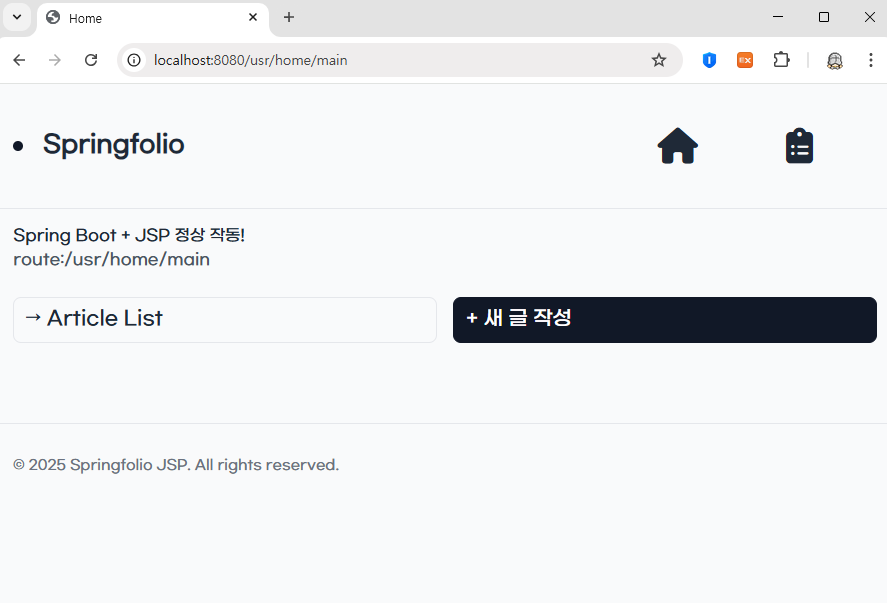
home 화면
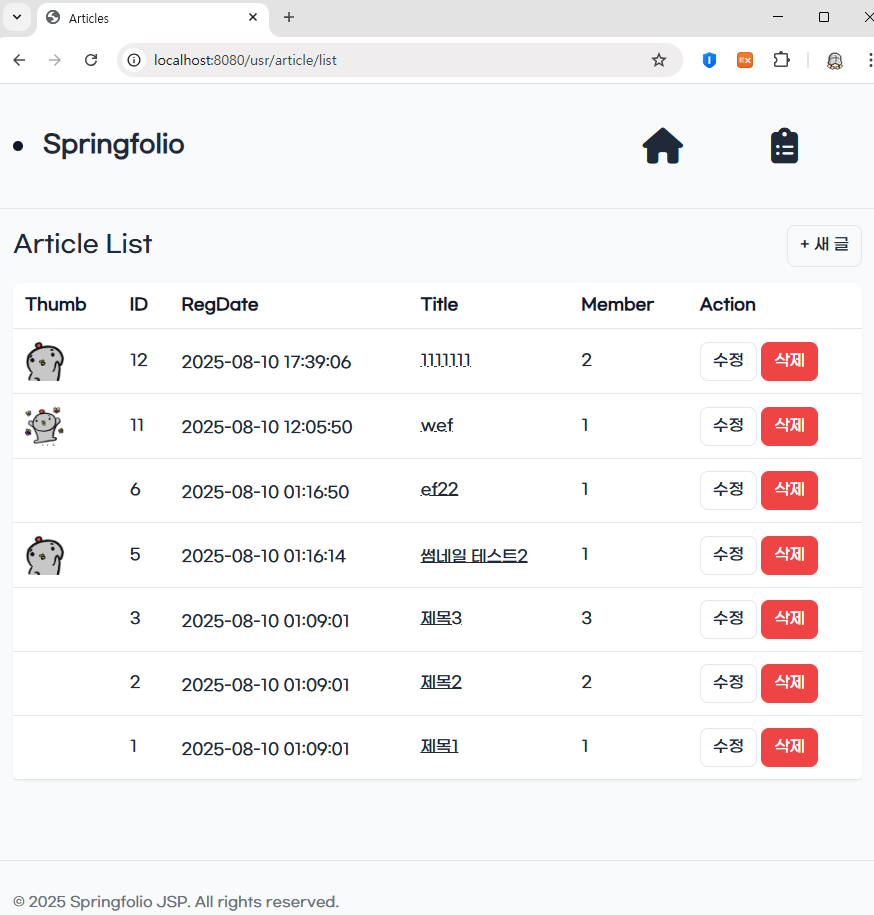
list 화면
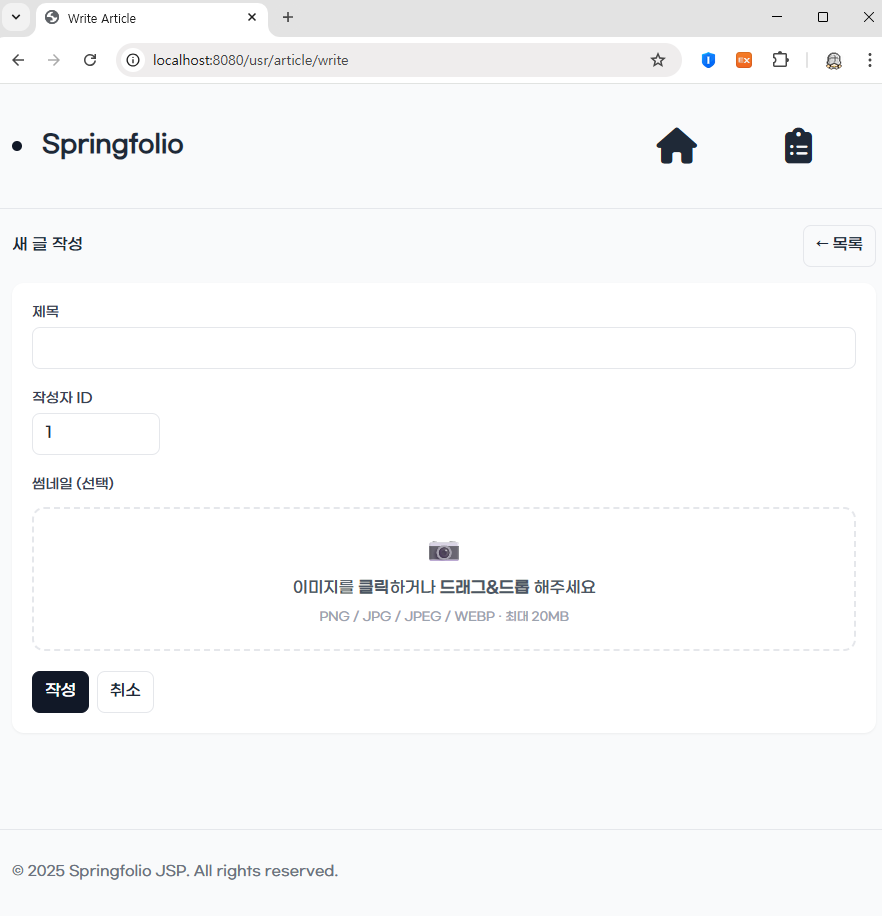
write 화면
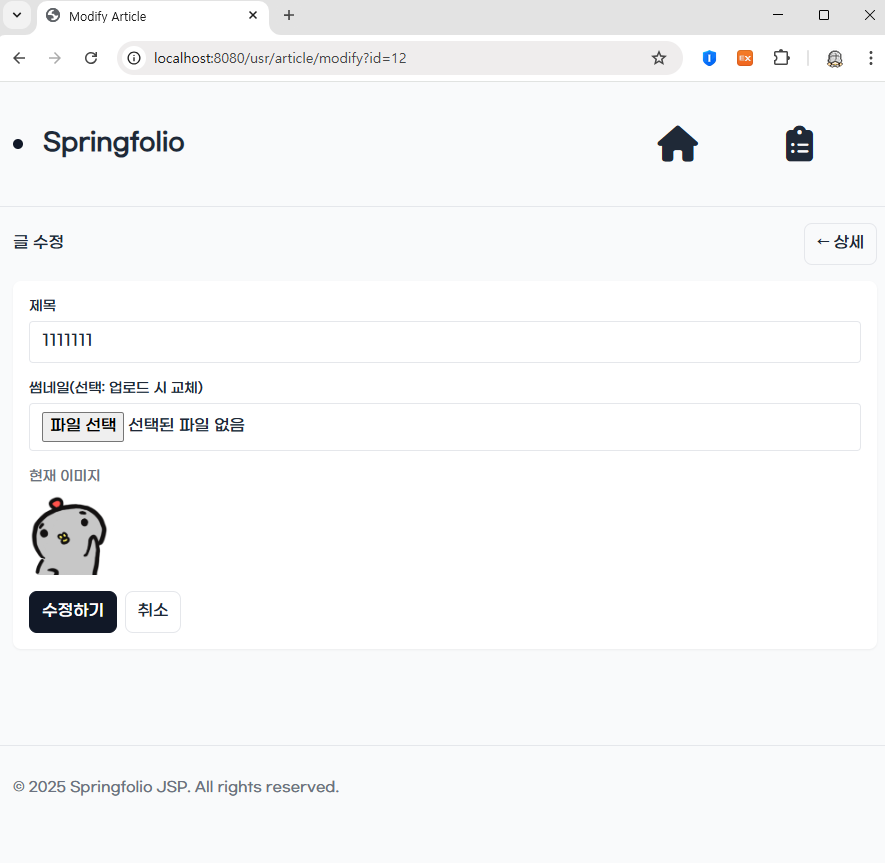
modify 화면
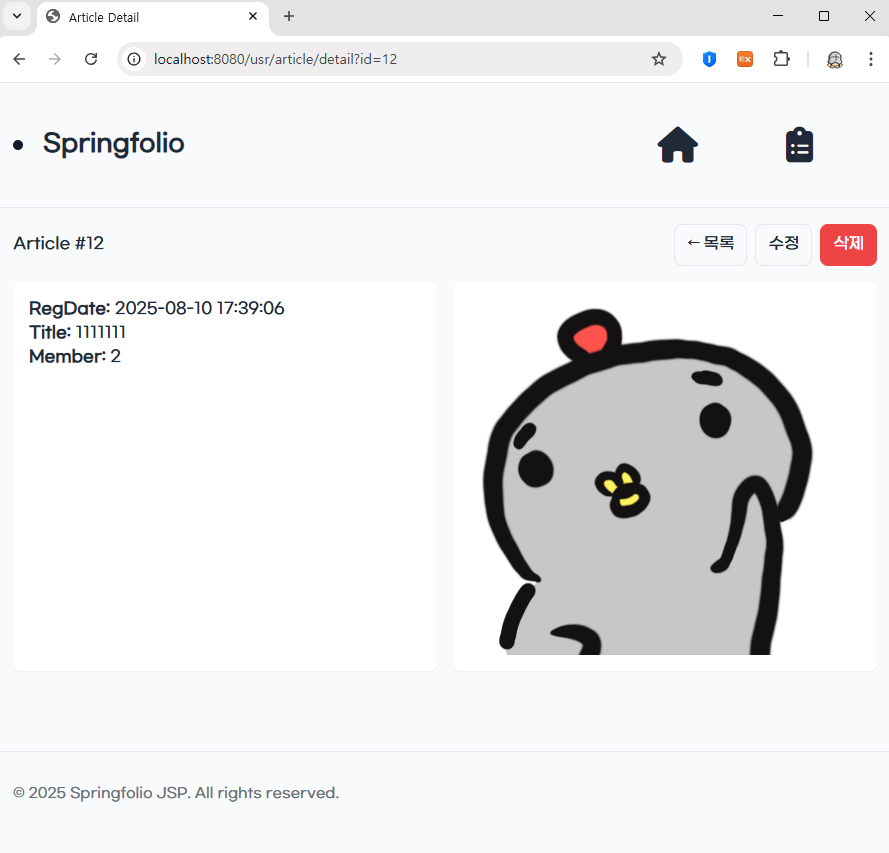
detail 화면
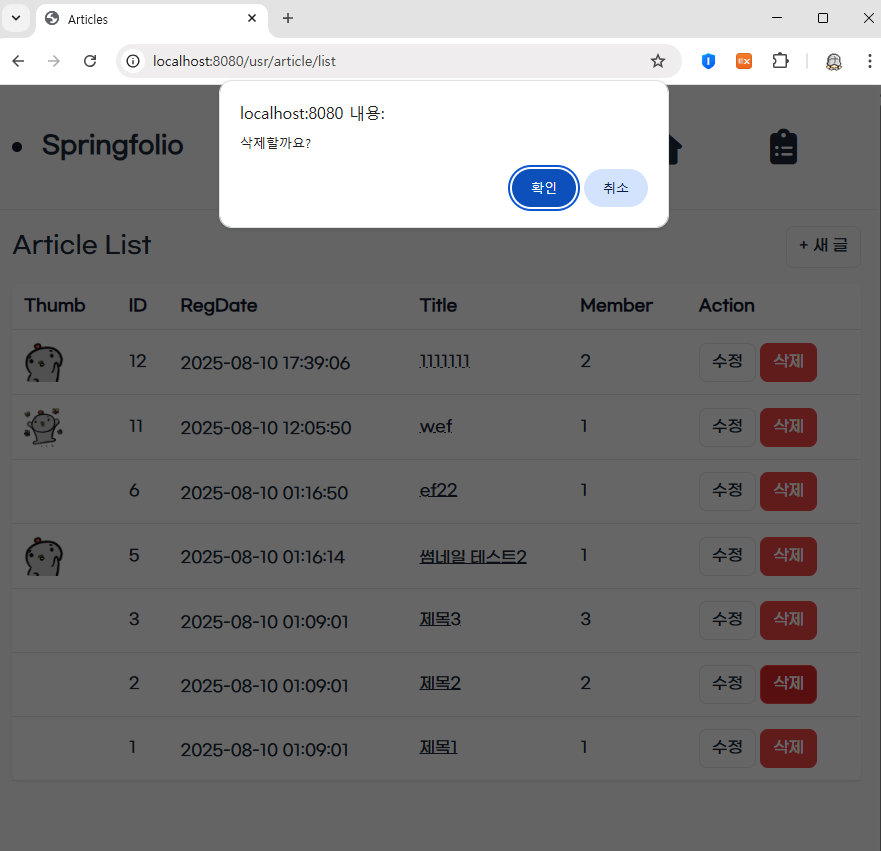
delete 경고화면
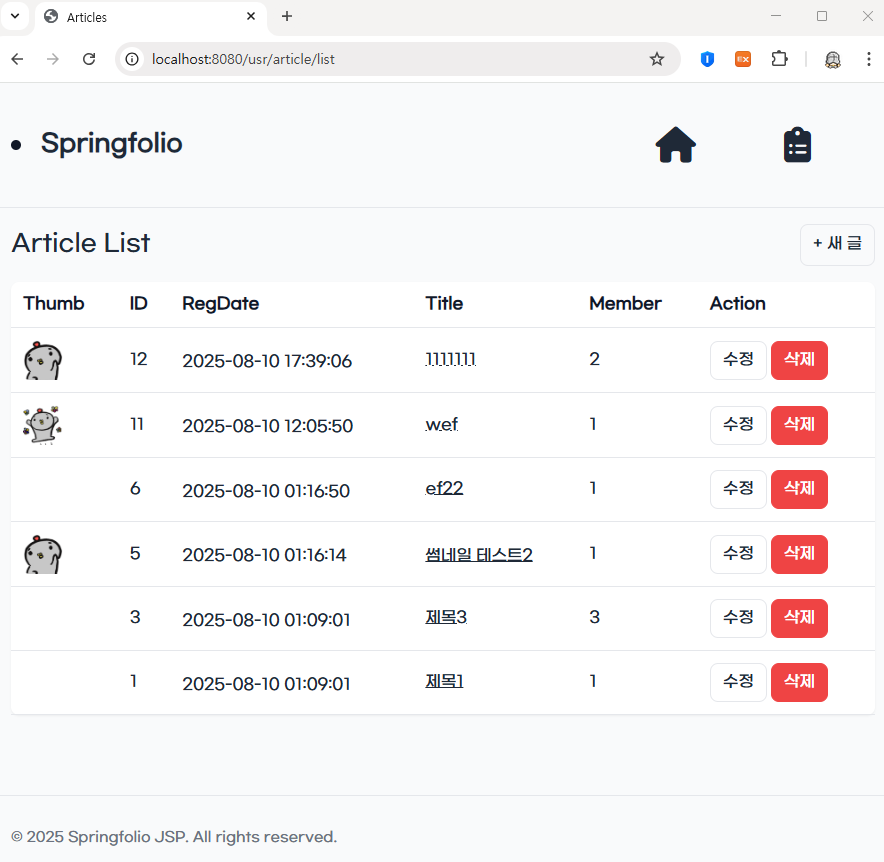
삭제 후 화면
이제 기능에 더 집중하고 UI개선은 차차하려한다.