언어모델 이해
NLP Natural Language Processing
NLP란?
-
NLP는 인간 언어와 관련된 모든 것을 이해하는 데 초점을 맞춘 언어학 및 기계 학습 분야
-
NLP 작업의 목표는 단일 단어를 개별적으로 이해하는 것 뿐만 아니라 해당 단어의 맥락을 이해하는 것_
일반적인 NLP 작업
- 문장 분류: 리뷰의 감정 파악, 스팸 여부 감지 등
- 개체 명(사람, 위치, 조직 등)인식
- 문장 생성
- 질문에 대한 답변
- 텍스트 번역, 요약
Transformer
기존의 NLP: RNN기반
- 오랫동안 언어모델을 위한 주요한 접근 방식
- 단점: 병렬 처리 어려움, 장기 의존성 문제, 확장성 제한
Transformer 등장 장 (Google, 2017, Attention Is All You Need, https://arxiv.org/abs/1706.03762)
- RNN 모델의 단점을 극복
- 언어 모델의 Game Changer
- Transformer 덕분에 LLM이 발전하게 됨.
특징
- 이전 문장들을 잘 기억함
- 문맥상 집중해야 할 단어를 잘 캐치
- 문장이나 단어 사이의 관계(문맥,context)를 파악하는 데 탁월한 능력
Transformer 사용하기
pipeline
- transformer 기반 LLM모델을 손쉽게 사용할 수 있게 해주는 함수
- 복잡한 모델처리 과정을 감춤.
from transformers import pipeline
#감성 분석
classifier = pipeline(task = "sentiment-analysis", model = 'bert-base-multilingual-cased')
# sentiment-analysis 모델 파이프라인 생성
# 기본값 : distilbert-base-uncased-finetuned-sst-2-english
classifier = pipeline("sentiment-analysis")
# 모델 사용
text = ["I've been waiting for a HuggingFace course my whole life.",
"I hate this so much!",
"I have a dream.",
"She was so happy."]
classifier(text)출력:
[{'label': 'POSITIVE', 'score': 0.9598048329353333},
{'label': 'NEGATIVE', 'score': 0.9994558691978455},
{'label': 'POSITIVE', 'score': 0.9997022747993469},
{'label': 'POSITIVE', 'score': 0.9998832941055298}]
이외 Pipeline으로 사용 가능한 언어 관련 task
-
Sentiment analysis : 주어진 문장에 대해 긍정, 부정 분류
-
Zero-shot classification: 학습 과정에서 본 적 없는 클래스에 대해 분류
-
Summarization : 긴 문장이나 글에대해 핵심 내용 요약
-
Translation : 다양한 언어로 번역
-
text-generation : 몇 글자를 입력하면 문장 생성
~~
Hugging Face
-
자연어 처리 및 인공 지능 분야에서 가장 인기 있는 오픈 소스 라이브러리와 모델을 제공하는 플랫폼
- Transformer 라이브러리 제공
- 모델 허브 제공
Tokenizing & Embedding
언어 모델링 절차
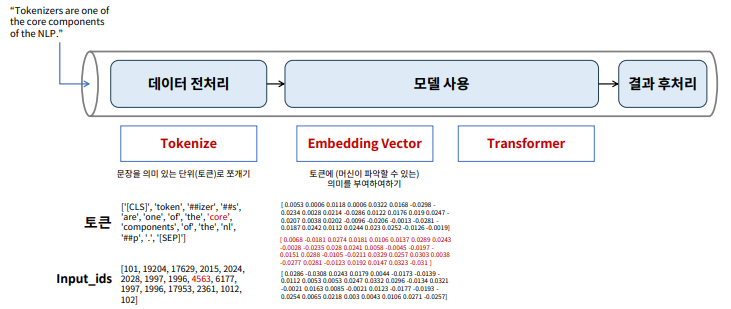
데이터 전처리 : Tokenize(토큰화)
- 문장을 분석하기 위한, 최소 단위 데이터
- 사람이 결정해 줘야 할 부분
Embedding
- 사람이 쓰는 자연어를 machine이 이해할 수 있는 숫자의 나열(벡터)로 변환(혹은 변환된 벡터)
- 사람의 언어인 자연어를 처리하게 하려면 자연어를 숫자로 바꿔 입력을 해줘야 함
단어 임베딩
- 단어를 고차원 벡터로 매핑하는 기술
- 문서, 문장 내에서 단어의 의미와 문맥을 담아 냄
- Word2Vec, FastText 등
언어 모델 Fine-tuning
Fine-tuning이란?
- 사전 훈련된 모델을, 특정 작업이나 데이터셋에 맞게 미세 조정 하는 과정
수행 절차
- 사전 훈련된 모델 선택
- NLP: BERT,GPT,RoBERTa 등
- 컴퓨터 비전: ResNET,VGGNet,EfficientNet 등
- 데이터 준비
- 특정 작업에 사용할 데이터 준비
- 사전 훈련된 무델과 호환되는 형태로 전처리
- NLP: 텍스트 토큰화
- 컴퓨터 비전: 이미지를 적절한 크기로 리사이징
- 모델 수정
- 대부분, 사전 훈련된 모델의 출력 레이어를 특정 작업에 맞게 수정
- 텍스트 분류 작업: 출력 레이어의 뉴런 수를 분류하려는 클래스 수와 일치시킴.
- 추가 학습
- 준비된 데이터셋을 사용하여 모델의 가중치를 추가로 학습
- 보통 작은 학습률을 사용
- 사전 훈련 과정에서 습득한 지식(파라미터)을 유지하면서도 새로운 작업에 맞게 조정됨
텍스트 분류 모델 파인 튜닝하기
!pip install transformers==4.31.0
!pip install datasets

import pandas as pd
import numpy as np
import matplotlib.pyplot as plt
import seaborn as sns

from datasets import load_dataset  # 데이터셋 다운로드

# emotion 데이터셋 다운로드
emotions = load_dataset("emotion")

# 데이터 레이블
classes = emotions['train'].features['label'].names
classes

# 데이터프레임으로 변환
emotions.set_format(type="pandas")

# train 데이터 만 추출
df = emotions["train"][:]

# 정수인코딩된 레이블에 원래 문자 추가하기
def label_int2str(row):
    return emotions["train"].features["label"].int2str(row)

df["label_name"] = df["label"].apply(label_int2str)
df.head()

# 데이터 준비
from transformers import AutoTokenizer
# 데이터 토큰화
# 문장 하나씩 토크나이즈 하기 위한 함수 생성
def tokenize(batch):
    return tokenizer(batch["text"], padding=True, truncation=True)

em_encoded = emotions.map(tokenize, batched=True, batch_size=None)

#텐서플로 학습을 위한 데이터셋 구성
em_encoded["train"]
tokenizer.model_input_names

# 학습 배치에 포함될 샘플의 수
batch_size = 64

# 필요한 칼럼 : ['input_ids', 'attention_mask']
token_cols = tokenizer.model_input_names

# 데이터셋 구성
train = em_encoded["train"].to_tf_dataset(columns=token_cols, label_cols="label",
                                          shuffle=True, batch_size=batch_size)

val = em_encoded["validation"].to_tf_dataset(columns=token_cols, label_cols="label",
                                             shuffle=False, batch_size=batch_size)

test = em_encoded["test"].to_tf_dataset(columns=token_cols, label_cols="label",
                                        shuffle=False, batch_size=batch_size)
파인 튜닝
from transformers import TFAutoModelForSequenceClassification
from sklearn.metrics import accuracy_score, f1_score
import tensorflow as tf
from keras.optimizers import Adam
from sklearn.metrics import *

# 사전훈련된 모델 지정
preTrModel = "distilbert-base-uncased"

# Output Layer 노드 수
nclass = 6

# 모델 로드하기
model_ft = TFAutoModelForSequenceClassification.from_pretrained(preTrModel, num_labels=nclass)

# 컴파일 및 학습
model_ft.compile(optimizer = Adam(5e-5), loss = 'sparse_categorical_crossentropy')
model_ft.fit(train, validation_data = val, epochs=5, batch_size = 64)

#예측 및 평가
pred = model_ft.predict(test)
pred = pred.logits.argmax(axis=1)

y_test = em_encoded["test"]['label']
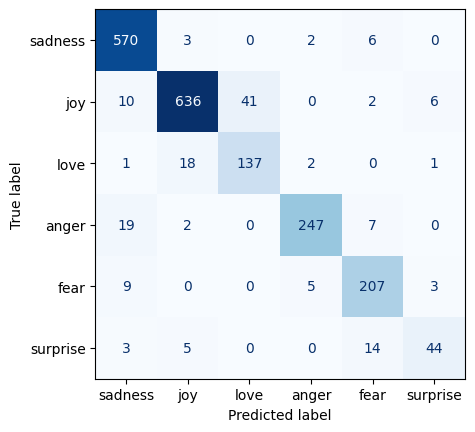
print(confusion_matrix(y_test, pred))
print()
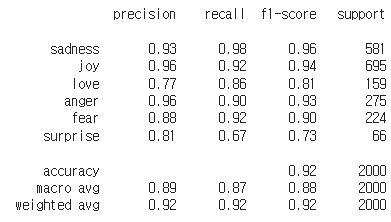
print(classification_report(y_test, pred, target_names = classes))
결과 :

데이터 탐색가