Toss payments + React Native
[환경]
React Native 프로젝트
"react-native": "0.69.12"
     "@tosspayments/widget-sdk-react-native": "1.3.5",
력하세요
React 프로젝트
    "@tosspayments/tosspayments-sdk": "2.3.2",
    "react": "^18.2.0",
    "react-dom": "^18.2.0",
    "react-router-dom": "6.28.0",
[과정]
React Native 기반 앱 서비스에 토스페이먼츠를 연동할 일이 생겼다. 기획자가 'RN 도 있던데요?'라고 얘기해서 가벼운 마음으로 닥스를 들어갔는데
https://docs.tosspayments.com/sdk/widget-rn
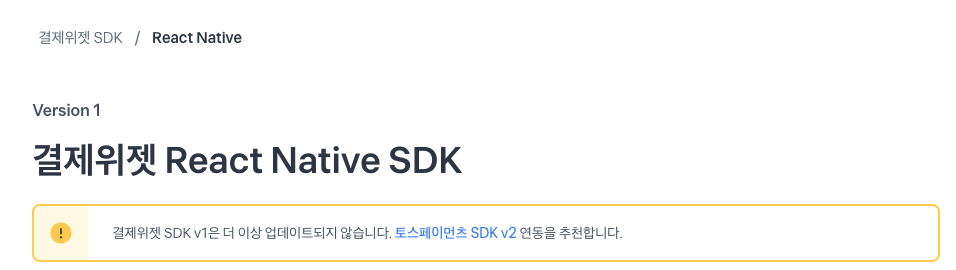
응?
그래도 모르니 가이드대로 연동을 진행해 보았다.
RN SDK V1
npm install @tosspayments/widget-sdk-react-native
import React, { useState } from "react";
import { Button, Alert } from "react-native";
import { PaymentWidgetProvider, usePaymentWidget, AgreementWidget, PaymentMethodWidget } from "@tosspayments/widget-sdk-react-native";
import type { AgreementWidgetControl, PaymentMethodWidgetControl, AgreementStatus } from "@tosspayments/widget-sdk-react-native";
// ...
export default function App() {
  return (
    <>
      {/* 스크롤이 필요한 경우 ScrollView로 감싸주세요. */}
      {/* <ScrollView> */}
      <PaymentWidgetProvider clientKey={`test_gck_docs_Ovk5rk1EwkEbP0W43n07xlzm`} customerKey={`iWoOW_8OKQ948MtLt562N`}>
        <CheckoutPage />
      </PaymentWidgetProvider>
      {/* </ScrollView> */}
    </>
  );
}
function CheckoutPage() {
  const paymentWidgetControl = usePaymentWidget();
  const [paymentMethodWidgetControl, setPaymentMethodWidgetControl] = useState<PaymentMethodWidgetControl | null>(null);
  const [agreementWidgetControl, setAgreementWidgetControl] = useState<AgreementWidgetControl | null>(null);
  return (
    <>
      <PaymentMethodWidget
        selector="payment-methods"
        onLoadEnd={() => {
          paymentWidgetControl
            .renderPaymentMethods(
              "payment-methods",
              { value: 50000 },
              {
                variantKey: "DEFAULT",
              }
            )
            .then((control) => {
              setPaymentMethodWidgetControl(control);
            });
        }}
      />
      <AgreementWidget
        selector="agreement"
        onLoadEnd={() => {
          paymentWidgetControl
            .renderAgreement("agreement", {
              variantKey: "DEFAULT",
            })
            .then((control) => {
              setAgreementWidgetControl(control);
            });
        }}
      />
      <Button
        title="결제요청"
        onPress={async () => {
          if (paymentWidgetControl == null || agreementWidgetControl == null) {
            Alert.alert("주문 정보가 초기화되지 않았습니다.");
            return;
          }
          const agreeement = await agreementWidgetControl.getAgreementStatus();
          if (agreeement.agreedRequiredTerms !== true) {
            Alert.alert("약관에 동의하지 않았습니다.");
            return;
          }
          paymentWidgetControl
            .requestPayment?.({
              orderId: 'mvX2C6oq6FsozqXCQCKh8',
              orderName: "토스 티셔츠 외 2건",
            })
            .then((result) => {
              if (result?.success) {
                // 결제 성공 비즈니스 로직을 구현하세요.
                // result.success에 있는 값을 서버로 전달해서 결제 승인을 호출하세요.
              } else if (result?.fail) {
                // 결제 실패 비즈니스 로직을 구현하세요.
              }
            });
        }}
      />
      <Button
        title="선택된 결제수단"
        onPress={async () => {
          if (paymentMethodWidgetControl == null) {
            Alert.alert("주문 정보가 초기화되지 않았습니다.");
            return;
          }
          Alert.alert(`선택된 결제수단: ${JSON.stringify(await paymentMethodWidgetControl.getSelectedPaymentMethod())}`);
        }}
      />
      <Button
        title="결제 금액 변경"
        onPress={() => {
          if (paymentMethodWidgetControl == null) {
            Alert.alert("주문 정보가 초기화되지 않았습니다.");
            return;
          }
          paymentMethodWidgetControl.updateAmount(100_000).then(() => {
            Alert.alert("결제 금액이 100000원으로 변경되었습니다.");
          });
        }}
      />
    </>
  );
}
닥스 그대로 실행했는데
can't find variable React
라는 에러가 계속 발생했다. 어떻게 하지 하다가 이왕 할거 새로운 버전으로 작업을 해보자 하고 웹뷰 형식으로 진행을 해보았다.
RN + React(Web)
React
import './App.css';
import React from 'react';
import { BrowserRouter as Router, Routes, Route, Link } from 'react-router-dom';
import Home from './pages/Home';
import Payment from './pages/Payment';
import Success from './pages/Success';
import Fail from './pages/Fail';
function App() {
  return (
    <Router>
                <Routes>
                    <Route path="/" element={<Home />} />
                    <Route path="/payment" element={<Payment />} />
                    <Route path="/success" element={<Success />} />
                    <Route path="/fail" element={<Fail />} />
                </Routes>

    </Router>
  );

}

export default App;


import { loadTossPayments, ANONYMOUS } from "@tosspayments/tosspayments-sdk";
import { useEffect, useState } from "react";

const clientKey = "test_gck_docs_Ovk5rk1EwkEbP0W43n07xlzm";
const customerKey = "_oIukxBu23FpApjwSHmfg";

const Payment = () => {
const [amount, setAmount] = useState({
  currency: "KRW",
  value: 50_000,
});
const [ready, setReady] = useState(false);
const [widgets, setWidgets] = useState(null);

useEffect(() => {
  async function fetchPaymentWidgets() {
    // ------  결제위젯 초기화 ------
    const tossPayments = await loadTossPayments(clientKey);
    // 회원 결제
    const widgets = tossPayments.widgets({
      customerKey,
    });
    // 비회원 결제
    // const widgets = tossPayments.widgets({ customerKey: ANONYMOUS });

    setWidgets(widgets);
  }

  fetchPaymentWidgets();
}, [clientKey, customerKey]);

useEffect(() => {
  async function renderPaymentWidgets() {
    if (widgets == null) {
      return;
    }
    // ------ 주문의 결제 금액 설정 ------
    await widgets.setAmount(amount);

    await Promise.all([
      // ------  결제 UI 렌더링 ------
      widgets.renderPaymentMethods({
        selector: "#payment-method",
        variantKey: "DEFAULT",
      }),
      // ------  이용약관 UI 렌더링 ------
      widgets.renderAgreement({
        selector: "#agreement",
        variantKey: "AGREEMENT",
      }),
    ]);

    setReady(true);
  }

  renderPaymentWidgets();
}, [widgets]);

useEffect(() => {
  if (widgets == null) {
    return;
  }

  widgets.setAmount(amount);
}, [widgets, amount]);

return (
  <div className="wrapper">
    <div className="box_section">
      {/* 결제 UI */}
      <div id="payment-method" />
      {/* 이용약관 UI */}
      <div id="agreement" />

      {/* 결제하기 버튼 */}
      <button
        className="button"
        disabled={!ready}
        onClick={async () => {
          try {
            // ------ '결제하기' 버튼 누르면 결제창 띄우기 ------
            // 결제를 요청하기 전에 orderId, amount를 서버에 저장하세요.
            // 결제 과정에서 악의적으로 결제 금액이 바뀌는 것을 확인하는 용도입니다.
            await widgets.requestPayment({
              orderId: "3Iwb5Hdb2E0n5rjBcLpp3",
              orderName: "토스 티셔츠 외 2건",
              successUrl: window.location.origin + "/success",
              failUrl: window.location.origin + "/fail",
              customerEmail: "customer123@gmail.com",
              customerName: "김토스",
              customerMobilePhone: "01012341234",
            });
          } catch (error) {
            // 에러 처리하기
            console.error(error);
          }
        }}
      >
        결제하기
      </button>
    </div>
  </div>
);
}

export default Payment;
RN
const ChallengePaymentWebView = ({challengeModel = new ChallengeModel(),navigation}) => {
  const webViewRef = useRef(null);
  const urlConverter = (url) => {
    const convertUrl = new ConvertUrl(url);

    if (convertUrl.isAppLink()) {
      // 앱 스킴 링크인 경우 외부 앱 실행 시도
      convertUrl.launchApp().then((isLaunch) => {
        if (!isLaunch) {
          Alert.alert("앱 실행 실패", "앱이 설치되어 있지 않아 앱 마켓으로 이동합니다.");
          Linking.openURL(`market://details?id=${convertUrl.package}`);
        }
      });
      return false; // WebView가 로딩하지 않도록 차단
    } else if (url.startsWith("intent://")) {
      // intent:// URL을 appScheme으로 변환하여 외부 앱 실행
      const appUrl = convertUrl.appLink;
      Linking.openURL(appUrl).catch(() => {
        Alert.alert("오류", "앱을 열 수 없습니다.");
      });
      return false;
    }
    return true; // 일반 URL은 WebView에서 로딩 허용
};
const onShouldStartLoadWithRequest = (event) => {
  const { url } = event;
  return urlConverter(url); // 모든 URL 이동에 대해 urlConverter를 사용하여 처리
};
const handleSuccess = async () => {
      try{
            const res = await challengeModel.enrollChallenge(challengeModel.challengeDocId);
            if(res){
              navigation.navigate('RN 내부 라우팅으로')
            }
        } catch(e){
            console.error(e)
        }
}
  const handleNavigationChange = (navState) => {
    const { url } = navState;
    if (url.includes('/success')) {
        handleSuccess();
    } else if (url.includes('/fail')) {
      // 결제 실패 페이지로 이동한 경우
      Alert.alert("결제 실패", "결제에 실패했습니다. 다시 시도해주세요.");
    } else {
      // 모든 URL에 대해 urlConverter 호출
      const shouldLoad = urlConverter(url);
      if (!shouldLoad) {
        return; // WebView 내에서 특정 URL을 로드하지 않도록 처리
      }
    }
  };

  return (
    <View style={styles.container}>
      <WebView
      ref={webViewRef}
        source={{ uri: 'yourUrl' }}
        onShouldStartLoadWithRequest={onShouldStartLoadWithRequest}
        createOnShouldStartLoadWithRequest={() => {}}
        onNavigationStateChange={handleNavigationChange} // URL 변경 시 호출
        style={styles.webview}
        originWhitelist={['http://*', 'https://*', 'intent://*']} // 모든 intent://* URL을 허용

      />
    </View>
  );
FLOW
결제 플로우는 RN 앱 -> React 웹뷰화면 -> 앱결제시 다른앱으로 이동 -> React 웹뷰 성공화면 -> RN 앱
이렇게 되어있다.
<Webview 내부에 source 를 통해 미리 구현해둔 React 프로젝트를 띄워준다.
그리고 라우팅 이동이 있을때 urlConverter를 호출해서 intent://로 시작할경우 appScheme로 변경해줘서 앱을 띄워준다.
성공했을경우에 React 라우팅을 /success로 이동시켜주고 해당 움직임이 감지되었을때 RN 제어를 진행해주면 된다.
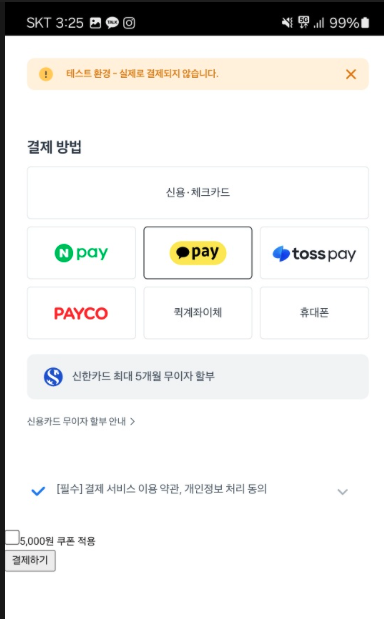
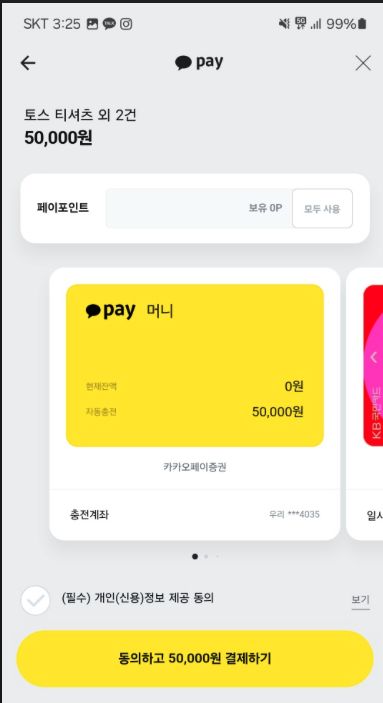
이렇게 카카오페이 앱으로 이동해서 결제가 되는걸 확인할 수 있다
Trouble shooting
Can't open url : intent~
RN 코드에서 포인트는 urlConverter이다.
웹뷰 가이드에 따르면 intent:appScheme:~~ 이렇게 들어오는 형식은 읽을 수 가 없는데 이걸 변환해주는 방식이다
https://docs.tosspayments.com/guides/v2/webview
안그러면
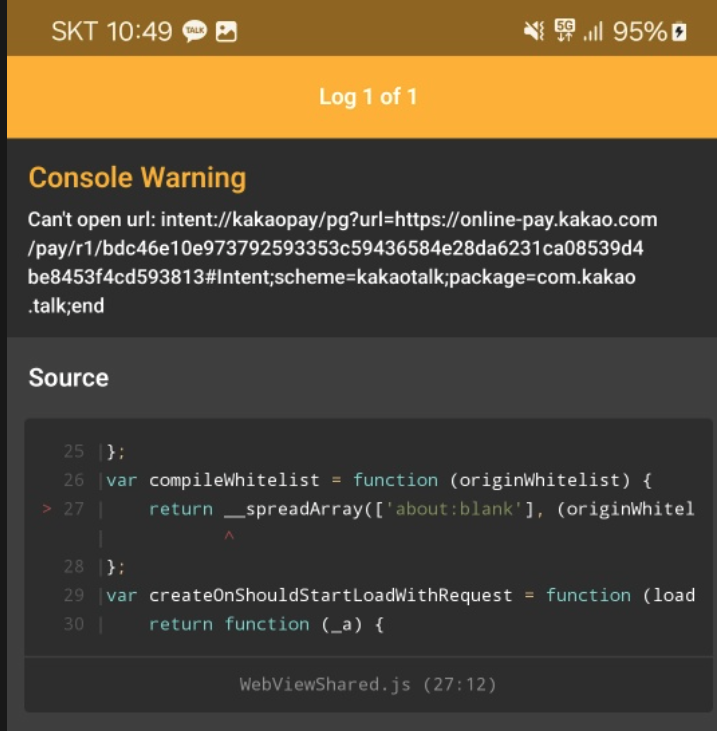
app scheme list
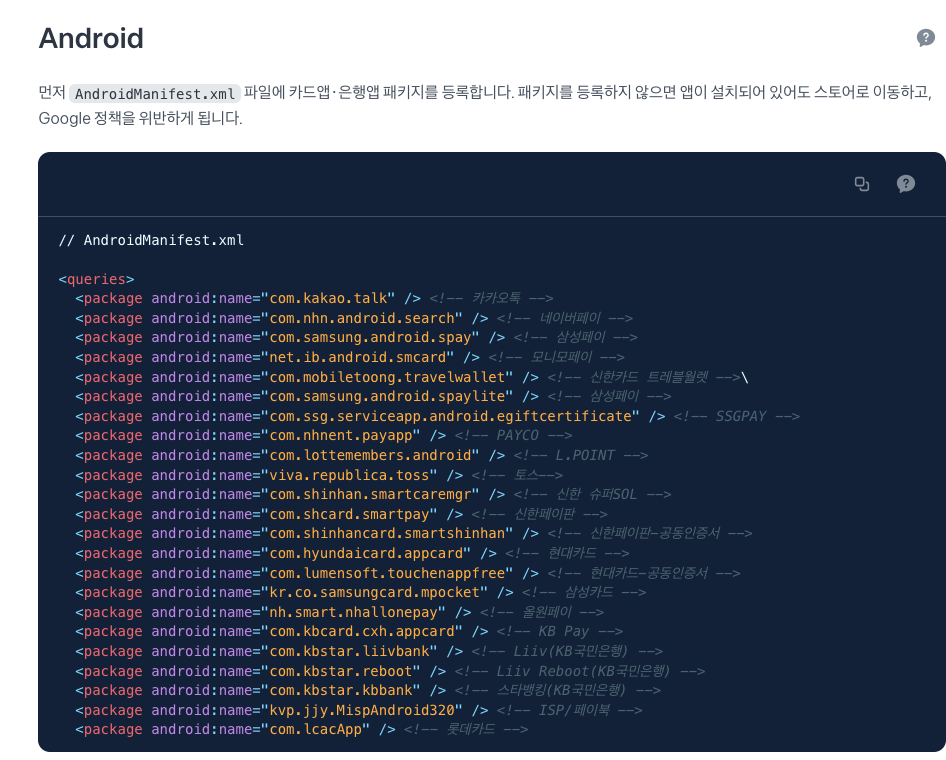
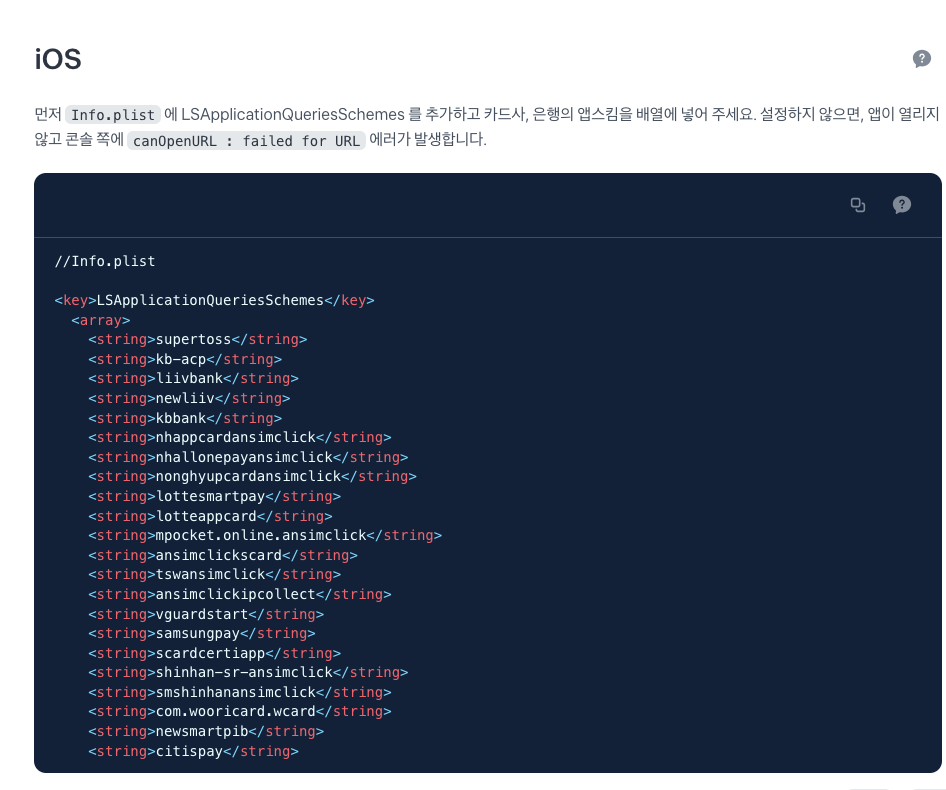
가이드문서에 있는 해당 내용들을 모두 추가해주어야한다.