position
1. static
기본값
2. relative
기본값인 static을 기준으로 배치
top,left,right,bottom 같은 속성을 지정해야지만 static 위치에서 이동
html
<body>
	<p id = "one">block #1</p>
    <div id="two">block #2
    <br>postion:relative</div>
    <p id = "three">block #3</p>
</body>
css
#one{
background-color: gold;
width:200px;
height:50px;
}
#two{
position: relative;
left:30px;
background-color: hotpink;
width:200px;
height:50px;
}
#three {
background-color: lightblue;
width:200px;
height:50px;
}
코드 결과는 다음과 같다
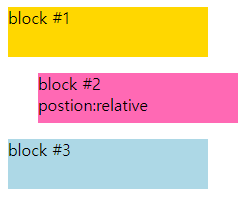
3. absolute
가장 가까운 부모를 기준으로 배치
기준이 될 부모가 없으면 body가 부모로 설정됨
html
<body>
	<p id = "one">block #1</p>
    <div id="two">block #2
    <br>postion:absolute</div>
    <p id = "three">block #3</p>
</body>
css
#one{
background-color: gold;
width:200px;
height:50px;
}
#two{
position: absolute;
top:30px
left:30px;
background-color: hotpink;
width:200px;
height:50px;
}
#three {
background-color: lightblue;
width:200px;
height:50px;
}
코드 결과는 다음과 같다
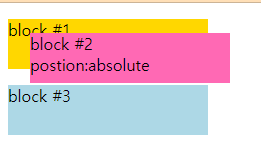
->css에서 따로 부모 속성을 지정해주기 않았기 때문에 body를 기준으로 top 30px, left 30px로 설정!
4. fixed
브라우저 화면의 상대 적인 위치를 의미한다
부모요소에 영향을 받지 않고 스크롤을 내려도 위치가 변화하지 않음
html
<body>
	<p>block #1</p>
    <p id="two">block #2
    <br>postion:fixed</p>
    <p>block #3</p>
	<p>block #4</p>
	<p>block #5</p>
	<p>block #6</p>
	<p>block #7</p>
	<p>block #8</p>
	<p>block #9</p>
</body>
css
p {
background-color:gold;
width:200px;
height:50px;
}
#two{
background-color: hotpink;
position:fixed;
top:0px;
right:0px;
}
코드 결과는 다음과 같다
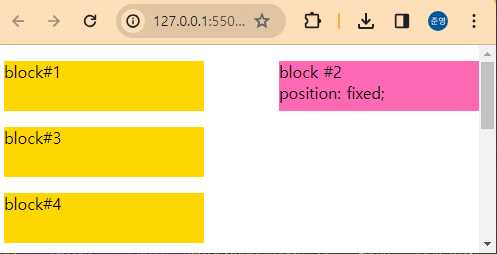
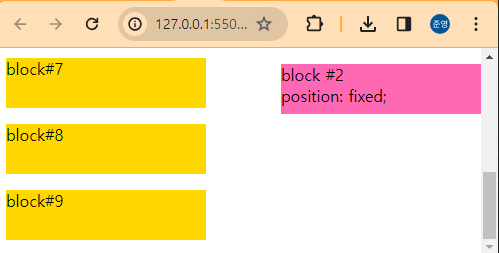
-> 다음과 같이 스크롤을 내려도 block #2의 위치는 고정되어 있는 것을 볼 수 있다.
5. sticky
요소가 특정 부분에 도달 할때 까지 position:relative 같이 작동하다가 스크롤 하다가 특정 부분에 도달하면 위치가 고정
html
<body>
	<p>block #1</p>
    <p id="two">block #2
    <br>postion:sticky</p>
    <p>block #3</p>
	<p>block #4</p>
	<p>block #5</p>
	<p>block #6</p>
	<p>block #7</p>
	<p>block #8</p>
	<p>block #9</p>
</body>
css
p {
background-color:gold;
width:200px;
height:50px;
}
#two{
background-color: hotpink;
position:sticky;
top:20px;
}
코드 결과는 다음과 같다
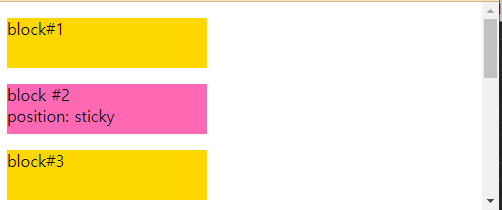
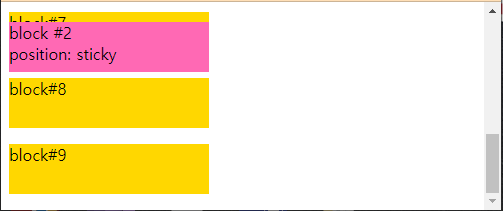
->sticky 속성에 top:20px를 줬기 때문에 스크롤을 내리다 보면 body 기준으로 위에서 20px에 고정됨