Stream (스트림)
컬렉션에 저장된 요소들을 순회하면서 처리할 수 있는 기능으로 람다식 또한 사용할 수 있다.
내부 반복자를 사용하기 때문에 병렬처리가 쉽다는 장점이 있다.
-
Java 6 이전
iterator를 사용하여 엘리먼트를 순회 -
Java 8 이전
for,for-each를 사용하여 엘리먼트를 컬렉션에서 꺼내 다룸 -
Java 8 이후
stream사용
특징
- 스트림은 원본을 변경하지 않는 읽기 전용이다.
- 스트림은
iterator처럼 한 번만 사용되고 사라진다. 필요하면 다시 스트림을 생성해야 한다. - 최종 연산 전까지 중간 연산이 처리되지 않는다.
- 병렬 처리가 용이하다.
병렬 처리? -> 간단하게 쓰레드와 함께 알아보자.
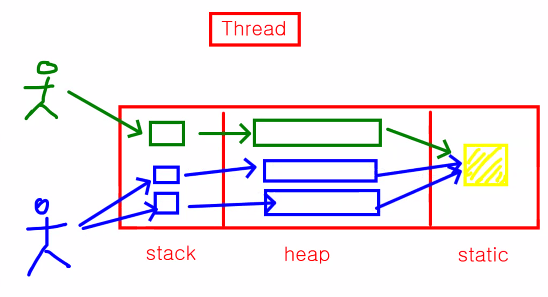
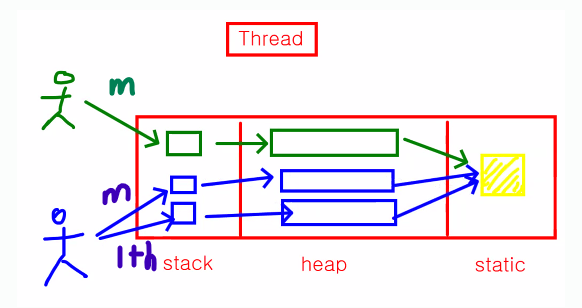
Ex) 어플리케이션 사용자가 2명일 때 (초록, 파랑) / (공용 데이터는 노랑)
이 때 사용자에게는 각각 하나의 쓰레드를 할당 받는다.
1. 초록 사용자가 어플리케이션을 실행했을 때 -> 첫 번째로는 main 쓰레드가 생성된다.
-> 1 application, 1 thread
2. 파랑 사용자가 어플리케이션을 실행했을 때 -> 첫 번째로는 main 쓰레드가 생성된다.
-> 1 application, 1 thread
경우에 따라서는 파랑 사용자는 main 쓰레드 말고도 추가적인 쓰레드를 생성해서 사용 가능하다. (멀티 쓰레드)멀티 쓰레드가 되면 일종의 병렬처리가 가능한 것이다.
이런 어플리케이션 속 쓰레드의 병렬처리와는 다른 Stream의 병렬처리를 알아보자.
Stream의 병렬
쓰레드가 1개 일 때 cpu가 1개로 담당하기도 하고 요즘은 기본적으로 4개가 내장된 상태인데
1개 쓰레드를 처리하기 위해서 cpu 1개로만 작업을 처리한다면 cpu가 4개임에도 1개를 사용한 것과 같은 시간이 걸리게 된다.
Stream은 쓰레드의 부하를 분산하는 개념으로 병렬 처리를 한다는 의미이다.
즉, Stream의 병렬 처리는 1개의 쓰레드를 분산해 처리하는 시간을 줄인다.
간단하게 알아봤으니 활용해보자.
2. Stream 활용
스트림은 크게 생성, 가공, 결과 3가지로 구분된다.
- 생성 : 스트림 생성
- 가공 : 원하는 결과를 만들기 위한 필터링, 매핑 등의 작업
- 결과 : 최종 결과를 만들어 내는 작업
배열, 컬렉션 -> 스트림 생성 -> 매핑 -> 필터링 -> 결과2-1. Stream 생성
컬렉션 스트림 생성
import java.util.ArrayList;
import java.util.Arrays;
import java.util.List;

public class Application {
    public static void main(String[] args) {
        List<String> stringList = new ArrayList<>(Arrays.asList("Hello", "World!!", "Stream"));

        System.out.println("====== for each");
        for(String str: stringList) {
            System.out.println(str);
        }

        System.out.println("====== stream");
//        stringList.stream().forEach(x -> System.out.println(x)); // Stream으로 바뀐 ArrayList의 요소들이 각각 람다식에 적용돼 동작한다.
        stringList.stream().forEach(System.out::println);
    }
}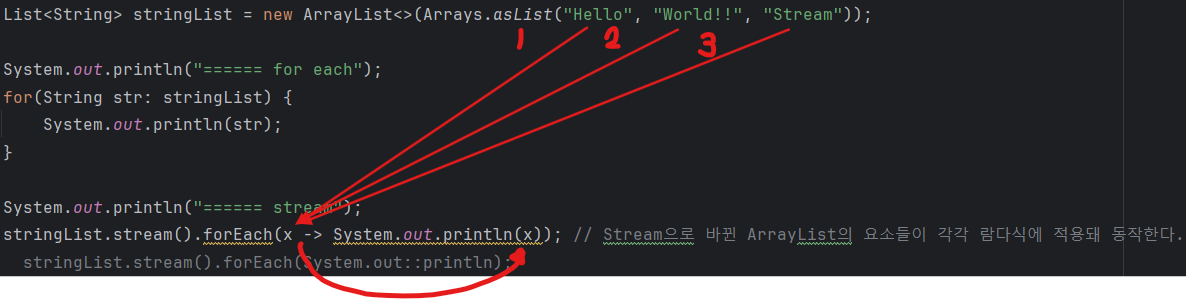
이런 상태인 것인데 일단 for-each와는 똑같이 동작하기 때문에 만큼 걸리는 것은 똑같다.
쓰레드 확인하기
- 스트림 사용 전
import java.util.ArrayList;
import java.util.Arrays;
import java.util.List;

public class Application {
    public static void main(String[] args) {
        List<String> stringList = new ArrayList<> (Arrays.asList("java", "mysql", "jdbc", "html", "css"));

        System.out.println("====== for-each");
        for (String s : stringList) {
            System.out.println(s + ": " + Thread.currentThread().getName());
        }
    }
}
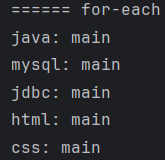
static 메소드로 제공해주는 Thread 클래스에서도 현재 돌아가고 있는 main 쓰레드에 대해서 확인 가능하다.
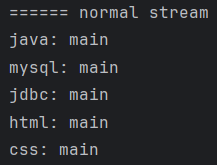
- 스트림 사용 후 쓰레드 확인 (병렬 처리 X)
import java.util.ArrayList;
import java.util.Arrays;
import java.util.List;

public class Application {
    public static void main(String[] args) {
        List<String> stringList = new ArrayList<> (Arrays.asList("java", "mysql", "jdbc", "html", "css"));

        System.out.println("====== normal stream");
//        stringList.stream().forEach(x -> Application.print(x));
        stringList.stream().forEach(Application::print);

    }

    private static void print(String s) {
        System.out.println("s " + ": " + Thread.currentThread().getName());
    }
}
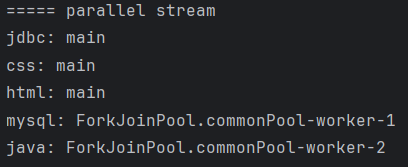
- main 쓰레드 상에서 병렬 스트림을 사용
import java.util.ArrayList;
import java.util.Arrays;
import java.util.List;

public class Application {
    public static void main(String[] args) {
        List<String> stringList = new ArrayList<> (Arrays.asList("java", "mysql", "jdbc", "html", "css"));

        System.out.println("===== parallel stream");
        stringList.parallelStream().forEach(Application::print);
    }

    private static void print(String s) {
        System.out.println(s + ": " + Thread.currentThread().getName());
    }
}
배열 Stream 생성
import java.util.Arrays;
import java.util.stream.Stream;

public class Application {
    public static void main(String[] args) {
        String[] sArr = new String[]{"java", "mariadb", "jdbc"};

        System.out.println("====== 배열로 스트림 생성 ======");
        Stream<String> stringStream = Arrays.stream(sArr);
        stringStream.forEach(System.out::println);

        System.out.println(); // 구분을 위한 개행

        Stream<String> stringStream1 = Arrays.stream(sArr, 0, 2); // start ~ (end - 1)까지 잘라준다.
        stringStream1.forEach(System.out::println);
    }
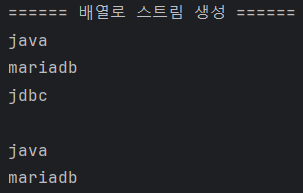
}
Builder를 활용한 Stream 생성
Builder는 static<T>으로 되어 있는 메소드이며, 호출 시 타입 파라미터를 메소드 호출 방식으로 전달한다.
공간은 더 잡아먹지만 편리하다. 추가적인 setter나 필드 생성이 필요 없이 편리하게 할 수 있다. 하지만 공간을 더 잡아먹는다는 단점때문에 너무 남발하는 것은 좋지 않다.
import java.util.Arrays;
import java.util.stream.Stream;

public class Application {
    public static void main(String[] args) {
        String[] sArr = new String[]{"java", "mariadb", "jdbc"};

        System.out.println("====== Builder로 스트림 생성 ======");
        Stream<String> builderStream = Stream.<String>builder()
                .add("홍길동")
                .add("유관순")
                .add("윤봉길")
                .build();

        builderStream.forEach(System.out::println);
    }
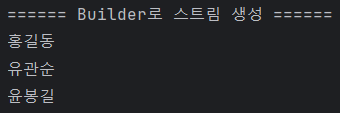
}
스트림에서 제공하는 iterate 사용해보기
iterate()를 활용해 수열 형태의 스트림을 생성한다.
import java.util.stream.Stream;

public class Application {
    public static void main(String[] args) {

        System.out.println("====== iterate로 스트림 생성 ======");
        Stream<Integer> integerStream = Stream.iterate(10, value -> value * 2)
                .limit(10);
        integerStream.forEach(value -> System.out.print(value + " "));
    }
}
초기값은 10, 그것의 2배를 limit 만큼 반복한다
import java.util.stream.Stream;

public class Application {
    public static void main(String[] args) {

        System.out.println("====== iterate로 스트림 생성 ======");
        Stream.iterate(10, value -> value * 2)
                .limit(10).
                forEach(value -> System.out.print(value + " "));
    }
}
이렇게도 가능하다.
기본 타입 스트림 생성
제네릭을 사용하지 않고, 기본 타입으로 스트림 생성이 가능하다.
range(시작값, 종료값) : 시작값부터 1씩 증가하는 숫자로 종료값 직전(종료값 - 1)까지 범위의 스트림 생성
rangeClosed(시작값, 종료값) : 시작값부터 1씩 증가하는 숫자로 종료값까지 포함한 스트림 생성
제네릭을 사용하지 않기 때문에 불필요한 오토박싱도 일어나지 않는다.
필요한 경우에는 boxed() 를 사용해 박싱을 할 수도 있다.
import java.util.stream.IntStream;
import java.util.stream.LongStream;

public class Application {
    public static void main(String[] args) {
        IntStream intStream = IntStream.range(5, 10);
        intStream.forEach(value -> System.out.print(value + " "));
        System.out.println();

        LongStream longStream = LongStream.rangeClosed(5, 10);
        longStream.forEach(value -> System.out.print(value + " "));
        System.out.println();

        Stream<Double> doubleStream = new Random().doubles(5).boxed();
        doubleStream.forEach(value -> System.out.print(value + " "));

    }
}
Wrapper 클래스 자료형의 스트림이 필요한 경우 boxing도 가능하다.
double(개수): 난수를 활용한DoubleStream을 개수만큼 생성해 반환하고boxed(): 기본 타입 스트림인XXXStream을 박싱해Wrapper타입의Stream<XXX>로 변환한다.
Intstream, LongStream 으로 된 것을 박싱할 때 사용하는 것을 boxed()를 활용해 나타내는 것

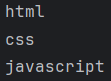
문자열을 split 하여 Stream으로 생성
import java.util.regex.Pattern;
import java.util.stream.Stream;

public class Application {
    public static void main(String[] args) {

        Stream<String> splitStream = Pattern.compile(", ").splitAsStream("html, css, javascript");
        splitStream.forEach(System.out::println);
    }
}
2-2. Stream 가공
스트림에 있는 데이터에 대해 내가 원하는 결과를 만들기 위해서 중간 처리 작업을 가공이라고 한다.
스트림에서는 데이터를 가공할 수 있는 메소드들을 제공하는데, 해당 메소드들은 Stream을 전달받아 Stream을 반환하므로 연속해서 메소드를 연결할 수 있다. 또한 Stream 가공할 때에 필터-맵(filter-map) 기반 API를 사용하기 때문에 지연연산을 통해 성능 최적화가 가능하다.
| 상세 역할 | 메소드 |
|---|---|
| 필터링 | filter(), distinct() |
| 변환 | map(), flatMap() |
| 제한 | limit(), skip() |
| 정렬 | sorted() |
| 결과 확인 | peek() |
Filter
필터(filter)는 스트림에서 특정 데이터만을 걸러내기 위한 메소드이다.
- 중계 연산 : Stream을 반환하며 Stream 관련 메소드 체이닝이 이어진다.
import java.util.stream.IntStream;

public class Application {
    public static void main(String[] args) {
        IntStream intStream = IntStream.range(0, 10);
        intStream.filter(i -> i % 2 ==0)
                .forEach(i -> System.out.print(i + " "));
    }
}filter()에서 i % 2 == 0이 true인 것만 골라서 Stream으로 뱉어준다.

map
스트림에 들어 있는 데이터를 람다식으로 가공하고 새로운 스트림에 담아주는 메소드이다.
import java.util.stream.IntStream;

public class Application {
    public static void main(String[] args) {
        IntStream intStream = IntStream.range(1, 10);
        intStream.filter(i -> i % 2 != 0)
                .map(i -> i * 5)
                .forEach(result -> System.out.print(result + " "));
    }
}
이번엔 홀수들만 골라서 map으로 그 골라진 홀수들을 5배해주는 것을 통해 가공한 뒤 새로운 스트림에 담아주는 것이다.
다음은 번외 느낌으로 알아보자.
flatMap
import java.util.Arrays;
import java.util.List;

public class Application {
    public static void main(String[] args) {
        List<List<String>> list = Arrays.asList(
                Arrays.asList("JAVA", "SPRING", "SPRINGBOOT"),
                Arrays.asList("java", "spring", "springboot")
        );
        list.stream().forEach(System.out::println);
        System.out.println("list = " + list);
    }
}
위와 같은 리스트가 있다고 치자.
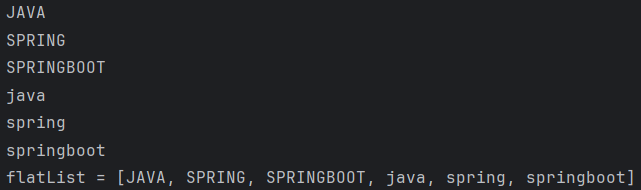
flatMap() 는 중첩 구조를 한 단계 제거하고 단일 컬렉션으로 만들어준다. 이러한 작업을 플래트닝(flattening)이라고한다.
import java.util.Arrays;
import java.util.Collection;
import java.util.List;
import java.util.stream.Collectors;

public class Application {
    public static void main(String[] args) {
        List<List<String>> list = Arrays.asList(
                Arrays.asList("JAVA", "SPRING", "SPRINGBOOT"),
                Arrays.asList("java", "spring", "springboot")
        );

        List<String> flatList = list.stream()
                .flatMap(Collection::stream)
                .collect(Collectors.toList());
        flatList.stream().forEach(System.out::println);
        System.out.println("flatList = " + flatList);
    }
}
sorted 메소드
스트림에 있는 데이터를 정렬할 때 사용한다.
import java.util.List;
import java.util.stream.Collectors;
import java.util.stream.IntStream;

public class Application {
    public static void main(String[] args) {
        List<Integer> integerList = IntStream.of(5, 10, 99, 2, 1, 35)
                .boxed()
                .sorted()
                .collect(Collectors.toList());
        System.out.println("정렬 된 integerList = " + integerList);
    }
}
이번엔 Comparator를 활용한 내림차순을 만들어보자.
DescInteger
import java.util.Comparator;

public class DescInteger implements Comparator<Integer> {
    @Override
    public int compare(Integer o1, Integer o2) {
        return o2 - o1;
    }
}
Application
import java.util.List;
import java.util.stream.Collectors;
import java.util.stream.IntStream;

public class Application {
    public static void main(String[] args) {
        List<Integer> integerList = IntStream.of(5, 10, 99, 2, 1, 35)
                .boxed()
//                .sorted()
                .sorted(new DescInteger())
                .collect(Collectors.toList());
        System.out.println("정렬 된 integerList = " + integerList);
    }
}
최종 연산 (터미널)
최종 연산 : Stream이 아닌 값을 반환하며 Stream이 끝날 때 사용한다.
Calculation
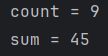
최소/최대/총합/평균 등 과 같은 결과를 알아보자.
import java.util.stream.IntStream;

public class Application {
    public static void main(String[] args) {
        long count = IntStream.range(1, 10).count();
        long sum = IntStream.range(1, 10).sum();

        System.out.println("count = " + count);
        System.out.println("sum = " + sum);
    }
}
import java.util.OptionalInt;
import java.util.stream.IntStream;

public class Application {
    public static void main(String[] args) {
        long count = IntStream.range(1, 10).count();
        long sum = IntStream.range(1, 10).sum();

        System.out.println("count = " + count);
        System.out.println("sum = " + sum);

        OptionalInt max = IntStream.range(1, 10).max();
        OptionalInt min = IntStream.range(1, 10).min();

        System.out.println("max = " + max);
        System.out.println("min = " + min);
    }
}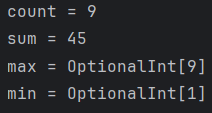
OptionalInt : 기본자료형도 존재하지 않으면 empty의 개념을 추가하기 위한 타입
만약 위 코드에서 OptionalInt max = IntStream.range(1,1).max(); 로 하게 되면
그 때 출력은 OptionalInt.empty 을 반환한다. (min도 마찬가지)
Reduction
reduce() 라는 메소드는 스트림에 있는 데이터들의 총합을 계산해준다.
import java.util.OptionalInt;
import java.util.stream.IntStream;
import java.util.stream.Stream;

public class Application {
    public static void main(String[] args) {

        /* 설명. 인자가 1개인 경우 */
        OptionalInt reduceOneParam = IntStream.range(1, 4)
                .reduce((a, b) -> Integer.sum(a, b));

        System.out.println("reduceOneParam = " + reduceOneParam.getAsInt());

        /* 설명. 인자가 2개인 경우 */
        int reduceTwoParam = IntStream.range(1, 4)
                .reduce(100, Integer::sum); // identity (100) 부터 누적 시작

        System.out.println("reduceTwoParam = " + reduceTwoParam);

        /* 설명. 인자가 3개인 경우 */
        Integer reduceThreeParam = Stream.of(1,2,3,4,5,6,7,8,9,10)
                .reduce(100, Integer::sum, (x, y) -> x + y);
    }
}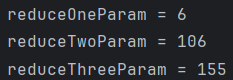
매개변수 3번째는 좀 더 효율적인 가산 누적연산을 위한 중간 합계 처리용 람다식을 작성한다.
(2번째 인자의 결과와 호환이 가능해야 한다.)
Collecting
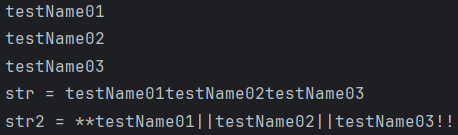
collect() 는 Collector 객체에서 제공하는 정적(static) 메소드를 사용할 수 있고, 해당 메소드를 통해 컬렉션을 출력으로 받을 수 있다.
- Collectors.toList()
스트림 작업 결과를 리스트로 반환해주는 메소드이다.
- Collectors.joining()
스트림의 작업 결과를 String 타입으로 이어 붙인다.
3개의 인자를 받을 수 있다. 각 인자는delimiter(구분자),prefix(맨 앞 문자),suffix(맨 뒤 문자) 이다.
Member
public class Member {
    private String memberId;
    private String memberName;

    public Member() {
    }

    public String getMemberId() {
        return memberId;
    }

    public void setMemberId(String memberId) {
        this.memberId = memberId;
    }

    public String getMemberName() {
        return memberName;
    }

    public void setMemberName(String memberName) {
        this.memberName = memberName;
    }

    public Member(String memberId, String memberName) {
        this.memberId = memberId;
        this.memberName = memberName;
    }
}
Application
import java.util.Arrays;
import java.util.List;
import java.util.stream.Collectors;

public class Application {
    public static void main(String[] args) {
        List<Member> memberList = Arrays.asList(
                new Member("test01", "testName01"),
                new Member("test02", "testName02"),
                new Member("test03", "testName03")
        );

        List<String> collectorCollection = memberList.stream()
                .map(Member::getMemberName)
                .collect(Collectors.toList());

        collectorCollection.forEach(System.out::println);

        String str = memberList.stream()
                .map(Member::getMemberName)
                .collect(Collectors.joining());
        System.out.println("str = " + str);

        String str2 = memberList.stream()
                .map(Member::getMemberName)
                .collect(Collectors.joining("||", "**", "!!"));
        System.out.println("str2 = " + str2);
    }
}
Matching
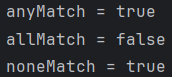
Matching 은 Predicate 를 인자로 받아 조건을 만족하는 엘리먼트가 있는지 확인하고 boolean 으로 리턴해준다.
anyMatch() : 위의 요소 중 하나라도 만족하면 true
allMatch() : 위의 요소가 전부 다 만족하면 true (하나라도 만족 못 하면 false)
noneMatch() : 위의 요소 중 하나라도 만족하지 않으면 true
import java.util.Arrays;
import java.util.List;

public class Application {
    public static void main(String[] args) {
        List<String> stringList = Arrays.asList("Java", "Spring", "SpringBoot");

        boolean anyMatch = stringList.stream()
                .anyMatch(str -> str.contains("p"));
        boolean allMatch = stringList.stream()
                .allMatch(str -> str.length() > 4);
        boolean noneMatch = stringList.stream()
                .noneMatch(str -> str.contains("c"));

        System.out.println("anyMatch = " + anyMatch);
        System.out.println("allMatch = " + allMatch);
        System.out.println("noneMatch = " + noneMatch);
    }
}
더 있긴 하지만, 스트림에 대해서는 일단 이 정도로 정리를 마치겠다.