입출력 (IO)
Input Output의 약자. 컴퓨터 내부 or 외부 장치와 프로그램 간의 데이터 연동을 위한 자바 라이브러리
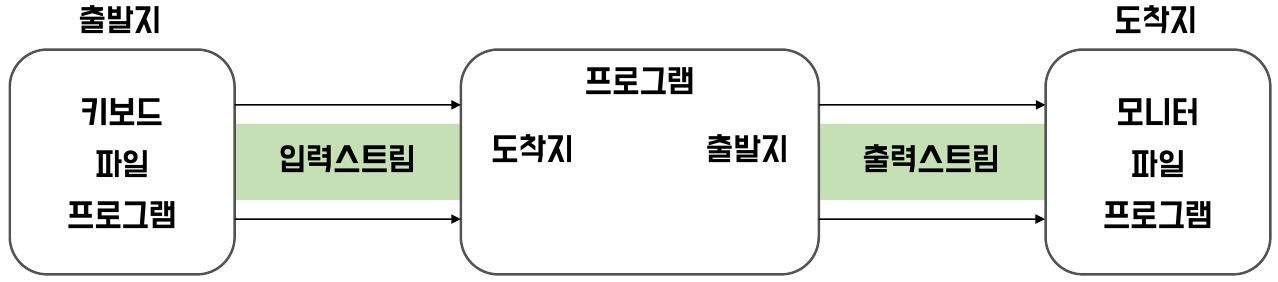
단방향 데이터 송, 수신을 위해 Stream 활용
스트림 (Stream)
입, 출력 장치에서 데이터를 읽고 쓰기 위한 단방향 통로로 자바에서 제공하는 클래스이다.
바이트 단위 처리와 문자 단위 처리를 위한 스트림 등이 존재한다.
기본적으로 1바이트 단위의 데이터만 지나가게 되고, 주고 받는 데이터의 기본 단위가 1바이트라는 것은 한 방향만 처리 가능하다는 것이다.
즉, 입력 스트림, 출력 스트림을 따로 구성해야 한다.

사용 이유
입출력을 사용함으로써 사용자로 부터 입력을 받거나 화면이나 스피커로 출력해 줄 수 있다.
또한 파일 형태로 프로그램의 종료 여부와 상관없이 영구적으로 데이터를 저장할 수도 있다.
파일 관련 입,출력
파일 클래스 (File class)
파일 시스템의 파일을 다루기 위한 클래스
File file = new File("file path");
File file = new File("C:/data/childDir/grandChildDir/fileTest.txt");$- 파일/디렉토리 생성 및 삭제 메소드
| 리턴 타입 | 메소드 | 설명 |
|---|---|---|
| boolean | createNewFile() | 새로운 파일 생성 |
| boolean | mkdir() | 새로운 디렉토리 생성 |
| boolean | mkdirs() | 경로 상에 없는 모든 디렉토리 생성 |
| boolean | delete() | 파일 또는 디렉토리 삭제 |
- 파일/디렉토리 생성 및 삭제 메소드
| 리턴 타입 | 메소드 | 설명 |
|---|---|---|
| boolean | canExecute() | 실행할 수 있는 파일인지 여부 |
| boolean | canRead() | 읽을 수 있는 파일인지 여부 |
| boolean | canWrite() | 수정 및 저장할 수 있는 파일인지 여부 |
| String | getName() | 파일 이름 리턴 |
| String | getParent() | 부모 디렉토리 리턴 |
| File | getParentFile() | 부모 디렉토리를 File객체로 생성 후 리턴 |
| String | getPath() | 전체 경로 리턴 |
| boolean | isDirectory() | 디렉토리인지 여부 |
| boolean | isFile() | 파일인지 여부 |
| boolean | isHidden() | 숨김 파일인지 여부 |
| long | lastModified() | 마지막 수정 날짜 및 시간 리턴 |
| long | length() | 파일 크기 리턴 |
파일 입출력 관련 기반 스트림의 종류
-
Byte 단위 (영어, 숫자, 특수기호 사용 시)
- InputStream
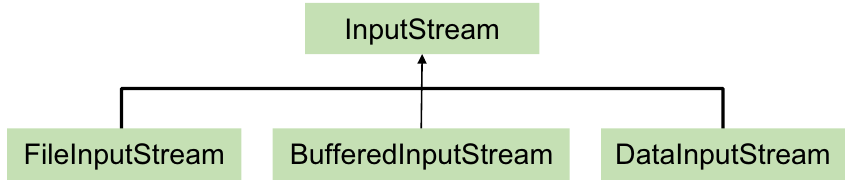
- OutputStream

-
문자 단위(한글까지 사용 시)
- Reader
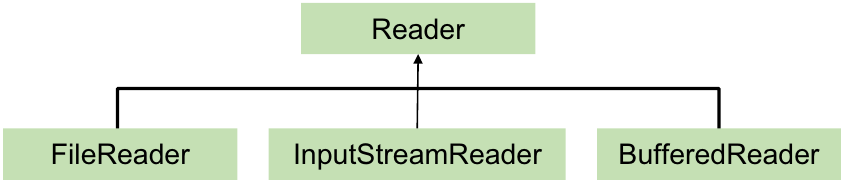
- Writer

- Reader
파일 입출력 관련 보조 스트림의 종류
보조 스트림 : 스트림의 기능을 향상시키거나 새로운 기능을 추가하기 위해 사용
- 보조 스트림만으로는 데이터를 주고 받는 대상에 대한 처리를 하는 것이 아니므로 입출력 처리가 불가능 하고 기반 스트림에 추가로 적용되어야 한다.
- 보조 스트림의 종류
- 입출력 성능 향상
BufferedInputStream/BufferedOutputStream
- 입출력 속도 향상 및 한 줄씩 출력 및 입력 관련 메소드 제공 보조 스트림
- 형변환 보조스트림
InputStreamReader/OutputStreamWriter
- 인코딩 방식을 고려한 한글 깨짐 방지를 위해 고려할 수 있는 보조 스트림
- 기본 자료형 데이터 입출력
DataInputStream/DataOutputStream
- 기본자료형 및 문자열 관련 타입에 따른 메소드를 제공하는 보조 스트림
- 객체 자료형 데이터 입출력
ObjectInputStream/ObjectOutputStream
- 객체 단위 입출력을 위한 보조 스트림
import java.io.BufferedWriter;
import java.io.FileWriter;
import java.io.IOException;

public class Application1 {
    public static void main(String[] args) {
        BufferedWriter writer = null;
        try {
            writer = new BufferedWriter(new FileWriter("src/main/java/com/.../testBuffered.txt", true));
            writer.write("This is a test\n");
            writer.write("우와와우와우아우\n");

            // Buffer를 사용해서 출력하는 경우 버퍼 공간이 가득차지 않으면 출력이 되지 않는 경우가 있다.
            // 이럴 경우 버퍼에 담긴 내용을 강제로 내보내기 위해 flush() 메소드를 활용해야 한다.

            writer.flush();
        } catch (IOException e) {
            throw new RuntimeException(e);
        } finally {
            try {
                if(writer != null) writer.close();	// BufferedWriter 스트림을 닫으면 내부적으로 flush()가 동작한다.
            } catch (IOException e) {
                throw new RuntimeException(e);
            }
        }

        /* BufferedReader를 활용한 한 줄(개행 문자 전까지)씩 읽어오기 */
        BufferedReader br = null;
        try {
            br = new BufferedReader(new FileReader("src/main/java/com/ohgiraffers/section03/filterstream/testBuffered.txt"));

            String returnString = "";
            while((returnString = br.readLine()) != null) {
                System.out.println(returnString);
            }
        } catch (FileNotFoundException e) {
            throw new RuntimeException(e);
        } finally {
            try {
                if(br != null) br.close();
            } catch (IOException e) {
                throw new RuntimeException(e);
            }
        }
    }
}
기반 스트림인 FileWriter를 먼저 생성하고 그걸 돕는 BufferedWriter 보조 스트림을 생성한다.
-> Buffered는 값을 옮길 단위의 주머니라고 생각하면 된다.
if(writer != null) writer.close(); 에서 보조스트림을 닫으면 그 이전에(내부에) 만든 스트림들은 자동으로 close() 된다.에 대해 알아두는 것이 좋다.
그 뒤 한 줄씩 출력하기 위해 BufferedReader를 사용해보았다.
콘솔 입출력으로 BufferedReader 사용하기
-> scanner를 사용하는 것과 비슷하다. (효율적이기 위해서는 BufferedReader 사용.!)
import java.io.BufferedReader;
import java.io.IOException;
import java.io.InputStreamReader;

public class Application {
    public static void main(String[] args) {
        BufferedReader br = new BufferedReader(new InputStreamReader(System.in));
        // 보조 스트림을 2개 쓰지만 InputStream은 Reader 계열을 만들어주는 보조 스트림이다.

        System.out.print("문자열 입력 : ");
        try {
            String input = br.readLine();

            System.out.println("input = " + input);
        } catch (IOException e) {
            throw new RuntimeException(e);
        } finally {
            try {
                if (br != null) br.close();
            } catch (IOException e) {
                throw new RuntimeException(e);
            }
        }
    }
}
try-catch 문도 되지만 main에 IOException만 적어줘도 되긴 한다.
(둘의 차이점이 있나? 찾아보겠다.)
package com.ohgiraffers.section03.filterstream;

import java.io.BufferedReader;
import java.io.IOException;
import java.io.InputStreamReader;

public class Application {
    public static void main(String[] args) throws IOException {
        BufferedReader br = new BufferedReader(new InputStreamReader(System.in));

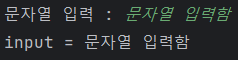
        System.out.print("문자열 입력 : ");

        String input = br.readLine();
        System.out.println("input = " + input);
    }
}
데이터 단위 입출력 활용
import java.io.*;

public class Application {
    public static void main(String[] args) {

        DataOutputStream dos = null;
        try {
            dos = new DataOutputStream(
                    new FileOutputStream("src/main/java/com/ohgiraffers/section03/filterstream/testData.txt"));
            dos.writeUTF("홍길동");
            dos.writeInt(20);
            dos.writeChar('A');

            dos.writeUTF("유관순");
            dos.writeInt(16);
            dos.writeChar('B');

            dos.writeUTF("강감찬");
            dos.writeInt(38);
            dos.writeChar('O');

        } catch (FileNotFoundException e) {
            throw new RuntimeException(e);
        } catch (IOException e) {
            throw new RuntimeException(e);
        } finally {
            try {
                if(dos != null) dos.close();
            } catch (IOException e) {
                throw new RuntimeException(e);
            }
        }

        DataInputStream dis = null;
        try {
            dis = new DataInputStream(
                    new FileInputStream("src/main/java/com/ohgiraffers/section03/filterstream/testData.txt"));
            while(true) {
                System.out.println(dis.readUTF());
                System.out.println(dis.readInt());
                System.out.println(dis.readChar());
            }

        } catch (EOFException e) {
            /* data 단위 입출력은 EOFException을 활용하여 파을의 끝까지 입력받았다는 것을 처리할 수 있다.*/
            System.out.println("파일 다 읽었음");
        } catch (FileNotFoundException e) {
            throw new RuntimeException(e);
        } catch (IOException e) {
            throw new RuntimeException(e);
        } finally {
            try {
                if(dis != null) dis.close();
            } catch (IOException e) {
                throw new RuntimeException(e);
            }
        }
    }
}
출력할 때
data 단위 입출력은 EOFException을 활용하여 파을의 끝까지 입력받았다는 것을 처리할 수 있다.
위와 같은 부분을 알아두자.
while(true)로 무한루프를 돌고 있음에도 EOFException 일 때는 System.out.println() 으로 출력해 실행에 성공하는 것을 알 수 있다.
직렬화 -> Serialzable 이며 이 객체가 어느 소속이었다는 것을 마크하는 것
성으로 된 레고를 write로 다 분해해도 어느 레고가 쓰였는지 알기 때문에 다시 원상복구가 가능하다.
반대로 하는 것 (write 된 것을 보고 자바에서 읽는 것) 을 역직렬화라고 한다.
객체 자료형 입출력 예제
Application
import com.ohgiraffers.section03.filterstream.dto.MemberDTO;

import java.io.*;

public class Application {
    public static void main(String[] args) {
        MemberDTO[] members = new MemberDTO[100];
        members[0] = new MemberDTO("user01", "pass01", "홍길동", "hong123@gmail.com", 25, '남');
        members[1] = new MemberDTO("user02", "pass02", "유관순", "korea123@gmail.com", 16, '여');
        members[2] = new MemberDTO("user03", "pass03", "강감찬", "kanggam123@gmail.com", 38, '남');

        ObjectOutputStream objectOutputStream = null;
        try {
            objectOutputStream = new ObjectOutputStream(new BufferedOutputStream(new FileOutputStream("src/main/java/com/ohgiraffers/section03/filterstream/testObject.txt")));

            for (int i = 0; i < members.length; i++) {
                if (members[i] == null) break;
                objectOutputStream.writeObject(members[i]);
            }

        } catch (IOException e) {
            throw new RuntimeException(e);
        } finally {
            try {
                if(objectOutputStream != null) objectOutputStream.close();
            } catch (IOException e) {
                throw new RuntimeException(e);
            }
        }

        MemberDTO[] newMembers = new MemberDTO[members.length];

        ObjectInputStream objectInputStream = null;
        try {
            objectInputStream = new ObjectInputStream(new BufferedInputStream(new FileInputStream("src/main/java/com/ohgiraffers/section03/filterstream/testObject.txt")));

            int i = 0;
            while (true) {
                newMembers[i] = (MemberDTO) objectInputStream.readObject();
                i++;
            }
        } catch (EOFException e) {
            System.out.println("객체 단위 파일 입력 완료");
        } catch (IOException e) {
            throw new RuntimeException(e);
        } catch (ClassNotFoundException e) {
            throw new RuntimeException(e);
        } finally {
            try {
                if(objectInputStream != null) objectInputStream.close();
            } catch (IOException e) {
                throw new RuntimeException(e);
            }

            for (MemberDTO m : newMembers) {
                if (m == null) break;
                System.out.println(m);
            }
        }
    }
}
MemberDTO
package com.ohgiraffers.section03.filterstream.dto;

import java.io.Serializable;

public class MemberDTO implements Serializable {

    private String id;
    private String password;
    private String name;
    private String email;
    private int age;
    private char gender;

    public MemberDTO() {
    }

    @Override
    public String toString() {
        return "MemberDTO{" +
                "id='" + id + '\'' +
                ", password='" + password + '\'' +
                ", name='" + name + '\'' +
                ", email='" + email + '\'' +
                ", age=" + age +
                ", gender=" + gender +
                '}';
    }

    public MemberDTO(String id, String password, String name, String email, int age, char gender) {
        this.id = id;
        this.password = password;
        this.name = name;
        this.email = email;
        this.age = age;
        this.gender = gender;
    }
}
실행 후 testObject.txt를 확인해보면 추가된 것을 알 수 있다.
실행결과

지금까지처럼 true가 없이 한다면 객체를 더 추가할 때마다 이제 덮어쓰기로 다시 처음부터 데이터를 넣어줘야 해서 비효율적이다.
그래서 끝에 기존 내용에 추가하기 위해 끝에 true를 추가하면 어떻게 될까?
objectOutputStream = new ObjectOutputStream(new BufferedOutputStream(new FileOutputStream("src/main/java/com/ohgiraffers/section03/filterstream/testObject.txt", true)));
에러가 생긴다.
왜? ->
OutputStream클래스에서writeStreamHeader메소드 때문에 객체를 새로 추가해주면 헤더가 계속 들어오려고 하는데, 파일에는 하나의 헤더만 필요하다.
이것을 개선해보자. (직접 OutputStream의 클래스를 오버라이드해주면 된다.)
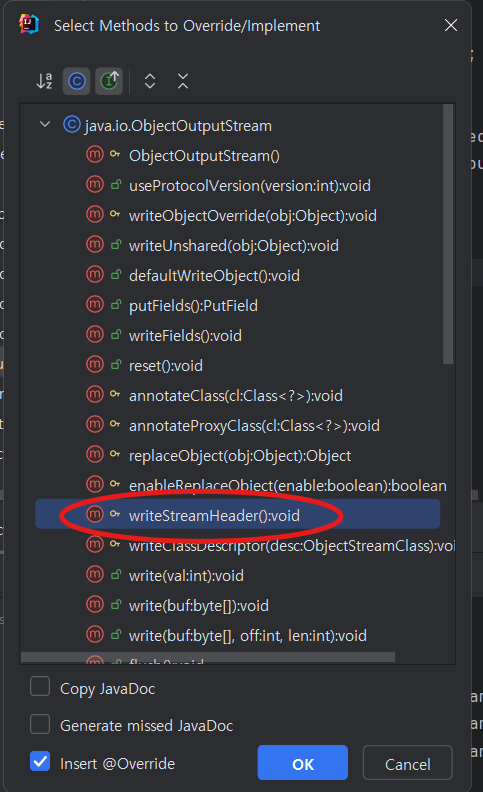
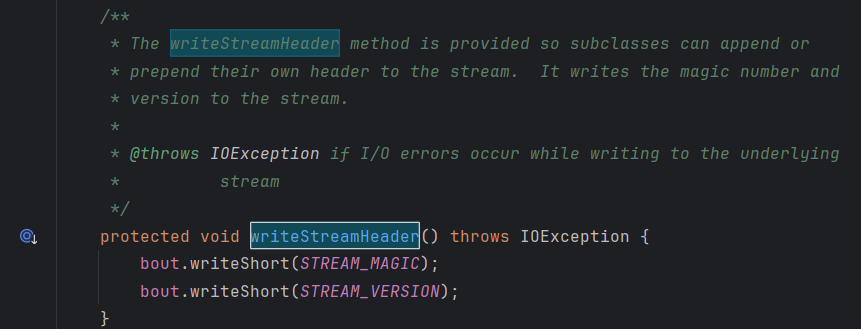
이것을 오버라이드 해주고
import java.io.IOException;
import java.io.ObjectOutputStream;
import java.io.OutputStream;

public class MyOutput extends ObjectOutputStream {
    public MyOutput(OutputStream out) throws IOException {
        super(out);
    }

    @Override
    protected void writeStreamHeader() throws IOException {
    }
}
이렇게 헤더가 추가되지 않게끔 해주고 Application에 적용만 시켜주면 실행할 때마다 객체가 덮어쓰기가 아닌 추가가 될 것이다.
근데 한 번 실수하게 되면 아래와 같은 예외가 뜬다.. (내가 겪음)
caused by java.io.streamcorruptedexception invalid stream header
이 예외의 이유는 ObjectOutputStream이 자동으로 텍스트를 객체로 변환할 것으로 기대할 수 없기 때문에 ObjectOutputStream을 사용하여 데이터를 전송하지 않기 때문에 발생한다.
이게 무슨 소리냐면
true를 해주고 (즉, 이어쓰기를 허용하고) 실행했을 때 처음은 괜찮지만 2번째부터stream이 들어올 때Header가 추가가 된다.
그래서 파일에는 하나의 헤더만 존재할 수 있는데 실행할 수록 계속 헤더가 추가가 되고,Reader로 읽어올 때 헤더 중복으로 인한 문제가 발생해서 읽을 수가 없다는 뜻이다.
testObject.txt 파일을 아예 지운채로 다시 실행하면 괜찮아질 것이다.