웹프로그래밍 A-Z 1주차에는 HTML, CSS, Javascript에 대한 내용을 다뤄보았다.
내일배움단 웹개발 강의와 내용이 거의 비슷해서 2배속으로 빠르게 들어보았는데,
새로운 내용이 조금 추가된 부분이 있어서 기억에 남는 내용만 정리해보려고 한다.
CSS
웹개발 강의때는 class명을 붙여 css를 작성해주었는데,
이번 강의에서는 약간은 새로운 방법을 알려주었다.
class 안에 있는 button을 가리켜 css를 적용시키는 것이다.
<style>
  . post-btn > button {
  	margin-right : 10px
  }
</style>

<body>
  <div class="post">
      <div class="post-btn">
          <button type="button" class="btn btn-dark">기록하기</button>
          <button type="button" class="btn btn-outline-dark">닫기</button>
      </div>
  </div>
</body>
HW ( 팬명록 만들기 )
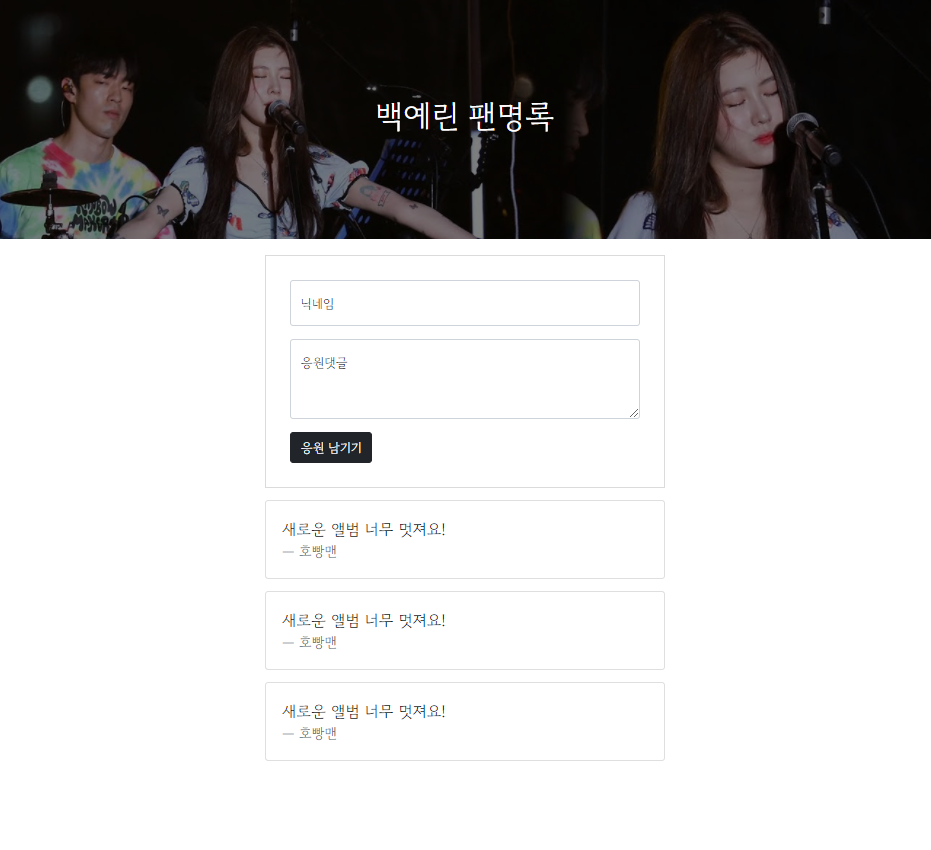
<!doctype html>
<html lang="en">

<head>
<meta charset="utf-8">
<meta name="viewport" content="width=device-width, initial-scale=1, shrink-to-fit=no">

<link href="https://cdn.jsdelivr.net/npm/bootstrap@5.0.2/dist/css/bootstrap.min.css" rel="stylesheet"
integrity="sha384-EVSTQN3/azprG1Anm3QDgpJLIm9Nao0Yz1ztcQTwFspd3yD65VohhpuuCOmLASjC" crossorigin="anonymous">
<script src="https://ajax.googleapis.com/ajax/libs/jquery/3.5.1/jquery.min.js"></script>
<script src="https://cdn.jsdelivr.net/npm/bootstrap@5.0.2/dist/js/bootstrap.bundle.min.js"
integrity="sha384-MrcW6ZMFYlzcLA8Nl+NtUVF0sA7MsXsP1UyJoMp4YLEuNSfAP+JcXn/tWtIaxVXM"
crossorigin="anonymous"></script>

<title>스파르타코딩클럽 | 팬명록</title>
<link href="https://fonts.googleapis.com/css2?family=Gowun+Dodum&display=swap" rel="stylesheet">

<style>
    * {
        font-family: 'Gowun Dodum', sans-serif;
    }

    .title {
            background-color: aquamarine;
            background-image: linear-gradient(0deg, rgba(0, 0, 0, 0.5), rgba(0, 0, 0, 0.5)), url(https://i.ytimg.com/vi/aLd3svNImLM/maxresdefault.jpg);
            background-position: top;
            background-size: cover;

            width: 100%;
            height: 300px;

            color: white;

            display: flex;
            flex-direction: column;
            justify-content: center;
            align-items: center;
    }

    .post {
        max-width: 500px;
        width: 95%;

        margin: 20px auto 0px auto;
        border: 1px solid rgb(219, 219, 219);
        padding: 30px;
    }

    .card {
        max-width: 500px;
        width : 95%;

        margin: 15px auto 0px auto;
        padding: 20px;
    }
</style>

</head>

<body>
    <div class="title">
        <h1>백예린 팬명록</h1>
    </div>

    <div class="post">
        <div class="form-floating mb-3">
            <input type="nickname" class="form-control" id="floatingInput" placeholder="name@example.com">
            <label for="floatingInput">닉네임</label>
        </div>

        <div class="form-floating mb-3">
            <textarea class="form-control" placeholder="Leave a comment here" id="floatingTextarea2" style="height: 100px"></textarea>
            <label for="floatingTextarea2">응원댓글</label>
        </div>

        <button type="button" class="btn btn-dark">응원 남기기</button>
    </div>

    <div class="card">
        <blockquote class="blockquote mb-0">
            <p>새로운 앨범 너무 멋져요!</p>
            <footer class="blockquote-footer">호빵맨</footer>
        </blockquote>
    </div>
    <div class="card">
        <blockquote class="blockquote mb-0">
            <p>새로운 앨범 너무 멋져요!</p>
            <footer class="blockquote-footer">호빵맨</footer>
        </blockquote>
    </div>
    <div class="card">
        <blockquote class="blockquote mb-0">
            <p>새로운 앨범 너무 멋져요!</p>
            <footer class="blockquote-footer">호빵맨</footer>
        </blockquote>
    </div>
</body>

</html>