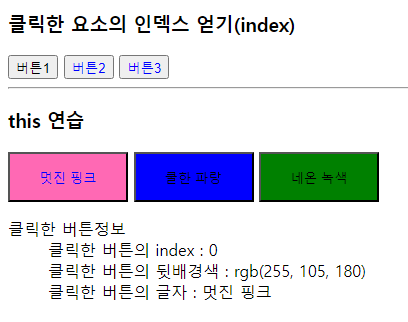
<!DOCTYPE html>
<html lang="ko">
<head>
<meta charset="UTF-8">
<title>07_this_index.html</title>
<script src="jquery-3.6.4.min.js"></script>
<style>
#exBox {width: 400px; height: 300px;}
.btn {width: 120px; height: 50px; cursor: pointer;}
#pinkBtn {background: hotpink}
#blueBtn {background: blue}
#greenBtn{background: green}
</style>
</head>
<body>
<h3>클릭한 요소의 인덱스 얻기(index)</h3>
<button>버튼1</button>
<button>버튼2</button>
<button>버튼3</button>
<hr>
<h3>this 연습</h3>
<div id="exBox">
<p>
<button id="pinkBtn" class="btn">멋진 핑크</button>
<button id="blueBtn" class="btn">쿨한 파랑</button>
<button id="greenBtn" class="btn">네온 녹색</button>
</p>
<dl>
<dt>클릭한 버튼정보</dt>
<dd>클릭한 버튼의 index : <span id="index">?</span></dd>
<dd>클릭한 버튼의 뒷배경색 : <span id="color">?</span></dd>
<dd>클릭한 버튼의 글자 : <span id="text">?</span></dd>
</dl>
</div>
<script>
$("button").click(function(){
$(this).css("color", "blue");
let idx=$(this).index();
alert(idx);
});
$("#exBox .btn").click(function(){
let idx=$(this).index();
var color=$(this).css("background-color");
var txt =$(this).text();
$("#index").text(idx);
$("#color").text(color);
$("#text").text(txt);
});
</script>
</body>
</html>