
개발 대상은 [비회원게시판 - 게시글검색] 페이지이다.
구성은 다음과 같다.
free_search.php : 게시글 검색 결과 페이지
free_search.js : 게시글 검색 결과 정렬 처리 Javascript
board_list.css : 게시글 목록 관련 CSS
1. Frontend & Backend
<free_search.php>
<?php
    include "../db/db_con.php";
    date_default_timezone_set("Asia/Seoul");

    if (!isset($_GET['input_select']))
        $input_select = "title";
    else
        $input_select = $_GET['input_select'];

    if (($input_select != "title") and ($input_select != "writer"))
        $input_select = "title";


    if (!isset($_GET['input_search']))
        $input_search = "";
    else
        $input_search = $_GET['input_search'];


    $sql = "select count(*) as total from freeboard where ($input_select like '%{$input_search}%')";
    $result = mysqli_query($con, $sql);
    $_result = mysqli_fetch_assoc($result);
    $count = $_result["total"];

    $limit = 5;

    $total_page = ceil($count/$limit);

    if(!isset($_GET['page']) or !ctype_digit($_GET['page']))
        $page = 1;
    else
        $page = $_GET["page"];


    if (($page<1) or ($page > $total_page))
        $page = 1;

    $offset = ($page-1)*$limit;

    if (!isset($_GET["order"]))
        $order = "num";
    else
        $order = $_GET["order"];

    if ($order != "views" and $order != "likes")
        $order = "num";

    $sql = "select * from freeboard where ($input_select like '%{$input_search}%')
            order by $order desc limit $limit offset $offset";
    $result = mysqli_query($con, $sql);
?>

<!DOCTYPE html>
<html>
    <head>
        <meta charset="UTF-8">
        <title>자유 게시판</title>
        <script src="../js/free_search.js"></script>
        <link rel="stylesheet" href="../css/board_list.css?v=<?=time()?>">
        <link rel="stylesheet" href="https://cdnjs.cloudflare.com/ajax/libs/font-awesome/6.1.1/css/all.min.css"/>
    </head>
    <body>
        <?php include "../include/header.php"; ?>
        <h2><i class="fa-solid fa-comments"></i> 자유 게시판</h2>
        <form method="get" action="./free_search.php">
            <select id="input_select" name="input_select">
                <option value="title" <?php if ($input_select=="title") echo "selected"; ?>>제목</option>
                <option value="writer" <?php if ($input_select=="writer") echo "selected"; ?>>작성자</option>
            </select>
            <input id="input_search" name="input_search" placeholder="검색어 입력" size="80">
            <input type="submit" value="검색">
        </form>
        <select id="order">
            <option value="recent" <?= ($_GET['order'] ?? '') == 'recent' ? 'selected' : '' ?>>최신순</option>
            <option value="views" <?= ($_GET['order'] ?? '') == 'views' ? 'selected' : '' ?>>조회순</option>
        </select>

        <table>
            <?php
            if (mysqli_num_rows($result)>0) {
                echo "<tr>";
                echo "<th>No.</th>";
                echo "<th width='800'>제목 <i class='fa-solid fa-book'></i></th>";
                echo "<th>작성자 <i class='fa-solid fa-user-pen'></i></th>";
                echo "<th>날짜 <i class='fa-solid fa-calendar-days'></i></th>";
                echo "<th>조회 <i class= 'fa-solid fa-eye'></i></th>";
                echo "</tr>";

                while ($row = mysqli_fetch_assoc($result)) {
                    $today_date = date("Y-m-d");
                    $write_day = substr($row['write_time'], 0, 10);

                    if ($write_day == $today_date)
                        $display_time = date("H:i", strtotime($row['write_time']));
                    else
                        $display_time = $write_day;

                    if ($input_select=="title")
                        $row['title'] = str_replace($input_search, "<strong>{$input_search}</strong>", $row['title']);

                    echo "<tr onclick=\"location.href='free_view.php?num={$row['num']}'\" style='cursor:pointer'>";
                    echo "<td>{$row['num']}</td>";
                    echo "<td>{$row['title']}</td>";
                    echo "<td>{$row['writer']}</td>";
                    echo "<td>{$display_time}</td>";
                    echo "<td>{$row['views']}</td>";
                    echo "</tr>";
                }
            }
            else {
                echo "<tr><td colspan='6' class='no-posts'>등록된 글이 없습니다.</td></tr>";
            }
            ?>
        </table>
        <div>
            <?php
            for ($i=1;$i<=$total_page;$i++) {
                if ($i == $page)
                    echo "<b>[{$i}]</b> ";
                else
                    echo "<a href='free_search.php?page={$i}&input_select={$input_select}&input_search={$input_search}&order={$order}'>$i</a> ";
            }
            ?>
        </div>
        <input type="button" onclick="location.href='./free_write.php'" value="게시글 작성">
    </body>
</html>| free_search.php |
|---|
 |
-
1. 기본 기능:
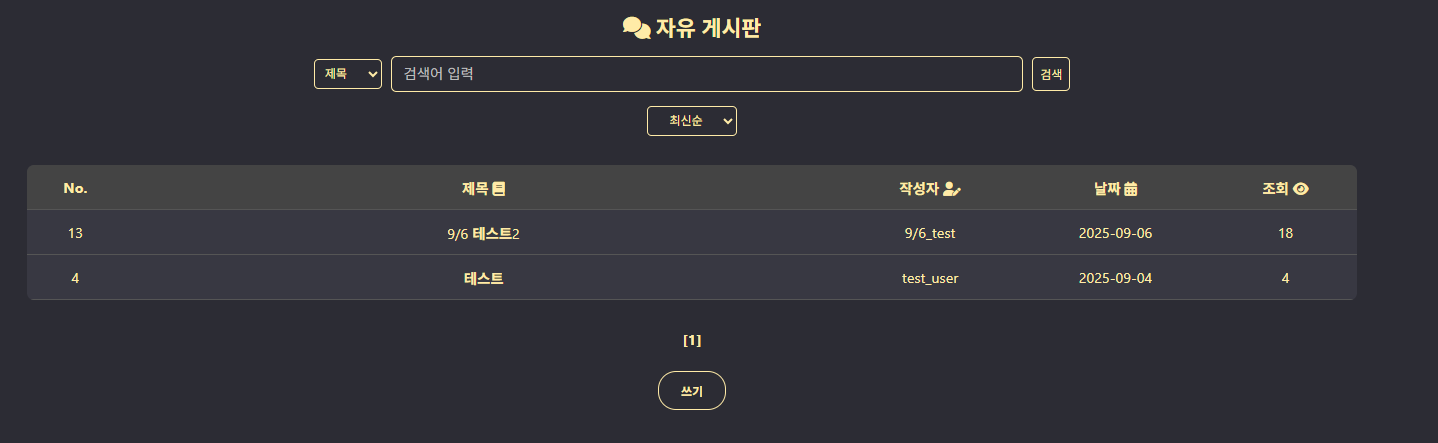
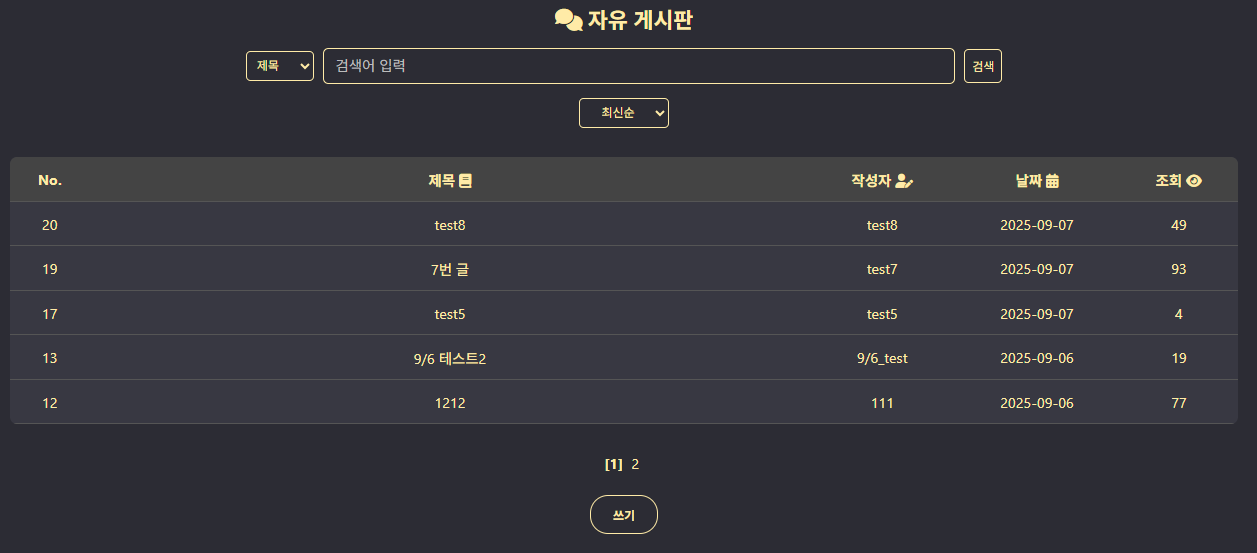
게시글 목록(free_list.php)에서 정리하였던 [페이지 인덱스 계산], [게시글 출력], [게시글 정렬], [페이지 인덱싱] 은 모두 그대로 존재한다.
-
2. 검색 쿼리:
free_list에서 전달 받은 검색 기준(input_select), 검색어(input_search)를 토대로 검색 쿼리문의 조건문이 추가된다.
"select * from freeboard where ($input_select like '%{$input_search}%')
            order by $order desc limit $limit offset $offset"
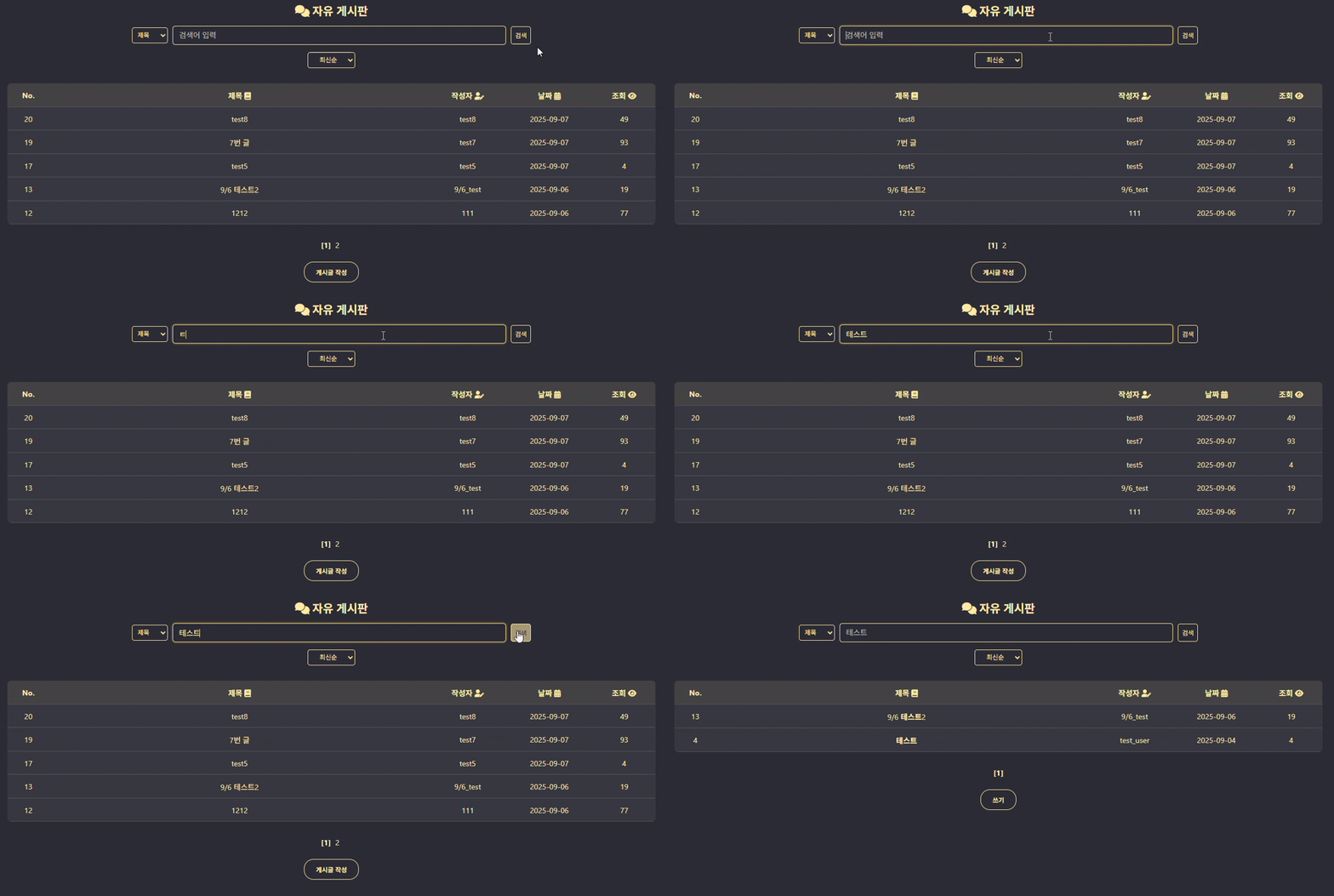
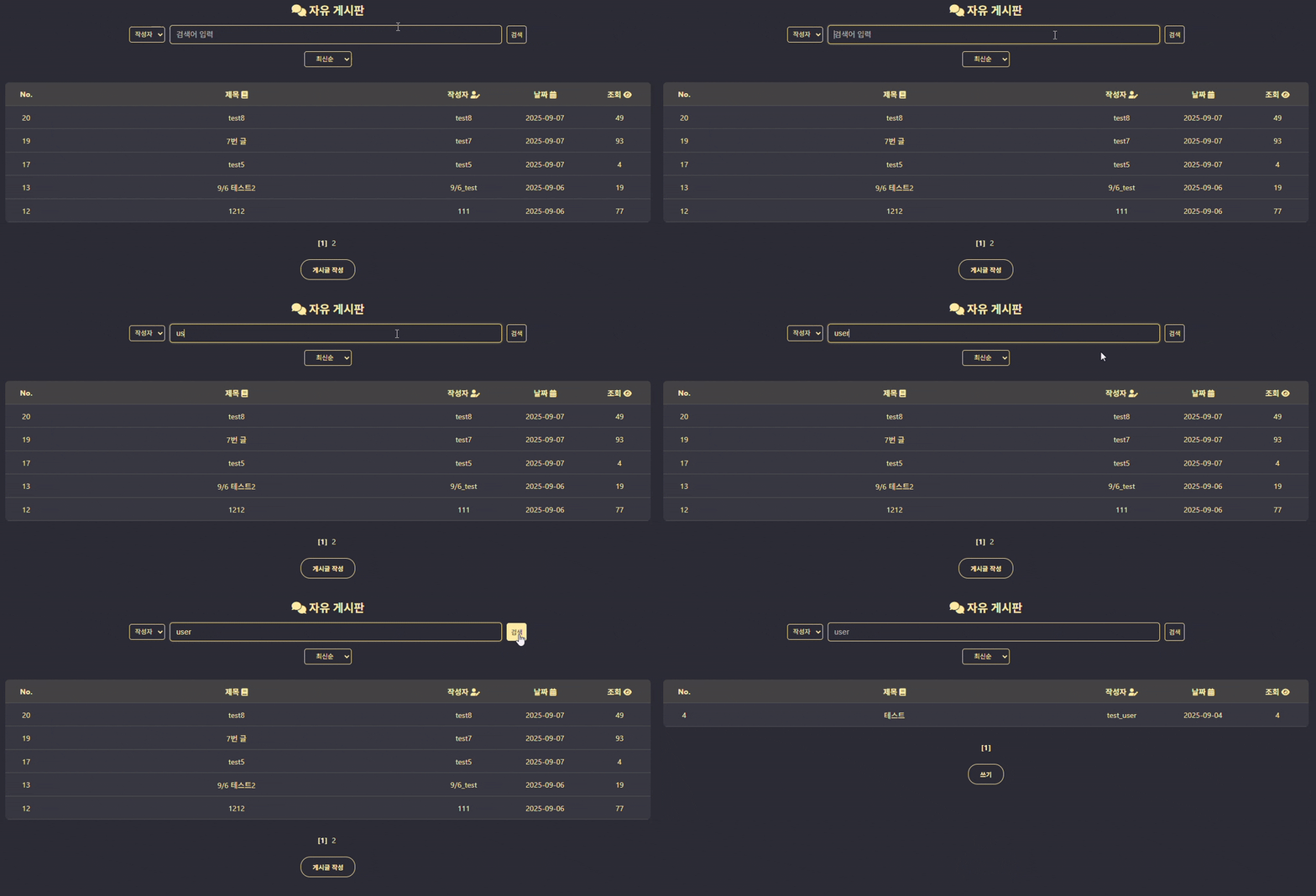
제목 또는 작성자명에 검색어 값이 포함되는 필드를 검색하여 그 결과를 리스트에 출력한다.
- 3. 부가 기능:
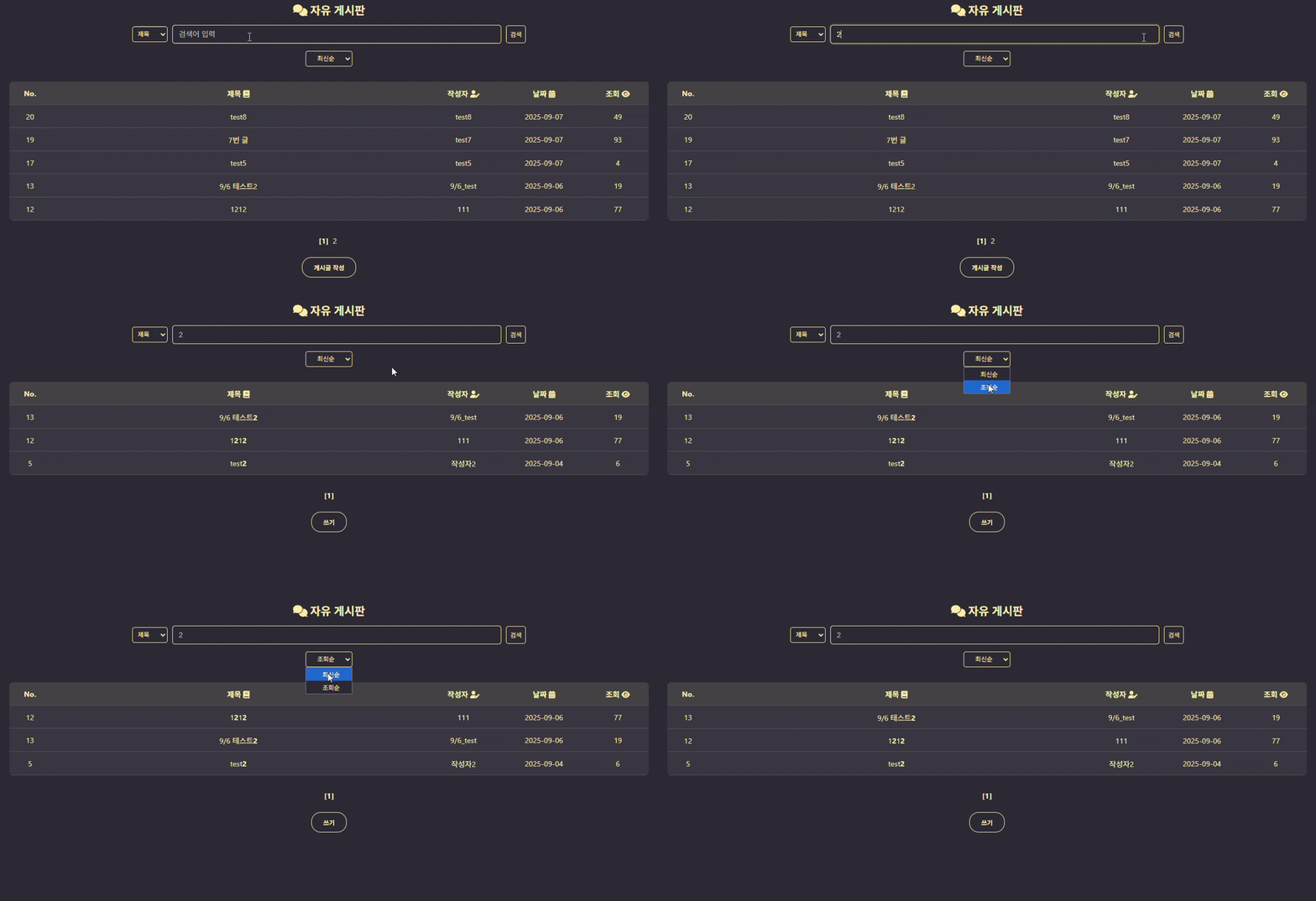
제목을 기준으로 검색하는 경우, 그 결과 리스트의 제목에서 검색어 부분은 두껍게 표시된다.
2. Javascript
<free_search.js>
document.addEventListener("DOMContentLoaded", function() {
    const select = document.getElementById("order");
    const params = new URLSearchParams(window.location.search);
    const page = params.get("page");
    const order = params.get("order");
    const input_select = params.get("input_select");
    const input_search = params.get("input_search");

    select.addEventListener("change", function() {
        location.href = "./free_search.php?page="+page+"&input_select="+input_select+"&input_search="+input_search
                        +"&order="+ this.value;
    });
});- 게시글 정렬:
게시글 검색 페이지에서도 정렬 기준을 선택하는 경우, 검색한 결과에서 해당 기준으로 다시 정렬되어 출력한다. 정렬 동작 방식은 free_list.js 와 동일하다.
3. 동작 정리
| 검색 페이지 기본 화면 |
|---|
 |
| 기능1 : 제목 기준으로 검색 (영상) |
|---|
 |
| ○ 검색 결과 제목에서 검색어는 bold체로 표시 |
| 기능2 : 작성자 기준으로 검색 (영상) |
|---|
 |
| 기능3 : 검색 + 정렬 (영상) |
|---|
 |
