개발 대상은 [회원게시판 - 게시글수정] 페이지이다.
구성은 다음과 같다.
mem_edit.php : 게시글 수정 양식 페이지
memedit_proc.php : 게시글 수정 처리 페이지
board_edit.css : 게시글 작성 및 수정 공통 CSS
1. Frontend + Backend
<mem_edit.proc>
<?php
    $num = $_POST["num"];
    $type = $_POST["type"];

    include "../db/db_con.php";
    session_start();
    if (!isset($_SESSION["user_id"])) {
        echo "<script>
        alert('회원만 이용가능합니다.');
        location.href='../auth/login.php';
        </script>";
        exit;
    }

    $sql = "select * from memboard where num=$num";
    $result = mysqli_query($con, $sql);
    $row = mysqli_fetch_assoc($result);

    if (!$row) {
        echo "<script>history.go(-1);</script>";
        exit;
    }

    $title = $row["title"];
    $content = $row["content"];
    $writer = $row["user_name"];
    $likes = $row["likes"];
    $views = $row["views"];
    $file_name = $row["file_name"];
    $file_copy = $row["file_copy"];


    if ($type == "delete") {
        if(!empty($file_copy)) {
            $filepath = "../uploads/".$file_copy;
            unlink($filepath);
        }

        $sql = "delete from memboard where num = $num";
        mysqli_query($con, $sql);
        echo "<script>
            alert('게시글이 삭제되었습니다');
            location.href='./mem_list.php';
        </script>";
        exit;
    }
    else if ($type == "likes") {
        session_start();
        $sql = "select * from likes where board_num=$num and user_id='{$_SESSION['user_id']}'";
        $result = mysqli_query($con, $sql);
        if (mysqli_num_rows($result) <= 0) {
            $sql = "insert into likes (board_num, user_id) values ($num, '{$_SESSION['user_id']}')";
            mysqli_query($con, $sql);

            $likes++;
            $views--;
            $sql = "update memboard set likes=$likes, views=$views where num=$num";
            mysqli_query($con, $sql);
            mysqli_close($con);
            echo "<script>location.href='mem_view.php?num=$num'</script>";
            exit;
        }
        else {
            $views--;
            $sql = "update memboard set likes=$likes, views=$views where num=$num";
            mysqli_query($con, $sql);
            echo "<script>
                alert('이미 추천한 글입니다.');
                location.href='mem_view.php?num=$num';
                exit;
            </script>";
        }
    }
    else if ($type != "modify") {
        echo "<script>history.go(-1)</script>";
        exit;
    }
?>
<!DOCTYPE html>
<html>
    <head>
        <meta charset="UTF-8">
        <title>회원 게시판</title>
        <link rel="stylesheet" href="../css/board_edit.css?v=<?=time()?>">
    </head>
    <body>
        <?php include "../include/header.php" ?>
        <h2>게시글 수정</h2>

        <div class="edit-container">
            <form class="edit-form" method="post" action="memedit_proc.php" enctype="multipart/form-data">
                <input type="hidden" id="num" name="num" value="<?php echo $num?>">

                <div class="edit-row">
                    <label for="input_title">제목 <i class="fa-solid fa-pen-to-square"></i></label>
                    <input id="input_title" name="input_title" type="text" value="<?php echo $title ?>">
                </div>

                <label for="input_cont">본문 <i class="fa-solid fa-pen-to-square"></i></label>
                <textarea id="input_cont" name="input_cont"><?php echo $content ?></textarea>

                <div class="edit-row">
                    <label for="input_file">파일 수정 <i class="fa-solid fa-paperclip"></i></label>
                    <?php
                    if (!empty($file_name))
                        echo  '<strong>[기존]</strong>'.$file_name.'<i class="fa-solid fa-arrows-rotate"></i>';
                    ?>
                    <input type="file" id="input_file" name="input_file">
                </div>

                <?php
                if (!empty($file_name)) {
                    echo '
                    <div class="edit-row">
                        <label for="file_delete">파일 삭제</label>
                        <input type="checkbox" id="file_delete" name="file_delete" value="1">
                    </div>
                    ';
                }
                ?>

                <div class="edit-actions">
                    <input type="submit" value="수정 완료">
                    <input type="button" onclick="location.href='mem_view.php?num=<?php echo $num?>'" value="뒤로가기">
                </div>
            </form>
        </div>
    </body>
</html>
| mem_edit.php |
|---|
 |
- 1. 입력값 확인:
1) user_id 세션값을 확인하여, 만약 할당되지 않은 경우(비로그인 상태) 로그인 페이지로 이동한다.
2) mem_view.php로부터 게시글 번호(num), 수정 유형(type)을 POST방식으로 전달받는다.
- 2. 편집 유형(type) 확인:
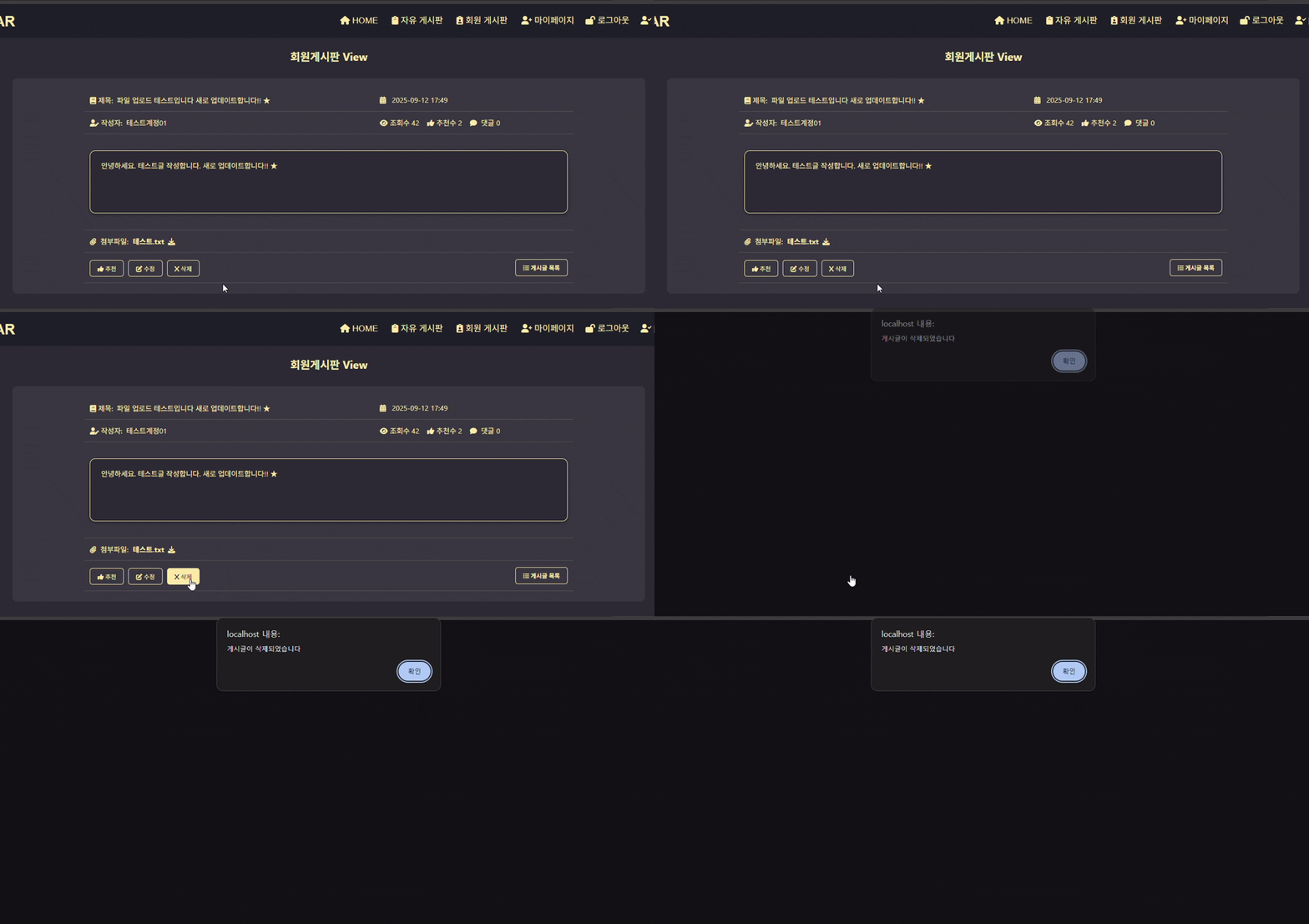
1) type == "delete" : 만약 사용자가 삭제 버튼을 눌러 delete 값이 전달된 경우, memboard 테이블에서 해당 게시글 번호(num)에 일치하는 필드를 delete 하여 해당 게시글을 삭제한다.
2) type == "likes" : 만약 사용자가 추천 버튼을 눌러 likes 값이 전달된 경우, 추천 동작 처리가 시작된다. 해당 내용은 12. 회원게시판 - 게시글확인 에 이전에 정리하였다.
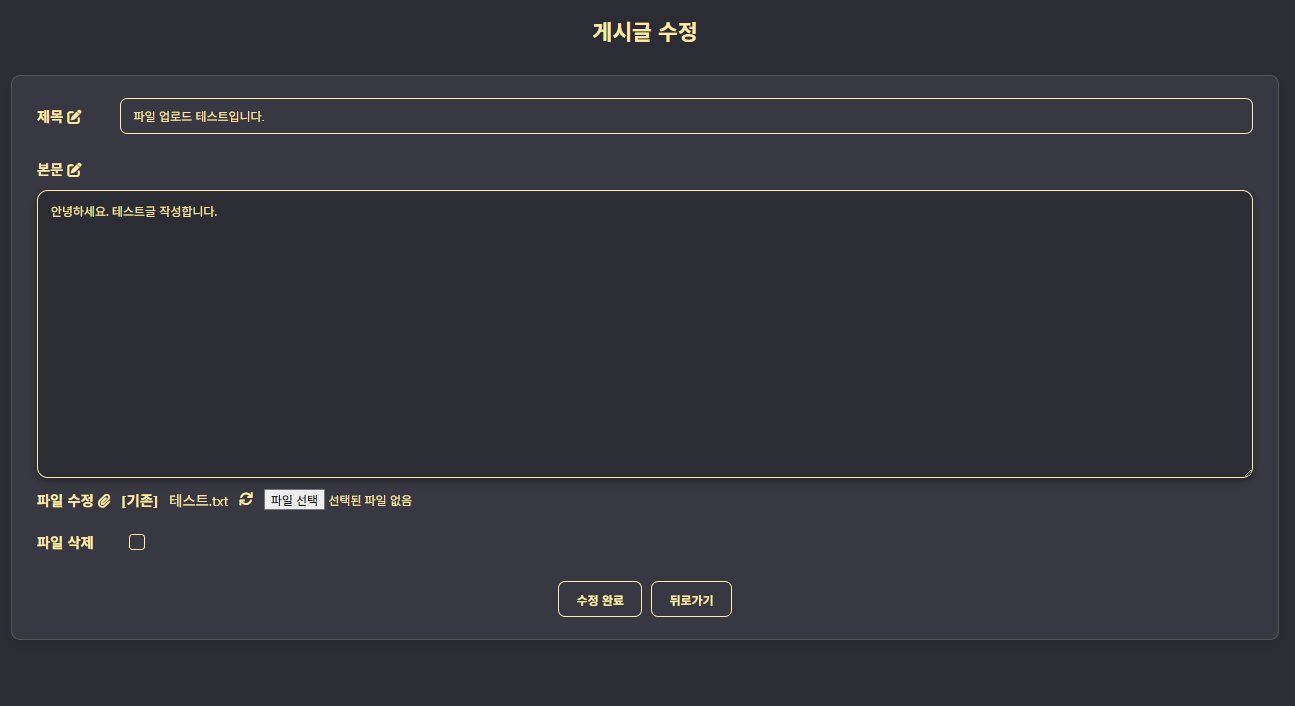
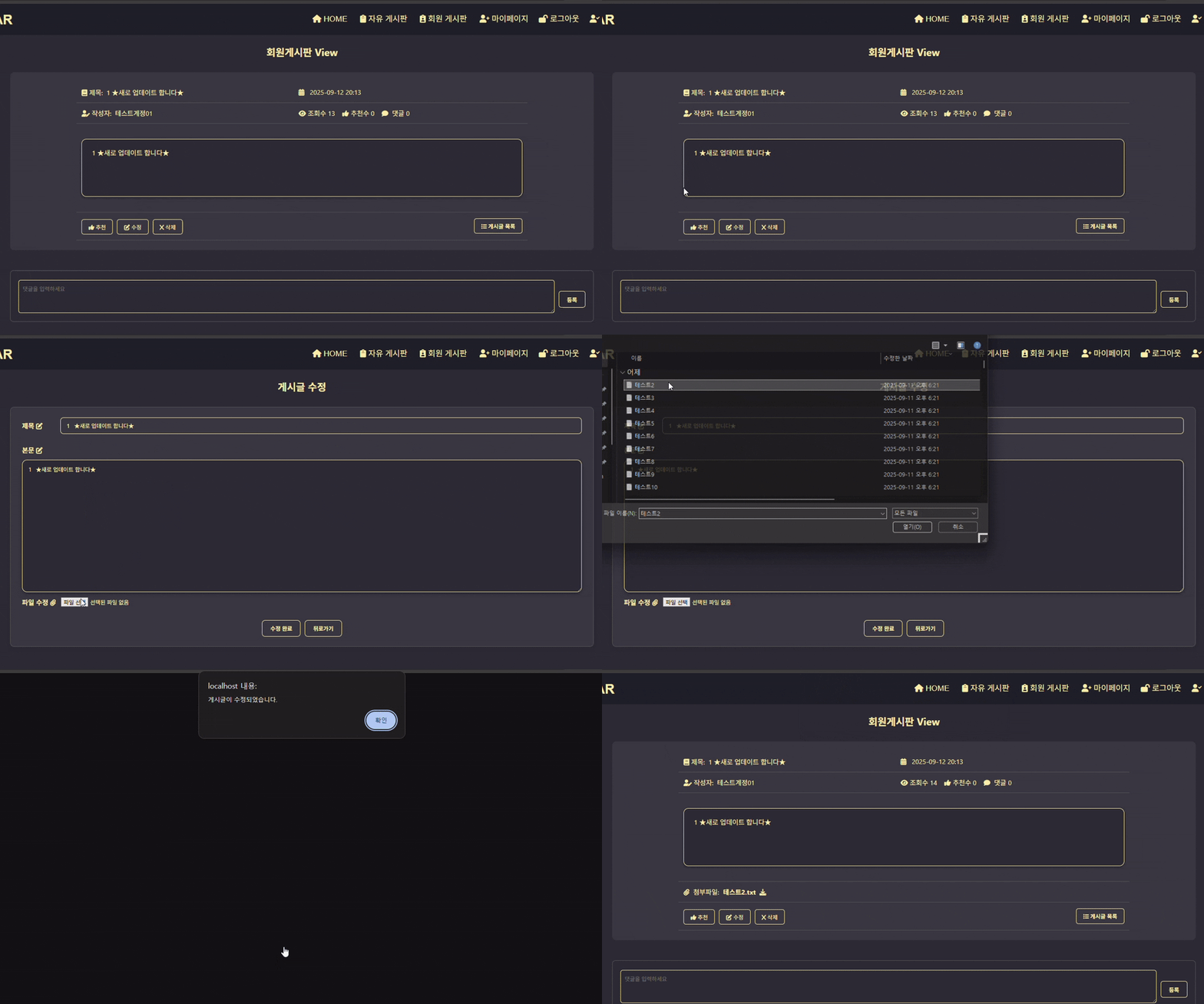
3) type == "modify" : 만약 사용자가 수정 버튼을 눌러 modify 값이 전달된 경우, 게시글 수정양식을 출력한다.
memboard 테이블에서 해당 게시글 정보를 불러와 이전에 작성하였던 게시글 제목과 내용, 첨부한 파일 내용을 보여준다.
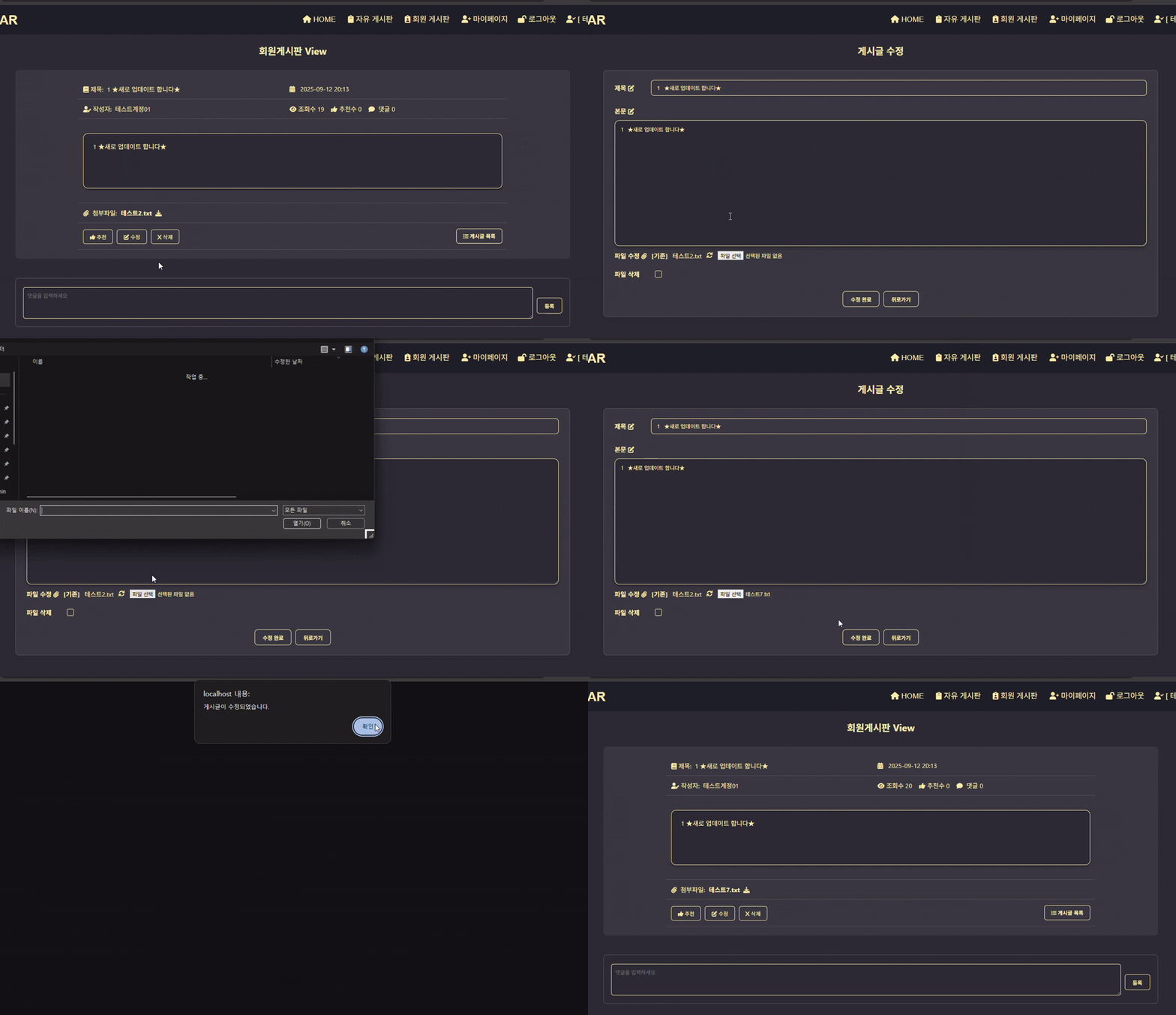
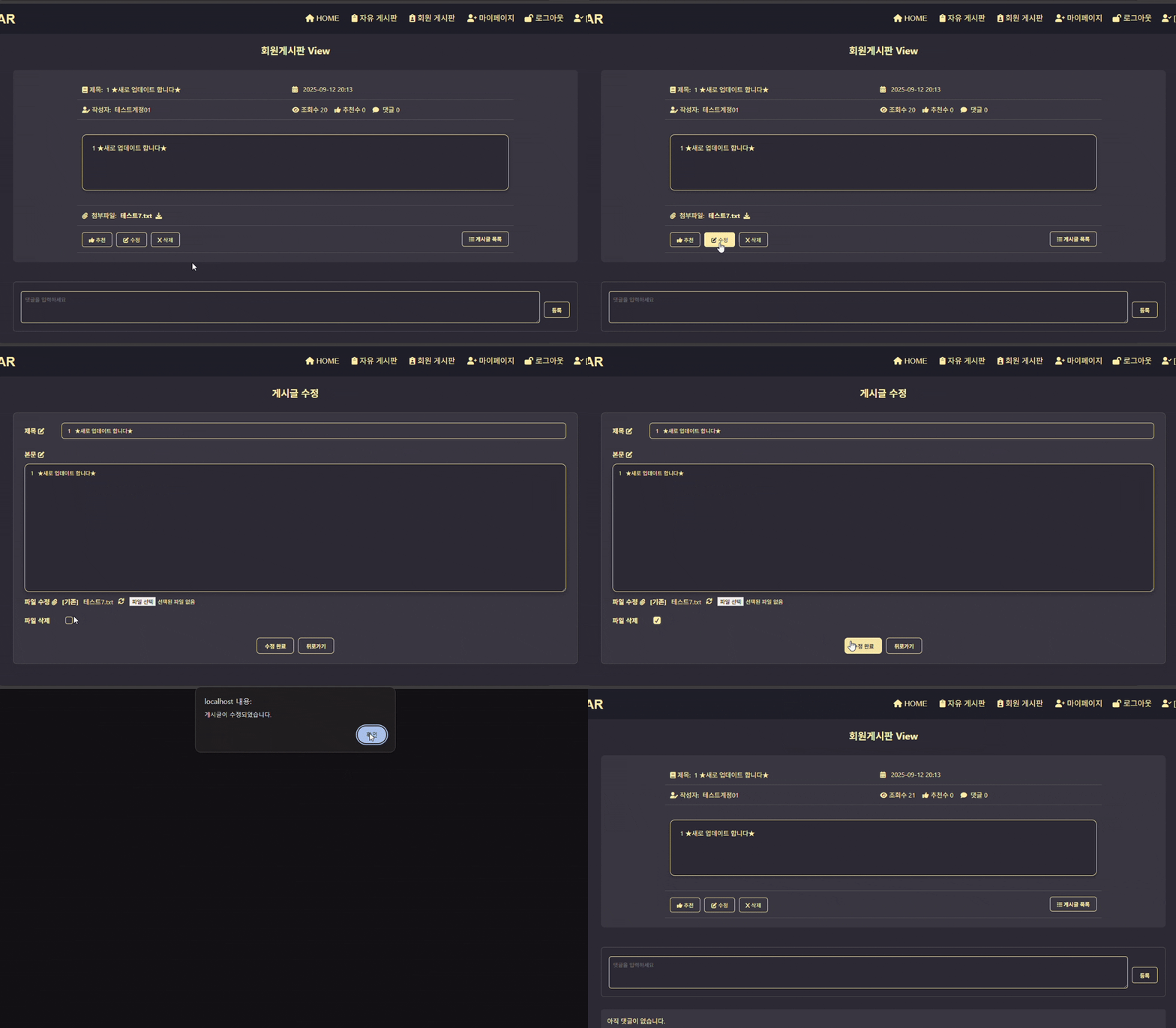
파일을 변경하면 새로운 파일로 갱신되어 저장되며, 파일삭제를 체크하면 업로드한 파일을 삭제한다.
여기서 게시글 정보를 수정하고 수정완료를 누르면, 사용자가 수정한 게시글 제목(input_title), 내용(input_title), 파일(input_file) 값이 POST방식으로memedit_proc.php에 전달된다.
2. Backend
<memedit_proc.php>
<?php
session_start();
date_default_timezone_set("Asia/Seoul");
if (!isset($_SESSION["user_id"])) {
echo "<script>
alert('회원만 이용가능합니다.');
location.href='../auth/login.php';
</script>";
exit;
}
include "../db/db_con.php";
$num = $_POST["num"];
$input_title = $_POST["input_title"];
$input_cont = $_POST["input_cont"];
$sql = "select file_name, file_copy from memboard where num=$num";
$result = mysqli_query($con, $sql);
$row = mysqli_fetch_assoc($result);
$ex_file_name = $row["file_name"];
$ex_file_copy = $row["file_copy"];
if (isset($_FILES["input_file"]["name"]))
$file_name = $_FILES["input_file"]["name"];
else
$file_name = "";
if (isset($_FILES["input_file"]["tmp_name"]))
$file_tmp = $_FILES["input_file"]["tmp_name"];
else
$file_tmp = "";
if (isset($_FILES["input_file"]["error"]))
$file_error = $_FILES["input_file"]["error"];
else
$file_error = 4;
if (isset($_POST["file_delete"]) && $_POST["file_delete"] == "1") {
if(!empty($ex_file_copy)) {
$filepath = "../uploads/".$ex_file_copy;
unlink($filepath);
$file_name = "";
$file_copy = "";
}
}
else if ($file_error === UPLOAD_ERR_OK && $file_name != "") {
if(!empty($ex_file_copy)) {
$filepath = "../uploads/".$ex_file_copy;
unlink($filepath);
}
$ext = pathinfo($file_name, PATHINFO_EXTENSION);
$file_copy = date("Ymd_His") . "." . $ext;
$upload_dir = "../uploads/";
if (!move_uploaded_file($file_tmp, $upload_dir . $file_copy)) {
echo "<script>
alert('파일 업로드에 실패하였습니다.');
history.go(-1);
</script>";
exit;
}
}
else {
$file_name = $ex_file_name;
$file_copy = $ex_file_copy;
}
$sql = "update memboard set title = '$input_title', content = '$input_cont', file_name = '$file_name', file_copy = '$file_copy' where num = $num";
mysqli_query($con, $sql);
mysqli_close($con);
echo "<script>
alert('게시글이 수정되었습니다.');
location.href='./mem_view.php?num=$num';
</script>";
?>
-
1. 입력값 확인:
게시글 수정 양식 페이지(mem_edit.php)에서 전달받은 게시글 번호(num), 게시글 제목(input_title), 게시글 내용(input_cont) 값을 각각 ($num, $input_title, $input_cont) 변수에 저장한다.
-
2. 파일정보 확인:
1) 만약 사용자가 파일을 수정하였다면, 해당 파일로 첨부파일이 갱신된다.
기존 파일이 존재하는 경우 unlink()를 통해 기존파일을 삭제한뒤, memboard 테이블에서 파일정보를 새로운 파일의 정보로 update 한다. 파일을 처리하는 과정은 11. 회원게시판-게시글작성 에서 이전에 정리해둔 방식과 동일하다.
2) 만약 mem_edit.php에서 파일삭제를 체크하여 $_POST["file_delete"] 값이 전달된 경우, unlink()를 통해 기존 업로드된 파일을 제거한 후, memboard 테이블에서 파일 정보를 없음처리한다.
-
3. 테이블 업데이트:
변수에 저장된 값을 토대로 memboard 테이블에서, 해당 게시글 번호에 해당하는 게시글 필드에서 title, content, file_name, file_copy 값을 update하여 게시글 내용을 수정한다.
3. 동작 정리
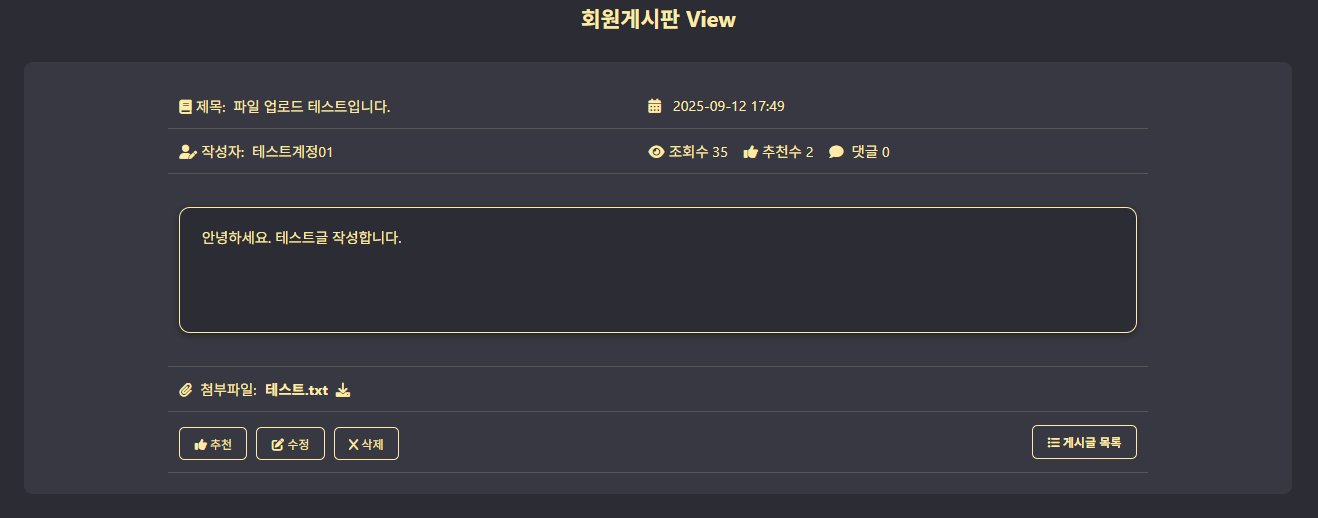
| 1. 회원게시글 내용 확인 페이지 |
|---|
 |
| 2. 수정 버튼 클릭 → 게시글 수정 페이지 이동 (영상) |
|---|
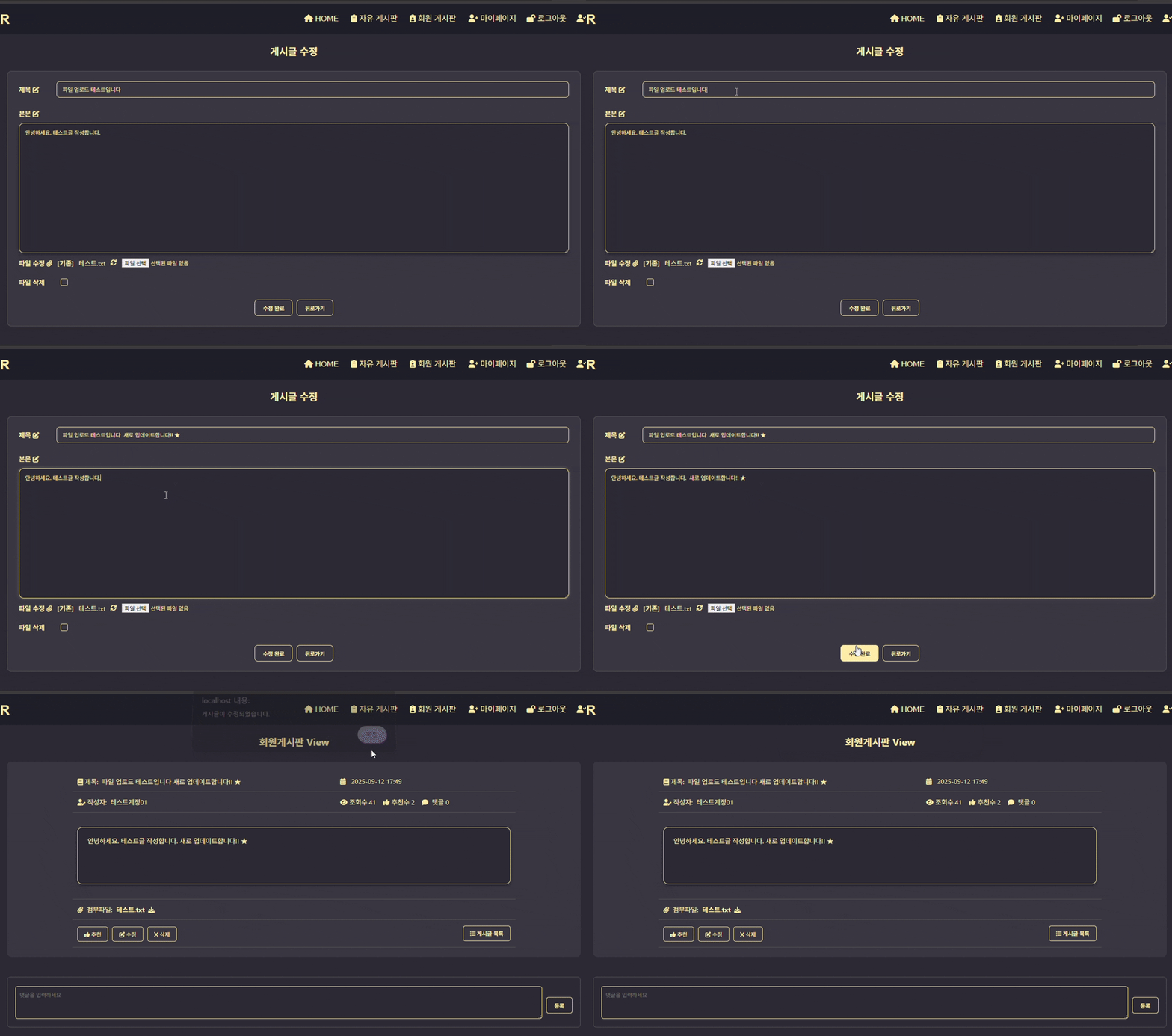 |
| 2-1. 게시글 내용을 수정하는 경우 (영상) |
|---|
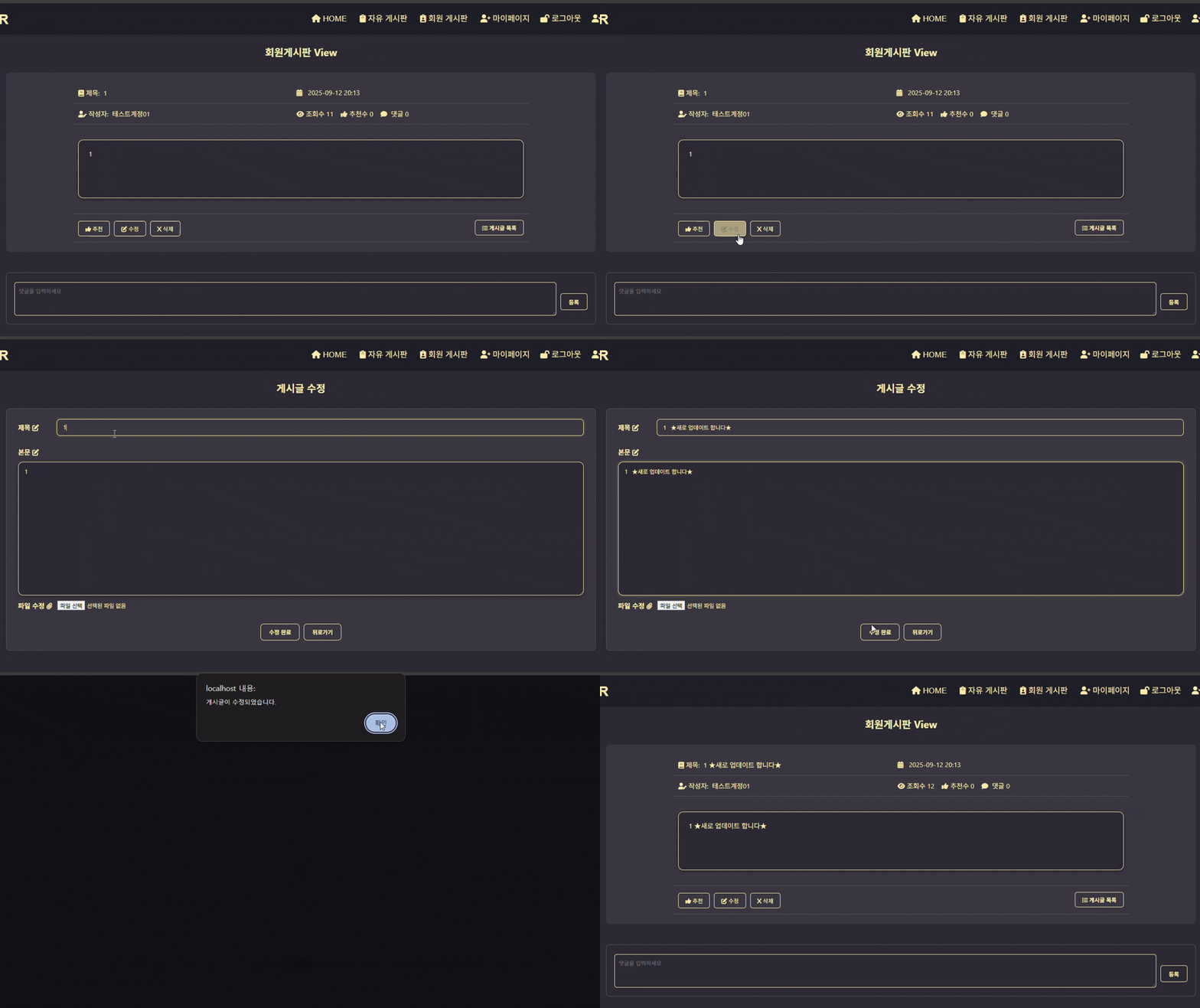 |
| 2-2. 새로 파일을 첨부하는 경우 (영상) |
|---|
 |
| 2-2. 첨부파일을 변경하는 경우 (영상) |
|---|
 |
| 2-3. 첨부파일을 삭제하는 경우 (영상) |
|---|
 |
| 3. 게시글 삭제 (영상) |
|---|
 |