6월 1주차 배움 정리
이스트소프트 프론트엔드 오르미를 시작하면서 기본부터 다시 배우게 되었습니다. 본 게시물은 수업하면서 중요하다고 생각했던 내용들을 정리하는 게시물입니다.
block / inline / inline-block
block
inline
inline-block
div / span
div
span
실습
스크린샷
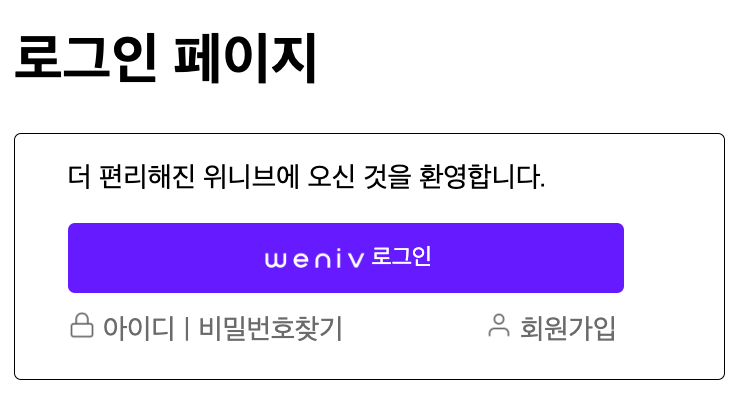
코드
<!DOCTYPE html>
<html lang="ko-KR">
  <head>
    <meta charset="UTF-8" />
    <meta name="viewport" content="width=device-width, initial-scale=1.0" />
    <title>로그인</title>
    <style>
      a {
        color: #767676;
        text-decoration: none;
      }
      #wrapper {
        display: flex;
        justify-content: space-between;
        margin-top: 10px;
        max-width: 314px;
      }
      section {
        max-width: 350px;
        height: 140px;
        border-radius: 4px;
        border: 1px solid;
        padding-left: 30px;
        padding-right: 25px;
      }
      button {
        background-color: #711bff;
        color: white;
        height: 40px;
        width: 318px;
        text-align: center;
        border-radius: 4px;
        border-style: none;
        display: flex;
        justify-content: center;
        align-items: center;
      }
      #icon-lock,
      #icon-user {
        width: 16px;
        height: 16px;
      }
      #weniv-logo {
        height: 18px;
        width: 64px;
      }
    </style>
  </head>
  <body>
    <h1>로그인 페이지</h1>
    <section>
      <p>더 편리해진 위니브에 오신 것을 환영합니다.</p>
      <!-- 로그인 모달 버튼 -->
      <button>
        <img src="./src/weniv-logo.png" alt="위니브 로고" id="weniv-logo" />
        <span>로그인</span>
      </button>
      <div id="wrapper">
        <div>
          <img src="./src/icon-lock.png" alt="" id="icon-lock" />
          <a href="#"><span>아이디</span></a>
          <span style="color: #767676"> | </span>
          <a href="#">비밀번호찾기</a>
        </div>
        <div>
          <img src="./src/icon-user.png" alt="" id="icon-user" />
          <a href="#"><span>회원가입</span></a>
        </div>
      </div>
    </section>
  </body>
</html>
초보 프론트엔드 개발자