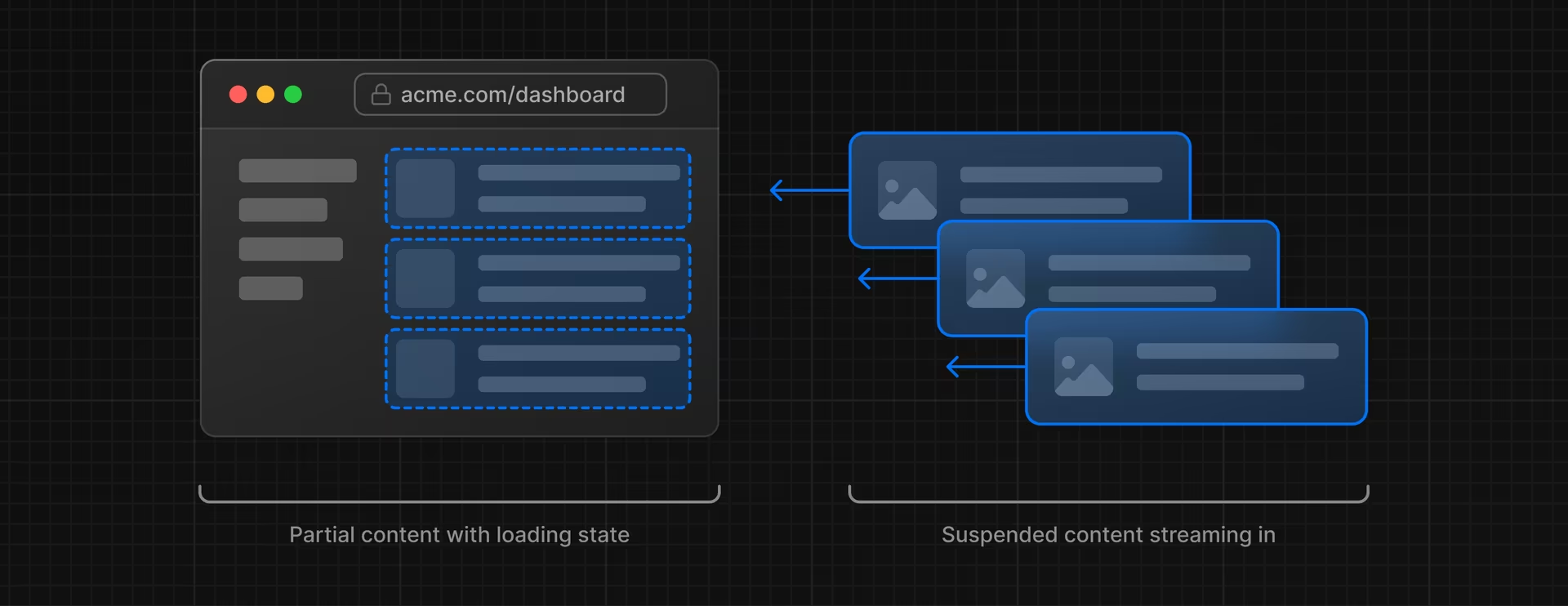
스트리밍은 데이터를 준비되는 대로 작은 '조각'으로 나누어 서버에서 클라이언트로 점진적으로 전송하는 기술이다.
이렇게 하면 느린 데이터 요청이 전체 페이지를 차단하지 않고, 사용자는 모든 데이터가 로드될 때까지 기다리지 않고도 페이지의 일부를 보고 상호 작용할 수 있다.
순차적 데이터 패칭 vs 병렬 데이터 패칭
순차적 데이처 패칭
순차적 데이터 패칭은 데이터 요청이 하나씩 순서대로 처리되는 방식이다.
첫 번째 요청이 완료되면 두 번째 요청이 시작된다.
이러한 방식은 간단하나 각 요청이 완료될 때까지 기다려야 해 오랜 시간이 소요될 수 있다.
병렬 데이터 패칭
병렬 데이터 패칭은 모든 데이터 요청이 동시에 시작되고, 각 요청이 완료되는 대로 데이터를 처리한다. 이 방식은 전체적인 로딩 시간을 단축시킬 수 있다.
스트리밍의 장점
-
빠른 초기 로드: 모든 데이터가 로드될 때까지 기다리지 않고 준비된 데이터를 먼저 표시할 수 있다.
-
사용자 경험 개선: 느린 데이터 요청으로 인해 전체 페이지가 차단되지 않으므로, 사용자에게 더 빠르게 반응하는 인터페이스를 제공한다.
Next.js에서 스트리밍 구현 방법
1. 페이지 수준에서 'loading.tsx' 파일 사용
//app/loading.tsx
export default function Loading(){
 return <p> Loading </p>;
}
.페이지 로드 중에 로딩 스피너나 플레이스홀더를 표시할 수 있다.
2. 특정 구성 요소에서 <Suspense> 사용
예시코드
import Header from "@/components/Header";
import Banner from "@/components/Banner";
import MovieArea from "@/components/MovieArea";
import { TMovie } from "@/types/movie";
import { Suspense } from "react";
import Movie from "@/components/MovieLoading";
//@ -> src/

//https://image.tmdb.org/t/p/w500/
export default async function Home() {
  return (
    <>
      {/* 헤더 */}
      <Header />
      {/* 배너 */}
      <Banner />
      {/* 무비 에어리어 */}
      <Suspense fallback={<Movie title="Now Playing" />}>
        <MovieArea path={"now_playing"} title="Now Playing" />
      </Suspense>
      <Suspense fallback={<Movie title="Popular" />}>
        <MovieArea path={"popular"} title="Popular" />
      </Suspense>
      <Suspense fallback={<Movie title="Upcoming" />}>
        <MovieArea path={"upcoming"} title="Upcoming" />
      </Suspense>
    </>
  );
}
export default function Movie({ title }: { title: string }) {
  return (
    <>
      <article className="bg-black py-10 px-4 xs:px-0">
        <section className="container mx-auto text-white">
          <span className="text-yellow-600">ONLINE STREAMING</span>
          <h2 className="text-[36px] font-bold mb-8">{title}</h2>
          <div className="grid grid-cols-1 xs:grid-cols-2 md:grid-cols-3 lg:grid-cols-4 gap-6 sm:px-0">
            {/* 스켈레톤 */}
            <div className="animate-pulse">
              <div className="h-[537px] xs:h-[297px] sm:h-[462px] md:h-[360px] xl:h-[453px] 2xl:h-[549px] bg-gray-800 rounded-md w-full"></div>
              <div className="flex justify-between items-center font-bold mt-4 mb-2 text-lg">
                <div className="h-6 bg-gray-800 rounded w-3/4"></div>
              </div>
              <div className="flex justify-between items-center text-sm text-gray-200">
                <div className="flex items-center gap-2 font-bold">
                  <div className="h-6 bg-gray-800 rounded w-4"></div>
                  <div className="h-6 bg-gray-800 rounded w-8"></div>
                </div>
                <div className="h-6 bg-gray-800 rounded w-10"></div>
              </div>
            </div>
          </div>
        </section>
      </article>
    </>
  );
}
이런식으로 스켈레톤을 적용해 놓은 loading페이지가 movieArea의 로딩화면처럼 보여지면서, 사용자 경험을 향상시킨다.
- React의 Suspense 컴포넌트를 사용하여 특정 부분의 데이터 로딩 상태를 관리할 수 있다.
