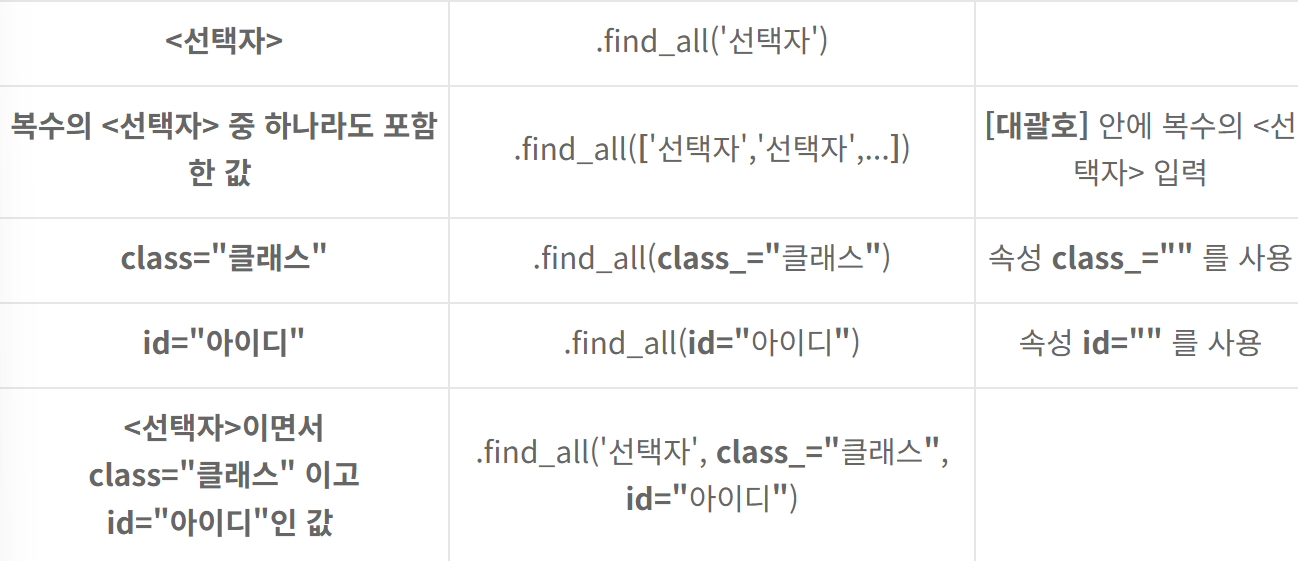
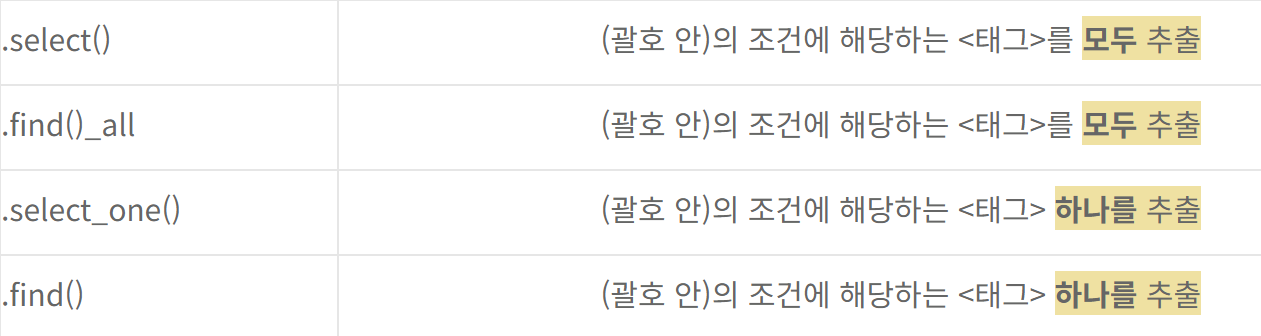
<.select() 와 .find() 메소드>
.select()와 .find() 모두 특정 경로의 정보를 가져다주는 메소드들다.
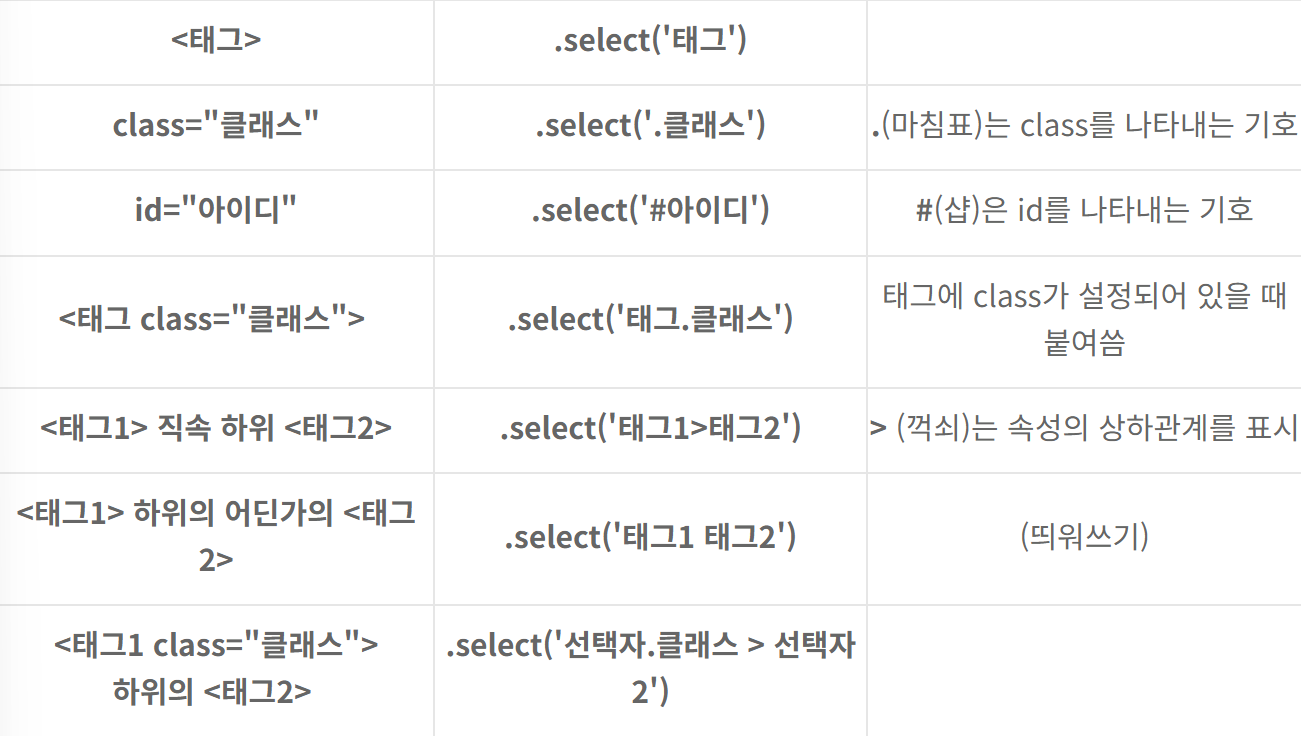
#태그 찾기
soup.select("title")
#특정 태그 아래에 있는 태그 찾기
soup.select("div a") #div 태그 아래에 있는 a 태그 찾기
#특정 태그 바로 아래에 있는 태그 찾기
soup.select("head > title")
soup.select("head > #link1") #아이디로 태그 찾음
#태그들의 형제 태그 찾기
soup.select("#link1 ~ .sister")
soup.select("#link1 + .sister")
#CSS class로 태그 찾기
soup.select(".sister")
#ID값으로 태그 찾기
soup.select("#link1")
ex2 = '''
<html>
    <head>
        <h1> 사야할 과일 </h1>
    </head>
    <body>
        <h1> 시장가서 사야할 과일 목록 </h1>
        <div>
          <p id='fruits1' class='name1' title='바나나'> 바나나
            <span class = 'price'> 3000원 </span>
            <span class = 'count'> 10개 </span>
            <span class = 'store'> 바나나가게 </span>
            <a href = 'https://www.banana.com'> banana.com </a>
          </p>
        </div>
        <div>
          <p id='fruits2' class='name2' title='체리'> 체리
            <span class = 'price'> 100원 </span>
            <span class = 'count'> 50개 </span>
            <span class = 'store'> 체리가게</span>
            <a href = 'https://www.cherry.com'> cherry.com </a>
          </p>
        </div>
        <div>
          <p id='fruits3' class='name3' title='오렌지'> 오렌지
            <span class = 'price'> 500원 </span>
            <span class = 'count'> 20개 </span>
            <span class = 'store'> 오렌지가게</span>
            <a href = 'https://www.orange.com'> orange.com </a>
          </p>
        <div>
    </body>
</html>
'''

bs = BeautifulSoup(ex2, 'html.parser')

tag = bs.select("p[title='오렌지']")[0]
print(tag.string) # 태그에 단순 문자열만 있는 경우 선택됨.
print('-' * 50)
print(tag.text)   # 태그의 모든 문자열 값 선택


실행 결과:

None
--------------------------------------------------
 오렌지
             500원
 20개
 오렌지가게
 orange.com
** None 이 나오는 이유
BeautifulSoup에서 .string은 해당 태그 안에 있는 단일한 문자열을 반환하는 속성
<p> 태그 안에 다양한 자식 요소들이 있기 때문에 단일한 문자열로 간주되지 않음
<p> 태그 안에는 <span> 태그들과 <a> 태그가 있으며, 이들은 모두 별도의 자식 요소로 간주됩니다.
따라서 .string 속성이 None을 반환함
대신에 .text를 사용하면 해당 태그 안에 있는 모든 문자열 값을 선택할 수 있음
예제 2)
####   a 태그 중에서 href 속성의 값이 'https://www.orange.com' 인 태그 선택
 <a href = 'https://www.orange.com'> orange.com </a>
print(bs.select("a[href='https://www.orange.com']")[0].string)
print(bs.select("a[href='https://www.orange.com']")[0].text)

실행 결과:
 orange.com
 orange.com


 # a 태그의 링크 값(href)을 전부 출력
tags = bs.select('a')
for tag in tags:
    print(tag['href'])

 실행 결과:
https://www.banana.com
https://www.cherry.com
https://www.orange.com
# 소스상에 tbody가 있는 경우는 자식태그로 인식이되나
# 크롬이 자동으로 생성한 tbody는 인식이 안됨.
ex4 = '''
<html>
    <head>
        <title> HTML 연습 </title>
    </head>
    <body>
        <table id='list1'>
          <tbody>
            <tr><td>no</td><td>name</td></tr>
            <tr><td>1</td><td>아로미</td></tr>
            <tr><td>2</td><td>왕눈이</td></tr>
          </tbody>
        </table>
        <table id='list2'>
          <tr><td>no</td><td>name</td></tr>
          <tr><td>1</td><td>아로미</td></tr>
          <tr><td>2</td><td>왕눈이</td></tr>
        </table>
    </body>
</html>
'''

bs = BeautifulSoup(ex4, 'html.parser')


# tr 선택
trs = bs.select('tr')

for tr in trs:
    tds = tr.select('td') # select의 연쇄 호출
    print(tds)

실행 결과:
[<td>no</td>, <td>name</td>]
[<td>1</td>, <td>아로미</td>]
[<td>2</td>, <td>왕눈이</td>]
[<td>no</td>, <td>name</td>]
[<td>1</td>, <td>아로미</td>]
[<td>2</td>, <td>왕눈이</td>]


# tr 선택
trs = bs.select('tr')
a = trs.select('td')
print(a)

실행결과: error
AttributeError: ResultSet object has no attribute 'select'. You're probably treating a list of elements like a single element. Did you call find_all() when you meant to call find()?
Select에 리스트 객체를 사용할 수 없는 이유
select 메소드는 BeautifulSoup에서 제공하는 메소드 중 하나로, 특정 요소 안에서 CSS 선택자를 사용해 다른 요소들을 찾는데 사용됩니다. 이 메소드는 Tag 객체나 BeautifulSoup 객체에만 사용할 수 있습니다. 이 객체들은 HTML 구조를 나타내며, 이 구조 안에서 다른 태그들을 탐색할 수 있도록 해줍니다.
하지만 select 메소드는 ResultSet 객체에는 사용할 수 없습니다. ResultSet 객체는 여러 Tag 객체들의 리스트와 비슷한 것으로, BeautifulSoup에서 특정 조건에 맞는 모든 태그를 찾았을 때 그 결과를 담는 용도로 사용됩니다. 각각의 Tag 객체는 select 메소드를 사용할 수 있지만, ResultSet 자체는 리스트와 같은 컬렉션이므로 select와 같은 탐색 메소드를 직접적으로 사용할 수 없습니다
즉, ResultSet은 단순히 여러 Tag 객체들을 포함하고 있는 컨테이너 역할을 하기 때문에, 각 태그를 개별적으로 다루기 위해서는 반복문을 사용하여 각 Tag 객체에 접근하고 그 객체에 select 메소드를 적용해야 합니다. 그래서 ResultSet에 직접 select를 사용하려고 하면 메소드가 존재하지 않는다는 에러가 발생하는 것입니다.
% 정리하면 select메소드는 리스트를 담을 수 없고 담으면 에러남
그래서 에러를 없애기 위해 for문으로 요소들을 개별적으로 처리하기 위함임