system config : 시스템의 모든 사용자와 모든 저장소에 적용
git config --systemglobal config : 시스템의 특정 사용자에게 적용
git config --globallocal config : 특정 저장소에 적용
git config --localuser name email
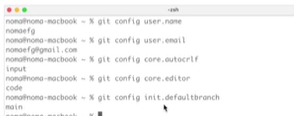
git config user.name <user_name>
git config user.email <user_email>
CRLF (End of Line) : 줄바꿈 문자 CR(\r), LF(\n)
git config core.autocrilf <value>-> =false : 파일에 적용된 줄바꿈 문자와 상관없이 작업한 환경의 줄바꿈 문자 적용
-> "=true"사용! : 파일에 적용된 줄바꿈 문자를 lf(\n)로 변경한다.
-> =input : commit 할 때만 lf로 변경한다.
Editor
git config core.editor <editor_name>이 에디터 쓰겠다~
Default Branch : github에서는 main이 브랜치 이름임
git config init.defaultBranch <branch_name>git 전체 설정 확인
git config --l
git config --list
git 범위별 설정 확인
git config --l --show-origin
git config --list --show-origin
git 항목별 설정 확인
git config <key>