
About EKS
Update EKS version
EKS Update
- EKS 는 한버전씩만 업그레이드를 할 수 있다.
- EKS update 명령어
aws eks update-cluster-version --name [cluster-name] --kubernetes-version [1.29]About K8s
KubeConfig 세팅
aws --profile [profile name] eks --region ap-northeast-2 update-kubeconfig --name [cluster name] --alias [원하는 이름]- 세팅 후 해당 경로 접속해서 정보 확인
cat ~/.kube/config- EKS context 변경
kubectl config use-context [context name]EKS RBAC
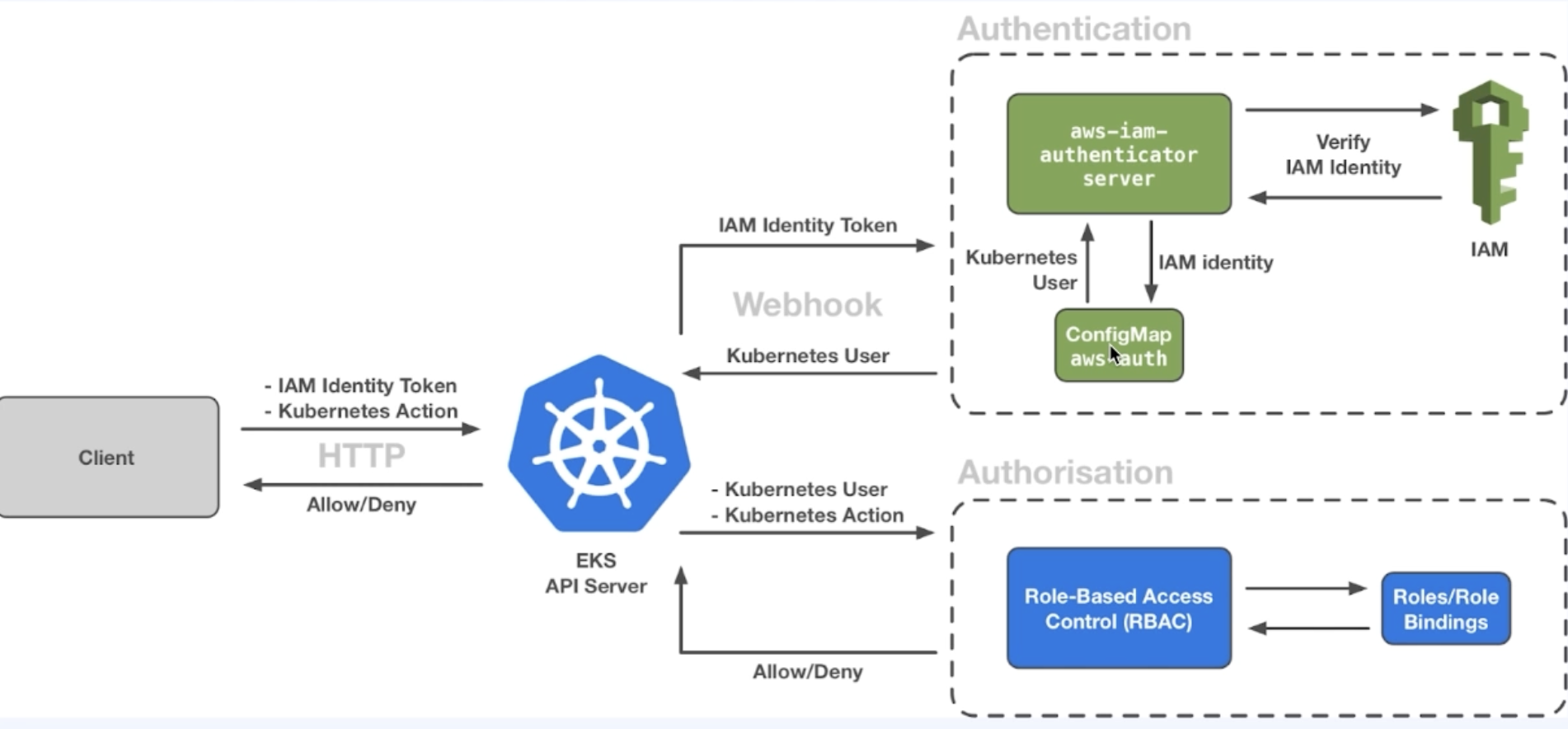
- IAM user로 등록한 사용자 즉 EKS를 구축한 사용자 이외의 IAM 유저는 AWS내의 EKS탭에 가보면 인가가 되지 않아 EKS 정보를 볼 수 없다.
- 다른 IAM 사용자도 사용하려면 configMap aws-auth를 등록해줘야 한다.
  aws_auth_users = [
    {
      userarn  = "arn:aws:iam::[account id]:user/admin2"
      username = "admin2"
      groups   = ["system:masters"]
    },
  ]

#  aws_auth_roles = [
#    {
#      rolearn = ""
#      username = ""
#      groups = ["system:masters"]
#    }
# ]- 해당 내용 Terraform 추가
참고: https://registry.terraform.io/modules/terraform-aws-modules/eks/aws/latest
node에 문제가 있을 때 해당 노드에 pod가 allocate 되는걸 막고싶을 때
k cordon [node name]다시 풀고싶을때
k uncordon [node name]
-- drain을 하고싶을때는 cordon을 하고 해야함.
ResoureQuota
- namesapce에 할당할 수 있는 자원을 제한하는 kind
namespace에 종속된 자원 혹은 종속되지 않은 자원 확인
k api-resources --namespaced=true # 종속된것
k api-resources --namespaced=false # 종속되지 않은 것
pod에 label command로 할당
k labels pods [pod name] key=valuereplicaset scale up command
k scale replicaset [replicaset name] --replicas [number]deployment 설명
- replicaset과 manifest 파일은 거의 동일하지만 아래와 같이 배포 전략을 내포할 수 있다.
strategy:
type: RollingUpdate-
RollingUpdate: maxUnavailable, maxSurge 값을 설정할 수 있다.(% 및 절대값으로 가능)
- maxUnavailable: 업데이트 중 최대 정지 가능한 pod의 수 설정- maxSurge: 업데이트 중에 동시에 업데이트 할 수 있는 pod의 개수
-
만약 100개의 pod가 replicaset으로 떠있다면
- maxUnavailable: 0%, maxSurge: 25% 라면- 100개를 띄운 상태에서 25개씩 업데이트를 진행할 수 있다.
-
Recreate: replicaset으로 떠있는 pod를 모두 지우고 다시 띄운다.
-
image update 명령어(보통은 k apply로 한다)
k set image deployment [deployment name] [container name]=[image name]- 업데이트 된 기록 확인
k rollout history deployment [deployment name]
k rollout history deployment [deployment name] --revision 1- 전 버전으로 rollback
k rollout undo deployment [deployment name] --to-revision [version]k8s 내부에서 curl 전용 pod 명령어 사용
k run curl -it --rm --image=curlimages/curl -- shk8s 서비스 타입 NodePort 포트열기
k expose deployment/[service name] --type="[service type]" --port [port number]configmap 생성
k create configmap --save-config [configmap name] --from-literal=app=pink --from-literal=connection.max=100

-- file

k create configmap --save-config [configmap name] --from-file=[file name]
secret 생성
k get secret test2-config generic --save-config [secret name] --from-literal password=test1234--from-literal password=test1234 는 자동으로 인코딩까지 해준다.
- base64로 인코딩된 값 디코딩 하는 법
echo -n '디코딩할 문자' | base 64 -d- txt 파일에서 db 접속정보 secret으로 설정하는 방법
k create secret generic --save-config [secret name] --from-env-file [가져올 txt파일]- secret 정보는 모두 etcd에 저장된다.
Terraform으로 서브넷 생성시
- 서브넷은 거의 대부분 destroy되고 재생성된다. 따라서 처음 vpc 구축 시에 잘 세팅하고 구축하여야 한다.

Dont regret it will be your future