IP Address Privacy: Is Your IP Address Exposing You?
Most people go about their day online without ever thinking about the string of numbers attached to their internet connection. Yet the moment you open a browser, stream a show, or send an email, your IP address is quietly working in the background, routing information back and forth so the internet knows where to send what you asked for. That constant, invisible activity is exactly why so many people start wondering: how much is my IP address actually telling the world about me?
It's a fair question, and one worth answering honestly rather than with scare tactics. An IP address privacy does carry some information about you, but it's far more limited than the headlines suggest. Understanding what it can and cannot reveal is the first step toward making sensible decisions about your own online privacy.
What Your IP Address Can and Cannot Revealwhat is an ip address
An IP address is essentially a numerical label assigned to your device by your internet service provider so that data can travel to and from you correctly. Think of it less like a home address and more like a postal code for your internet connection. It tells servers roughly where to send information, but it doesn't come with your name printed on it.
Here's what an IP address typically can indicate:
Your approximate geographic location, usually accurate to a city, region, or postal code, though rarely to an exact street
The internet service provider you use to connect
Whether you're connecting from a mobile network, a home broadband connection, or a business network
General timezone and language settings tied to your region
And here's what it cannot do on its own:
Reveal your full name or identity
Show your exact home address
Expose personal details like your date of birth, phone number, or financial information
Identify which specific device or person within a household is browsing
The gap between those two lists is where a lot of confusion lives. Yes, someone could look up a public IP address and learn that a connection originates from a particular city. No, they can't take that number and instantly know who you are. That link only exists on the internet service provider's side, and providers only hand over subscriber information when legally compelled to, typically through a court order or law enforcement request. Without that step, an IP address remains a fairly anonymous piece of network data.
Public vs Private IP: Why the Distinction Matters for Privacy
A lot of the confusion around IP privacy comes from mixing up public and private IP addresses, so it helps to separate the two clearly.
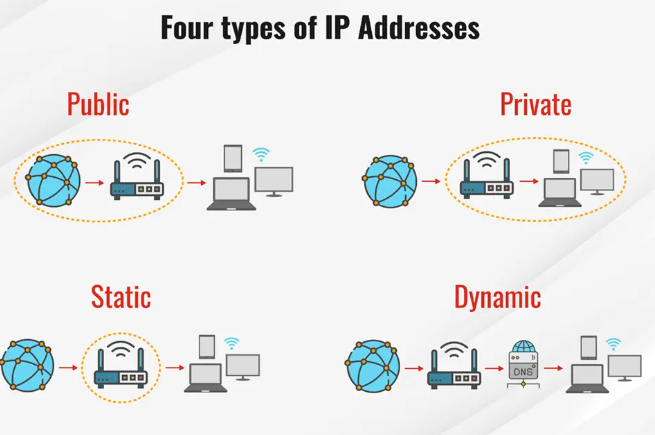
Your private IP address is the one assigned to your device within your own home or office network, usually handed out automatically by your router. It might look something like 192.168.1.15. This address only matters inside your local network. Your laptop, phone, and smart TV might all have private IPs that let them talk to each other and to your router, but none of that information ever reaches the wider internet directly.
Your public IP address is the one your internet provider assigns to your entire home or business network. This is the number that websites, apps, and online services actually see when you browse the web. It's the address that shows up when you check your current IP, and it's the one relevant to any conversation about online privacy.
This distinction matters because a private IP is never exposed to the outside world on its own, so it isn't a privacy concern in the way a public IP can be. When people worry about their IP being "leaked" or "tracked," they're really talking about their public IP, since that's the one visible to every website they visit.
Static vs Dynamic IP: How Your Address Already Limits Exposure
Another piece of the privacy puzzle involves whether your IP address is static or dynamic, and this distinction plays a bigger role in protecting you than most people realize.
A static IP address stays the same every time you connect. It doesn't change unless you or your provider deliberately reassign it. Static IPs are common for businesses running servers, or for situations where a consistent, unchanging address is genuinely useful.
A dynamic IP address, on the other hand, changes periodically. Most home internet connections are assigned dynamic IPs by default, meaning your address might rotate every few days, every time you restart your router, or on a schedule set by your provider. This happens simply because it's more efficient for providers to reuse a shared pool of addresses across many customers, rather than permanently tying one number to one household.
The privacy upside is a natural byproduct of this efficiency. Because your address changes periodically, any tracking or profiling tied to that specific number has a built-in expiration date. A website that logged your IP address last month may find that the same number now belongs to a completely different household. This doesn't make you invisible, but it does mean the "trail" left by any single IP address is naturally limited in how long it stays useful for tracking purposes.
If you're unsure whether your connection uses a static or dynamic address, you can usually find that detail by checking with your provider, though for most everyday home users, dynamic is the default.
Realistic Privacy Risks Tied to IP Exposure
With the myths set aside, it's worth talking honestly about the privacy concerns that are actually grounded in reality. None of these involve someone showing up at your door because they know your IP address, but they're still worth understanding.
Targeted advertising. Advertisers and ad networks use IP addresses as one signal among many to build a picture of a user's general location and browsing patterns. Combined with cookies, device fingerprints, and browsing history, this can result in ads that feel oddly specific to your region or recent searches. The IP address alone isn't doing all that work, but it contributes to the larger profile.
Regional content restrictions. Streaming services, retailers, and even news sites often use your IP address to determine what content, pricing, or catalog you're shown. This is why the same streaming platform might display a different lineup of shows depending on the country your IP suggests you're connecting from, or why flight and hotel prices sometimes shift based on location signals.
Combined-data tracking. In rare but real cases, an IP address becomes one piece of a larger puzzle used to track behavior across sites. On its own, an IP is a weak identifier because it's shared across households and changes over time. But when paired with login sessions, tracking pixels, and device information, it can contribute to a more persistent profile of online activity. This is less about the IP itself and more about how it's combined with everything else a website collects.
Network-level annoyances. Occasionally, an exposed IP address can be targeted with unwanted connection attempts, port scans, or spam traffic, particularly if it's been static for a long time or associated with unusual activity. These are generally more of a nuisance than a serious threat for typical home users, and most modern routers and firewalls handle them without any noticeable disruption.
Practical Steps to Protect Your IP Privacy
If you'd like a bit more control over what your IP address exposes, there are several practical, widely used approaches.
Use a VPN. A virtual private network routes your traffic through an intermediary server, so websites see the VPN's IP address rather than your own. This is one of the most straightforward ways to mask your public IP while browsing, particularly on public Wi-Fi networks where exposure risk is naturally higher.
Consider a proxy service. Similar to a VPN in concept, a proxy server sits between your device and the websites you visit, substituting its own IP address for yours. Proxies are often used for specific tasks like accessing region-restricted content or managing multiple accounts, though they typically don't encrypt traffic the way a VPN does.
Restart your router periodically. Since most home connections use dynamic IPs, restarting your router can sometimes trigger your provider to assign a new address, effectively refreshing your exposure.
Be selective about what you connect to. Public Wi-Fi networks, unfamiliar file-sharing services, and unverified links are common ways an IP address ends up more exposed than necessary. Sticking to secured, trusted networks reduces unnecessary visibility.
Adjust privacy settings where available. Some apps and services let you limit location sharing or restrict how your connection data is used, which can reduce how much your IP contributes to a broader tracking profile.
None of these steps are about achieving total invisibility online, since that's rarely realistic or necessary for everyday browsing. They're about narrowing the gap between casual, low-risk exposure and situations where your address might be used more aggressively for tracking or profiling.
Myth-Busting: What IP Addresses Don't Actually Do
Because IP addresses sound technical and a little mysterious, they've become the subject of some persistent myths, often repeated online without much scrutiny. It's worth clearing a few of these up.
Myth: "Someone with your IP address can hack your computer instantly." In reality, knowing an IP address alone doesn't grant access to your device. Hacking requires exploiting specific vulnerabilities, weak passwords, or unpatched software, none of which an IP address hands over by itself. A properly updated device behind a standard router and firewall isn't meaningfully more vulnerable just because someone knows its public IP.
Myth: "Your IP address reveals your exact home address." As covered earlier, an IP address at most narrows things down to a city or region, and even that estimate isn't always precise. It has never functioned like a street address, and no legitimate lookup tool can convert an IP into a specific residence.
Myth: "Changing your IP makes you completely anonymous online." Rotating or masking your IP address helps reduce one layer of tracking, but browsers, cookies, account logins, and device fingerprints all continue collecting information independently. IP privacy is one piece of a much larger privacy picture, not a complete solution on its own.
Myth: "Only people doing something wrong need to worry about their IP." Caring about IP privacy isn't about hiding anything; it's simply good digital hygiene, similar to locking a front door even in a safe neighborhood. Understanding your exposure is a reasonable, ordinary part of using the internet responsibly.
Understanding Your Exposure Is the First Step
IP address privacy sits in an interesting middle ground: it's not the dramatic identity risk that some corners of the internet suggest, but it's also not something to completely ignore. Your public IP can hint at your general location and your provider, contribute to targeted advertising, and shape the content you're shown, all without ever revealing who you actually are. Dynamic IPs already do quiet work behind the scenes to limit long-term exposure, and tools like VPNs and proxies give you additional control when you want it.
The best place to start is simply knowing what your current IP address actually reveals right now. A quick, free lookup can show you your public IP, your general location estimate, and other network details in seconds, giving you a clearer picture of your own exposure rather than relying on guesswork. If you'd like to see exactly what your connection is showing to the sites you visit, you can check your IP address at MyIPNow and get a straightforward, no-frills look at your current network information.
