CSS 속성 3형제
display : none
-요소를 화면에 표시하지 않음
-요소가 차지하는 공간도 사라진다
-=그냥 없애 버리는 방법!
visibility : hidden
-요소만 사라지고 차지하던 공간은 그대로 남는다
-모습과 속성을 숨긴다.
opacity : 0
: 요소 투영도
-요소만 사라지고 차지하던 공간은 그대로 남는다
-모습만 숨기고 속성은 남는다 ( ex. 클릭, 호버, 포커스 등 이벤트 기능)
-투명도 0~1 사이의 숫자로 조절 가능
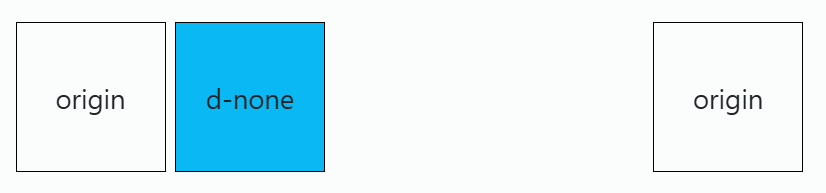
<style>
.square {
	width: 100px;
    height: 100px;
    border: 1px solid black;
    display: inline-block;
    text-align: center;
    line-height: 100px;
}
.d-none {
  /* display: none; */
  background-color: rgb(10, 185, 243);
}

.invisible {
  visibility: hidden;
  background-color: lightskyblue;
}
.invisible:hover {
  background-color: red;
}

.opacity-0 {
  opacity: 0;
  background-color: lightcyan;
}
.opacity-0:hover {
  background-color: red;
}

</style>
<body>
<div class="square">origin</div>
    <div class="square d-none">d-none</div>
    <div class="square invisible">invisible</div>
    <div class="square opacity-0">opacity-0</div>
    <div class="square">origin</div>
</body>