ToastProvider.tsx
🖥️ 구현 코드
/* eslint-disable react-refresh/only-export-components */
import { createContext, memo, type PropsWithChildren, useContext, useReducer } from "react";
import { createPortal } from "react-dom";
import { Toast } from "./Toast";
import { createActions, initialState, toastReducer, type ToastType } from "./toastReducer";
import { debounce } from "../../utils";
import { useCallback, useMemo } from "@hanghae-plus/lib/src/hooks";

type ShowToast = (message: string, type: ToastType) => void;
type Hide = () => void;
// Context 분리
// 상태 Context
const ToastStateContext = createContext<{
  message: string;
  type: ToastType;
}>({ ...initialState });
// 이벤트 Context
const ToastCommandContext = createContext<{ show: ShowToast; hide: Hide }>({
  show: () => null,
  hide: () => null,
});

const DEFAULT_DELAY = 3000;
// Hook 수정
export const useToastCommand = () => useContext(ToastCommandContext);
export const useToastState = () => useContext(ToastStateContext);

export const ToastProvider = memo(({ children }: PropsWithChildren) => {
  const [state, dispatch] = useReducer(toastReducer, initialState);
  const { show, hide } = useMemo(() => createActions(dispatch), [dispatch]);
  const visible = state.message !== "";
  // 메모이제이션
  const hideAfter = useMemo(() => debounce(hide, DEFAULT_DELAY), [hide]);
  // 메모이제이션
  const showWithHide: ShowToast = useCallback(
    (...args) => {
      show(...args);
      hideAfter();
    },
    [show, hideAfter],
  );
  // props 로 넘길 값 (메모이제이션)
  const commandValue = useMemo(
    () => ({
      show: showWithHide,
      hide: hide,
    }),
    [showWithHide, hide],
  );
  return (
    // Provider 중첩
    <ToastCommandContext.Provider value={commandValue}>
      <ToastStateContext.Provider value={state}>
        {children}
        {visible && createPortal(<Toast />, document.body)}
      </ToastStateContext.Provider>
    </ToastCommandContext.Provider>
  );
});
📘 work-log
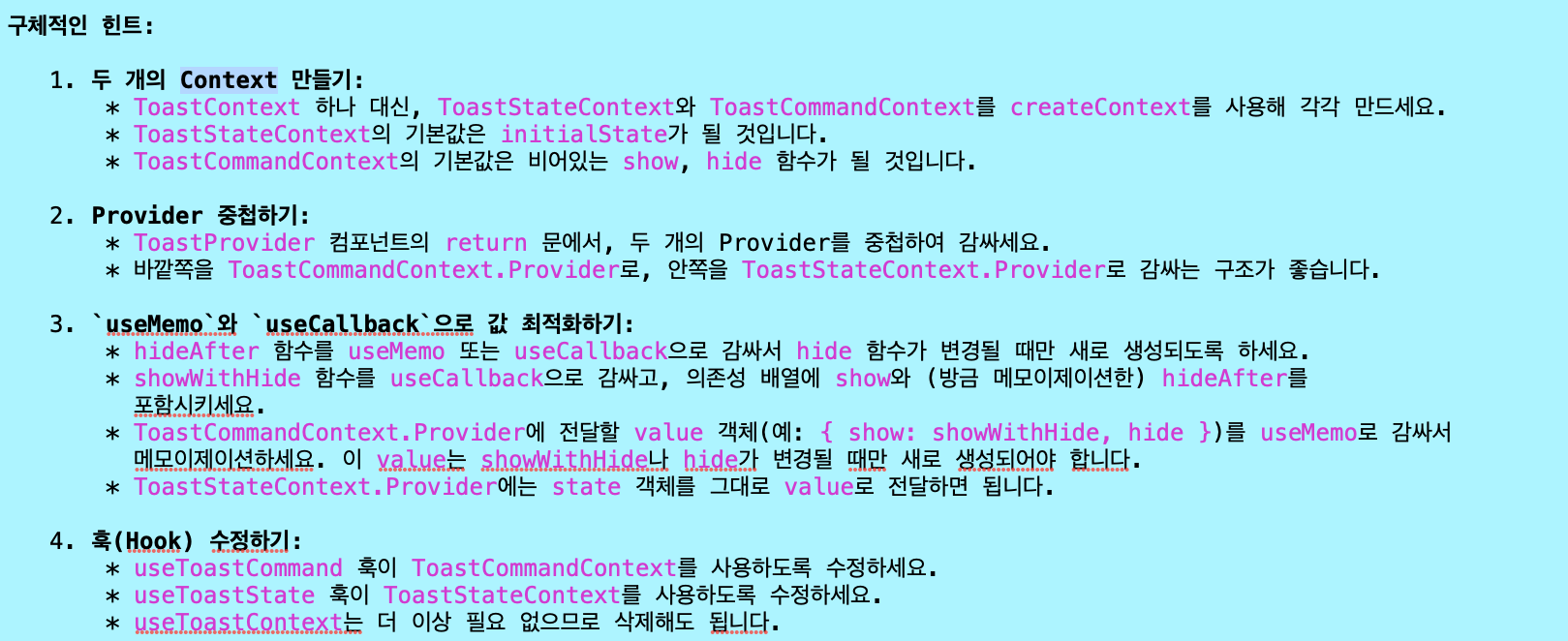
🤖 Gemini 설명문
궁금증 정리
1단계: 컨텍스트 분리 (State와 Command로 나누기)
-
이전 문제: ToastContext 하나에 상태(message, type)와 함수(show, hide)가 모두 들어있었습니다.
-
왜 문제인가? React 컨텍스트는 value가 변경되면 해당 컨텍스트를 구독하는 모든 컴포넌트를 리렌더링시킵니다.
즉, 토스트 메시지(state)가 나타났다가 사라질 때마다 ToastContext의 value가 계속 변경됩니다.
이로 인해 show 함수만 필요한 버튼 컴포넌트까지 불필요하게 리렌더링되는 문제가 발생합니다. -
해결책 (1단계): 자주 변하는 데이터(state)와 거의 변하지 않는 데이터(command)를 별개의 컨텍스트
(ToastStateContext,ToastCommandContext)로 분리했습니다. 이제 컴포넌트는 자신이 정말 필요한 정보만 구독할 수 있게 되었습니다.💬: 모든 부서의 소식을 하나의 게시판에 공지하는 대신,
'인사팀 게시판'과 '개발팀 게시판'을 따로 만드는 것과 같습니다.
저는 개발팀 소식만 보면 되니, 인사팀 공지가 올라와도 신경 쓰지 않아도 됩니다.
2단계: 각 훅이 분리된 컨텍스트를 바라보게 수정
- 이전 문제: 컨텍스트를 분리했지만,
useToastCommand와useToastState훅이 여전히 예전 ToastContext를 바라보고 있었습니다. - 왜 문제인가? 1단계에서 게시판을 나눠놓고, 모두가 여전히 예전 통합 게시판만 쳐다보는 것과 같습니다. 분리의 의미가 전혀 없죠.
- 해결책 (2단계):
useToastCommand는 ToastCommandContext를,useToastState는 ToastStateContext를 각각 바라보도록 수정했습니다.
이로써 컴포넌트가"나는 Command만 구독할래" 또는 "나는 State만 구독할래"라고 명확하게 선언할 수 있게 되었습니다.
3단계: Provider의 value를 useMemo로 메모이제이션
- 이전 문제:
ToastCommandContext.Provider에
value로{ show: showWithHide, hide: hide }와 같은 객체를 매번 새로 생성해서 전달하고 있었습니다. - 왜 문제인가? JavaScript에서 {}는 내용이 같아도 매번 새로운 메모리 주소를 갖는 새 객체를 만듭니다.
React는 이 메모리 주소(참조)가 바뀌면 value가 변경되었다고 인식하고,
이 컨텍스트를 구독하는 모든 자식 컴포넌트를 리렌더링시킵니다. Command는 변하지 않았는데도 말이죠! - 해결책 (3단계):
useMemo를 사용해 commandValue 객체를 감쌌습니다.
이렇게 하면 showWithHide나 hide 함수 자체가 바뀌지 않는 한,useMemo는 이전에 생성한 commandValue 객체의 참조를 그대로 반환합니다.
React는 value가 바뀌지 않았다고 판단하여 불필요한 리렌더링을 막아줍니다.
참조 안정성을 확보한 것입니다.
4단계: 액션 생성 함수(createActions)를 useMemo로 메모이제이션
- 이전 문제: 3단계에서 commandValue를 useMemo로 감쌌지만,
그 의존성 배열에 들어있는 showWithHide와 hide 함수가ToastProvider가 리렌더링될 때마다 새로 생성되고 있었습니다. - 왜 문제인가? hide 함수가 계속 새로 만들어지니, hide에 의존하는 hideAfter도 새로 만들어지고, 결국 commandValue도 매번 새로 계산되었습니다.
3단계의 useMemo가 무력화되는 것이죠. - 해결책 (4단계):
createActions(dispatch)자체를 useMemo로 감싸주었습니다. useReducer의 dispatch 함수는 참조가 절대 변하지 않는다는 것을 React가 보장합니다.
따라서useMemo(() => createActions(dispatch), [dispatch])는 최초 렌더링 시에만 show, hide 함수를 만들고, 그 이후에는 항상 동일한 함수를 반환합니다. 이로써 hide 함수가 안정화되고, 3단계의 useMemo까지 완벽하게 작동하게 된 것입니다.
결론
이 4단계 리팩토링을 통해 "상태(State)의 변경이 명령(Command)만 사용하는 컴포넌트에 영향을 주지 않도록" 완벽하게 분리해냈습니다.
이는 React의 렌더링 메커니즘을 깊이 이해하고 활용한 매우 효과적인 최적화 패턴이며, 복잡한 애플리케이션에서 뛰어난 성능을 유지하는 비결입니다.