
Thinking in React
React can change how you think about the designs you look at and the apps you build. When you build a user interface with React, you will first break it apart into pieces called components. Then, you will describe the different visual states for each of your components. Finally, you will connect your components together so that the data flows through them. In this tutorial, we’ll guide you through the thought process of building a searchable product data table with React.
React는 여러분이 디자인을 바라보는 방식과 앱을 만드는 사고방식을 바꾼다.
React로 사용자 인터페이스(UI)를 만들 때는 먼저 화면을 여러 조각으로 나누어 컴포넌트(component)라는 단위로 쪼갠다.
그 다음, 각 컴포넌트가 가질 수 있는 다양한 시각적 상태를 정의하고 마지막으로 이 컴포넌트들을 서로 연결해 데이터가 흐르도록 만든다.
이 튜토리얼에서는 React로 검색 가능한 상품 데이터 테이블을 만드는 과정을 단계별로 설명한다.
Start with the mockup
Imagine that you already have a JSON API and a mockup from a designer.
디자이너가 제공한 목업(mockup)과 이미 완성된 JSON API가 있다고 상상해보자.
The JSON API returns some data that looks like this:
JSON API가 반환하는 데이터는 아래와 같다:
[
{ category: "Fruits", price: "$1", stocked: true, name: "Apple" },
{ category: "Fruits", price: "$1", stocked: true, name: "Dragonfruit" },
{ category: "Fruits", price: "$2", stocked: false, name: "Passionfruit" },
{ category: "Vegetables", price: "$2", stocked: true, name: "Spinach" },
{ category: "Vegetables", price: "$4", stocked: false, name: "Pumpkin" },
{ category: "Vegetables", price: "$1", stocked: true, name: "Peas" }
]
The mockup looks like this:
목업은 상품 카테고리별로 정리된 표 형태를 띤다. Fruits와 Vegetables로 나뉘고, 각 상품의 이름, 가격, 재고 여부가 표시된다.
To implement a UI in React, you will usually follow the same five steps.
React로 UI를 구현할 때는 보통 다섯 가지 단계를 거친다.
Step 1: Break the UI into a component hierarchy
Start by drawing boxes around every component and subcomponent in the mockup and naming them. If you work with a designer, they may have already named these components in their design tool. Ask them!
먼저 목업에서 각 컴포넌트와 하위 컴포넌트를 구분해 박스로 나누고 이름을 붙인다.
디자이너와 협업 중이라면 디자인 툴(Figma 등)에 이미 컴포넌트 이름이 설정돼 있을 수도 있다.
Depending on your background, you can think about splitting up a design into components in different ways:
배경 지식에 따라 컴포넌트를 나누는 기준은 다를 수 있다.
Programming — use the same techniques for deciding if you should create a new function or object. One such technique is the separation of concerns, that is, a component should ideally only be concerned with one thing. If it ends up growing, it should be decomposed into smaller subcomponents.
CSS — consider what you would make class selectors for. (However, components are a bit less granular.)
Design — consider how you would organize the design’s layers.
프로그래밍 관점에서는 새로운 함수나 객체를 만들 때처럼 관심사의 분리(Separation of Concerns)를 기준으로 나눈다. 하나의 컴포넌트는 한 가지 역할만 담당해야 하며, 너무 커진다면 더 작은 하위 컴포넌트로 분리한다.
CSS 관점에서는 어떤 요소에 클래스를 부여할지를 생각하면 도움이 된다. 다만 컴포넌트는 CSS 셀렉터보다 더 큰 단위다.
디자인 관점에서는 디자인의 레이어를 어떻게 나눌지를 고려한다.
If your JSON is well-structured, you’ll often find that it naturally maps to the component structure of your UI. That’s because UI and data models often have the same information architecture—that is, the same shape. Separate your UI into components, where each component matches one piece of your data model.
JSON 데이터가 잘 구조화되어 있다면, 그 구조가 UI의 컴포넌트 구조와 자연스럽게 일치하는 경우가 많다.
이는 UI와 데이터 모델이 동일한 정보 구조, 즉 동일한 형태를 가지는 경우가 많기 때문이다.
데이터 모델의 각 부분에 맞게 UI를 컴포넌트로 나누면 된다.
There are five components on this screen:
이 화면에는 다섯 개의 컴포넌트가 있다.
FilterableProductTable (회색): 앱 전체를 감싸는 루트 컴포넌트
SearchBar (파란색): 사용자 입력을 받는 검색창
ProductTable (보라색): 사용자 입력에 따라 필터링된 상품 목록을 표시
ProductCategoryRow (초록색): 각 카테고리의 제목 표시
ProductRow (노란색): 개별 상품의 행 표시
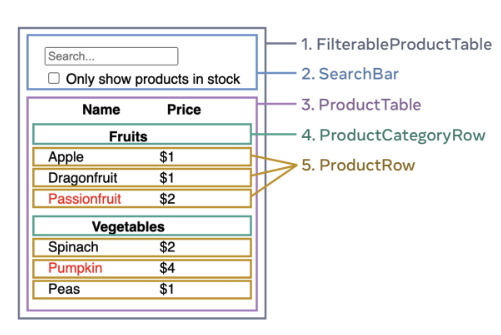
If you look at ProductTable (lavender), you’ll see that the table header (containing the “Name” and “Price” labels) isn’t its own component. This is a matter of preference, and you could go either way. For this example, it is a part of ProductTable because it appears inside the ProductTable’s list. However, if this header grows to be complex (e.g., if you add sorting), you can move it into its own ProductTableHeader component.
ProductTable을 보면 Name과 Price가 적힌 테이블 헤더는 별도 컴포넌트로 분리되어 있지 않다.
이건 개발자의 선택 문제다.
이 예시에서는 간단하기 때문에 ProductTable 안에 포함되어 있지만 나중에 정렬(sorting) 같은 기능이 추가된다면 별도의 ProductTableHeader 컴포넌트로 분리할 수 있다.
Now that you’ve identified the components in the mockup, arrange them into a hierarchy. Components that appear within another component in the mockup should appear as a child in the hierarchy:
이제 컴포넌트를 식별했으니 계층 구조로 정리해보자.
목업에서 다른 컴포넌트 안에 포함된 요소는 계층 구조에서 하위 컴포넌트로 나타나야 한다.
FilterableProductTable
SearchBar
ProductTable
ProductCategoryRow
ProductRow
Step 2: Build a static version in React
Now that you have your component hierarchy, it’s time to implement your app. The most straightforward approach is to build a version that renders the UI from your data model without adding any interactivity… yet! It’s often easier to build the static version first and add interactivity later. Building a static version requires a lot of typing and no thinking, but adding interactivity requires a lot of thinking and not a lot of typing.
컴포넌트 계층 구조를 정리했으니, 이제 실제 앱을 구현할 차례다.
가장 단순한 방법은 데이터 모델을 기반으로 UI를 그리되, 아직은 상호작용을 넣지 않는 정적 버전을 먼저 만드는 것이다.
정적 버전을 먼저 만드는 이유는, 이 단계에서는 단순히 코드를 많이 작성하기만 하면 되지만,
상호작용을 추가하는 단계에서는 더 많은 사고와 구조 설계가 필요하기 때문이다.
To build a static version of your app that renders your data model, you’ll want to build components that reuse other components and pass data using props. Props are a way of passing data from parent to child. (If you’re familiar with the concept of state, don’t use state at all to build this static version. State is reserved only for interactivity, that is, data that changes over time. Since this is a static version of the app, you don’t need it.)
정적 버전을 만들려면 컴포넌트를 재사용 가능한 구조로 구성하고, props를 통해 부모 컴포넌트에서 자식 컴포넌트로 데이터를 전달한다.
여기서 중요한 점은 state를 사용하지 않는 것이다.
state는 시간에 따라 변하는 데이터를 다루는 데 사용되며, 상호작용이 없는 정적 버전에서는 필요하지 않다.
You can either build “top down” by starting with building the components higher up in the hierarchy (like FilterableProductTable) or “bottom up” by working from components lower down (like ProductRow). In simpler examples, it’s usually easier to go top-down, and on larger projects, it’s easier to go bottom-up.
컴포넌트를 구현하는 순서는 두 가지 접근 방식이 있다.
상위 컴포넌트부터 만드는 탑다운(top-down) 방식과,
하위 컴포넌트부터 조립하는 보텀업(bottom-up) 방식이다.
간단한 예제에서는 보통 탑다운 방식이 편하고, 규모가 큰 프로젝트에서는 보텀업 방식이 효율적이다.
After building your components, you’ll have a library of reusable components that render your data model. Because this is a static app, the components will only return JSX. The component at the top of the hierarchy (FilterableProductTable) will take your data model as a prop. This is called one-way data flow because the data flows down from the top-level component to the ones at the bottom of the tree.
이 단계를 마치면 데이터 모델을 화면에 렌더링하는 재사용 가능한 컴포넌트 라이브러리가 완성된다.
이때 모든 컴포넌트는 JSX만 반환하며, 최상위 컴포넌트(FilterableProductTable)는 데이터 모델을 props로 받아 하위 컴포넌트로 전달한다.
이런 구조를 단방향 데이터 흐름(one-way data flow)이라고 하며,
데이터는 트리의 꼭대기에서 아래로만 흘러간다.
Pitfall
At this point, you should not be using any state values. That’s for the next step!
주의할 점:
이 시점에서는 state를 사용하지 않는다.
state는 다음 단계(상호작용 추가)에서 다룬다.
Step 3: Find the minimal but complete representation of UI state
To make the UI interactive, you need to let users change your underlying data model. You will use state for this.
UI를 상호작용 가능하게 만들려면 사용자가 데이터 모델을 변경할 수 있어야 한다.
이를 위해 React의 state(상태)를 사용한다.
Think of state as the minimal set of changing data that your app needs to remember. The most important principle for structuring state is to keep it DRY (Don’t Repeat Yourself). Figure out the absolute minimal representation of the state your application needs and compute everything else on-demand. For example, if you’re building a shopping list, you can store the items as an array in state. If you want to also display the number of items in the list, don’t store the number of items as another state value—instead, read the length of your array.
state는 앱이 기억해야 하는 변할 수 있는 최소한의 데이터 집합으로 생각하면 된다.
state를 구성할 때 가장 중요한 원칙은 DRY(Don’t Repeat Yourself), 즉 중복을 피하는 것이다.
앱이 동작하는 데 꼭 필요한 최소한의 상태만 저장하고, 그 외의 값은 필요할 때 계산한다.
예를 들어, 쇼핑 리스트를 만든다면 state에는 단순히 항목 배열만 저장하면 된다.
리스트에 들어 있는 항목 개수를 표시하려면 별도의 state를 만들지 말고, array.length로 계산하면 된다.
Now think of all of the pieces of data in this example application:
이제 이 예제 앱에 포함된 데이터를 살펴보자.
제품의 원본 목록
사용자가 입력한 검색 텍스트
체크박스의 값
필터링된 제품 목록
Which of these are state? Identify the ones that are not:
이 중에서 어떤 항목이 state일까?
다음 질문을 통해 state가 아닌 것을 걸러낼 수 있다.
시간이 지나도 변하지 않는가? 그렇다면 state가 아니다.
부모 컴포넌트에서 props로 전달되는가? 그렇다면 state가 아니다.
기존의 state나 props를 이용해 계산할 수 있는가? 그렇다면 state가 아니다.
What’s left is probably state.
이 세 가지를 제외하고 남은 것이 진짜 state다.
Let’s go through them one by one again:
각 항목을 다시 살펴보면,
제품의 원본 목록은 props로 전달되므로 state가 아니다.
검색 텍스트는 시간이 지나며 변하고 계산할 수 없으므로 state이다.
체크박스의 값도 마찬가지로 변할 수 있고 계산할 수 없으므로 state이다.
필터링된 제품 목록은 기존 데이터와 검색 텍스트, 체크박스 값을 조합해 계산할 수 있으므로 state가 아니다.
This means only the search text and the value of the checkbox are state! Nicely done!
결국, 검색 텍스트와 체크박스 값만 state로 관리하면 된다.
이 두 가지가 사용자의 상호작용에 따라 변하는 핵심 데이터다.
Props vs State
There are two types of “model” data in React: props and state. The two are very different:
Props are like arguments you pass to a function. They let a parent component pass data to a child component and customize its appearance. For example, a Form can pass a color prop to a Button.
State is like a component’s memory. It lets a component keep track of some information and change it in response to interactions. For example, a Button might keep track of isHovered state.
Props and state are different, but they work together. A parent component will often keep some information in state (so that it can change it), and pass it down to child components as their props. It’s okay if the difference still feels fuzzy on the first read. It takes a bit of practice for it to really stick!
props와 state
Props는 함수에 전달하는 인자 같습니다. 부모컴포넌트 자식컴포넌트에 데이터를 전달해서 커스터마이즈 할수 있도록 합니다. 예를 들면 버튼에 color라는 props를 전달할수 있음.
State는 컴포넌트의 기억과 같습니다. 컴포넌트가 정보를 추적할수 있게하며 상호작용에 반응하여 바뀔수도 있다. 예를 들어 버튼 컴포넌트는 isHovered state를 추적하여 마우스가 올라가 있는지 확인가능하다.
Identify where your state should live
After identifying your app’s minimal state data, you need to identify which component is responsible for changing this state, or owns the state. Remember: React uses one-way data flow, passing data down the component hierarchy from parent to child component. It may not be immediately clear which component should own what state. This can be challenging if you’re new to this concept, but you can figure it out by following these steps!
state가 어디 위치해야하는지 정하기.
앱의 최소한의 state 데이터를 정했다면 어떤 컴포넌트가 state 변경을 책임지고 어떤 컴포넌트 해당 state를 소유하는지 결정해야한다. React는 단방향 데이터 흐름인것을 기억해보면 데이터는 부모에서 자식계층으로 넘어갑니다. 지금 바로 어떤 컴포넌트가 state를 가져야하는지 모를수 있다. 만약 새로운 개념이라면 어려울수 있지만 아래 단계를 따르면 충분히 알수있게 된다.
For each piece of state in your application:
Identify every component that renders something based on that state.
Find their closest common parent component—a component above them all in the hierarchy.
Decide where the state should live:
Often, you can put the state directly into their common parent.
You can also put the state into some component above their common parent.
If you can’t find a component where it makes sense to own the state, create a new component solely for holding the state and add it somewhere in the hierarchy above the common parent component.
애플리케이션의 각 state 마다 이렇게 보자
그 state를 기준을로 화면을 렌더링하는 컴포넌트가 누구인지 정의하기
그 컴포넌트의 가장 가까운 공통 부모 컴포넌트 찾기
state를 어디다 둘지 결정하기.
-
보통은 그 공통 부모에 둔다.
-
또는 공통 부모보다 더 위쪽에 둘수도 있다.
-
만약 state를 소유할만한 컴포넌트를 못찾겠다면 state만 관리하는 새로운 컴포넌트를 만들어 공통 부모 위에 배치해도 된다.
In the previous step, you found two pieces of state in this application: the search input text, and the value of the checkbox. In this example, they always appear together, so it makes sense to put them into the same place.
예제에서는 이 앱에 state가 두 가지이다.
이 예제에서는 이 둘이 항상 같이 쓰이기에 같은 위치에 state를 두는것이 맞다.
Now let’s run through our strategy for them:
Identify components that use state:
ProductTable needs to filter the product list based on that state (search text and checkbox value).
SearchBar needs to display that state (search text and checkbox value).
Find their common parent: The first parent component both components share is FilterableProductTable.
Decide where the state lives: We’ll keep the filter text and checked state values in FilterableProductTable.
So the state values will live in FilterableProductTable.
이 원칙을 적용해보자.
state를 사용하는 컴포넌트 찾기
- ProductTable은 검색 텍스트와 체크박스 값에 따라 상품 목록을 필터링해야 한다.
- SearchBar는 검색 텍스트와 체크박스 값을 화면에 보여줘야 한다.
공통 부모 찾기
- 두 컴포넌트가 처음으로 함께 만나는 부모는 FilterableProductTable이다.
state 위치 결정하기
- 그래서 검색어와 체크 여부 state는 FilterableProductTable에 두는 것이 적절하다.
즉, 이 state들은 FilterableProductTable 안에서 관리된다.
Add state to the component with the useState() Hook. Hooks are special functions that let you “hook into” React. Add two state variables at the top of FilterableProductTable and specify their initial state:
그 다음에는 useState 훅을 사용해서 이 컴포넌트에 state를 추가한다.
훅은 React의 기능을 컴포넌트 안에서 사용할 수 있게 해주는 특별한 함수다.
FilterableProductTable의 상단에 두 개의 state 변수를 만들고, 각각의 초기값도 지정한다.
Currently your app renders correctly with props and state flowing down the hierarchy. But to change the state according to user input, you will need to support data flowing the other way: the form components deep in the hierarchy need to update the state in FilterableProductTable.
지금까지는 앱이 props와 state가 위에서 아래로 내려가는 구조로 잘 동작하고 있다.
하지만 이제는 사용자 입력에 따라 state가 바뀌어야 한다.
그러려면 계층 아래쪽에 있는 form 컴포넌트들이 FilterableProductTable 안의 state를 업데이트할 수 있어야 한다.
React makes this data flow explicit, but it requires a little more typing than two-way data binding. If you try to type or check the box in the example above, you’ll see that React ignores your input. This is intentional. By writing
<input value={filterText} />, you’ve set the value prop of the input to always be equal to the filterText state passed in from FilterableProductTable. Since filterText state is never set, the input never changes.
React에서는 이런 데이터 흐름을 명시적으로 처리한다.
다만 양방향 바인딩(two-way data binding) 방식보다 코드가 조금 더 길어진다.
위 예제에서 input에 글자를 입력하거나 체크박스를 눌러보면, React가 입력을 무시하는 걸 볼 수 있다.
이건 의도된 동작이다.
왜냐하면:
<input value={filterText} />이렇게 작성하면, input의 value prop은 항상 FilterableProductTable에서 내려받은 filterText state와 같도록 고정된다.
그런데 filterText state를 바꾸는 코드가 없으니, input 값도 절대 변하지 않는 것이다.
You want to make it so whenever the user changes the form inputs, the state updates to reflect those changes. The state is owned by FilterableProductTable, so only it can call setFilterText and setInStockOnly. To let SearchBar update the FilterableProductTable’s state, you need to pass these functions down to SearchBar
즉, 사용자가 입력을 바꿀 때마다 그 변경사항이 state에도 반영되도록 만들어야 한다.
그런데 state는 FilterableProductTable이 소유하고 있으므로,
setFilterText와 setInStockOnly를 호출할 수 있는 것도 FilterableProductTable뿐이다.
그래서 SearchBar가 FilterableProductTable의 state를 바꿀 수 있게 하려면,
이 함수들을 props로 SearchBar에 내려줘야 한다.