terraform을 이용하여 linode VM 이중화 구성 및 트래픽 분산 실습.
apache, nginx 서버를 각각 1대 생성하고 L4 switch를 이용하여 부하를 분산시키게 구성한다.
아키텍처 다이어그램
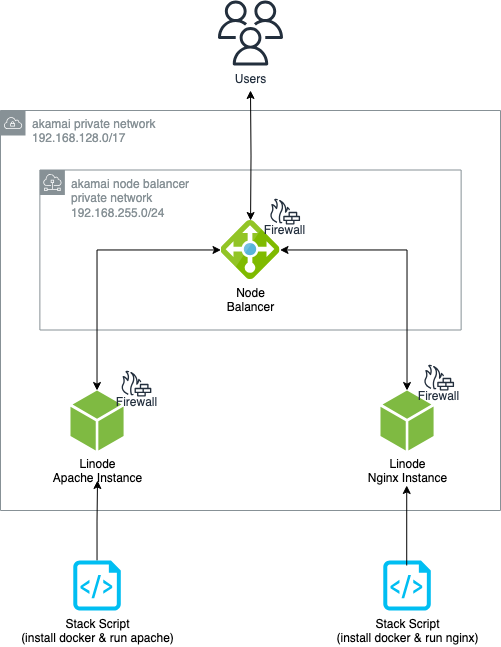
- 2개의 Linode 가상머신 인스턴스에 docker를 설치하고 각각 nginx, apache 이미지를 pull 받아 3000번 호스트 포트를 연결하여 실행한다.
- docker 설치, nginx, apache 컨테이너 생성은 모두 bash 스크립트로 제작 후 StackScript를 이용하여 VM 생성 시 자동으로 실행되도록 구성한다.
- round robin 로드 밸런싱 정책을 사용하여 번갈아가며 nginx, apache 서버 화면이 보이도록 구성한다.
- 단순하게 ip와 port를 기반으로 트래픽을 라우팅하기 때문에 L4 스위치로서 node balancer 서비스를 사용한다.
- ubuntu22.04 운영체제를 사용하여 가상머신을 생성한다.
Stack Script
docker 설치, nginx, apache 컨테이너 생성 bash 스크립트를 작성하고, 이를 VM 생성 시 자동으로 실행할 수 있게 StackScript 리소스를 생성한다.
-
bash script
- nginx 서버
#!/bin/bash #install docker apt-get update -y apt-get install apt-transport-https ca-certificates curl gnupg-agent software-properties-common curl -fsSL https://download.docker.com/linux/ubuntu/gpg | apt-key add - add-apt-repository "deb [arch=amd64] https://download.docker.com/linux/ubuntu $(lsb_release -cs) stable" apt-get install docker-ce docker-ce-cli containerd.io -y #run nginx container docker run --rm -d -p 3000:80 --name=nginx nginx- apache 서버
#!/bin/bash #install docker apt-get update -y apt-get install apt-transport-https ca-certificates curl gnupg-agent software-properties-common curl -fsSL https://download.docker.com/linux/ubuntu/gpg | apt-key add - add-apt-repository "deb [arch=amd64] https://download.docker.com/linux/ubuntu $(lsb_release -cs) stable" apt-get install docker-ce docker-ce-cli containerd.io -y #run apache container docker run --rm -d -p 3000:80 --name=apache httpd -
Stack Script
resource "linode_stackscript" "install_docker_nginx" {
  label       = "docker-nginx-ss"
  description = "install docker and run nginx"
  script      = file("./files/install-docker-nginx.sh")
  images      = ["linode/ubuntu22.04"]
}

resource "linode_stackscript" "install_docker_apache" {
  label       = "docker-apache-ss"
  description = "install docker and run apache"
  script      = file("./files/install-docker-apache.sh")
  images      = ["linode/ubuntu22.04"]
}
Linode 가상머신
nginx, apache 컨테이너를 실행할 가상머신을 정의한다.
linode node balancer는 가상머신에 트래픽을 분산할 때 private ip를 대상으로 트래픽을 분산한다. 따라서 private_ip = true 속성을 사용하여 가상머신에 private ip를 할당한다.
private ip는 192.168.128.0/17 대역 안에서 동적으로 할당된다.
위에서 작성한 stack script id를 추가하여 가상머신 생성 시 정의한 stack script가 실행되도록 한다.
resource "linode_instance" "nginx" {
  label     = "nginx"
  image     = "linode/ubuntu22.04"
  region    = "jp-osa"
  type      = "g6-standard-1"
  root_pass = var.instance_password

  private_ip = true

  stackscript_id = linode_stackscript.install_docker_nginx.id
}

resource "linode_instance" "apache" {
  label     = "apache"
  image     = "linode/ubuntu22.04"
  region    = "jp-osa"
  type      = "g6-standard-1"
  root_pass = var.instance_password

  private_ip = true

  stackscript_id = linode_stackscript.install_docker_apache.id
}
Firewall
로컬 PC에서 VM 인스턴스에 접속할 수 있게 22번 포트를 개방해주고, node balancer에서 오는 3000번 포트로의 트래픽을 허용한다.
linode node balancer는 자신의 private ip가 동적으로 바뀐다. 따라서 특정 ip만을 firewall에 허용해서 트래픽을 허용할 수 없다.
따라서 node balancer private ip 범위인 192.168.255.0/24 대역을 열어준다.
resource "linode_firewall" "backend_backend_firewall" {
  label = "backend-fw"

  inbound {
    label    = "allow-ssh"
    action   = "ACCEPT"
    protocol = "TCP"
    ports    = "22"
    ipv4     = ["0.0.0.0/0"]
		ipv6.    = ["::/0"]
  }

  inbound {
    label    = "allow-nb-traffic"
    action   = "ACCEPT"
    protocol = "TCP"
    ports    = "3000"
    ipv4     = ["192.168.255.0/24"]
  }

  inbound_policy = "DROP"

  outbound_policy = "ACCEPT"

  linodes = [linode_instance.nginx.id, linode_instance.apache.id]
}
node balancer는 80번 포트에서 오는 트래픽을 허용한다.
resource "linode_firewall" "nb_fw" {
  label = "nb-fw"

  inbound {
    label    = "allow-http"
    action   = "ACCEPT"
    protocol = "TCP"
    ports    = "80"
    ipv4     = ["0.0.0.0/0"]
    ipv6     = ["::/0"]
  }

  inbound_policy = "DROP"

  outbound_policy = "ACCEPT"

  nodebalancers = [linode_nodebalancer.backend_nb.id]
}
Node Balancer
80번 포트를 리스닝 하고 있도록 구성하고, 들어온 트래픽을 round robin 방식으로 2개의 서버에 분산시킨다.
resource "linode_nodebalancer" "backend_nb" {
  label  = "backend-nb"
  region = "jp-osa"
}

resource "linode_nodebalancer_config" "backend_nb_config" {
  nodebalancer_id = linode_nodebalancer.backend_nb.id
  port            = 80
  protocol        = "http"
  check           = "none"
  stickiness      = "none"
  algorithm       = "roundrobin"
}
vm 구성이 바뀌었을 때 terraform 반영이 실패하는 이슈가 linode provider 자체적으로 있어 lifecycle.replace_triggered_by meta-argument를 사용하여 강제로 재생성 하도록 구성한다.
resource "linode_nodebalancer_node" "nginx_nb_node" {
  nodebalancer_id = linode_nodebalancer.backend_nb.id
  config_id       = linode_nodebalancer_config.backend_nb_config.id
  address         = "${linode_instance.nginx.private_ip_address}:3000"
  label           = "nginx-node"

  lifecycle {
    // Tell Terraform to implicitly recreate the NodeBalancer node when
    // the target instance has been marked for recreation.
    // See: https://github.com/linode/terraform-provider-linode/issues/1224
    replace_triggered_by = [linode_instance.nginx.id]
  }
}

resource "linode_nodebalancer_node" "apache_nb_node" {
  nodebalancer_id = linode_nodebalancer.backend_nb.id
  config_id       = linode_nodebalancer_config.backend_nb_config.id
  address         = "${linode_instance.apache.private_ip_address}:3000"
  label           = "apache-node"

  lifecycle {
    // Tell Terraform to implicitly recreate the NodeBalancer node when
    // the target instance has been marked for recreation.
    // See: https://github.com/linode/terraform-provider-linode/issues/1224
    replace_triggered_by = [linode_instance.apache.id]
  }
}
전체 코드
실습 결과
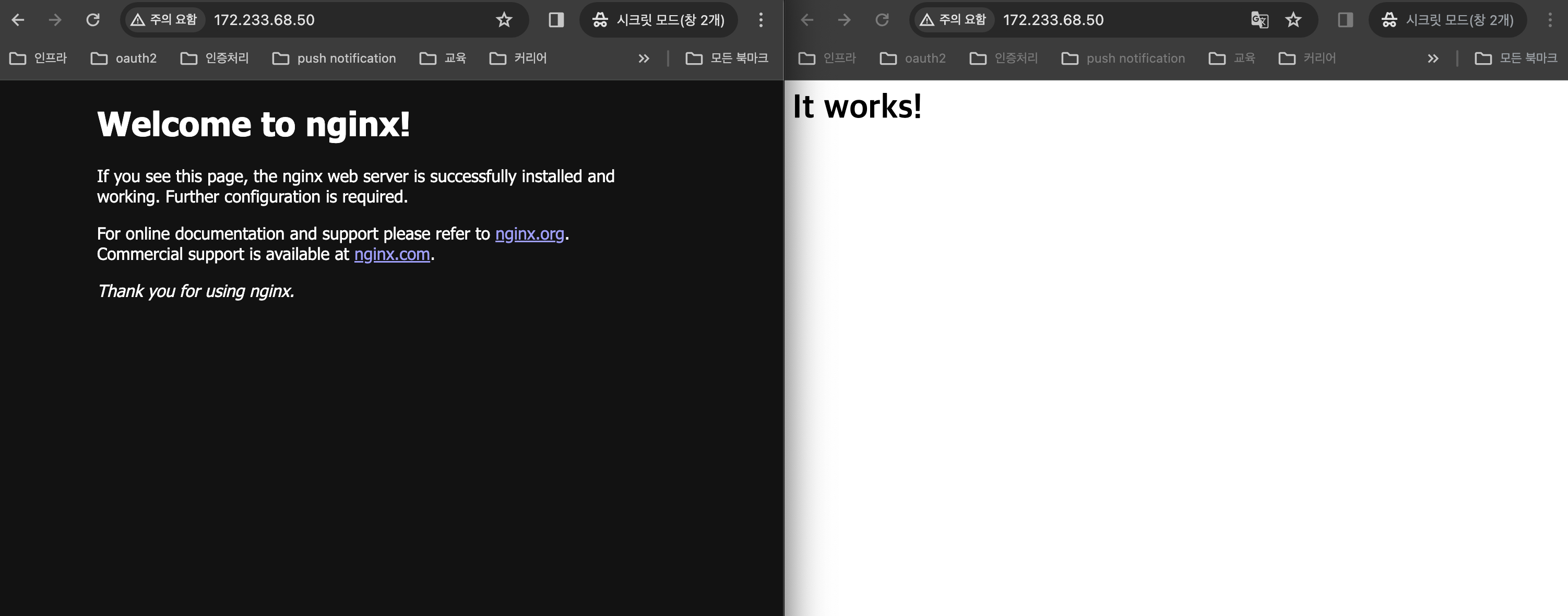
새로고침을 누를 때마다 nginx, apache 서버 메인 화면이 번갈아 나오며 정상적으로 트래픽이 분산되는 것을 확인할 수 있다.
관련 자료
https://github.com/linode/terraform-provider-linode/issues/1224
https://github.com/junho100/terraform-linode-load-balancing
https://www.linode.com/docs/products/networking/nodebalancers/guides/backends/