과제에서 필수 사용되는 문법 요약
- 7) 랭크게임 하다가 싸워서 피드백 남겼어요…
-
테이블 생성
id user_name satisfaction_score feedback_date 1 르탄이 5 2023-03-01 2 배캠이 4 2023-03-02 3 구구이 3 2023-03-01 4 이션이 5 2023-03-03 5 구구이 4 2023-03-04 create table lol_feedbacks( id INT Primary key, user_name varchar(3), satisfaction_score INT, feedback_date date ); INSERT INTO lol_feedbacks(id, user_name, satisfaction_score, feedback_date) values (1,'르탄이',5,'2023-03-01'); INSERT INTO lol_feedbacks(id, user_name, satisfaction_score, feedback_date) values (2,'배캠이',4,'2023-03-02'); INSERT INTO lol_feedbacks(id, user_name, satisfaction_score, feedback_date) values (3,'구구이',3,'2023-03-01'); INSERT INTO lol_feedbacks(id, user_name, satisfaction_score, feedback_date) values (4,'이션이',5,'2023-03-03'); INSERT INTO lol_feedbacks(id, user_name, satisfaction_score, feedback_date) values (5,'구구이',4,'2023-03-04'); -
lol_feedbacks테이블에서 만족도 점수(satisfaction_score)에 따라 피드백을 내림차순으로 정렬하는 쿼리를 작성해주세요!select * from lol_feedbacks order by satisfaction_score desc; -
lol_feedbacks테이블에서 각 유저별로 최신 피드백을 찾는 쿼리를 작성해주세요!select user_name, MAX(feedback_date) as latest_feedback_date from lol_feedbacks group by user_name;- 서브쿼리
select user_name, feedback_date as latest_feedback_date
from lol_feedbacks lf
where feedback_date = (
	select max(feedback_date)
	from lol_feedbacks
	where user_id = lf.user_id
);
- 서브쿼리
-
lol_feedbacks테이블에서 만족도 점수가 5점인 피드백의 수를 계산하는 쿼리를 작성해주세요!select count(*) as five_stars from lol_feedbacks where satisfaction_score = 5; -
lol_feedbacks테이블에서 가장 많은 피드백을 남긴 상위 3명의 고객을 찾는 쿼리를 작성해주세요!select *, count(*) as feedback_count from lol_feedbacks group by user_name order by count(*) desc limit 3; -
lol_feedbacks테이블에서 평균 만족도 점수가 가장 높은 날짜를 찾는 쿼리를 작성해주세요!select feedback_date, AVG(satisfaction_score) as satisfaction_avg from lol_feedbacks group by feedback_date order by avg(satisfaction_score) desc limit 1;⇒ 서브쿼리로 짠다면?
알고 싶은 것 : 날짜
찾아올 테이블 : 날짜 / 평균 피드백 점수로 이루어진 테이블
가장 높은 날짜 : order by ~ desc limit 1
select date
from (
		select date, avg(score) as avg_score
		from feedbacks
		group by date
) AS Subquery
order by avg_score desc
limit 1;
-
- 8) LOL을 하다가 홧병이 나서 병원을 찾아왔습니다.
-
테이블 생성
id name major hire_date 1 르탄이 피부과 2018-05-10 2 배캠이 성형외과 2019-06-15 3 구구이 안과 2020-07-20 create table doctors( id INT Primary key, name varchar(3), major varchar(4), hire_date date ); Insert INTO doctors (id, name, major, hire_date) values (1, '르탄이', '피부과', '2018-05-10'); Insert INTO doctors (id, name, major, hire_date) values (2, '배캠이', '성형외과', '2019-06-15'); Insert INTO doctors (id, name, major, hire_date) values (3, '구구이', '안과', '2020-07-20'); -
doctors테이블에서 전공(major)가 성형외과인 의사의 이름을 알아내는 쿼리를 작성해주세요!select name from doctors where major = '성형외과'; -
doctors테이블에서 각 전공 별 의사 수를 계산하는 쿼리를 작성해주세요!select major, count(*) from doctors group by major; -
doctors테이블에서 현재 날짜 기준으로 5년 이상 근무(hire_date)한 의사 수를 계산하는 쿼리를 작성해주세요!select count(*) as fiveyears_doc from doctors where hire_date <= DATE('now', '-5 years');⇒ MySQL 기준
select count(*) as fiveyears_doc from doctors where hire_date <= DATE_SUB(CURDATE(), Interval 5 YEAR); -
doctors테이블에서 각 의사의 근무 기간을 계산하는 쿼리를 작성해주세요!select *, ROUND(JULIANDAY('now') - JULIANDAY(hire_date)) as working_days from doctors;⇒ MySQL 기준
select *, DATEDIFF(CURDATE(), hire_date) as working_days from doctors;
-
- 9)아프면 안됩니다! 항상 건강 챙기세요!
-
테이블 생성
id name birth_date gender last_visit_date 1 르탄이 1985-04-12 남자 2023-03-15 2 배캠이 1990-08-05 여자 2023-03-20 3 구구이 1982-12-02 여자 2023-02-18 4 이션이 1999-03-02 남자 2023-03-17 Create table patients( id INT Primary key, name varchar(3), birth_date date, gender varchar(2), last_visit_date date ); Insert into patients (id, name, birth_date, gender, last_visit_date) values (1, '르탄이', '1985-04-12', '남자', '2023-03-15'), (2, '배캠이', '1990-08-05', '여자', '2023-03-20'), (3, '구구이', '1982-12-02', '여자', '2023-02-18'), (4, '이션이', '1999-03-02', '남자', '2023-03-17'); -
patients테이블에서 각 성별(gender)에 따른 환자 수를 계산하는 쿼리를 작성해주세요!select gender, count(*) from patients group by gender; -
patients테이블에서 현재 나이가 40세 이상인 환자들의 수를 계산하는 쿼리를 작성해주세요!select count(*) as over40 from patients where birth_date <= DATE('now', '-40 years');⇒ MySQL 기준
Select count(*) as over 40 from patients where birth_date <= DATE_SUB(CURDATE(), Interval 40 year) -
patients테이블에서 마지막 방문 날짜(last_visit_date)가 1년 이상 된 환자들을 선택하는 쿼리를 작성해주세요!select * from patients where last_visit_date <= DATE('now', '-1 years');⇒ MySQL 기준
select * from patients from last_visit_date <= DATE_SUB(CURDATE(), Interval 1 YEAR); -
patients테이블에서 생년월일이 1980년대인 환자들의 수를 계산하는 쿼리를 작성해주세요!select count(*) as birth1980 from patients where birth_date BETWEEN '1980-01-01' and '1989-12-31';
-
- 10) 이젠 테이블이 2개입니다
-
테이블 생성
-
employees 테이블
id department_id name 1 101 르탄이 2 102 배캠이 3 103 구구이 4 101 이션이 -
departments 테이블
id name 101 인사팀 102 마케팅팀 103 기술팀
create table departments( id INT Primary key, name varchar(4) ); create table employees( id INT Primary key, department_id INT, name varchar(3), Foreign Key (department_id) references departments(id) ); Insert into departments (id, name) values (101, '인사팀'), (102, '마케팅팀'), (103, '기술팀'); Insert into employees (id, department_id, name) values (1, 101, '르탄이'), (2, 102, '배캠이'), (3, 103, '구구이'), (4, 101, '이션이'); -
-
현재 존재하고 있는 총 부서의 수를 구하는 쿼리를 작성해주세요!
select count(*) from departments; -
모든 직원과 그들이 속한 부서의 이름을 나열하는 쿼리를 작성해주세요!
select employees.name, departments.name from employees left join departments on employees.department_id = departments.id; -
'기술팀' 부서에 속한 직원들의 이름을 나열하는 쿼리를 작성해주세요!
select employees.name, departments.name from employees inner join departments on employees.department_id = departments.id where departments.name = '기술팀'; -
부서별로 직원 수를 계산하는 쿼리를 작성해주세요!
select departments.name, count(*) as number from employees inner join departments on employees.department_id = departments.id group by departments.name; -
직원이 없는 부서의 이름을 찾는 쿼리를 작성해주세요!
select departments.name from departments left join employees on employees.department_id = departments.id where employees.name is null; -
'마케팅팀' 부서에만 속한 직원들의 이름을 나열하는 쿼리를 작성해주세요!
select employees.name from employees
inner join departments on employees.department_id = departments.id
where departments.name = '마케팅팀';
-
- 마지막 연습 문제 !
-
테이블 생성
-
products 테이블
id name price 1 랩톱 1200 2 핸드폰 800 3 타블렛 400 -
orders 테이블
id product_id quantity order_date 101 1 2 2023-03-01 102 2 1 2023-03-02 103 3 5 2023-03-04
create table products_2( id INT primary key, name varchar(3), price INT ); create table orders_2( id INT primary key, product_id INT, quantity INT, order_date date, Foreign key (product_id) references products_2(id) ); Insert into products_2 (id, name, price) values (1,'랩톱',1200), (2,'핸드폰',800), (3,'타블렛',400); Insert into orders_2 (id, product_id, quantity, order_date) values (101, 1, 2, '2023-03-01'), (102, 2, 1, '2023-03-02'), (103, 3, 5, '2023-03-04'); -
-
모든 주문의 주문 ID와 주문된 상품의 이름을 나열하는 쿼리를 작성해주세요!
Select orders_2.id, products_2.name from orders_2 left join products_2 on orders_2.product_id = products_2.id; -
총 매출(price * quantity의 합)이 가장 높은 상품의 ID와 해당 상품의 총 매출을 가져오는 쿼리를 작성해주세요!
Select products_2.id, SUM(orders_2.quantity * products_2.price) as revenue from orders_2 left join products_2 on orders_2.product_id = products_2.id group by products_2.id order by revenue limit 1; -
각 상품 ID별로 판매된 총 수량(quantity)을 계산하는 쿼리를 작성해주세요!
Select products_2.id, SUM(orders_2.quantity) as tot_quantity from orders_2 left join products_2 on orders_2.product_id = products_2.id group by products_2.id; -
2023년 3월 3일 이후에 주문된 모든 상품의 이름을 나열하는 쿼리를 작성해주세요!
select products_2.name from orders_2 left join products_2 on products_2.id = orders_2.product_id where orders_2.order_date > '2023-03-03'; -
가장 많이 판매된 상품의 이름을 찾는 쿼리를 작성해주세요!
select products_2.name, sum(orders_2.quantity) as tot_quantity from orders_2 left join products_2 on products_2.id = orders_2.product_id group by products_2.name order by tot_quantity DESC limit 1; -
각 상품 ID별로 평균 주문 수량을 계산하는 쿼리를 작성해주세요!
select products_2.id, AVG(orders_2.quantity) as avg_quantity from orders_2 left join products_2 on products_2.id = orders_2.product_id group by products_2.id; -
판매되지 않은 상품의 ID와 이름을 찾는 쿼리를 작성해주세요!
select products_2.id, products_2.name from products_2
left join orders_2 on products_2.id = orders_2.product_id
where orders_2.quantity is null;
-
오답노트
-
Insert into 여러 번 중복 없이 삽입 가능
-
테이블 생성
id name birth_date gender last_visit_date 1 르탄이 1985-04-12 남자 2023-03-15 2 배캠이 1990-08-05 여자 2023-03-20 3 구구이 1982-12-02 여자 2023-02-18 4 이션이 1999-03-02 남자 2023-03-17 Create table patients( id INT Primary key, name varchar(3), birth_date date, gender varchar(2), last_visit_date date ); Insert into patients (id, name, birth_date, gender, last_visit_date) values (1, '르탄이', '1985-04-12', '남자', '2023-03-15'), (2, '배캠이', '1990-08-05', '여자', '2023-03-20'), (3, '구구이', '1982-12-02', '여자', '2023-02-18'), (4, '이션이', '1999-03-02', '남자', '2023-03-17');
-
-
Alter table (테이블명) Add Column (컬럼명 데이터 타입) : 이미 생성된 테이블에 컬럼 추가하기
- 사용법 : Alter table 테이블 Add Column 컬럼 데이터 타입
-
orders 테이블
id product_id quantity order_date 101 1 2 2023-03-01 102 2 1 2023-03-02 103 3 5 2023-03-04 create table orders_2( id INT primary key, product_id INT, quantity INT order_date date, Foreign key (product_id) references products_2(id) ); -- quantity INT 뒤 ','를 붙이지 않아 quantity 는 생성되지 않고 다른 컬럼들만 생성된 경우, Alter table orders_2 ADD Column quantity INT Insert into orders_2 (id, product_id, quantity, order_date) values (101, 1, 2, '2023-03-01'), (102, 2, 1, '2023-03-02'), (103, 3, 5, '2023-03-04'); -- 만약 새로운 컬럼을 추가 후 데이터를 삽입하고 싶다면, Update 함수 사용 Update orders_2 set quantity = 2 where id = 101;
-
From절 서브쿼리
-
lol_feedbacks테이블에서 평균 만족도 점수가 가장 높은 날짜를 찾는 쿼리를 작성해주세요!select feedback_date, AVG(satisfaction_score) as satisfaction_avg from lol_feedbacks group by feedback_date order by avg(satisfaction_score) desc limit 1;- 서브쿼리
select date from ( select date, avg(score) as avg_score from feedbacks group by date ) AS Subquery order by avg_score desc limit 1;-
알고 싶은 것 : 날짜
-
찾아올 테이블
날짜 평균 만족도 -
가장 높은 날짜 : order by ~ desc limit 1
-
- 서브쿼리
-
-
Round : 반올림하고 싶을 때
- 사용법 : Round(숫자) ⇒ 버림하고 싶을 땐, Cast 사용
-
doctors테이블에서 각 의사의 근무 기간을 계산하는 쿼리를 작성해주세요!select *, ROUND(JULIANDAY('now') - JULIANDAY(hire_date)) as working_days from doctors;
- 사용법 : Round(숫자) ⇒ 버림하고 싶을 땐, Cast 사용
-
Date(’now’, ‘-n years’) : 현재 날짜에서 특정 기간을 뺀 값
- 사용법
- SQLite
- Date(’now’, ‘-n 년/월/일’) : 현재 날짜에서 특정 기간을 뺀 값
- MySQL
- DATE_SUB(CURDATE(), Interval n 년/월/일)
- SQLite
- DATE_SUB vs. DATEDIFF
- DATE_SUB : 날짜가 반환됨. (특정 날짜 - 특정 기간)
- DATEDIFF : 일 수가 반환됨. (특정 날짜 - 특정 날짜)
-
doctors테이블에서 현재 날짜 기준으로 5년 이상 근무(hire_date)한 의사 수를 계산하는 쿼리를 작성해주세요!select count(*) as fiveyears_doc from doctors where hire_date <= DATE('now', '-5 years');⇒ MySQL 기준
select count(*) as fiveyears_doc from doctors
where hire_date <= DATE_SUB(CURDATE(), Interval 5 YEAR);
- 사용법
-
Foreign key 컬럼 references 연결테이블(연결컬럼) : 외래키 만드는 법
- 사용법
- Foreign Key (참조할 컬럼) References 참조될 테이블(참조될 컬럼)
- (departments 테이블의 id) → (employees 테이블의 departmet_id) 외래키 참조
-
테이블 생성
-
employees 테이블
id department_id name 1 101 르탄이 2 102 배캠이 3 103 구구이 4 101 이션이 -
departments 테이블
id name 101 인사팀 102 마케팅팀 103 기술팀
create table departments( id INT Primary key, name varchar(4) ); create table employees( id INT Primary key, department_id INT, name varchar(3), Foreign Key (department_id) references departments(id) ); Insert into departments (id, name) values (101, '인사팀'), (102, '마케팅팀'), (103, '기술팀'); Insert into employees (id, department_id, name) values (1, 101, '르탄이'), (2, 102, '배캠이'), (3, 103, '구구이'), (4, 101, '이션이'); -
- 사용법
-
Left Join vs. Inner join
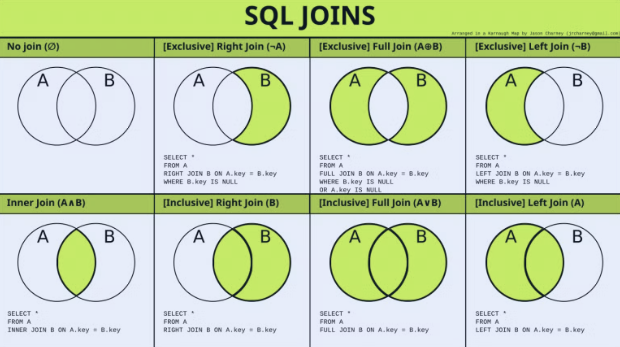
⇒ 위 그림의 A, B 집합은 각 테이블을 연결하는 외래키 집합으로 생각하면 됨.
⇒ A/B : 왼/오 순서로 각 시나리오별 join 쿼리를 돌렸을 때,
- A ⊃ B
A B 1 1 2 2 3 3 4 1 5 -
Inner
A B 1 1 1 1 2 2 3 3 -
Left
A B 1 1 1 1 2 2 3 3 4 NULL 5 NULL -
Right
A B 1 1 1 1 2 2 3 3 -
Full
A B 1 1 1 1 2 2 3 3 4 NULL 5 NULL
-
- A ⊂ B
A B 1 1 2 2 3 3 5 4 5 - Inner
A B 1 1 2 2 3 3 5 5 - Left
A B 1 1 2 2 3 3 5 5 - Right
A B 1 1 2 2 3 3 NULL 4 5 5 - Full
A B 1 1 2 2 3 3 NULL 4 5 5
- Inner
- A = ****B
A B 1 1 2 2 3 3 4 4 - Inner
A B 1 1 2 2 3 3 4 4 - Left
A B 1 1 2 2 3 3 4 4 - Right
A B 1 1 2 2 3 3 4 4 - Full
A B 1 1 2 2 3 3 4 4
- Inner
- A ≠ B
A B 1 1 2 2 4 6 5 7 - Inner
A B 1 1 2 2 - Left
A B 1 1 2 2 4 NULL 5 NULL - Right
A B 1 1 2 2 NULL 6 NULL 7 - Full
A B 1 1 2 2 4 NULL 5 NULL NULL 6 NULL 7
- Inner
-
모든 주문의 주문 ID와 주문된 상품의 이름을 나열하는 쿼리를 작성해주세요!
Select orders_2.id, products_2.name from orders_2
left join products_2 on orders_2.product_id = products_2.id;
⇒ 기본 문법
Select 테이블명.컬럼명 from 테이블1
left join 테이블2 on 테이블1.컬럼 = 테이블2.컬럼;
- A ⊃ B
-
IS NULL
⇒ 아래 쿼리를 아래 두 테이블에서 진행해봤을 때, 나오는 결과값은
select * from products_2 left join orders_2 on products_2.id = orders_2.product_id;-
products 테이블
id name price 1 랩톱 1200 2 핸드폰 800 3 타블렛 400 4 워치 600 -
orders 테이블
id product_id quantity order_date 101 1 2 2023-03-01 102 2 1 2023-03-02 103 3 5 2023-03-04 104 1 5 2023-03-05 -
결과값
id name price id product_id quantity order_date 1 랩톱 1200 101 1 2 2023-03-01 1 랩톱 1200 104 1 5 2023-03-05 2 핸드폰 800 102 2 1 2023-03-02 3 타블렛 400 103 3 5 2023-03-04 4 워치 600 [NULL] [NULL] [NULL] [NULL] ⇒ 여기서 판매되지 않은 상품을 찾기 위해선 order 테이블의 컬럼이 NULL 값을 갖는 프로덕트의 id와 이름을 찾아야 함.
select products_2.id, products_2.name from products_2
left join orders_2 on products_2.id = orders_2.product_id
where orders_2.quantity is null;
-
판매되지 않은 상품의 ID와 이름을 찾는 쿼리를 작성해주세요!
select products_2.id, products_2.name from products_2
left join orders_2 on products_2.id = orders_2.product_id
where orders_2.quantity is null;
-