HTTP 프록시의 개념과 역할
- HTTP 프록시는 클라이언트와 원본 서버 사이에서 중계 역할을 하는 서버
- 클라이언트의 요청을 받아서 원본 서버에 전달하고, 서버의 응답을 다시 클라이언트에게 전달
구현 목표
- HTTP GET 요청 처리
- URI 파싱 (hostname, port, path 분리)
- 원본 서버와의 연결 및 통신
- 바이너리 파일 포함한 모든 파일 타입 처리
- 에러 처리 및 적절한 HTTP 응답
단계별 구현 과정
1단계: 기본 서버 구조 (main 함수)
목표: 클라이언트 연결을 받을 수 있는 기본 서버 구조 구현
int main(int argc, char **argv) {
  int listenfd, connfd;
  socklen_t clientlen;
  struct sockaddr_storage clientaddr;

  // 명령행 인수 검증
  if (argc != 2) {
    fprintf(stderr, "usage: %s <port>\n", argv[0]);
    exit(1);
  }

  listenfd = Open_listenfd(argv[1]);

  while (1) {
    clientlen = sizeof(clientaddr);
    connfd = Accept(listenfd, (SA *)&clientaddr, &clientlen);
    doit(connfd);   // HTTP 요청 처리
    Close(connfd);
  }
}포인트:
Open_listenfd(): 지정된 포트에서 리스닝 소켓 생성, 클라이언트의 요청을 받아야하기 때문Accept(): 클라이언트 연결 수락
2단계: HTTP 요청 처리 (doit 함수)
개요: HTTP 요청을 파싱하고 처리하는 메인 로직
void doit(int fd) {
  char buf[MAXLINE], method[MAXLINE], uri[MAXLINE], version[MAXLINE];
  char hostname[MAXLINE], port[MAXLINE], path[MAXLINE];
  rio_t rio;
  int serverfd;

  // 1. RIO 구조체 초기화
  Rio_readinitb(&rio, fd);

  // 2. HTTP 요청 라인 읽기
  if (!(Rio_readlineb(&rio, buf, MAXLINE))) {
    return;
  }

  // 3. 요청 라인 파싱
  sscanf(buf, "%s %s %s", method, uri, version);

  // 4. GET/HEAD 메소드만 허용
  if (strcasecmp(method, "GET") && strcasecmp(method, "HEAD")) {
    clienterror(fd, method, "501", "Not implemented",
                "Proxy does not implement this method");
    return;
  }

  // 5. HTTP 헤더들 읽기
  read_requesthdrs(&rio);

  // 6. URI 파싱
  if (parse_uri(uri, hostname, port, path) < 0) {
    clienterror(fd, uri, "400", "Bad Request", "Invalid URI format");
    return;
  }

  // 7. 원본 서버에 연결
  serverfd = Open_clientfd(hostname, port);
  if (serverfd < 0) {
    clienterror(fd, hostname, "502", "Bad Gateway",
                "Could not connect to origin server");
    return;
  }

  // 8. 원본 서버로 요청 전달
  forward_request(serverfd, method, path, version, &rio, hostname, port);

  // 9. 원본 서버 응답을 클라이언트로 전달
  forward_response(fd, serverfd);

  // 10. 서버 연결 종료
  Close(serverfd);
}포인트:
Rio_readlineb(): 라인 단위로 HTTP 요청 읽기sscanf(): 요청 라인을 method, uri, version으로 파싱- 메소드 검증: GET/HEAD만 허용
- 에러 처리: 각 단계에서 실패 시 적절한 HTTP 에러 응답
3단계: URI 파싱 (parse_uri 함수)
목표: URI를 hostname, port, path로 분리
int parse_uri(char *uri, char *hostname, char *port, char *path) {
  char *ptr = uri;

  // 1. "http://" 제거
  if (strncmp(uri, "http://", 7) == 0) {
    ptr += 7;
  }

  // 2. 경로 분리 (먼저)
  char *path_ptr = strchr(ptr, '/');
  if (path_ptr) {
    strcpy(path, path_ptr);
    *path_ptr = '\0';
  } else {
    strcpy(path, "/");
  }

  // 3. 포트 분리 (나중에)
  char *port_ptr = strchr(ptr, ':');
  if (port_ptr) {
    strcpy(port, port_ptr + 1);
    *port_ptr = '\0';
  } else {
    strcpy(port, "80");
  }

  // 4. 호스트명 복사
  strcpy(hostname, ptr);

  return 0;
}포인트: 순서가 매우 중요
- 경로 분리 먼저:
/home.html을 먼저 분리 - 포트 분리 나중에:
:8000을 나중에 분리
처음엔 포트를 먼저 분리해버려서 Getaddrinfo error: Name or service not known 에러가 났다.
잘못된 순서의 예:
입력: http://localhost:8000/home.html
잘못된 순서: port=8000/home.html, path=/
올바른 순서: port=8000, path=/home.html
4단계: 요청 전달 (forward_request)
목표: 파싱된 정보를 바탕으로 원본 서버에 HTTP 요청 전송
void forward_request(int serverfd, char *method, char *path, char *version,
                    rio_t *rio, char *hostname, char *port) {
  char buf[MAXLINE];

  // 1. 요청 라인 생성 및 전송
  sprintf(buf, "%s %s HTTP/%s\r\n", method, path, version);
  Rio_writen(serverfd, buf, strlen(buf));

  // 2. Host 헤더 생성 및 전송
  sprintf(buf, "Host: %s:%s\r\n", hostname, port);
  Rio_writen(serverfd, buf, strlen(buf));

  // 3. Connection 헤더 생성 및 전송
  sprintf(buf, "Connection: close\r\n");
  Rio_writen(serverfd, buf, strlen(buf));

  // 4. User-Agent 헤더 전송
  Rio_writen(serverfd, user_agent_hdr, strlen(user_agent_hdr));

  // 5. 헤더 끝 표시
  Rio_writen(serverfd, "\r\n", 2);
}
핵심 포인트:
- 모든 헤더 끝에
\r\n포함 - 마지막에 빈 줄
\r\n추가 user_agent_hdr: 미리 정의된 User-Agent 문자열 사용
5단계: 응답 전달 (forward_response)
목표: 원본 서버의 응답을 클라이언트에게 전달
void forward_response(int clientfd, int serverfd) {
  rio_t rio;
  char buf[MAXLINE];
  int n;

  Rio_readinitb(&rio, serverfd);

  while ((n = Rio_readnb(&rio, buf, MAXLINE)) > 0) {
    Rio_writen(clientfd, buf, n);
  }
}
바이너리 파일 처리의 중요성:
// ❌ 텍스트 파일용 (바이너리 파일 실패)
while (Rio_readlineb(&rio, buf, MAXLINE) > 0) {
  Rio_writen(clientfd, buf, strlen(buf));  // NULL 바이트에서 끊어짐
}

// ✅ 바이너리 파일용 (모든 파일 타입 처리)
while ((n = Rio_readnb(&rio, buf, MAXLINE)) > 0) {
  Rio_writen(clientfd, buf, n);  // 실제 읽은 바이트 수 사용
}
핵심 학습 포인트
1. 소켓 프로그래밍
- 리스닝 소켓:
Open_listenfd()로 서버 소켓 생성 - 클라이언트 소켓:
Open_clientfd()로 원본 서버 연결 - 데이터 전송:
Rio_writen(),Rio_readnb()사용
2. HTTP 프로토콜 이해
- 요청 라인:
GET /path HTTP/1.1 - 헤더: Host, Connection, User-Agent 등
- 응답: 상태 라인, 헤더, 바디
3. 문자열 처리
- 파싱:
sscanf(),strchr(),strncmp() - 복사:
strcpy() - 분리:
*ptr = '\0'로 문자열 분리
4. 바이너리 데이터 처리
- 텍스트 vs 바이너리:
Rio_readlinebvsRio_readnb - 길이 계산:
strlen()vs 실제 읽은 바이트 수 - NULL 바이트: 바이너리 파일의 중간 NULL 처리
디버깅
1. URI 파싱 문제
문제: 포트에 경로가 포함됨
URI: http://localhost:8000/home.html
잘못된 결과: port=8000/home.html, path=/
해결: 파싱 순서 변경 (경로 → 포트 → 호스트명)
2. 바이너리 파일 처리 문제
문제: 이미지 파일 전송 실패
Failure: Files differ. (godzilla.jpg, tiny)
해결: Rio_readnb() 사용으로 바이너리 안전 처리
최종 결과
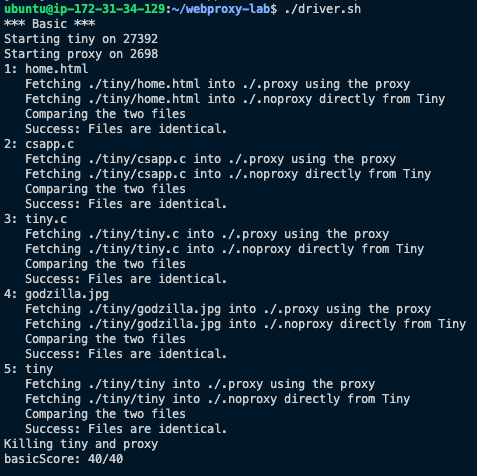
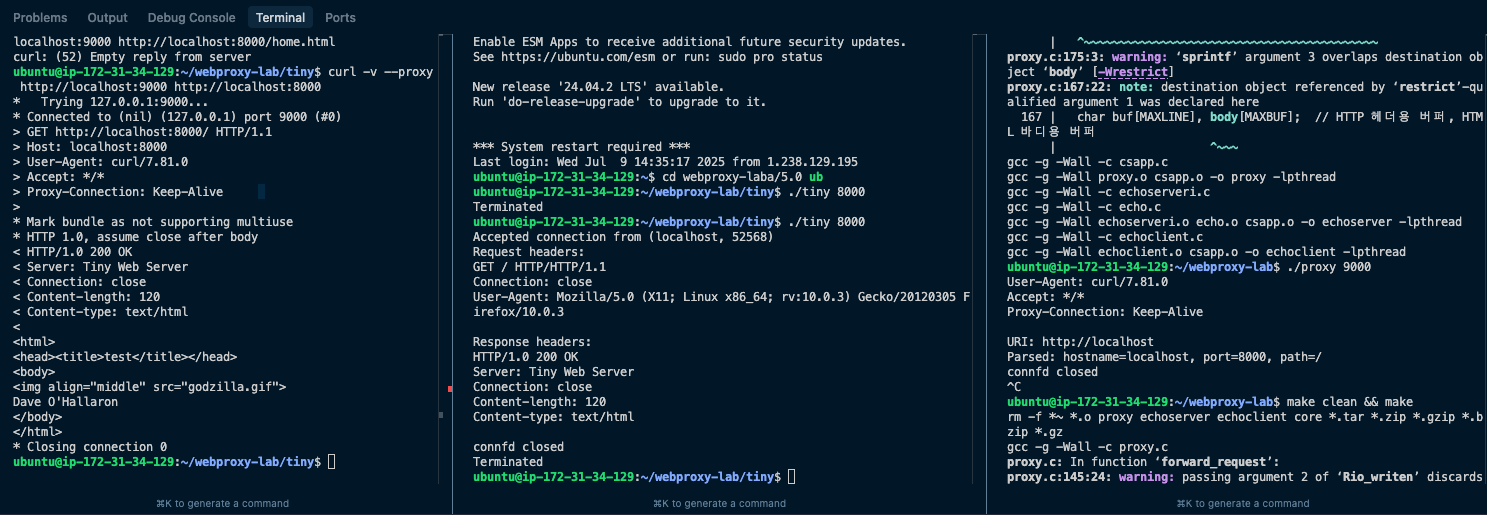
테스트 결과
마무리
어찌저찌 tiny까지는 책을 보면서 했지만, proxy.c를 작성하면서 벽에 막힌 기분이 들었다...
아직 동시성 처리와 캐시가 남았지만 이번 순차적처리를 통해서 다시 잘 작성해봐야겠다.
이제는 Pintos까지 진행하게 되면 더 어려워질텐데 아직 많이 부족한거 같아 걱정이 많지만 정글이 끝나더라도 꾸준히 노력을 한다면 실력이 더 늘지 않을까 생각한다ㅠ