harbor - 로봇 계정으로 kubernetes imagePullSecrts 만들기
imagePullSecrts
harbor 로봇 계정
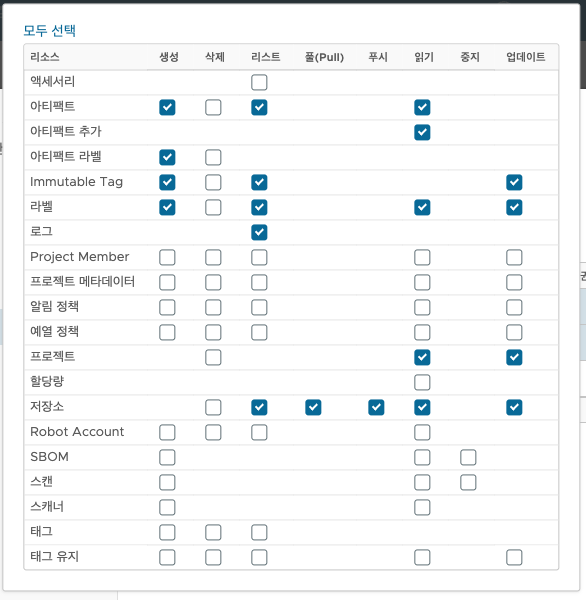
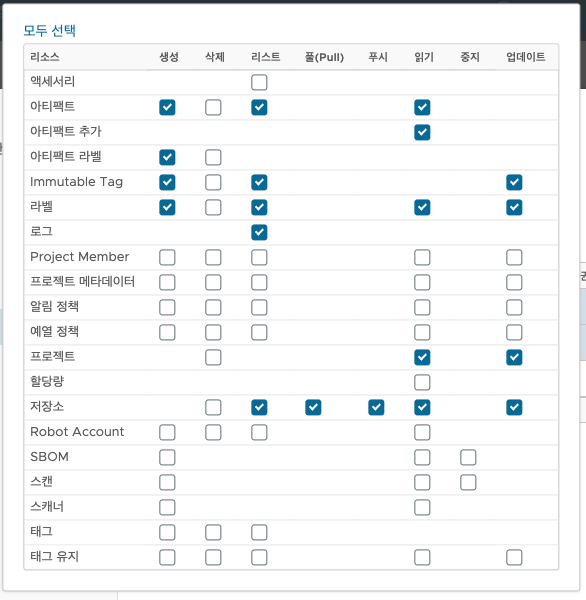
- 로봇 계정 생성 시 권한 설정 방법
kubectl create secret docker-registry harbor-registry-secret \
  --docker-server={harobr_host} \
  --docker-username=robot$name \
  --docker-password=robotpassword \
  --docker-email={email} \
  -n project-name
ex)
kubectl create secret docker-registry harbor-registry-secret \
  --docker-server=harbor.com \
  --docker-username="robot\$cicd-bot" \
  --docker-password="password_password" \
  --docker-email=harbor@harbor.com \
-n aimp- 주의: 로봇 이름 중 $를 변수로 간주해서
\$로 변경 후 진행
장점
- docker 에 ca.crt 등록 필요 없음
- containerd config.toml에 registry.configs, registry.mirrors 설정 필요 없음
- "harbor.pai-world.com/aimp/aimp-web-server:latest" 와 secrets 의 정보로 이미지를 pull
- ca.crt 필요없는 이유는 도메인을 보고 접근 > letsencrypt 인증서 발급 해줌
k8s 메니페스트 파일 적용
다음과 같이 yaml 파일 수정
...
spec.template.spec.containers:
        - image: harbor.com/{project}/{image}:latest

...
spec.template.spec.imagePullSecrets:
        - name: harbor-registry-secret
가끔 기록하는 velog