
useRef?
useRef를 한 문장으로 설명하자면 리랜더링을 필요로 하지 않는 값을 참조(reference) 할 때 사용하는 리액트 내장훅이다.
침조 대상은 primitive 값(number, string...) 부터 DOM까지 광범위하며 참조값은 useRef(값).current값에 저장할 수 있다.
DOM요소를 참조하려면 JSX의 속성(attribute)에서 ref를 연결하면 된다.
 console.log(useRef(1)); // {current: 1}
 console.log(useRef("a")); // {current: "a"}
 console.log(useRef(true)); // {current: true}

// JSX
import { useRef } from 'react';

export default function App() {
  const idRef = useRef<HTMLInputElement | null>(null);

  console.log(idRef.current) // <input type="text" id="id" name="id">

  return (
    <input type="text" id="id" name="id" ref={idRef} />
  );
}
리랜더링이 필요한 값은 useState, state값이 변하면 컴포넌트가 리랜더링된다.
리랜더링이 필요없는 값은 useRef, ref값이 변해도 컴포넌트가 리랜더링되지 않는다.
뭔소리인지 잘 와닿지 않으므로 퀴즈들과 예시를 보면서 useState와 useRef에 차이점에 대해서 알아보자!
Q1. 버튼을 눌렀을 때 콘솔과 화면을 예상하시오.
import { useState } from 'react';

export default function App() {
  const [stateCount, setStateCount] = useState(0);

  const handleClick = () => {
    setStateCount(stateCount + 1);
    console.log('inside handleClick : ', stateCount);
  };

  console.log('outside handleClick : ', stateCount);

  return (
    <div className="text-center p-20 bg-red-50 h-screen">
      <span>{stateCount}</span>
      <button onClick={handleClick} className="bg-sky-200 w-10">
        +
      </button>
    </div>
  );
}
클릭 전
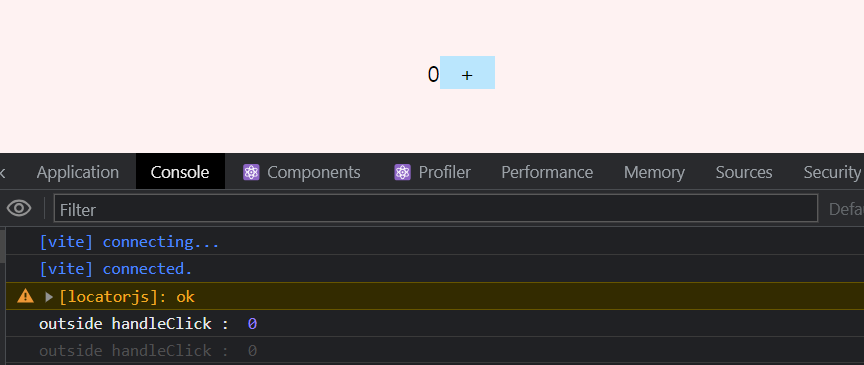
클릭 후
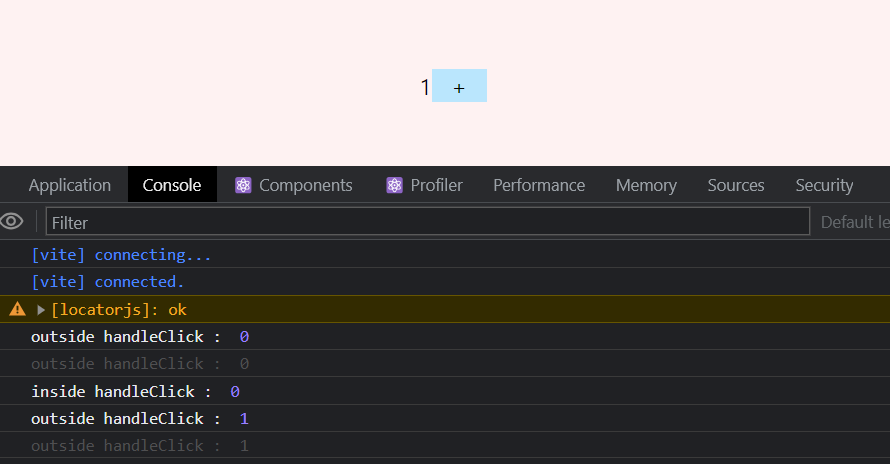
- state가 변하였으므로 컴포넌트가 리랜더링되기 때문에 화면에 1이 표시된다.
- 리랜더링이 발생을 하지만 state를 변경하는 함수(handleClick) 내부의 state는 이벤트 발생 전의 값인 0이다.
- 컴포넌트가 리랜더링 되면서 실행되는 console.log는 최신 stateCount인 1이다.
Q2. 버튼을 눌렀을 때 콘솔과 화면을 예상하시오.
import { useRef } from 'react';

export default function App() {
  const refCount = useRef(0);

  const handleClick = () => {
    refCount.current++;
    console.log('inside handleClick : ', refCount.current);
  };

  console.log('outside handleClick : ', refCount.current);

  return (
    <div className="text-center p-20 bg-red-50 h-screen">
      <span>{refCount.current}</span>
      <button onClick={handleClick} className="bg-sky-200 w-10">
        +
      </button>
    </div>
  );
}
클릭 전
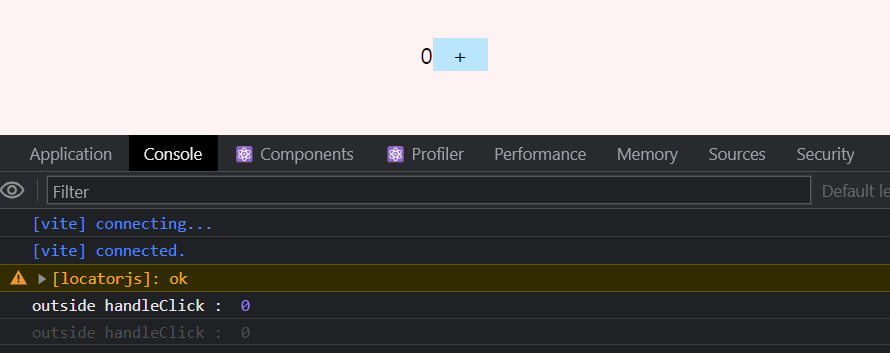
클릭 후
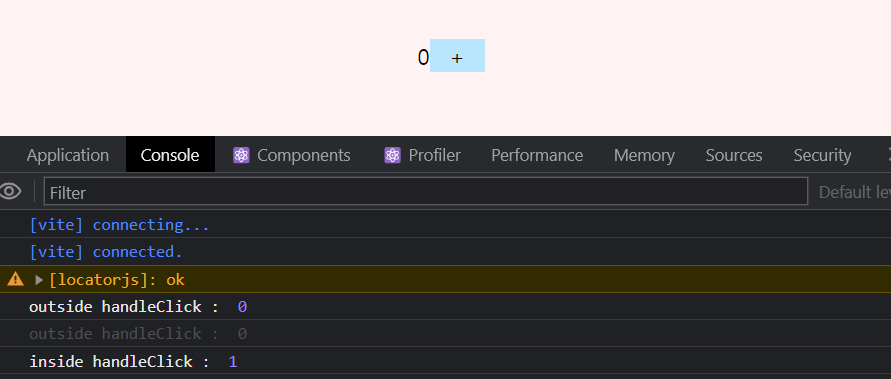
- 컴포넌트가 리랜더링되지 않으므로 화면의 숫자는 그대로 0이다.
- 리랜더링이 되지는 않았으나 handleClick 내부의 refcount.current값은 ++가 되어 1이다.
- 컴포넌트가 리랜더링되지 않았으므로 handleClick 와부의 console.log는 실행되지 않는다.
Q3. 버튼을 눌렀을 때 콘솔과 화면을 예상하시오.
import { useRef, useState } from 'react';

export default function App() {
  const [stateCount, setStateCount] = useState(0);
  const refCount = useRef(0);

  const handleClick = () => {
    refCount.current++;
    setStateCount(stateCount + 1);
    console.log('inside handleClick state : ', stateCount);
    console.log('inside handleClick ref : ', refCount.current);
  };

  console.log('outside handleClick state : ', stateCount);
  console.log('outside handleClick ref : ', refCount.current);

  return (
    <div className="text-center p-20 bg-red-50 h-screen">
      <span>{refCount.current}</span>
      <button onClick={handleClick} className="bg-sky-200 w-10">
        +
      </button>
    </div>
  );
}
클릭 전
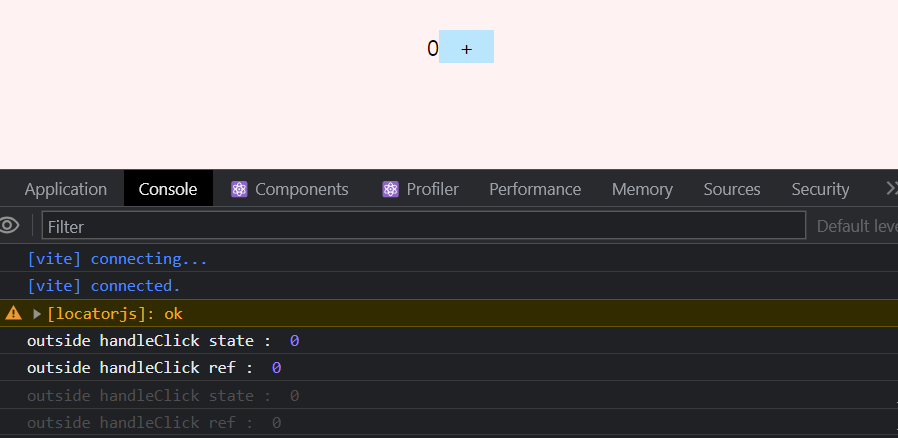
클릭 후
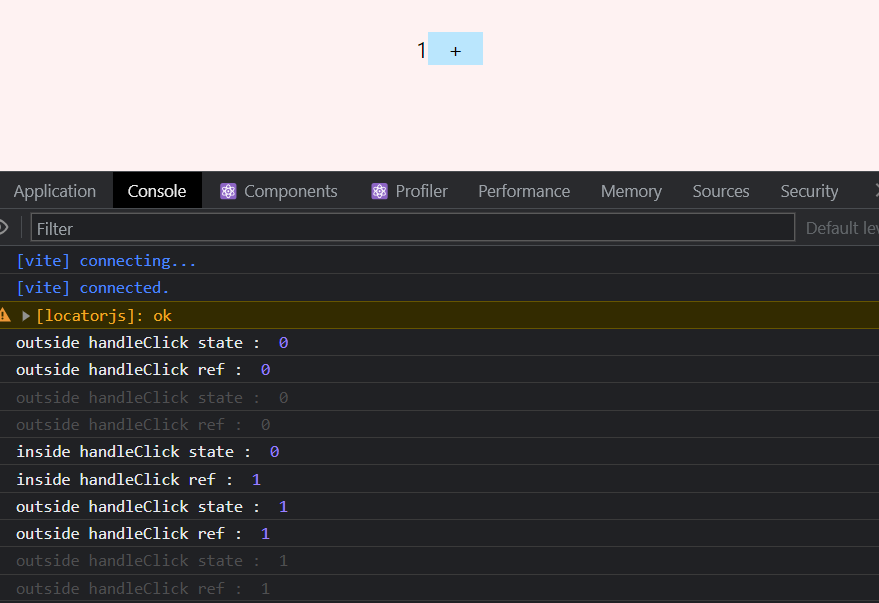
- state가 변하였으므로 컴포넌트가 리랜더링이되므로 화면에 refCount.current값인 1이 표시된다.
- inside handleClick state : 0 인 이유는 위와 동일
- inside handleClick state : 1 인 이유는 위와 동일
- 컴포넌트의 리랜더링이 발생하였으므로 handleClick 외부에 선언된 console.log는 실행되며 각각 최신의 상태를 반영한다.
Q4. 버튼을 눌렀을 때 콘솔과 화면을 예상하시오.
import { useRef, useState } from 'react';

export default function App() {
  const [stateCount, setStateCount] = useState(0);
  const refCount = useRef(0);

  const handleClick = () => {
    refCount.current++;
    console.log('inside handleClick state : ', stateCount);
    console.log('inside handleClick ref : ', refCount.current);
  };

  console.log('outside handleClick state : ', stateCount);
  console.log('outside handleClick ref : ', refCount.current);

  return (
    <div className="text-center p-20 bg-red-50 h-screen">
      <span>{refCount.current}</span>
      <button onClick={handleClick} className="bg-sky-200 w-10">
        +
      </button>
    </div>
  );
}
클릭 전
클릭 후
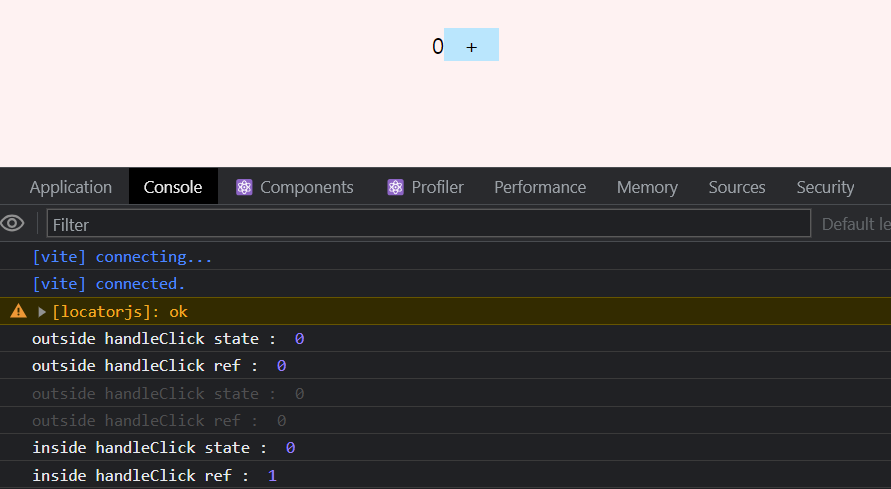
- state가 변하지 않았으므로 컴포넌트의 리랜더링이 발생하지 않으므로 화면에 0이 그대로 표시된다.
- inside handleClick state : 0 인 이유는 위와 동일
- inside handleClick state : 1 인 이유는 위와 동일
- 컴포넌트가 리랜더링되지 않았으므로 handleClick 와부의 console.log는 실행되지 않는다.
실제 사용 예시
import { useState } from 'react';

export default function App() {
  const [signinInput, setSigninInput] = useState({
    id: '',
    password: '',
  });

  const handleChange = (e: React.ChangeEvent<HTMLInputElement>) => {
    const { name, value } = e.target;
    setSigninInput((prev) => ({ ...prev, [name]: value }));
  };

  const onSubmit = (e: React.FormEvent<HTMLFormElement>) => {
    e.preventDefault();
    console.log(signinInput); // {id: 'howooking', password: '1234'}
  };

  return (
    <form
      className="text-center p-20 bg-red-100 h-screen flex flex-col gap-2 items-center"
      onSubmit={onSubmit}
    >
      <div>
        <label htmlFor="id">아이디 : </label>
        <input
          id="id"
          name="id"
          value={signinInput.id}
          onChange={handleChange}
        />
      </div>
      <div>
        <label htmlFor="password">비밀번호 : </label>
        <input
          type="password"
          id="password"
          name="password"
          value={signinInput.password}
          onChange={handleChange}
        />
      </div>
      <button className="bg-sky-100 w-60">로그인</button>
    </form>
  );
}
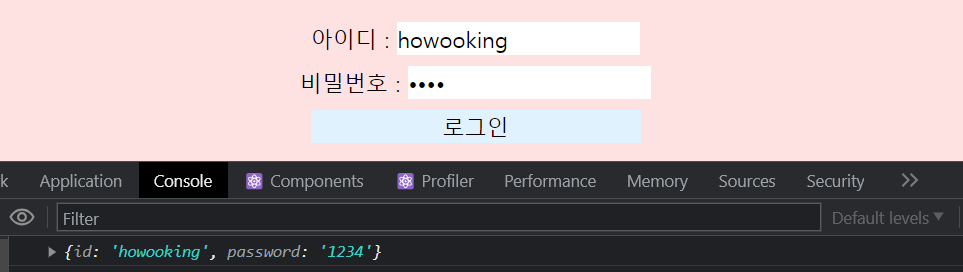
- onChange 이벤트를 통해서 state가 계속 바뀌기 때문에 값을 입력 할 때마다 리랜더링이 발생한다.
- 실제로 signinInput값이 필요한 시점은 onSubmit이 이벤트가 발생하는 순간이지만 값이 입력될 때마다 불필요한 리랜더링이 발생하고 있다.
import { useRef } from 'react';

export default function App() {
  const idRef = useRef<HTMLInputElement | null>(null);
  const passwordRef = useRef<HTMLInputElement | null>(null);

  const onSubmit = (e: React.FormEvent<HTMLFormElement>) => {
    e.preventDefault();
    const signinInput = {
      id: idRef.current?.value,
      password: passwordRef.current?.value,
    };
    console.log(signinInput); // {id: 'howooking', password: '1234'}
  };
  return (
    <form
      className="text-center p-20 bg-red-100 h-screen flex flex-col gap-2 items-center"
      onSubmit={onSubmit}
    >
      <div>
        <label htmlFor="id">아이디 : </label>
        <input
		  id="id"
	      ref={idRef} />
      </div>
      <div>
        <label htmlFor="password">비밀번호 : </label>
        <input
          type="password"
          id="password"
          ref={passwordRef}
        />
      </div>
      <button className="bg-sky-100 w-60">로그인</button>
    </form>
  );
}
- useRef를 사용하였으므로 불필요한 리랜더링이 발생하지 않는다.
- onSubmit이 발생하는 순간 ref에 담긴 값을 콘솔에 출력한다.
- 만약 실시간으로 입력값에 대한 validation 안내가 필요한 경우라면 리랜더링이 발생하는 useState를 사용해야 한다.

개발바닥