쉘스크립트(2)
shell script 란?
- 리눅스 command들을 모아 놓은 ASCII Text파일
- 실행 퍼미션을 할당해야 실행 가능
- Bash shell script에서 특별히 의미가 정해진 기능
- Shell 구문은 기본 top-down방식으로 해석해서 실행됨(위에서부터 순차적으로 실행)
- SubShell
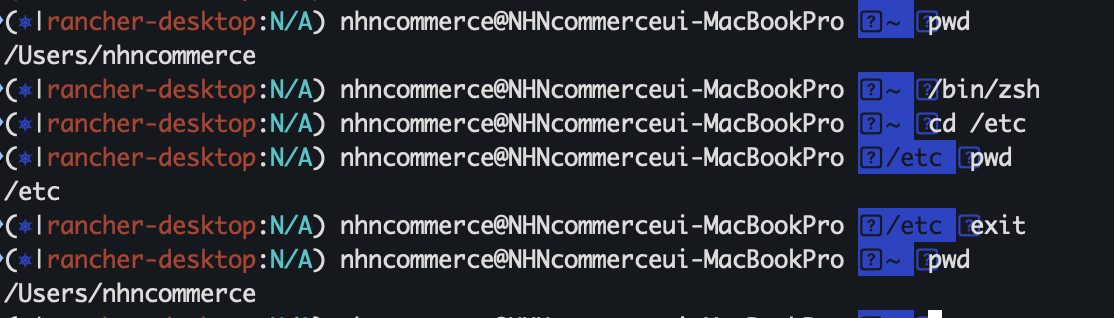
위와 같이 쉘에 접속후 /etc로 디렉토리를 이동하였지만, 쉘을 종료하면 디렉토리 이동된것이 반영이 안된이유는 서브쉘 안에서만 작동을 했기 때문이다.
로그인쉘: 로그인시 처음 실행되는 쉘
서브쉘: 따로 실행하는 쉘
즉 스크립트 처음에 시작하는 "#!/bin/bash" 라는 구문은 셔뱅(#!),서브쉘을 실행시키는 것이다.
Positional Parameters
- 입력하는 arguments들은 $0 $1 $2 와 같은 변수에 저장되어 script에 전달
name od shell script: $0
first argument: $1
Number of arguments in $#
List of all parameters in $@, $*
- Special shell variables
로그인 shell PID: $$
현재 작업 디렉토리: $PWD
부모 프로세스 ID: $PPID
#! /bin/zsh
#: Usage		: parameters-exam.sh arg1 arg2 arg3
echo "The script name: $0"
echo "The first argument: $1"
echo "The second argument: $2"
echo "The number of arguments: $#"
echo "The list of arguments: $@"
echo "The list of argumnets: $*"
parameter-test.sh red blue로 스크립트 실행시
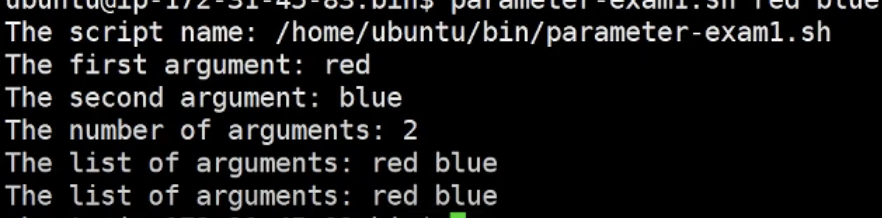
와 같이 나온다.
Input&Output
Echo
- prints text to standard output (말그대로 문자를 보여줌)
ex) echo <옵션><메시지>
-n : 메시지 출력후 newline 문자를 추가하지 않는다.
-e : backslash escapes(아래 같은 지시어)문자를 해석하여 특별한 의미를 지정한다.
\t TAb키
\n 줄바꿈
\a alert(bell)
- Example
echo "Your time is up"
echo "Your time is up" > time.txt
echo -n "Name:"
echo -e "First\tSecond"
Read
- reads text from standard input
read<옵션> 변수명
-n : 지정한 문자수만큼 입력 받는다
-t : 지정된 시간안에 입력 받는다
-s : silent mode로 입력하는 글자가 보이지 않는다.(비밀번호 같이 보안상황에 유용하다)
- read 명령에서 변수 명 생략시 기본 reply변수에 채워진다.

-
만약 변수는 2개인데, 데이터는 3개를 입력받을 경우는?

두번째 변수에 나머지 값이 모두 입력된다. -
Example
$ read name
$ read -t10 -n8 password
$ read -t10 -n8 -s password
$ read
$ echo -n "Name:"; read name
$ echo $name
printf
- 서식 format에 맞춰서 출력할 수 있는데, c언어의 printf함수와 동일
print format <메시지>
%d or %i 숫자
%s 문자열
%f 실수형 숫자
- example
$ printf "Hello linux shell\n"
$ printf "Name: %s \t Score: %i\n" junyoung 100

$ today='date +%Y%m%d'
$ printf "date is %s\n" "$today"

$ printf "number is %.3f\n" 20
$ printf "|%10s|%10s|%10.2f\n" ubuntu junyoung 10