GraphQL이란?
GraphQL은 웹 클라이언트가 데이터를 효율적으로 가져오는 것을 목적으로한 Query Language 이다. 이름만 보면 SQL에 가까워 보이지만, 웹 클라이언트와 통신하는 것이 목적이라는 점에서 REST API를 대체할 수 있는 기술이다.
GraphQL은 REST API와 다르게 '/graph' 라는 하나의 엔드포인트만 제공하고, 불러올 데이터의 종류나 데이터 변경 동작을 Query를 통해 결정한다.
GraphQL의 장점
그렇다면 GraphQL은 REST API와 비교하여 어떤 장점이 있을까?
GraphQL의 실제 사용 예시를 통해 알아보자.
Spotify에서 아래와 같이 키워드를 통해 검색하면 아티스트, 앨범, 곡 등 다양한 데이터에 대한 결과를 노출한다.
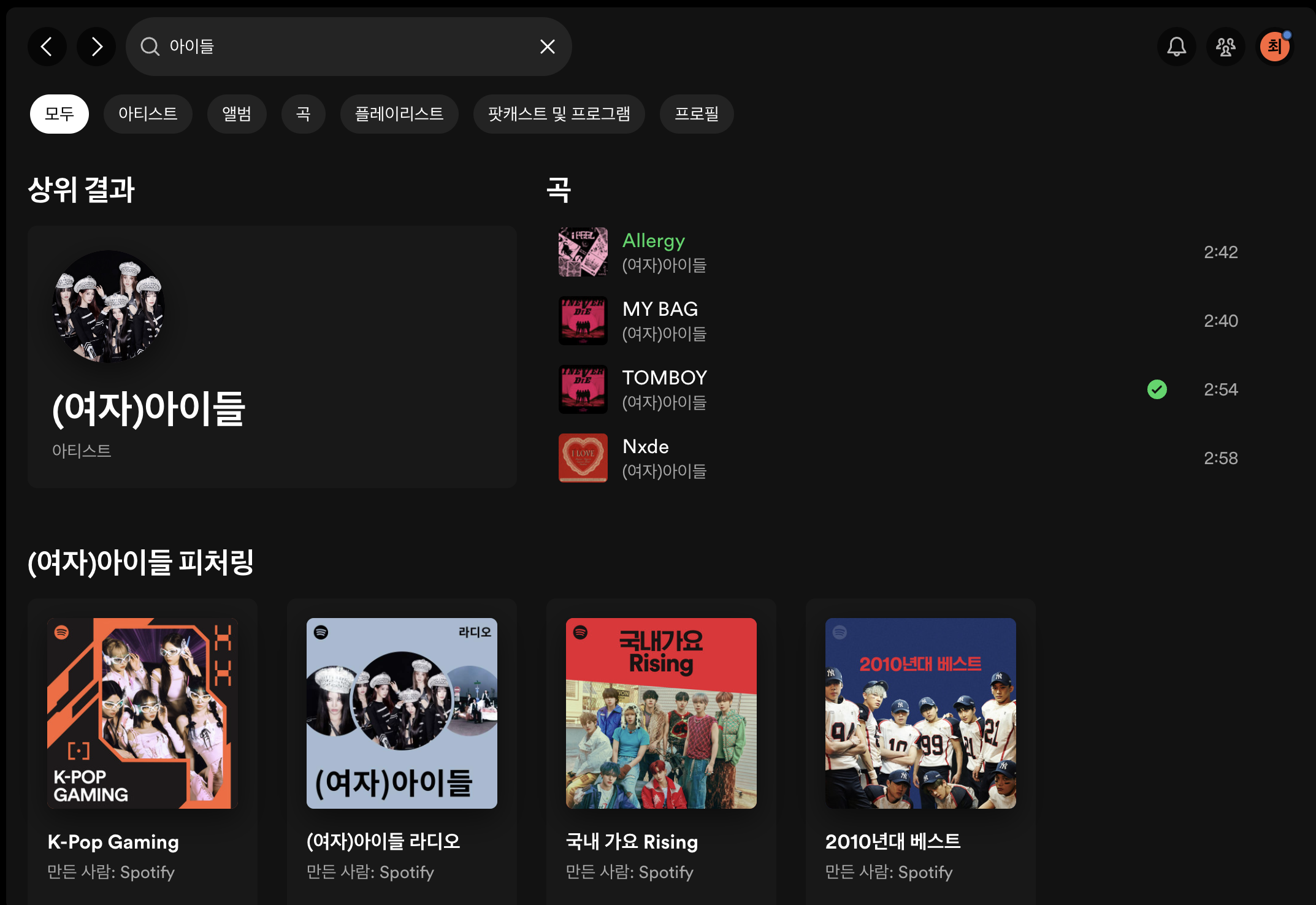
문제를 단순하게 생각했을때, REST API를 이용한다면 해당 화면을 구성하기 위해 여러 개의 엔드포인트에 검색 요청을 해야할 것이다.
GET https://www.spotify.com/artist?query=아이들
GET https://www.spotify.com/music?query=아이들
GET https://www.spotify.com/album?query=아이들
하지만 GraphQL 에서는 한 번의 요청과 쿼리로 화면 구성에 필요한 모든 데이터를 가져올 수 있다.
요청
POST https://www.spotify.com/graphql쿼리
{
	artist(query: "아이들") {
    	name
        ...
    }
    music(query: "아이들") {
		name
        ...
    }
    album(query: "아이들") {
    	name
        ...
    }
}
GraphQL API 구현
Spring for GraphQL 프레임워크를 사용하여 구현하면서 GrpahQL 문법을 함께 알아보자.
프로젝트 생성
GraphQL API를 간단하게 구현하기 위해 다음과 같은 의존성을 추가하여 프로젝트를 생성했다.
- Spring Web
- Spring for GraphQL
- Spring Data JPA
- H2 Database
application.yml 작성
간단하게 프로젝트를 진행하기 위한 설정을 작성해주었다.
spring:
  h2:
    console:
      enabled: true
      path: /h2-console

  jpa:
    hibernate:
      ddl-auto: create-drop
    show-sql: true
    properties:
      hibernate:
        format_sql: true

  datasource:
    url: jdbc:h2:mem:test
    username: sa

  graphql:
    graphiql:
      enabled: true #
    schema:
      printer:
        enabled: true
graphql.graphiql.enabled
'/graphiql' 경로로 접근하면 웹 브라우저에서 GraphQL API를 테스트 할 수 있다.
graphql.schema.printer.enabled
수행한 쿼리를 콘솔에 출력한다.
단일 객체를 활용한 기능 구현
schema.graphqls 생성
Spring for GraphQL 의존성을 추가하여 프로젝트 생성시 resources/graphql 폴더가 자동 생성된다. 해당 폴더에 schema.graphqls 파일을 생성 한 뒤 기능 구현을 위한 간단한 객체를 정의한다.
type Music {
    id: ID! ## '!'는 Not Null을 제약조건을 의미한다.
    name: String
    releaseDate: String
}
type 선언 으로 객체 타입을 정의할 수 있다. 위 객체와 필드를 이용해 클라이언트는 Music 객체의 데이터를 요청할 때 원하는 필드만 선택해서 요청할 수 있다.
Music Entity 생성
schema 에 정의한 객체와 대응되는 Entity를 생성한다.
@Getter
@NoArgsConstructor
@AllArgsConstructor
@Builder
@Entity
public class Music {
    @Id @GeneratedValue
    private Long id;
    private String name;
    private String releaseDate;
}
Query, Mutation 구현
GraphQL 은 HTTP 프로토콜을 활용하지만, 일반적으로 POST 메소드를 사용하여 통신하고,Query 와 Mutation 을 통해 기능을 구현한다.
Query 는 데이터를 읽기 위해 사용되며, REST API에서 Get Mapping, CRUD 에서 READ와 대응한다.
Mutation 은 데이터를 변경하기 위해 사용되며, READ 이외 모든 작업과 대응한다.
schema.graphqls 파일에 다음과 같이 Query 와 Mutation 기능을 정의할 수 있다.
type Query {
    music(id: ID!): Music
}

type Mutation {
    createMusic(name: String, releaseDate: String): Music
}
객체와 마찬가지로 type 을 이용해 선언하며, 메소드 형태로 필드를 정의하고 인자도 전달할 수 있다.
다음은 컨트롤러에 해당 Operation 과 매핑되는 메소드를 작성해야 한다.
@RequiredArgsConstructor
@Controller
public class MusicController {
    private final MusicService musicService;

    @QueryMapping
    //@Argument의 변수 이름은 schema에 정의한 것과 일치해야 한다.
    public Music music(@Argument Long id) {
        return musicService.getMusicById(id);
    }

    @MutationMapping
    public Music createMusic(@Argument String name, @Argument String releaseDate) {
        musicService.createMusic(name, releaseDate);
    }
}
기본적으로 schema.graphql 에 작성한 필드명과 일치하도록 메소드 이름을 작성해야 한다.
하위 레이어에서는 해당 기능에 맞는 로직을 구현해주면 된다.
Query, Mutation 수행 예시
Muation Operatoin
우선 저장된 데이터가 없으므로 Mutation 명령을 이용해 Music 데이터를 생성해준다.
mutation CreateMusicMutation {
	createMusic(name: "UnderWater", releaseDate: "2023") {
		id
	}
}
첫번째 라인의 CreateMusicMutation은 Operation name 에 해당하는 부분이다. 생략할 수 있는 부분이지만, 공식문서에 따르면 실제 서비스 환경에서 요청을 식별하고 디버깅하는데 도움을 주기 때문에 Operation name 을 부여하는 것을 권장한다.
두번째 라인의 createMusic 이름을 통해 실제로 스키마에 정의된 필드 및 컨트롤러 메서드와 매핑된다.
하지만, 위 쿼리처럼 하드코딩된 값을 사용하면, 정적인 인자를 전달한다는 문제점이 있다.
mutation CreateMusicMutation (
  $name: String,
  $releaseDate: String,
) {
  createMusic(name: $name, releaseDate: $releaseDate) {
    id
  }
}

# Variables
{
  "name": "Tomboy",
  "releaseDate": "2023",
}
동적인 인자를 전달하기 위해서는 위와 같이 Variables 를 사용해야 한다.
Query Operation
이제 생성된 Music 데이터를 조회해보자. Query 는 아래와 같이 작성할 수 있다.
query GetByMusicID($id: ID!){
    music(id: $id) {
        id
        name
    }
}

# Variables
{
	"id": 1
}
Query 는 Operation type(query, mutation, subscription) 을 생략할 수 있다. Operation name 은 원래 생략할 수 있으므로, 극단적으로 생략한다면 아래와 같은 간단한 Query 작성할 수 있다.
{
	music(id: 1) {
    	id
    	name
    }
}
하지만 Operation Name 에서 설명한 것과 같은 이유로 가능한 모든 것을 명시적으로 사용하는 것을 권장한다.
조회 결과
{
  "data": {
    "music": {
      "id": "1",
      "name": "Tomboy",
      "releaseDate": "2023"
    }
  }
}
Controller 메서드에서는 모든 필드값이 담긴 Music 인스턴스를 반환하지만, 클라이언트는 id, name 필드만 요청했으므로 해당하는 필드만 반환하게 된다.
원하는 필드만 요청하고 반환받을 수 있다는 GraphQL의 장점을 엿볼수 있다.
Enum Type 활용하기
GraphQL 에서는 enum type 도 지원한다.
Enum 타입은 shema 에 아래와 같이 정의하고 사용할 수 있다.
enum Genre {
    DANCE
    ROCK
    BALLADE
    JAZZ
}

type Music {
    id: ID!
    name: String!
    releaseDate: String
    genre: Genre
}

type Mutation {
    saveMusic(name: String, releaseDate: String, genre: Genre): Music
프로젝트 내에도 Enum 클래스를 생성한다.
@Getter
@RequiredArgsConstructor
public enum Genre {
    DANCE("댄스"),
    ROCK("락"),
    BALLADE("발라드"),
    JAZZ("재즈")
    ;

    private final String name;
}
Enum name이 서로 일치한다면 별도의 매핑 작업 없이도 @Argument 를 통해 인자로 받거나 반환 타입으로 사용할 수 있다.
@MutationMapping
public Music createMusic(
		@Argument String name, @Argument String releaseDate, @Argument Genre genre
        ) {
    return musicService.createMusic(name, releaseDate, genre);
}
Input Type 활용하기 with DTO
Music 에 필드가 많이 생길수록 createMusic 의 인자가 많아진다. 인자가 많아지면 가독성이 저하되고 유지보수가 어려워진다. REST API에서 @Request Body 로 DTO를 사용하듯이, GraphQL 에서도 Input Type 을 이용해 객체를 인자로 전달할 수 있다.
인자로 사용하는 객체는 type이 아닌 input으로 선언해줘야 한다.
input MusicInput {
	name: String!
    releaseDate: String
    genre: Genre
}

type Mutation {
    createMusic(musicInput: MusicInput): Music
}
위와 같이 생성하고 DTO를 생성해주면 Controller에서 DTO를 사용할 수 있다.
// MusicInput
@Builder
public record MusicInput(
        long id,
        String name,
        String releaseDate,
        Genre genre
) {
    public Music toEntity() {
        return Music.builder()
                .name(name)
                .releaseDate(releaseDate)
                .genre(genre)
                .build();
    }
}

// MusicController
@MutationMapping
public MusicResponse createMusic(@Argument MusicInput musicInput) {
    return musicService.saveMusic(musicInput);
}
Music 엔티티와 필드가 일치하기 때문에 그대로 인자로 사용할 수도 있지만, 엔티티를 클라이언트에게 노출하는 것은 좋은 방안이 아니라고 생각한다.
코드 예시는 생략하였지만, Response 도 동일한 이유로 DTO를 생성하고 활용해 주었다.
Custom Scalar type 정의하기
Scalar Type은 객체가 아닌 구체적인 데이터를 가지는 타입이다. GraphQL은 어떤 언어에 의존하지 않으며, 기본적으로 ID, String, Int, Float, Boolean 타입들을 내장하고 있다.
Music 객체의 releaseDate는 음악의 발매일을 표현하는 필드이다. 지금까지는 해당 필드를 String 으로 사용했지만 DateTime이라는 타입으로 정의
GraphQL에서는 다음과 같이 간단하게 custom scalar를 정의할 수 있다.
scalar DateTimeServer에서는 이를 사용하기 위해 직렬화, 역직렬화, 유효성 검증을 해줘야 한다.
이는 graphql.schema.Coercing 인터페이스를 통해 구현할 수 있다.
DateTime scalar를 TimeZone까지 표현할 수 있는 ZonedDateTime으로 역직렬화 하는 것으로 결정하였다. 시간 포맷은 ISO8601 표준을 따르는 것으로 하였다.
이를 위해 구현해줘야 하는 메소드는 다음과 같다.
new Coercing<ZonedDateTime, String>() {
    @Override
    public @Nullable ZonedDateTime parseLiteral(@NotNull Value<?> input, @NotNull CoercedVariables variables, @NotNull GraphQLContext graphQLContext, @NotNull Locale locale) throws CoercingParseLiteralException {

    }

    @Override
    public @Nullable ZonedDateTime parseValue(@NotNull Object input, @NotNull GraphQLContext graphQLContext, @NotNull Locale locale) throws CoercingParseValueException {

    }


	@Override
    public @Nullable String serialize(@NotNull Object dataFetcherResult, @NotNull GraphQLContext graphQLContext, @NotNull Locale locale) throws CoercingSerializeException {

    }
}parseLiteral은 클라이언트가 인자로 하드코딩한 literal 값을 전달했을 때 수행하는 메서드이며 literal 값을 ZonedDateTime 타입으로 역직렬화한다.
parseValue 는 Variables로 동적 변수를 전달했을 때 수행하는 메서드이다.
이때의 input은 클라이언트가 요청한 변수의 문자열이 그대로 전달된다.
serialize 는 메서드 이름 그대로 로직에 의해 가져온 데이터를 직렬화 하는 기능이다.
parseLiteral 메서드의 input 인자의 타입인 Value<?> 인터페이스를 어떻게 활용해야 하는지 알 수 없었다. 확인하기 위해 Value 인터페이스와 부모 인터페이스인 Node 인터페이스를 확인했다.
하지만 Node 인터페이스에 단일 필드 값을 가져오는 메소드가 없어 디버깅을 통해 어떤 객체인지 확인하였다.
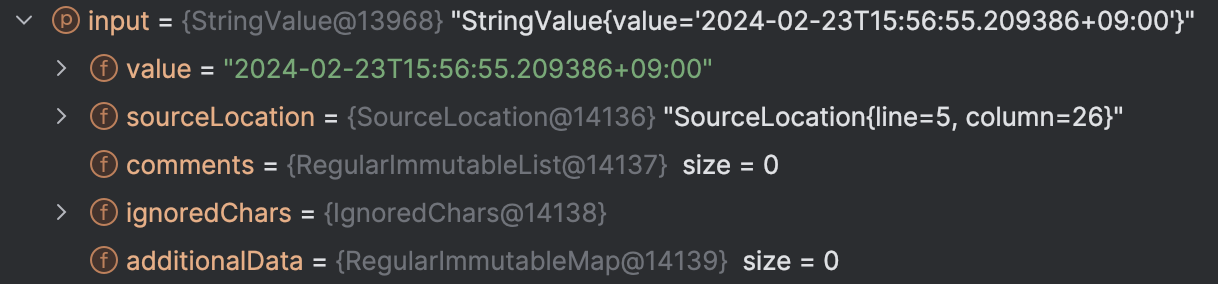
디버깅을 통해 문자열 요청 값은 StringValue 구현체를 통해 전달되고 있다는 것을 알아내었다.
위 정보를 바탕으로 해당 메서드들을 다음과 같이 구현하고, 이를 이용하여 GraphQLScalarType을 @Bean으로 등록해주었다.
@Configuration
public class DateTimeScalarConfig {
    @Bean
    public GraphQLScalarType dateTimeScalar() {
        return GraphQLScalarType.newScalar()
                .name("DateTime")
                .description("ZonedDateTime Scalar")
                .coercing(dateTimeCoercing())
                .build();
    }

    private Coercing<ZonedDateTime, String> dateTimeCoercing() {
        return new Coercing<ZonedDateTime, String>() {
            @Override
            public @Nullable ZonedDateTime parseValue(@NotNull Object input, @NotNull GraphQLContext graphQLContext, @NotNull Locale locale) throws CoercingParseValueException {
                try {
                    if (input instanceof String) {
                        return ZonedDateTime.parse((String) input);
                    }
                    throw new CoercingParseValueException("Expected a String");
                } catch (DateTimeException e) {
                    throw new CoercingParseValueException("Expected ISO 8601 time format");
                }
            }

            @Override
            public @Nullable ZonedDateTime parseLiteral(@NotNull Value<?> input, @NotNull CoercedVariables variables, @NotNull GraphQLContext graphQLContext, @NotNull Locale locale) throws CoercingParseLiteralException {
                if (input instanceof StringValue) {
                    try {
                        StringValue stringValue = (StringValue) input;
                        return ZonedDateTime.parse(stringValue.getValue());
                    } catch (DateTimeException e) {
                        throw new CoercingParseValueException("Expected ISO 8601 time format");
                    }
                }
                throw new CoercingParseValueException("Expected a String");
            }

            @Override
            public @Nullable String serialize(@NotNull Object dataFetcherResult, @NotNull GraphQLContext graphQLContext, @NotNull Locale locale) throws CoercingSerializeException {
                if (dataFetcherResult instanceof ZonedDateTime) {
                    return ((ZonedDateTime) dataFetcherResult).toOffsetDateTime().toString();
                }
                throw new CoercingSerializeException("Expected a ZonedDateTime object.");
            }
        };
    }
}
마지막으로 RuntimeWiringConfigurer에 해당 GraphQLScalarType을 scalar로 등록해주어야 ZonedDateTime을 scalar type으로 사용할 수 있다.
@Configuration
public class GraphQLConfig {
    private final GraphQLScalarType dateTimeScalar;

    public GraphQLConfig(GraphQLScalarType dateTimeScalar) {
        this.dateTimeScalar = dateTimeScalar;
    }

    @Bean
    public RuntimeWiringConfigurer runtimeWiringConfigurer() {
        return builder -> builder
                .scalar(dateTimeScalar);
    }
}
기능 테스트를 위해 다음과 같이 Muation을 작성해보았다.
mutation createMusic(
  $music : MusicInput
) {
  createMusic(musicInput: $music) {
    id
    name
    releaseDate
  }
}

# Variables
{
    "music": {
        "name": "Tomboy",
        "releaseDate": "2022-03-24T14:30:00.209386+09:00",
        "genre": "DANCE"
    }
}
Controller 에서 디버깅을 해본 결과 releaseDate 에 전달한 문자열이 정상적으로 ZonedDateTime 타입으로 파싱되었음을 확인 할 수 있었다.

응답 역시 직렬화되어 잘 반환되는 것을 확인하였다.
{
    "data": {
        "createMusic": {
            "id": "2",
            "name": "Tomboy",
            "releaseDate": "2022-03-24T14:30:00.209386+09:00"
        }
    }
}
마무리하며
Spring for GrahQL 과 간단한 Model 객체를 이용하여 GraphQL API를 구현하는 과정을 알아보았다.
REST API로 개발할 때에는 하나의 Model에 대해서 다양한 기능을 구현하기 위해 여러개의 Endpoint와 그에 맞는 DTO를 구현해야 했다.
GraphQL을 사용한다고 해서 마법처럼 하나의 Query로 모든 기능을 구현할 수 있는 것은 아니다. 하지만 REST API에 비해 적은 Query와 DTO 구현으로 다양한 기능을 커버할 수 있을 것이라는 것을 예상할 수 있었다.
2편에서는 연관관계 모델을 활용해 기능을 구현하는 방법에 대해 작성해보도록 하겠다.
참고 자료
GraphQL
Spring for GraphQL
https://docs.spring.io/spring-graphql/reference/index.html
https://graphql.org/learn/queries/
https://medium.com/supercharges-mobile-product-guide/graphql-server-using-spring-boot-part-ii-scalars-31505fe90c4c
https://stackoverflow.com/questions/73292862/custom-scalar-date-not-recognized-by-graphql-java-spring-boot-plugin-for-unit-te
