
이슈 현상
현상
- 서버 구동 시, 아래와 같이 KV 스토어가 제대로 작동 되지 않았다는 에러가 발생
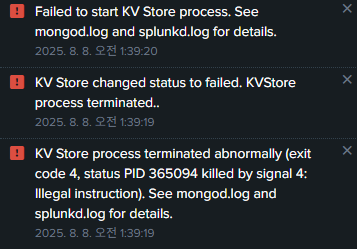
메세지
KV Store process terminated abnormally (exit code 4, status PID 365094 killed by signal 4: Illegal instruction). See mongod.log and splunkd.log for details.
Illegal instruction
- CPU에서 사용할 수 없는 옵션을 사용하려고 함
로그 확인
- KVstore 자체가 뜨지 않음
8-12-2025 19:49:22.708 -0400 ERROR ExecProcessor [365189 ExecProcessor] - message from "/opt/splunk/bin/python3.9 /opt/splunk/etc/apps/splunk_secure_gateway/bin/ssg_alerts_ttl_modular_input.py" WARNING:root:Modular input: splunk_secure_gateway can't be run due to Splunk role/mode

08-12-2025 03:27:09.548 -0400 ERROR KVStorageProvider [879217 TcpChannelThread] - An error occurred during the last operation ('serverStatus', domain: '15', code: '13053'): No suitable servers found: `serverSelectionTimeoutMS` expired: [Failed to connect to target host: 127.0.0.1:48191]. Topology type: Single

08-12-2025 03:26:39.520 -0400 ERROR KVStoreIntrospection [876644 TcpChannelThread] - failed to get introspection data
환경
- 팀 서버
- OS : Rocky Linux 8.10
- Splunk 버전 : 10.0 버전
이슈 원인
- KV Store와 CPU 문제
- 동일한 이슈로 보이는 커뮤니티글 (링크)
KVstore 버전 지원
- Splunk 9.4 버전 이후 부터 KVStore가 이전에 사용하던 MongoDB 4.2버전을 지원하지 않음
- 7.0버전 사용이 강제됨
- 공식 문서 (링크)
Splunk Enterprise versions 9.4 and higher no longer support KV store server version 4.2. Upgrade to KV store server version 7.0 for continued support and security, and to comply with Splunk Support Policy.Mongo DB 7.0 버전의 참고사항
AVX 명령어세트를 사용 할 수 있어야함 (링크)
## 플랫폼 지원 참고 사항

### x86_64
MongoDB에는 다음 최소 `x86_64` 마이크로아키텍처가 필요합니다.
- Intel `x86_64`의 경우 MongoDB에는 다음 중 하나가 필요합니다.
    - _Sandy Bridge_ 이상 코어 프로세서, 또는
    - _Tiger Lake_ 이상의 Celeron 또는 Pentium 프로세서.

- AMD `x86_64`의 경우 MongoDB에는 다음이 필요합니다.
    - _Bulldozer_ 이상의 프로세서.


MongoDB 5.0부터 mongod, mongos 및 레거시 mongo 셸은 이 최소 마이크로아키텍처 요구 사항을 충족하지 않는 `x86_64` 플랫폼을 더 이상 지원하지 않습니다.

- MongoDB는 RHCK(Red Hat Compatible Kernel)를실행하는 Oracle Linux만 지원합니다. MongoDB는 UEK(Unbreakable Enterprise Kernel)를 지원하지 **않습니다**.

- MongoDB 5.0에서는 특정 Intel 및 AMD 프로세서에서 사용할 수 있는 AVX 명령어 세트를 사용해야 합니다.
서버와 mongo 지원 여부 확인
OS의 지원 확인
- Rocky Linux 8.X 버전 지원

CPU 버전 확인
AVX미지원
-AVX(Advanced Vector Extensions): 인텔에서 CPU의 벡터 연산 성능을 향상 시키기 위해 만든 명령어 집합체- 지원 확인 :
lscpu | grep avx
- 지원 할 경우Flags안에avx가 존재함
lscpu | grep Flags

Flags:               fpu vme de pse tsc msr pae mce cx8 apic sep mtrr pge mca cmov pat pse36 clflush dts acpi mmx fxsr sse sse2 ht tm pbe syscall nx pdpe1gb rdtscp lm constant_tsc arch_perfmon pebs bts rep_good nopl xtopology nonstop_tsc cpuid aperfmperf pni pclmulqdq dtes64 monitor ds_cpl vmx smx est tm2 ssse3 cx16 xtpr pdcm pcid dca sse4_1 sse4_2 popcnt aes lahf_lm pti ssbd ibrs ibpb stibp tpr_shadow vnmi flexpriority ept vpid dtherm ida arat flush_l1d

lscpu | grep avx
해결 방안
- 어짜피 팀서버라 kvstore가 필요할 정도로 사용하지 않기에 비활성화
- kvstore 비활성화 - 비활성화 방법 :
server.conf에 아래 내용 추가 후 재시작 (링크)
[kvstore]
disabled = true
우유애호가의 종합 IT 생활 그런데 ML과 보안과 Splunk와 인프라를 곁들인