  import requests
  import fitz
  import os
  import pdfplumber
  from langchain_groq import ChatGroq
  from langchain_core.output_parsers import JsonOutputParser
  from langchain_core.prompts import ChatPromptTemplate
  import json
  from dotenv import load_dotenv
  load_dotenv()  # .env 파일 자동 로딩
  import easyocr


  # ✅ 예제 PDF 파일 경로
  PDF_FILE_PATH = "./2024 대전 0시 축제 포스터_최종.pdf"

  # ✅ 리스트에 저장
  text_list = []
  with pdfplumber.open(PDF_FILE_PATH) as pdf:
      for page in pdf.pages:
          text = page.extract_text()
          if text:
              text_list.append(text.strip())

  # ✅ 출력 예시
  for i, page_text in enumerate(text_list):
      print(f"\n📄 Page {i+1} 텍스트:\n{page_text}")

  # ✅ 저장할 폴더 생성
  os.makedirs('./data', exist_ok=True)

  # ✅ PDF → PNG 변환
  doc = fitz.open(PDF_FILE_PATH)
  for i, page in enumerate(doc):
      img = page.get_pixmap()
      output_path = f"./data/{i}.png"
      img.save(output_path)
      # print(f"📸 저장 완료: {output_path}")

  # ✅ 사용자 설정
  api_key = 'K85417667888957'  # 발급받은 API 키
  filename = './data/0.png'     # OCR할 이미지 경로
  language = 'eng'              # 'kor'도 가능
  overlay = False               # 단어 위치 좌표 필요 여부
  # ✅ payload 구성
  payload = {
      'isOverlayRequired': overlay,
      'apikey': api_key,
      'language': language,
  }
  # ✅ OCR API 요청
  with open(filename, 'rb') as f:
      response = requests.post(
          'https://api.ocr.space/parse/image',
          files={'filename': f},
          data=payload,
      )
  # ✅ 결과 출력
  result = response.json()
  # print("result\n",result)
  first_ocr_text = result['ParsedResults'][0]['ParsedText']
  # print("\n\n 📸 이미지에서 추출된 텍스트 \n ", first_ocr_text)

  reader = easyocr.Reader(['ko'])  # 한국어 + 영어, CPU 모드
  result = reader.readtext('./data/0.png')
  # ✅ OCR 결과를 리스트 형태로 정리
  ocr_lines = []
  for bbox, text, confidence in result:
      ocr_lines.append(f"[{confidence:.2f}] {text}")
  # ✅ OCR 텍스트를 줄바꿈 문자로 연결
  second_ocr_text = "\n".join(ocr_lines)


  # ✅ PDF에서 추출된 text_list와 결합
  parsed_text = (
      "📄Text extracted from pdf \n"
      + "\n---\n".join(text_list)
      + "\n\n\n\n 📸Text from image extracted from pdf \n"
      + " first OCR MODEL \n"
      + first_ocr_text
      + " second OCR MODEL \n"
      + second_ocr_text
  )

  print("parsed_text",parsed_text)
  #############################################


  ############################################# pdf 카테고리 분류
  llm = ChatGroq(
      model_name="llama-3.3-70b-versatile",
      temperature=0.7
  )

  parser = JsonOutputParser(pydantic_object={
      "type": "object",
      "properties": {
          "input": {"type": "string"},
          "output": {"type": "string"},
      }
  })

  prompt = ChatPromptTemplate.from_messages([
  ("system", """
  1. Your role is to categorize the PDFs sent by users.
  2. Return only a JSON object with the following format:
  "input": "...",
  "output": "..."  // One of: agentic-calendar, agentic-resume, agentic-create, agentic-visa, general


  3. Do not add any explanations. Do not return markdown. Do not add commentary.

  input : "2025년 3월 4일 ~ 10일: 제1학기 수강신청 변경 기간"
  output : "agentic-calendar"

  input : "2025년 6월 30일: 제1학기 성적제출 마감일"
  output : "agentic-calendar"

  input : "2026년 1월 6일 ~ 10일: 2026학년도 전과 신청"
  output : "agentic-calendar"

  input : "제2학기 개강: 2025년 9월 1일"
  output : "agentic-calendar"

  input : "제2학기 재학생 등록: 8월 25일 ~ 29일"
  output : "agentic-calendar"

  input : "2026년 2월 28일: 동계휴가 종료"
  output : "agentic-calendar"

  input : "제1학기 보강 기간: 6월 17일 ~ 23일"
  output : "agentic-calendar"


  input : "이력서"
  output : "agentic-resume"

  input : "성명: 홍길동 / 생년월일: 1990.01.01"
  output : "agentic-resume"

  input : "학력: 2010~2014 서울대학교 컴퓨터공학과 졸업"
  output : "agentic-resume"

  input : "경력: 2015~2020 Naver Corp. 백엔드 개발자"
  output : "agentic-resume"

  input : "자격증: 정보처리기사"
  output : "agentic-resume"

  input : "자기소개서"
  output : "agentic-resume"

  input : "학위: 석사 / 전공: 인공지능"
  output : "agentic-resume"

  input : "경력사항 요약"
  output : "agentic-resume"


  input : "2024 대전 이시 축제 개최 안내"
  output : "agentic-create"

  input : "행사일시: 2024년 8월 9일 ~ 17일"
  output : "agentic-create"

  input : "K-pop 콘서트, 과학 전시 체험, 퍼레이드"
  output : "agentic-create"

  input : "바로가기 / 대전시 공식 행사"
  output : "agentic-create"

  input : "행사 포스터 / 장소: 옛 충남도청"
  output : "agentic-create"

  input : "출연진: 화사, 제시, 다비치 등"
  output : "agentic-create"

  input : "과학기술 테마파크 / 체험 부스 운영"
  output : "agentic-create"

  input : "이무진, 박지현, 장민호 등 출연"
  output : "agentic-create"


  input : "IMMIGRANT VISA / IV Case Number: 00200416000201"
  output : "agentic-visa"

  input : "Given name: HAPPY / Nationality: GBR"
  output : "agentic-visa"

  input : "Issue Date: 23DEC2004 / Passport Number: 555123ABC"
  output : "agentic-visa"

  input : "US CONSULATE GENERAL - LONDON"
  output : "agentic-visa"

  input : "Visa Type: TRAVELER"
  output : "agentic-visa"

  input : "Date of Birth: 05FEB1965 / Status: IV On"
  output : "agentic-visa"

  input : "SERVES I-551 / Immigrant Visa Status"
  output : "agentic-visa"

  input : "Case No: 00000473 / Category: F11"
  output : "agentic-visa"

  input : "Immigration Barcode: 555123ABC6GBR6502056F04122361FLNDOOAMS803085"
  output : "agentic-visa"

  input : "Residence: United Kingdom / Entry Code: IV"
  output : "agentic-visa"


  intput : All answers other than the above examples
  output : general


  Only return the JSON object like above.
  """

   ),
      ("user", "{input}")
  ])

  chain = prompt | llm | parser

  def parse_product(description: str) -> dict:
          result = chain.invoke({"input": description})
          print(json.dumps(result, indent=2, ensure_ascii=False))

          return json.dumps(result, indent=2, ensure_ascii=False)

  description = parsed_text
  print("description\n",description)
  response = parse_product(description)
  print("response\n",response)

  ############################################# pdf 카테고리 분류


  ############################################# pdf 요약
  def pdf_general(parsed_text) :

      llm = ChatGroq(
          model_name="llama-3.3-70b-versatile",
          temperature=0.7
          )

      parser = JsonOutputParser(pydantic_object={
          "type": "object",
          "properties": {
              "input": {"type": "string"},
              "output": {"type": "string"},
          }
      })
      prompt = ChatPromptTemplate.from_messages([
      ("system", """
      1. You are the part that organizes the text.
      2. I will give you the text extracted from the pdf.
      3. Please organize the text so that it is easy for users to understand.

      Return only this JSON:

      {{
      "input": "Original text",
      "output": "organized text"
      }}
      """

      ),
          ("user", "{input}")
      ])

      chain = prompt | llm | parser

      def parse_product(description: str) -> dict:
          result = chain.invoke({"input": description})
          print(json.dumps(result, indent=2, ensure_ascii=False))

          return json.dumps(result, indent=2, ensure_ascii=False)

      description = parsed_text
      print("description\n",description)
      response = parse_product(description)
      print("response\n",response)
  ############################################# pdf 요약
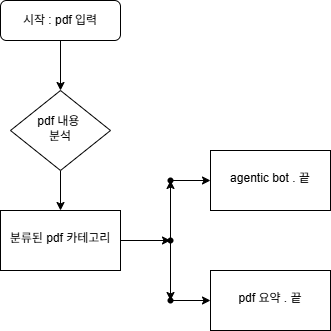
✅ 1단계: PDF에서 텍스트 추출 + OCR 이미지 처리
with pdfplumber.open(PDF_FILE_PATH) as pdf:
...
PDF의 페이지별 텍스트를 추출합니다.
response = requests.post('~~~',...) // api.ocr.space 요청
reader - easyocr.Reader(['ko']) // 라이브러리 사용
이미지 내 텍스트 ocr 실행합니다
parsed_text = (...)
결과들을 parsed_text로 합침
✅ 2단계: Langchain을 통해 PDF 분류 (카테고리 지정)
PDF 내용을 보고 5가지 중 하나로 분류
llm = ChatGroq(...)
prompt = ChatPromptTemplate.from_message([...])
chain = prompt | llm | parser
랭체인 사용
few-shot예시 기반으로 분류 요청 결과를 json으로 반환
✅ 3단계: 결과에 따라 분기 처리
PDF가 general이면 요약을 해야 하고, 아니면 그냥 끝냄
(아직 미완성)
✅ 4단계: general인 경우 요약 함수 호출
def pdf_general(parsed_text):
input : 원본문서
output : 요약된 정리문서
2단계동일
랭체인과 예시를 사용해서 반환
...
✅ 추후 진행해야할 로직
PDF가 general이면 요약,
agentic의경우는 해당 로직으로 상태변수와 사용자가 입력한 pdf의 텍스트를 전달
뭐가될지 모름