권한 설정
Android 12(API 레벨 31) 이상에서 새로운 블루투스 권한 요구 사항이 추가됨.
- 블루투스 연결을 설정하고 블루투스 장치와 상호작용하려면 android.permission.BLUETOOTH_CONNECT 권한이 필요.
- 이 권한이 AndroidManifest.xml 파일에 선언시 사용 가능
해결 방법
AndroidManifest.xml에 권한 추가:
AndroidManifest.xml 파일에 다음 권한들 추가해야 함.
<uses-permission android:name="android.permission.BLUETOOTH" />
<uses-permission android:name="android.permission.BLUETOOTH_ADMIN" />
<uses-permission android:name="android.permission.BLUETOOTH_SCAN" />
<uses-permission android:name="android.permission.BLUETOOTH_CONNECT" />
<uses-permission android:name="android.permission.ACCESS_FINE_LOCATION" />
이 권한들은 Android 12(API 레벨 31) 이상에서 필요.
런타임 권한 요청:
- Android 6.0(API 레벨 23) 이상에서는 위험 권한을 런타임에 요청해야 함
- Flutter에서 런타임 권한을 요청하려면 permission_handler 패키지를 사용 가능.
pubspec.yaml 파일에 의존성 추가:
yaml
dependencies:
permission_handler: ^10.0.0
그런 다음, 실제로 앱에서 권한을 요청할 수 있습니다:
import 'package:permission_handler/permission_handler.dart';

void checkPermissions() async {
  if (await Permission.bluetoothConnect.request().isGranted) {
    // 권한이 부여된 경우 페어링된 장치를 가져옵니다.
    getPairedDevices();
  } else {
    print("Bluetooth connect permission not granted.");
  }
}
initState 초기화 시점에 권한을 확인, 요청.
@override
void initState() {
  super.initState();
  checkPermissions();  // 권한을 확인 및 요청
}
요약
- Android 12(API 레벨 31) 이상에서 블루투스 관련 권한이 추가. - - - AndroidManifest.xml 파일에 권한을 추가, 런타임에 적절히 권한을 요청.
flutter_blue_Plus(BLE)
- BLE 장치 (저 전력 블루투스 장치) 검색을 위해 필요한 패키지.
flutter_bluetooth_serial(classic)
- Classic bluetooth 장치 검색을 위해 필요한 패키지.
- 서로 다른 개념의 블루투스.
- 내가 검색할 기기가 어떤 블루투스를 사용 하는 지 확인 후 사용.
- BLE 는 serial 패키지에서 검색할 수 없고,
- Classic 은 blue_plus 패키지에서 검색이 안됨.
패키지 설치
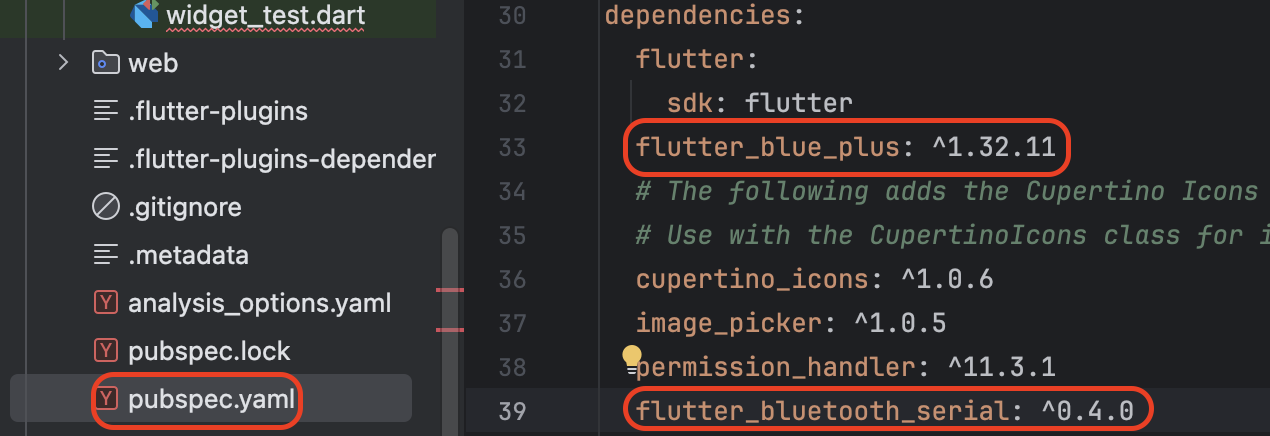
pubspec.yaml 파일에 두 패키지를 설치할 수 있도록 작성해준다.
BLE 장치 검색
import 'dart:async';
import 'package:flutter/material.dart';
import 'package:flutter_blue_plus/flutter_blue_plus.dart';
import 'package:permission_handler/permission_handler.dart';

void main() {
  runApp(MyApp());
}

class MyApp extends StatelessWidget {
  @override
  Widget build(BuildContext context) {
    return MaterialApp(
      title: 'Flutter Bluetooth Demo',
      theme: ThemeData(
        primarySwatch: Colors.blue,
      ),
      home: BluetoothScreen(),
    );
  }
}

class BluetoothScreen extends StatefulWidget {
  @override
  _BluetoothScreenState createState() => _BluetoothScreenState();
}

class _BluetoothScreenState extends State<BluetoothScreen> {
  final FlutterBluePlus flutterBlue = FlutterBluePlus(); // 변경된 인스턴스 생성 방식
  List<BluetoothDevice> connectedDevices = [];

  @override
  void initState() {
    super.initState();
    requestPermissions();
  }

  Future<void> requestPermissions() async {
    if (await Permission.bluetooth.request().isGranted &&
        await Permission.location.request().isGranted) {
      getConnectedDevices();
      print("successff ${connectedDevices.length}");

    } else {
      // 권한 요청 실패 시 처리
      print("Bluetooth or Location permission not granted");
    }
  }

  Future<void> getConnectedDevices() async {
    try {
      List<BluetoothDevice> devices = await FlutterBluePlus.connectedDevices;
      setState(() {
        connectedDevices = devices;
      });
    } catch (e) {
      print('Error fetching connected devices: $e');
    }
  }

  @override
  Widget build(BuildContext context) {
    return Scaffold(
      appBar: AppBar(
        title: Text('Connected Bluetooth Devices'),
      ),
      body: RefreshIndicator(
        onRefresh: getConnectedDevices,
        child: ListView.builder(
          itemCount: connectedDevices.length,
          itemBuilder: (context, index) {
            BluetoothDevice device = connectedDevices[index];
            return ListTile(
              title: Text(device.name.isNotEmpty ? device.name : 'Unknown Device'),
              subtitle: Text(device.id.toString()),
            );
          },
        ),
      ),
    );
  }
}
Classic 장치 검색
import 'dart:async';
import 'package:flutter/material.dart';
import 'package:flutter_bluetooth_serial/flutter_bluetooth_serial.dart';
import 'package:permission_handler/permission_handler.dart';

void main() {
  runApp(MyApp());
}

class MyApp extends StatelessWidget {
  @override
  Widget build(BuildContext context) {
    return MaterialApp(
      title: 'Flutter Bluetooth Serial Demo',
      theme: ThemeData(
        primarySwatch: Colors.blue,
      ),
      home: BluetoothScreen(),
    );
  }
}

class BluetoothScreen extends StatefulWidget {
  @override
  _BluetoothScreenState createState() => _BluetoothScreenState();
}

class _BluetoothScreenState extends State<BluetoothScreen> {
  List<BluetoothDevice> _connectedDevices = [];
  BluetoothState _bluetoothState = BluetoothState.UNKNOWN;
  StreamSubscription<BluetoothDiscoveryResult>? _discoveryStreamSubscription;

  @override
  void initState() {
    super.initState();
    _requestPermissions();
    _getBluetoothState();
    _getConnectedDevices();
  }

  Future<void> _requestPermissions() async {
    if (await Permission.bluetooth.request().isGranted &&
        await Permission.location.request().isGranted) {
      print("Permissions granted");
    } else {
      print("Bluetooth or Location permission not granted");
    }
  }

  void _getBluetoothState() {
    FlutterBluetoothSerial.instance.state.then((state) {
      setState(() {
        _bluetoothState = state;
      });
    });
  }

  void _getConnectedDevices() async {
    List<BluetoothDevice> devices = [];
    try {
      devices = await FlutterBluetoothSerial.instance.getBondedDevices();
      setState(() {
        _connectedDevices = devices.where((device) => device.isConnected).toList();
      });
    } catch (e) {
      print('Error getting bonded devices: $e');
    }
  }

  @override
  void dispose() {
    _discoveryStreamSubscription?.cancel();
    super.dispose();
  }

  @override
  Widget build(BuildContext context) {
    return Scaffold(
      appBar: AppBar(
        title: Text('Connected Bluetooth Devices'),
      ),
      body: RefreshIndicator(
        onRefresh: () async {
          _getConnectedDevices();
        },
        child: ListView.builder(
          itemCount: _connectedDevices.length,
          itemBuilder: (context, index) {
            BluetoothDevice device = _connectedDevices[index];
            return ListTile(
              title: Text(device.name ?? 'Unknown Device'),
              subtitle: Text(device.address),
              trailing: Icon(
                device.isConnected ? Icons.bluetooth_connected : Icons.bluetooth,
                color: device.isConnected ? Colors.blue : null,
              ),
            );
          },
        ),
      ),
    );
  }
}