React-5일차
학습한 내용
React/ 실습 - (실습) 비동기 제어하기
동기
- 작업(task)들이 순차적으로 이루어 지는 것
- 현재 작업하고 있으면 다른 작업들을 blocking
비동기
- 작업(task)들이 순차적으로 이루어지지 않음
- 다른 작업들은 non-blocking
- Ajax 통신
비동기 - async/await
- ES8에서 나온 비동기 패턴
- Promise기반, 사용하기 편함
비동기 - Promise
- ES6에서 나온 비동기 패턴
- 비동기 통신 결과와 상태를 저장하는 객체
stateful, stateless
- 컴포넌트를 나누는 또 다른 방식이다.
- stateful 컴포넌트 : 모든 state를 들고있는 컴포넌트
- stateless 컴포넌트: state를 안들고 있고 props 와 같이 받은 데이터만 보여주는 컴포넌트
- 리액트는 단방향 통신이라서 부모에서 자식쪽으로는 데이터를 줄 수 있지만, props로 자식에서 부모쪽으로는 줄 수가 없다. 자식과 자식간에도 연관이 없다면 줄 수 없다.
- 자식 쪽에서 이벤트를 발생시키는 시점에서 부모가 모든 데이터를 가지고 있다가 자식쪽으로 데이터를 전달
실습. 날씨앱 만들기
- 먼저 날씨 api를 받아오기 위해 KEY받아오기
- https://openweathermap.org/
- 회원가입 후, key 확인
-
구현 과정 설계
1) 현재 위치 기반의 날씨를 보이도록 설정
2) 날씨 정보에는 도시, 섭씨, 화씨, 날씨상태
3) 1개는 현재위치, 4개는 다른 도시
4) 해당 버튼을 누르면 현재 지역, 해당 도시의 날씨가 나오도록 설정
5) 데이터를 들고오는 동안 로딩 스피너가 돌도록 설정 -
필요한 확장팩, 패키지 설치
1) es7 react 확장팩
- rcc + enter처럼 간단 명령어로 기본 골격 구조 만들어 줌
- 명령어 : rafce + enfer
2) 부트스트랩 패키지 설치 - npm install react-bootstrap bootstrap
3) 스피너 패키지 설치 - react spinner 검색
- https://www.npmjs.com/package/react-spinners
- 설치 명령어 : npm install --save react-spinners
- 코드 작성
1) App.js
import React, { useState, useEffect } from 'react';
import 'bootstrap/dist/css/bootstrap.min.css';
import './App.css';
import { Container } from 'react-bootstrap';
import WeatherButton from './components/WeatherButton';
import WeatherBox from './components/WeatherBox';
import { ClipLoader } from 'react-spinners';

const cities = ['paris', 'new york', 'tokyo', 'seoul'];
// https://openweathermap.org 의 키
const API_KEY = '68426cc698229c9257d29f7fc86b3a6f';

const App = () => {
  const [loading, setLoading] = useState(false);
  const [city, setCity] = useState(null); // 도시 정보초기값 설정
  const [weather, setWeather] = useState(null); // 날씨 정보
  const [apiError, setAPIError] = useState('');

  // 현재 위치 정보 가져오기
  const getWeatherByCurrentLocation = async (lat, lon) => {
    console.log('현재 위치', lat, lon);
    //비동기 처리
    try {
      let url =
        // let url = `https://api.openweathermap.org/data/2.5/weather?lat=${lat}&lon=${lon}&appid=${API_KEY}`;
        // lat과 lon으로 위도와 경도를 받아 오는 것이 맞지만, 현 대구 지역의 위도, 경도가 다른 지역으로 검색되어 지정해줌
        'http://api.openweathermap.org/data/2.5/weather?lat=35.87222&lon=128.60250&appid=b4a0b63fb0a27cc709f6ea5ecd5f5d7d';
      //뒤에 &units=metric 붙이면 캘빈온도를 섭씨온도로 변환해줌
      const res = await fetch(url); //비동기, 요청
      const data = await res.json(); //json으로 받아옴
      setWeather(data); // 데이터 받아오기
      setLoading(false);
    } catch (err) {
      setAPIError(err.message);
      setLoading(false);
    }
  };

  const getCurrentLocation = () => {
    navigator.geolocation.getCurrentPosition((position) => {
      const { latitude, longitude } = position.coords;
      getWeatherByCurrentLocation(latitude, longitude);
      // console.log('현재 위치', lat, lon);
    });
  };

  // 도시별 정보 요청
  const getWeatherByCity = async () => {
    try {
      let url = `https://api.openweathermap.org/data/2.5/weather?q=${city}&appid=${API_KEY}`;
      //&units=metric
      const res = await fetch(url); // 비동기, 요청
      const data = await res.json(); // json으로 받아옴

      setWeather(data); // 데이터 받아오기
      setLoading(false);
    } catch (err) {
      console.log(err);
      setAPIError(err.message);
      setLoading(false);
    }
  };

  // 데이터 불러오기
  useEffect(() => {
    if (city == null) {
      setLoading(true);
      getCurrentLocation(); // 도시 정보가 없다면 현재 정보를 불러옴
    } else {
      setLoading(true);
      getWeatherByCity();
    }
  }, [city]);

  const handleCityChange = (city) => {
    if (city === 'current') {
      setCity(null);
    } else {
      setCity(city);
    }
  };

  return (
    <Container className="vh-100">
      {loading ? (
        <div className="w-100 vh-100 d-flex justify-content-center align-items-center">
          <ClipLoader color="#f86c6b" size={150} loading={loading} />
        </div>
      ) : !apiError ? (
        <div class="main-container">
          <WeatherBox weather={weather} /> {/* 정보 내려주기 */}
          <WeatherButton
            cities={cities}
            handleCityChange={handleCityChange}
            selectedCity={city}
          /> {/* 정보 내려주기 */}
        </div>
      ) : (
        apiError
      )}
    </Container>
  );
};

export default App;
- 현재 위치 불러오기
- get current location javascript 검색
- https://www.w3schools.com/html/html5_geolocation.asp 사이트 참고
2) WeatherBox.js
import React from 'react';
import { Card } from 'react-bootstrap';

const WeatherBox = ({ weather }) => {
  // 섭씨, 화씨 계산
  const temperatureC =
    weather && weather.main ? (weather.main.temp - 273.15).toFixed(2) : '';
  const temperatureF =
    weather && weather.main
      ? (((weather.main.temp - 273.15) * 9) / 5 + 32).toFixed(2)
      : '';
  return (
    <Card className="weather-card">
      {/* <Card.Img src="holder.js/100px270" alt="Card image" /> */}
      <Card.ImgOverlay className="d-flex flex-column justify-content-center text-center">
        <Card.Title>{weather?.name}</Card.Title>
        <Card.Text className="text-success h1">
          {`${temperatureC} °C / ${temperatureF} °F`} {/* 섭씨, 화씨 나태니기 */}
        </Card.Text>
        <Card.Text className="text-info text-uppercase h2">
          {weather && weather.weather[0]?.description} {/* 날씨 정보 */}
        </Card.Text>
      </Card.ImgOverlay>
    </Card>
  );
};

export default WeatherBox;
3) WeatherButton.js
import React from 'react';
import { Button } from 'react-bootstrap';

const WeatherButton = ({ cities, selectedCity, handleCityChange }) => {
  return (
    <div class="menu-container">
      <Button
        variant={`${selectedCity === null ? 'outline-warning' : 'warning'}`}
        onClick={() => handleCityChange('current')}
      >
        Current Location
      </Button>
      {/* 배열에서 가져올 때는 map */}
      {cities.map((city) => (
        <Button
          variant={`${selectedCity === city ? 'outline-warning' : 'warning'}`}
          onClick={() => handleCityChange(city)}
        >
          {city}
        </Button>
      ))}
    </div>
  );
};

export default WeatherButton;- WeatherButton에서 WeatherBox에 정보를 전달해야 하지만, 단방향 통신이라서 자식 간의 정보를 줄 수 없음.
- 그래서 모든 데이터를 가지고 있는 부모 App.js에서 데이터를 자식 WeatherBox로 넘겨줌.
4) App.css
body {
  background: url(https://cdn.pixabay.com/photo/2017/01/17/16/45/night-1987408_960_720.png);
  height : 100vh;
  background-repeat: no-repeat;
  background-size: cover;
}

.weather-card{
  background-color: rgba(52,52,52,.7) !important;
  padding: 50px;
  border: 2px solid #fff;
  border-radius: 20px;
  max-width: 700px;
  width:100%;
  height: 300px;
}
.main-container{
  display: flex;
  flex-direction: column;
  align-items: center;
  justify-content: center;
  height: 100%;

}
.menu-container{
  display: flex;
  justify-content: center;
  background-color: #000;
  border-radius: 60px;
  max-width: 700px;
  width:100%;
  padding: 30px;
  margin-top: 30px;

}
.menu-container Button{
  margin-right:30px;
}

.menu-container Button:hover{
  background-color: #ffc107;
}- 실행
- 명령어 : npm start
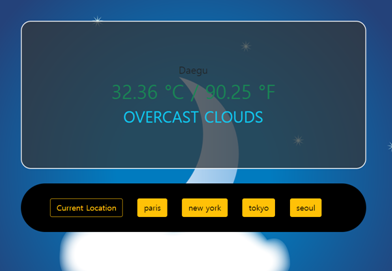
현 위치 지역의 날씨 정보
각 도시의 날씨 정보
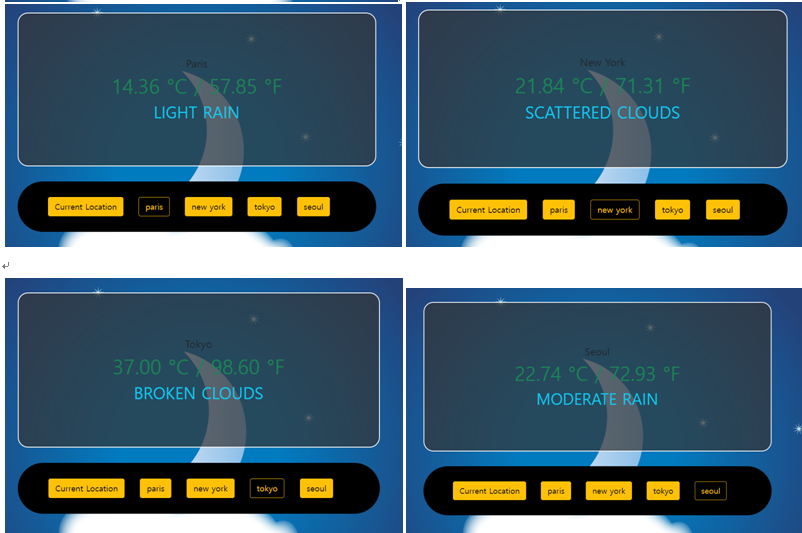
버튼 이동( 데이터를 불러오는 과정에서 로딩, spinner)모습

학습한 내용 중 어려웠던 점 또는 해결못한 것들
해결방법 작성
학습 소감
5일동안 React를 학습해보았는데, 기본 구조나 코드 작성하는 방법에는 익숙해졌다. 하지만, 특정 문법에서는 제대로 학습을 못하여 아직까지 어려움이 남아 있는 것 같다. 그리고 React는 올해 많은 변화가 이루어지고 있다고 한다. 그래서 문법이나 사용 방법에 대해서 외우는 것이 아닌 작성해보고 이해하려고 노력하는 모습이 필요할 것 같다.

예비 프론트엔드 개발자