210813 개발일지
1) 학습한 내용
국내외 사이트 카피캣 (네이버 이스포츠 3편)

> 네이버 이스포츠 오른쪽 영역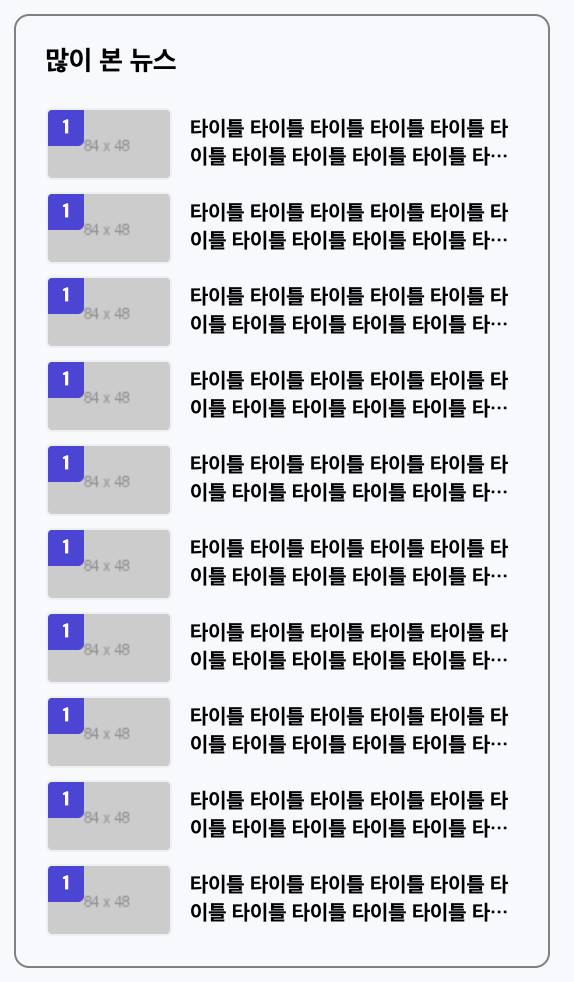
<div id="esport-news-view">

<h2>많이 본 뉴스</h2>

<ol>
<li>
<a href="#" class="esport-flex-between">
<div class="image-wrap">
<img src="https://via.placeholder.com/84x48">
<span class="rank">1</span>
</div>

<h3>타이틀 타이틀 타이틀 타이틀 타이틀 타이틀 타이틀 타이틀 타이틀 타이틀 타이틀 타이틀</h3>
</a>
</li>
<li>
<a href="#" class="esport-flex-between">
<div class="image-wrap">
<img src="https://via.placeholder.com/84x48">
<span class="rank">1</span>
</div>

<h3>타이틀 타이틀 타이틀 타이틀 타이틀 타이틀 타이틀 타이틀 타이틀 타이틀 타이틀 타이틀</h3>
</a>
</li>
<li>
<a href="#" class="esport-flex-between">
<div class="image-wrap">
<img src="https://via.placeholder.com/84x48">
<span class="rank">1</span>
</div>

<h3>타이틀 타이틀 타이틀 타이틀 타이틀 타이틀 타이틀 타이틀 타이틀 타이틀 타이틀 타이틀</h3>
</a>
</li>
<li>
<a href="#" class="esport-flex-between">
<div class="image-wrap">
<img src="https://via.placeholder.com/84x48">
<span class="rank">1</span>
</div>

<h3>타이틀 타이틀 타이틀 타이틀 타이틀 타이틀 타이틀 타이틀 타이틀 타이틀 타이틀 타이틀</h3>
</a>
</li>
<li>
<a href="#" class="esport-flex-between">
<div class="image-wrap">
<img src="https://via.placeholder.com/84x48">
<span class="rank">1</span>
</div>

<h3>타이틀 타이틀 타이틀 타이틀 타이틀 타이틀 타이틀 타이틀 타이틀 타이틀 타이틀 타이틀</h3>
</a>
</li>
<li>
<a href="#" class="esport-flex-between">
<div class="image-wrap">
<img src="https://via.placeholder.com/84x48">
<span class="rank">1</span>
</div>

<h3>타이틀 타이틀 타이틀 타이틀 타이틀 타이틀 타이틀 타이틀 타이틀 타이틀 타이틀 타이틀</h3>
</a>
</li>
<li>
<a href="#" class="esport-flex-between">
<div class="image-wrap">
<img src="https://via.placeholder.com/84x48">
<span class="rank">1</span>
</div>

<h3>타이틀 타이틀 타이틀 타이틀 타이틀 타이틀 타이틀 타이틀 타이틀 타이틀 타이틀 타이틀</h3>
</a>
</li>
<li>
<a href="#" class="esport-flex-between">
<div class="image-wrap">
<img src="https://via.placeholder.com/84x48">
<span class="rank">1</span>
</div>

<h3>타이틀 타이틀 타이틀 타이틀 타이틀 타이틀 타이틀 타이틀 타이틀 타이틀 타이틀 타이틀</h3>
</a>
</li>
<li>
<a href="#" class="esport-flex-between">
<div class="image-wrap">
<img src="https://via.placeholder.com/84x48">
<span class="rank">1</span>
</div>

<h3>타이틀 타이틀 타이틀 타이틀 타이틀 타이틀 타이틀 타이틀 타이틀 타이틀 타이틀 타이틀</h3>
</a>
</li>
<li>
<a href="#" class="esport-flex-between">
<div class="image-wrap">
<img src="https://via.placeholder.com/84x48">
<span class="rank">1</span>
</div>

<h3>타이틀 타이틀 타이틀 타이틀 타이틀 타이틀 타이틀 타이틀 타이틀 타이틀 타이틀 타이틀</h3>
</a>
</li>
</ol>

</div>

#esport-news-view
	{padding: 20px;
	border: solid 1px grey;
	border-radius: 10px;

	margin-bottom: 30px;}

#esport-news-view h2
	{font-size: 18px;}

#esport-news-view ol
	{margin-top: 20px;}

#esport-news-view li
	{margin-bottom: 8px;}

#esport-news-view li:last-child
	{margin-bottom: 0;}

#esport-news-view li a
	{/*display: block;*/}

#esport-news-view li .image-wrap
	{overflow: hidden;
	position: relative;
	width: 84px;
	height: 48px;
	border: solid 1px rgba(0, 0, 0, .04);
	border-radius: 4px;}

#esport-news-view li .image-wrap img
	{position: absolute;
	width: 100%;
	height: 100%;}

#esport-news-view li .image-wrap .rank
	{position: absolute;
	background-color: #4e41db;
	border-bottom-right-radius: 4px;

	padding: 4px 10px;

	top: 0;
	left: 0;

	font-size: 13px;
	color: #fff;
	font-weight: 800;}

#esport-news-view li h3
	{display: -webkit-box;
	overflow: hidden;

	width: 218px;
	max-height: 38px;
	-webkit-line-clamp: 2;
	-webkit-box-orient: vertical;
	text-overflow: ellipsis;


	font-size: 14px;
	line-height: 19px;}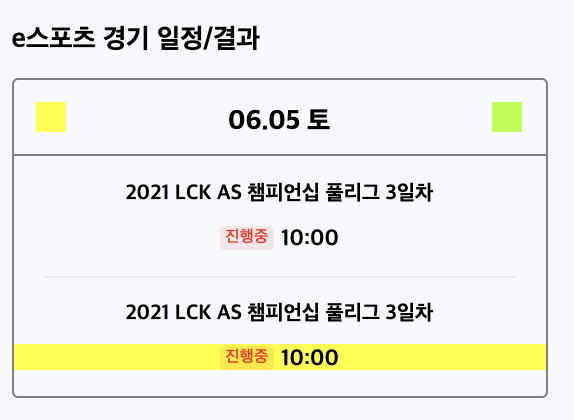
<div id="esport-schedule">
<h2>e스포츠 경기 일정/결과</h2>

<div class="schedule-wrap">

<div class="schedule-header esport-flex-between">

<button class="arrow arrow-left"></button>
<span>06.05 토</span>
<button class="arrow arrow-right"></button>

</div>

<div class="schedule-body">

<ul>
<li>
<h3>2021 LCK AS 챔피언십 풀리그 3일차</h3>
<div class="status-wrap esport-flex-center">
<span class="status">진행중</span>
<span class="time">10:00</span>
</div>
</li>

<li>
<h3>2021 LCK AS 챔피언십 풀리그 3일차</h3>
<div class="status-wrap esport-flex-center">
<span class="status">진행중</span>
<span class="time">10:00</span>
</div>
</li>
</ul>

</div>

</div>
</div>

</div>

#esport-schedule {}

#esport-schedule h2
	{font-size: 18px;}

#esport-schedule .schedule-wrap
	{margin-top: 15px;
	border: solid 1px grey;
	border-radius: 4px;}

#esport-schedule .schedule-wrap .schedule-header
	{padding: 14px 15px;
	border-bottom: solid 1px grey;}

#esport-schedule .schedule-wrap .schedule-header .arrow
	{width: 20px;
	height: 20px;}

#esport-schedule .schedule-wrap .schedule-header .arrow.arrow-left
	{background-color: yellow;}

#esport-schedule .schedule-wrap .schedule-header .arrow.arrow-right
	{background-color: greenyellow;}

#esport-schedule .schedule-wrap .schedule-header span
	{position: relative;

	font-size: 18px;
	font-weight: 800;

	top: 3px;}

#esport-schedule .schedule-body
	{padding: 17px 0;}

#esport-schedule .schedule-body li
	{/*padding: 17px 0;*/}

#esport-schedule .schedule-body li:first-child:after
	{content: "";
	display: block;
	width: calc(100% - 40px);
	height: 1px;
	background-color: rgba(0, 0, 0, .05);

	margin: 17px auto;}

#esport-schedule .schedule-body li h3
	{font-size: 14px;
	margin-bottom: 12px;
	text-align: center;}

#esport-schedule .schedule-body li .status-wrap {}

#esport-schedule .schedule-body li .status-wrap:hover
	{/*cursor: pointer;*/
	background-color: yellow;}

#esport-schedule .schedule-body li .status-wrap .status
	{background-color: rgba(255, 0, 0, .1);
	color: red;
	font-weight: 500;
	font-size: 11px;
	border-radius: 3px;

	margin-right: 4.5px;

	padding: 2px 4px;}

#esport-schedule .schedule-body li .status-wrap .time
	{position: relative;

	top: 1px;

	font-size: 15px;
	font-weight: 700;}
> 웹폰트 적용하기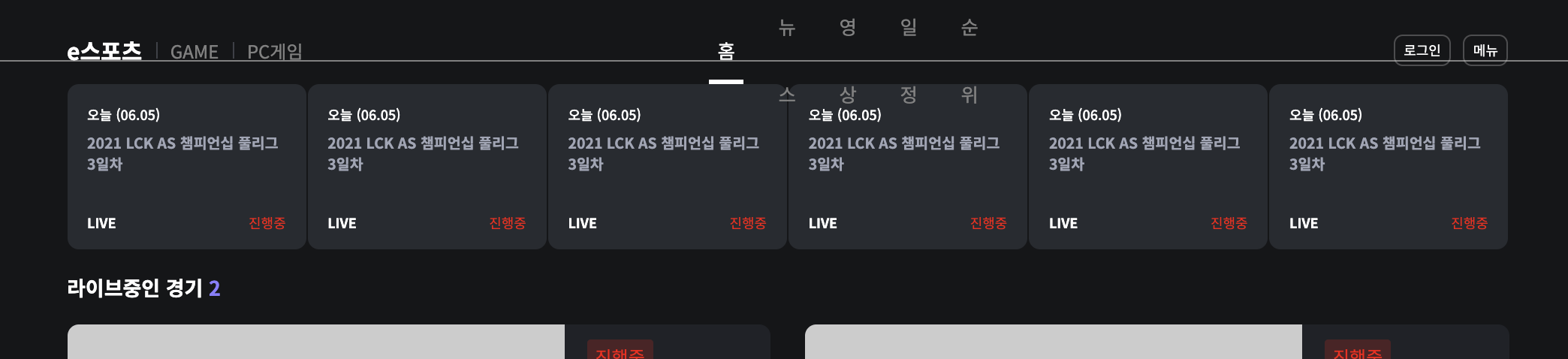
<link rel="preconnect" href="https://fonts.gstatic.com">
<link href="https://fonts.googleapis.com/css2?family=Nanum+Gothic:wght@400;700;800&family=Noto+Sans+KR:wght@100;300;400;500;700;900&display=swap" rel="stylesheet">

*
	{margin: 0;
	padding: 0;

	box-sizing: border-box;
	font-family: 'Noto Sans KR', 'Nanum Gothic', sans-serif;}
국내외 사이트 카피캣 (네이버 오디오 1편)

> 네이버 오디오 상단영역
<header id="audio-header">

<div class="audio-container">

<nav id="audio-nav" class="audio-flex-between">

<div class="audio-nav-left audio-flex-between">
<h1 class="audio-logo">
<a href="#">audio clip</a>
</h1>

<ul class="audio-flex-end">
<li><a href="audio.html" class="active"><span>홈</span></a></li>
<li><a href="#"><span>랭킹</span></a></li>
<li><a href="#"><span>연재 채널</span></a></li>
<li><a href="#"><span>오디오북</span></a></li>
<li><a href="audio-category.html"><span>카테고리</span></a></li>
<li><a href="#"><span>이벤트</span></a></li>
</ul>
</div>

<div class="audio-nav-right audio-flex-between">
<div class="search-wrap audio-flex-start">
<i class="icon-search"></i>
<input type="text">
</div>

<div class="profile-wrap">
<img src="https://via.placeholder.com/32" class="profile-img">
<a href="#" class="btn-login">로그인</a>
</div>
</div>

</nav>

</div>

</header>

/* 오디오 클립  */
.audio-container
	{width: 1080px;
	margin: 0 auto;}

.audio-flex-start
	{display: flex;
	flex-direction: row;
	flex-wrap: wrap;
	justify-content: flex-start;
	align-items: center;
	align-content: stretch;}

.audio-flex-between
	{display: flex;
	flex-direction: row;
	flex-wrap: wrap;
	justify-content: space-between;
	align-items: center;
	align-content: stretch;}

.audio-flex-center
	{display: flex;
	flex-direction: row;
	flex-wrap: wrap;
	justify-content: center;
	align-items: center;
	align-content: stretch;}

.audio-flex-end
	{display: flex;
	flex-direction: row;
	flex-wrap: wrap;
	justify-content: flex-end;
	align-items: center;
	align-content: stretch;}

#audio-header
	{position: fixed;
	width: 100%;
	background-color: #ffffff;
	border-bottom: solid 1px #efeff4;

	left: 0;
	top: 0;

	z-index: 99999;}

#audio-header .audio-nav-left
	{width: 660px;}

#audio-header .audio-nav-left .audio-logo
	{font-size: 25px;}

#audio-header .audio-nav-left .audio-logo a {}

#audio-header .audio-nav-left ul
	{padding-top: 10px;}

#audio-header .audio-nav-left li {}

#audio-header .audio-nav-left li a
	{display: block;
	font-size: 17px;
	padding: 12px 13px 17px 12px;}

#audio-header .audio-nav-left li a.active
	{font-weight: 700;}

#audio-header .audio-nav-left li a span
	{position: relative;
	display: inline-block;
	height: 21px;}

#audio-header .audio-nav-left li a.active span:after
	{display: block;
	position: absolute;
	content: "";
	border-bottom: solid 3px #222222;
	border-radius: 1.5px;

	z-index: 1;

	left: -4.5px;
	right: -5.5px;
	bottom: -17px;}

#audio-header .audio-nav-right
	{width: 330px;}

#audio-header .audio-nav-right .search-wrap
	{width: 180px;
	height: 40px;
	background-color: #ffffff;
	border: solid 2px rgba(0, 86, 201, .2);
	border-radius: 4px;}

#audio-header .audio-nav-right .search-wrap .icon-search {
	width: 40px;
	height: 100%;
	background-color: yellow;
}

#audio-header .audio-nav-right .search-wrap input
	{width: calc(100% - 40px);
	height: 100%;

	padding: 8px 15px;
	font-size: 15px;

	outline: none;
	border: none;}

#audio-header .audio-nav-right .search-wrap input:focus
	{outline: none;}

#audio-header .audio-nav-right .profile-wrap {}

#audio-header .audio-nav-right .profile-wrap .profile-img
	{width: 32px;
	height: 32px;
	border-radius: 50%;}

#audio-header .audio-nav-right .profile-wrap .btn-login
	{font-size: 15px;
	padding-left: 8px;}
2)학습한 내용 중 어려웠던 점 또는 해결못한 것들
어려운 점 없이 잘 해결했다.
3)해결방법 작성
강의 열심히 들으면서 해결해나갔다
4)학습 소감
8월 2째주가 끝났다.
벌써 인가 싶으면서도 빠르게 지나가서 좋다.