📚 자바 예외 처리 정리
🥊 에러(Error) vs 예외(Exception)
| 구분 | 설명 | 예시 |
|---|---|---|
| 에러 (Error) | 개발자가 직접 제어할 수 없는 심각한 문제 | 메모리 부족, JVM 오류, StackOverflowError 등 |
| 예외 (Exception) | 코드 실행 중 발생할 수 있는 문제. 개발자가 처리 가능 | 파일 없음, 잘못된 인덱스 접근, 0으로 나누기 등 |
System.out.println(1);
System.out.println(2 / 0); // ArithmeticException 발생
System.out.println(3);     // 이 줄은 실행되지 않음
⚽️ 예외 처리 방법: try-catch
예외가 발생할 가능성이 있는 코드를 try 블록에 넣고, 예외가 발생했을 때 처리할 코드를 catch 블록에 작성
System.out.println(1);

try {
    System.out.println(2 / 0); // 0으로 나누기 -> 예외 발생
} catch (ArithmeticException e) {
    System.out.println("0으로 나누셨나요?");
}

System.out.println(3);
✅ 출력 결과
1
0으로 나누셨나요?
3
🥌 try-catch 여러 개 사용하기
int[] numbers = {10, 20, 30};
System.out.println(1);

try {
    System.out.println(numbers[4]); // ArrayIndexOutOfBoundsException
} catch (ArrayIndexOutOfBoundsException e) {
    System.out.println("인덱스 잘못된 것 같아요!");
}

try {
    System.out.println(2 / 0); // ArithmeticException
} catch (ArithmeticException e) {
    System.out.println("0으로 나누셨나요?");
}

System.out.println(3);
🏓 여러 예외를 하나의 try 블록에서 처리
int[] numbers = {10, 20, 30};
System.out.println(1);

try {
    System.out.println(numbers[4]); // 첫 번째 예외 발생 시점에서 바로 catch로 이동
    System.out.println(2);
    System.out.println(2 / 0);      // 실행되지 않음
} catch (ArrayIndexOutOfBoundsException e) {
    System.out.println("인덱스 오류!");
} catch (ArithmeticException e) {
    System.out.println("0으로 나누셨나요?");
}

System.out.println(3);
✅ 출력 결과
1
인덱스 오류!
3
※ 예외가 발생하면 그 이후 try 블록의 코드는 실행되지 않고, 바로 해당하는 catch 블록으로 이동
🎸 Exception의 순서
try {
    // 예외 발생 코드
} catch (Exception e) {
    // 모든 예외의 부모이므로 가장 마지막에 위치해야 함
} catch (ArithmeticException e) {
    // 도달 불가능 코드로 간주됨 (컴파일 에러 발생)
}
부모 클래스인
Exception이 위에 있으면 아래에 있는 자식 예외는 절대 실행되지 않으므로 항상 마지막에 둬야 함
🥁 e.printStackTrace()
try {
    int result = 10 / 0;
} catch (ArithmeticException e) {
    e.printStackTrace();
}- 예외 발생 경로를 빨간색 메시지로 출력
- 디버깅에 유용하지만 사용자에게 보여주면 안 됨
- 실무에서는 로그 파일에 기록하는 용도로 사용
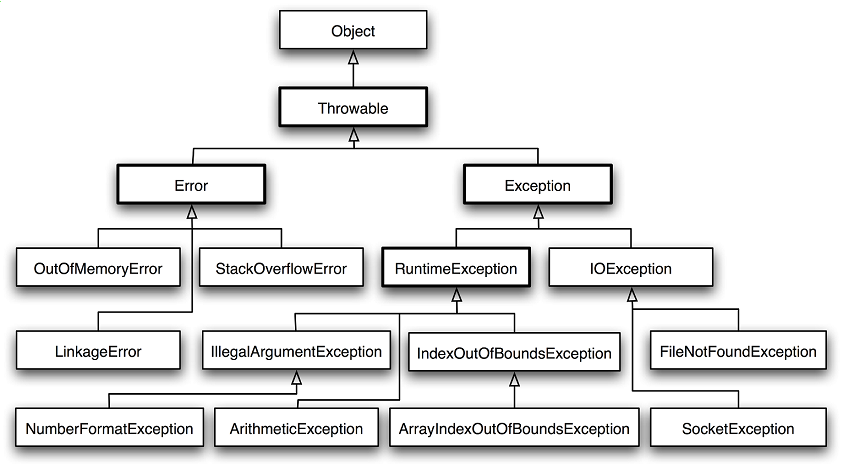
⛳️ 체크 예외 vs 언체크 예외
📌 체크 예외 (Checked Exception)
- 컴파일 시점에 처리 필요 (예외처리 안 하면 컴파일 에러)
- 예시:
IOException,SQLException,FileNotFoundException
📌 언체크 예외 (Unchecked Exception)
- 런타임 시 발생하며, 예외처리 강제 X
- 예시:
NullPointerException,ArithmeticException,ArrayIndexOutOfBoundsException
참고 이미지
🍎 리소스 정리 (파일, 네트워크 등)
리소스를 사용하는 경우, 작업 후 반드시 정리(close)해야 함
FileWriter fw = null;

try {
    fw = new FileWriter("output.txt");
    fw.write("Hello, world!");
} catch (IOException e) {
    System.out.println("파일 처리 중 오류 발생");
} finally {
    try {
        if (fw != null) fw.close(); // close 시에도 IOException 가능성 있음
    } catch (IOException e) {
        e.printStackTrace();
    }
}
🍓 try-with-resources (Java 7+)
AutoCloseable을 구현한 객체는 try()에 선언하면 자동으로 close() 처리
try (FileWriter fw = new FileWriter("output.txt")) {
    fw.write("자동으로 close 됩니다.");
} catch (IOException e) {
    System.out.println("예외 발생");
}
🥑 커스텀 예외 만들기
// 사용자 정의 예외 클래스
public class MyException extends Exception {
    public MyException(String message) {
        super(message);
    }
}

// 예외 던지기
public void doSomething() throws MyException {
    throw new MyException("사용자 정의 예외 발생!");
}

// 예외 처리
try {
    doSomething();
} catch (MyException e) {
    System.out.println("커스텀 예외 잡음: " + e.getMessage());
}
햇내기 개발자 지망생