22.06.21 댓글 목록 구현
댓글 목록 요청("/getList")
freeDetail.jsp
getList의 매개값으로 요청된 페이지 번호와 화면을
리셋할 것인지의 여부를 bool타입의 reset 이름의 변수로 받겠다.
(페이지가 그대로 머물면서 댓글이 밑에 계속 쌓이기 때문에,
상황에 따라서 페이지를 리셋해서 새롭게 가져올 것인지, 누적해서 쌓을 것인지의 여부를 확인)
$.getJSON
getJSON 함수를 통해 JSON 형식의 파일을 읽어올 수 있다.
get 방식의 요청을 통해 서버로부터 받은 JSON 데이터를 로드한다.
.jaxa와 비슷하다 get방식으로 보낼때는 getJSON이 편하다.
<script>
//목록 요청
let page = 1;//페이지 번호
let strAdd = ''; //화면에 그려넣을 태그를 문자열의 형태로 추가할 변수

getList(1, true);//상세보기 화면에 처음 진입 시 댓글 리스트를 불러옴.

function getList(pageNum, reset) {

	const bno = '${article.bno}'; //게시글 번호

	$.getJSON(
		"<c:url value='/reply/getList/'/>" + bno + '/' + pageNum,
		function(data) {
			console.log(data);
		}
	);
}
</script>
ReplyController
- getList 메서드가(글 번호, 페이지 번호)를 매개값으로 받는다.
- Mapper 인터페이스에 각각 다른 값을 전달하기 위해 Map을 쓰던지, @Param 아노테이션을 사용.
- ReplyMapper.xml에 sql문을 페지징 쿼리로 작성한다.
- 레스트 방식은 화면에 필요한 값을 여러 개 보낼 때,
리턴에 Map이나 VO형식으로 필요한 데이터를 한번에 담아서 처리. model은 사용하기 애매하다.
댓글 목록 리스트와, 전체 댓글 개수를 함께 전달할 예정.
<script>
//페이징이 추가된 댓글 목록
@GetMapping("/getList/{bno}/{pageNum}")
public Map<String, Object> getList(@PathVariable int bno, @PathVariable int pageNum) {

	PageVO vo = new PageVO();
	vo.setPageNum(pageNum); //화면에서 전달된 페이지 번호
	vo.setCpp(5); //댓글은 한 화면에 5개씩 배치(변경가능)

	List<ReplyVO> list = service.getList(vo,bno); //댓글 목록 데이터
	int total = service.getTotal(bno); //전체 댓글 개수

	Map<String, Object> map = new HashMap<String, Object>();
	map.put("list", list);
	map.put("total", total);

	return map;
}
</script>
ReplyService
controller쪽에서 온 파라미터 값 두개(PageVO vo, int bno)를 service쪽에서
map으로 포장.
<script>
@Override
public List<ReplyVO> getList(PageVO vo, int bno) {
	Map<String, Object> data = new HashMap<String, Object>();
	data.put("paging", vo);
	data.put("bno", bno);
	return mapper.getList(data);
}

@Override
public int getTotal(int bno) {
	return mapper.getTotal(bno);
}
</script>
ReplyMapper
<resultMap type="com.spring.myweb.command.ReplyVO" id="replyMap">
	<result property="replyId" column="reply_id"/>
	<result property="replyPw" column="reply_pw"/>
	<result property="replyDate" column="reply_date"/>
	<result property="updateDate" column="update_date"/>
</resultMap>
...
<select id="getList" resultMap="replyMap">
	SELECT * FROM
		(
		SELECT ROWNUM rn, tbl.* FROM
			(
			SELECT * fROM freereply
			WHERE bno=#{bno}
			ORDER BY rno DESC
			)tbl
		)
	<![CDATA[
	WHERE rn > (#{paging.pageNum}-1) * #{paging.cpp}
	AND rn <= #{paging.pageNum} * #{paging.cpp}
	]]>
</select>

<select id="getTotal" resultType="int">
	SELECT COUNT(*) FROM freereply
	WHERE bno=#{bno}
</select>
화면에 뿌리기
freeDetail.jsp에 있는 더미 데이터를 댓글이 새로작성될때마다 추가할 것이다.
<!--여기에접근 반복-->
<div id="replyList">

  <%-- 자바스크립트 단에서 반복문을 이용해서 댓글의 개수만큼 반복 표현.
  		더미 데이터이기 때문에 주석처리
  <div class='reply-wrap'>
    <div class='reply-image'>
      <img src="<c:url value='/img/profile.png'/>">
    </div>
    <div class='reply-content'>
      <div class='reply-group'>
      	<strong class='left'>honggildong</strong>
      	<small class='left'>2019/12/10</small>
      	<a href='#' class='right'><span class='glyphicon glyphicon-pencil'></span>수정</a>
      	<a href='#' class='right'><span class='glyphicon glyphicon-remove'></span>삭제</a>
      </div>
      <p class='clearfix'>여기는 댓글영역</p>
    </div>
  </div> --%>
</div>
jQuery
/reply/getList/ 요청을 보내면서 게시글번호(bno)와 현재페이지 번호(pageNum)도 함께 보낸다.
strAdd라는 변수에 위에 작성되어 있던 더미데이터의 형식을 replyList.length만큼
반복해서 화면에 표현한다.
$.getJSON(
	"<c:url value='/reply/getList/'/>" + bno + '/' + pageNum,
	function(data) {
		console.log(data);

		let total = data.total; //총 댓글 수
		let replyList = data.list;//댓글 리스트

		for(let i=0; i<replyList.length; i++){
			strAdd +=
			`<div class='reply-wrap'>
				<div class='reply-image'>
					<img src='${pageContext.request.contextPath}/img/profile.png'/>">
                      </div>
                      <div class='reply-content'>
                          <div class='reply-group'>
                              <strong class='left'>` + replyList[i].replyId + `</strong>
                              <small class='left'>` + replyList[i].replyDate + `</small>
                              <a href='#' class='right'><span class='glyphicon glyphicon-pencil'></span>수정</a>
                              <a href='#' class='right'><span class='glyphicon glyphicon-remove'></span>삭제</a>
                          </div>
                          <p class='clearfix'>` + replyList[i].reply + `</p>
                      </div>
                  </div>`;
		}//for문
		//replyList라는 div 영역에 문자열 형식으로 모든 댓글을 추가.
		$('#replyList').html(strAdd);
	}
);
댓글 등록 로직에도 등록 완료 후 댓글 목록 함수 호출해서 목록이 보여질 수 있도록 하자.
success: function(data) {
		console.log('댓글 등록 완료!' + data);
		$('#reply').val('');
		$('#replyId').val('');
		$('#replyPw').val('');

		//등록 완료 후 댓글 목록 함수를 호출해서 비동기식으로 목록 표현.
		getList(1, true);
},
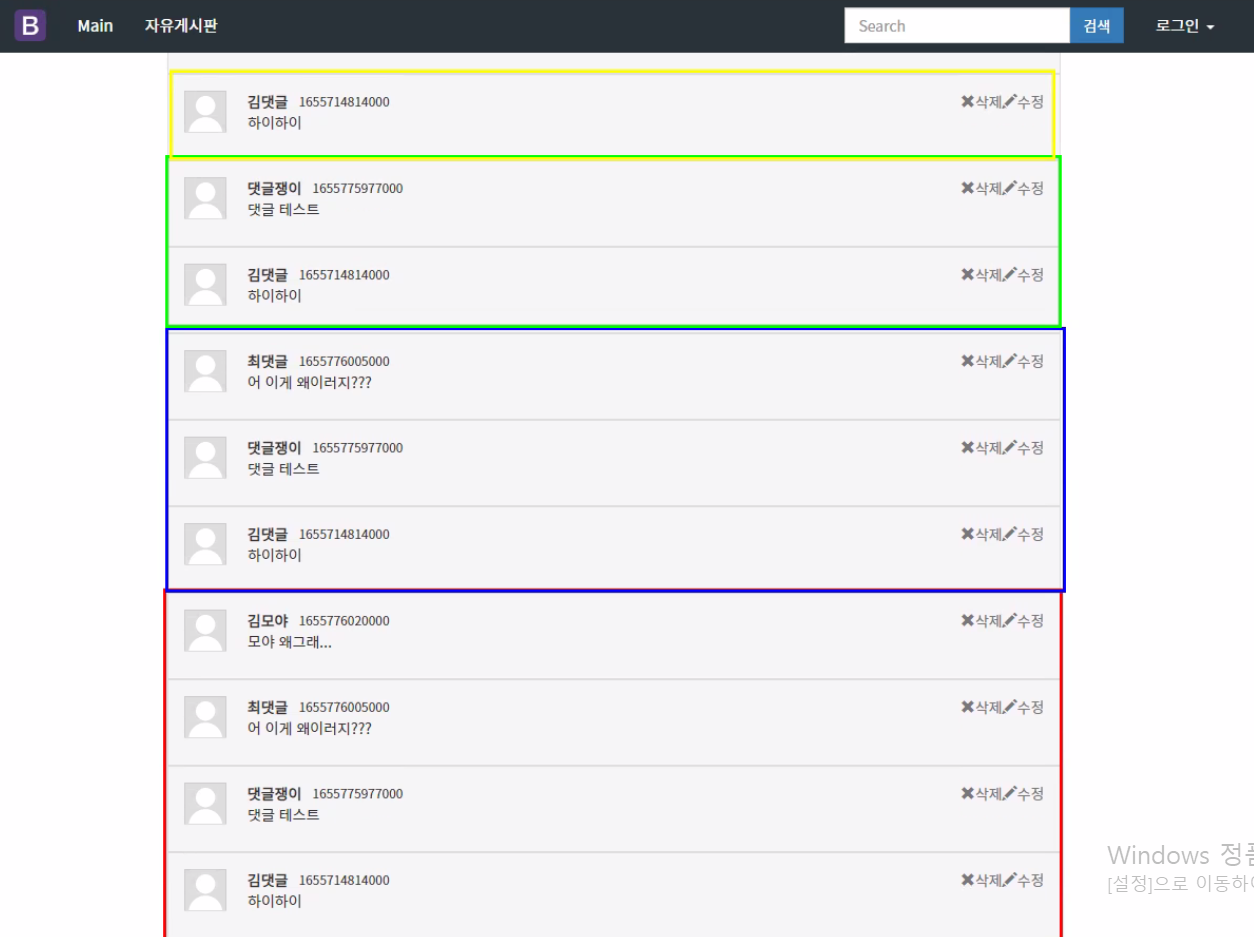
이렇게 작성 후 브라우저를 실행하고 댓글을 작성하면 아래처럼 댓글이 계속 누적되어서 나오게 된다.
그 이유는 strAdd를 비우지 않아서 계속 누적이 된다.
처리를 진행해보자.
날짜변경
누적 처리전에 날짜가 밀리초로 나오는 것을 변경해보자.
freeDetail.jsp밑에 jQuery에 작성.
<script>
//날짜 처리 함수
	function timeStmp(millis) {
		const date = new Date(); //현재 날짜
		//현재 날짜를 밀리초로 변환 - 등록일 밀리초 -> 시간차
		const gap = date.getTime() - millis;

		let time; //리턴할 시간
		if(gap < 60*60*24*1000){ //1일 미만일 경우
			if(gap <60*60*1000){ //1시간 미만일 경우
				time = '방금 전';
			} else {
				time = parseInt(gap / (1000*60*60)) + '시간 전'; //소수점 떨구기
			}
		} else { //1일 이상일 경우
			const today = new Date(millis);
			const year = today.getFullYear(); //년
			const month = today.getMonth() + 1; //월
			const day = today.getDate(); //일

			time = year + '년 ' + month + '월 ' + dya + '일';
		}
		return time;
	}
</script>
getList 요청 진행하는 strAdd에도 날짜형식 변경.
<div class='reply-content'>
	<div class='reply-group'>
		<strong class='left'>` + replyList[i].replyId + `</strong>
	    <small class='left'>` + timeStamp(replyList[i].replyDate) + `</small>
	    <a href='#' class='right'><span class='glyphicon glyphicon-pencil'></span>수정</a>
	    <a href='#' class='right'><span class='glyphicon glyphicon-remove'></span>삭제</a>
	</div>
	<p class='clearfix'>` + replyList[i].reply + `</p>
</div>
누적되는 댓글 수정, 더보기 버튼
더보기 버튼 생성
<button class="form-control" id="moreList">더보기(페이징)</button>freeDetail.jsp밑에 jQuery에 작성.
<script>
//더보기 버튼 처리(클릭 시 전역 변수 page에 +1 한 값을 전달)
	$('#moreList').click(function() {
		//false인 이유
		//더보기라서. 누적해서 보여줘야한다.
		//1페이지의 댓글 내용 밑에다가 2페이지를 누적해서 보여줘야지
        //1페이지를 없애고 2페이지를 보여주는 것이 아니니까 false
		getList(++page, false);
	});
</script>
최종 수정된 getList( )
<script>
function getList(pageNum, reset) {

				const bno = '${article.bno}'; //게시글 번호

				//getJSON 함수를 통해 JSON 형식의 파일을 읽어올 수 있다.
				//get 방식의 요청을 통해 서버로부터 받은 JSON 데이터를 로드한다.
				//$.getJSON(url, DATA, 통신 성공여부)
				//$.jaxa와 비슷하다 get방식으로 보낼때는 getJSON이 편하다.
				$.getJSON(
					"<c:url value='/reply/getList/' />" + bno + '/' + pageNum,
					function(data) {
						console.log(data);

						let total = data.total; //총 댓글 수
						let replyList = data.list; //댓글 리스트

						//inset, update, delete 작업 후에는 댓글을 누적하고 있는 strAdd 변수를 초기화 해서
						//화면이 리셋된 것처럼 보여줘야 한다.
						if(reset === true) {
							strAdd = '';
							page = 1;
						}

						//페이지번호 * 데이터 수보다 전체 댓글 개수가 작으면 더보기 버튼을 없애자.
						console.log('현재 페이지: ' + page);
						if(total <= page * 5) {
							$('#moreList').css('display', 'none');
						} else {
							$('#moreList').css('display', 'block');
						}

						//응답 데이터의 길이가 0과 같거나 더 작으면 함수를 종료하자.
						if(replyList.length <= 0) {
							return; //함수 종료
						}

						for(let i=0; i<replyList.length; i++) {
							strAdd +=
							`<div class='reply-wrap'>
                            <div class='reply-image'>
                                <img src='${pageContext.request.contextPath}/img/profile.png'>
                            </div>
                            <div class='reply-content'>
                                <div class='reply-group'>
                                    <strong class='left'>` + replyList[i].replyId + `</strong>
                                    <small class='left'>` + timeStamp(replyList[i].replyDate) + `</small>
                                    <a href='` + replyList[i].rno + `' class='right replyDelete'><span class='glyphicon glyphicon-remove'></span>삭제</a>
                                    <a href='` + replyList[i].rno + `' class='right replyModify'><span class='glyphicon glyphicon-pencil'></span>수정</a>
                                </div>
                                <p class='clearfix'>` + replyList[i].reply + `</p>
                            </div>
                        	</div>`;
						}
						//replyList라는 div 영역에 문자열 형식으로 모든 댓글을 추가.
						$('#replyList').html(strAdd);


					}
				); //end getJSON


			} //end getList()

</script>