Map 이란?
- Map은 다른 자료구조와는 다르게 Key와 Value를 쌍으로 데이터를 저장하는 자료구조
- Key를 통해 Value에 접근할 수도 있고 Value를 통해 Key를 찾을 수도 있다.
- 또 하나의 정의된 Map에서는 Key의 중복은 불가능 하지만 Value의 중복은 가능하다.
- Key 와 Value는 모두 객체로 구성되어 있다.
Hash 란?
- Hash는 단방향 암호화 기법으로 입력된 값을 출력 데이터의 위치 값으로 변환해준다.
- Hash 함수은 이 Hash 기법을 사용하는 함수로, 입력값과 출력 데이터의 위치값을 연결(매핑, mapping) 해준다.
- Hash 기법은 시간복잡도는 평균적으로 O(1)인 자료구조로 데이터 접근, 검색에 용이하다.
- 다만, 데이터가 순서 없이 저장되므로 정렬이 필요하지 않고, 빠른 검색이 필요한 데이터에 사용한다.
HashMap 이란?
- HashMap 은 Hash 기법을 사용하여 데이터를 보관하는 자료구조
- 이터에 접근하거나 검색할 때 데이터들을 순회하면서 일일이 비교하는 일반적인 자료구조와 다르게 key값을 통해 한 번의 산술연산으로 데이터에 접근할 수 있기 때문에 아주 빠른 접근 속도와 검색 속도가 특징
- 순서를 보장하지 않는다.
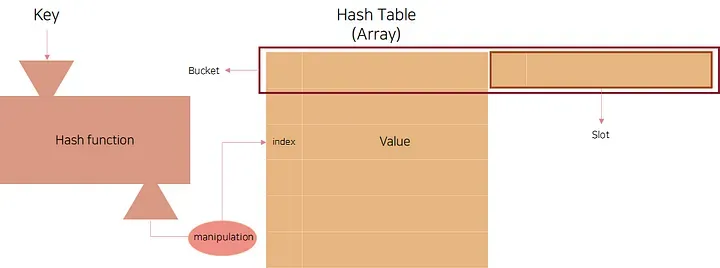
Fig1. HashMap, HashTable 구조 (https://medium.com/depayse/kotlin-data-structure-hashtable-ebb9f949e936 의 이미지 참고)
Collision(충돌)
Hash 함수를 거친 HashMap을 보게 되면, 배열로 이루어져 있다.
배열의 원소에는 또 여러 개의 데이터가 들어있다.
이유는 서로 다른 두 입력 값이 Hash function을 거쳐 나온 HashMap의 주소를 가리키는 곳이 같을 수도 있기 때문이다. 이런 경우를 collision(충돌)이라고 한다.
만약 Hash 함수가 여러 입력 값에 대해 같은 결과를 많이 만든다면, collision이 많아질 수 있고, 이렇게 되면 데이터를 찾는데 더 오랜 시간이 걸릴 수 있다. 따라서 Hash function을 잘 설계하는 것도 HashMap의 효율성에 연관된다.
→ Collision이 최대한 안 생기도록 Hash 함수를 설계해야 한다.
Hash function
다음은 Hash function을 구현하는 대표적인 방법들이다.
- Division Method : 나눗셈을 이용하는 방법으로 입력값을 테이블의 크기보다 큰 값으로 나누어 계산한다. 테이블의 크기를 소수로 정하고 2의 제곱수와 먼 값을 사용해야 효과가 좋다고 알려져 있다. h(k) = k % Q (단, Q ≥ table size)
- Digit Folding : Folding이란 key를 동일하게 분할한 후 각 부분을 XOR연산하거나, 더하거나, 또는 key가 문자열일 경우 ASCII 코드로 바꾸고 값을 합하는 등의 연산을 하여 테이블 내의 주소로 사용하는 방법이다.
- Multiplication Method : 숫자로 된 key값 k와 0과 1사이의 실수 A, 보통 2의 제곱수인 m을 사용하여 다음과 같은 계산을 해준다. h(k)=(kA % 1) × m
- Radix Conversion : 진수 변환을 통해 테이블 내의 주소로 사용하는 방법이다.
- Algebraic Coding : key를 이루고 있는 각각의 bit를 다항식의 계수로 이용하여 계산한 값을 테이블 내의 주소로 사용하는 방법이다.
- Univeral Hashing : 다수의 해시함수를 만들어 집합 H에 넣어두고, 무작위로 해시함수를 선택해 해시값을 만드는 기법이다.
Collision resolution(충돌 해결법)
- Separate chaining
- Fig1과 같이 동일한 Bucket에 여러 개의 데이터를 저장하여 관리하는 방법
- Bucket안의 데이터들을 Linked List를 활용해 Separate chaining을 적용할 경우, N개의 데이터가 같은 Bucket에 저장된다면 최악의 경우 O(N)의 시간복잡도를 가진다.
- Bucket 안의 데이터들을 관리하는 자료구조의 구현을 제외하면 구현이 간단하고, 쉽게 추가하고 삭제할 수 있다는 장점이 있다.
- 하지만 데이터의 수가 많아지면 동일한 버킷에 chaining되는 데이터가 많아져 효율성이 감소한다.
- Open Addressing
- 추가적인 메모리를 사용하는 Chaining 방식과 다르게 비어있는 해시 테이블의 공간을 활용하는 방법 (대표적으로 3가지 방법이 있다.)
- Linear Probing: 현재의 버킷 index로부터 고정폭 만큼씩 이동하여 차례대로 검색해 비어 있는 버킷에 데이터를 저장한다.
- Quadratic Probing: 해시의 저장순서 폭을 제곱으로 저장하는 방식 (처음 충돌이 발생한 경우에는 1만큼 이동하고 그 다음 계속 충돌이 발생하면 2², 3² 칸씩 옮기는 방식)
- Double Hashing Probing: 해시된 값을 한번 더 해싱하여 해시의 규칙성을 없애버리는 방식 (해시된 값을 한번 더 해싱하여 새로운 주소를 할당하기 때문에 다른 방법들보다 많은 연산을 하게 된다.)
Java의 HashMap
- initial capacity
initial capacity는 처음 HashMap을 생성할 때 배열의 크기
HashMap의 배열 공간의 대부분이 찼을 때 collision이 일어날 확률이 높아지므로, 어느 정도 데이터가 차면 HashMap의 배열의 크기를 늘려줘야 함.
데이터가 어느 정도 찼는지의 정도를 나타내는 것이 load factor 이고, 이 값은 0에서 1사이의 값이 될 수 있다.
- load factor
HashMap을 생성할 때 이 값을 정해주지 않으면 initial capacity는 16, load factor는 0.75로 작동한다.
배열을 확장하는 것은 시간을 소요하는 작업이므로 어느 정도의 데이터를 저장할 것인지에 따라 initial capacity를 정해주는 것이 중요하다.
Java의 HashMap은 separate chaining을 사용하여 Bucket에 Linked List를 사용하거나, java8 이후에는 Red-Black Tree를 사용한다.
참고
- https://medium.com/depayse/kotlin-data-structure-hashtable-ebb9f949e936
- https://huiwoo-devlog.tistory.com/4
초기 구현
import java.util.*;

//HashMap의 key와 value를 구현하기 위한 클래스
class Hash {
    private String key;
    private String value;
    private Hash nextNode;

    public Hash(String key, String value) {
        this.key = key;
        this.value = value;
        this.nextNode = null;
    }

    public Hash(String key, String value, Hash nextNode) {
        this.key = key;
        this.value = value;
        this.nextNode = nextNode;
    }

    // Getters and Setters
    public String getKey() { return key; }
    public String getValue() { return value; }
    public void setValue(String value) { this.value = value; }
    public Hash getNextNode() { return nextNode; }
    public void setNextNode(Hash nextNode) { this.nextNode = nextNode; }
}

//Bucket Size : 초기 버킷 크기(16)
//Separate Chaining으로 충돌 해결
class CustomizedHashMap {
    private Hash[] bucket;
    private int bucketSize;
    private int currentSize;
    // 버킷 크기가 3/4가 넘을 경우 배열 크기 늘리기 위한 변수 (load factor)
    private final double loadFactor = 0.75;

    public CustomizedHashMap() {
        this(16);
    }

    public CustomizedHashMap(int bucketSize) {
        this.bucketSize = bucketSize;
        this.bucket = new Hash[bucketSize];
        this.currentSize = 0;
    }

    //해시 함수 (Digit Folding 방식)
    private int hash(String key) {
        int hashValue = 0;
        int keySegment = 2;

        for (int i = 0; i < key.length(); i += keySegment) {
            int endIndex = Math.min(i + keySegment, key.length());
            String segment = key.substring(i, endIndex);
            for (char c : segment.toCharArray()) {
                hashValue += (int) c;
            }
        }

        return hashValue % bucketSize;
    }

    //크기 2배로 늘리기
    private void resize() {
        Hash[] oldBucket = bucket;
        bucketSize *= 2;
        bucket = new Hash[bucketSize];
        currentSize = 0;

        for (Hash head : oldBucket) {
            Hash current = head;
            while (current != null) {
                put(current.getKey(), current.getValue());
                current = current.getNextNode();
            }
        }
    }

    /*
    put
    - 현재 배열 크기가 3/4을 넘을 경우 크기 2배로 늘리기.
    - 만약 이미 같은 key가 존재한다면, value 바꾸기.
    - 새로운 key라면 맨 뒤에 추가하기.
     */
    public void put(String key, String value) {
        if (currentSize >= loadFactor * bucketSize) {
            resize();
        }

        int index = hash(key);

        if (bucket[index] == null) {
            bucket[index] = new Hash(key, value);
            currentSize++;
            return;
        }

        Hash current = bucket[index];
        while (current != null) {
            if (current.getKey().equals(key)) {
                current.setValue(value);
                return;
            }
            current = current.getNextNode();
        }

        Hash newNode = new Hash(key, value);
        newNode.setNextNode(bucket[index]);
        bucket[index] = newNode;
        currentSize++;
    }

    //Bucket 배열 비우기 + 현재 크기 0
    public void clear() {
        bucket = new Hash[bucketSize];
        currentSize = 0;
    }

    //Linked list 형식으로 앞으로 가며 탐색하기
    public String get(String key) {
        int index = hash(key);
        Hash current = bucket[index];

        while (current != null) {
            if (current.getKey().equals(key)) {
                return current.getValue();
            }
            current = current.getNextNode();
        }
        return null;
    }

    //현재 크기 반환
    public int size() {
        return currentSize;
    }

    //같은 키가 존재한다면 true 없으면 false
    public boolean containsKey(String key) {
        int index = hash(key);
        Hash current = bucket[index];

        while (current != null) {
            if (current.getKey().equals(key)) {
                return true;
            }
            current = current.getNextNode();
        }
        return false;
    }

    //현재 크기가 0인지 확인
    public boolean isEmpty() {
        return currentSize == 0;
    }

    /*
    remove
    - 삭제할 키가 맨 앞인 경우
    - 삭제할 키가 맨 앞이 아닌 경우 (탐색하며 찾아 삭제)
     */
    public boolean remove(String key) {
        int index = hash(key);
        Hash current = bucket[index];

        if (current == null) return false;

        if (current.getKey().equals(key)) {
            bucket[index] = current.getNextNode();
            currentSize--;
            return true;
        }

        while (current.getNextNode() != null) {
            if (current.getNextNode().getKey().equals(key)) {
                current.setNextNode(current.getNextNode().getNextNode());
                currentSize--;
                return true;
            }
            current = current.getNextNode();
        }

        return false;
    }

    //전체 키 리스트 반환
    public List<String> keys() {
        List<String> allKeys = new ArrayList<>();
        for (int i = 0; i < bucket.length; i++) {
            Hash current = bucket[i];
            while (current != null) {
                allKeys.add(current.getKey());
                current = current.getNextNode();
            }
        }
        return allKeys;
    }
}

public class Main {
    public static void main(String[] args) {
        Scanner scanner = new Scanner(System.in);
        CustomizedHashMap customizedHashMap = new CustomizedHashMap();

        while (true) {
            System.out.print("하고 싶은 동작을 입력해주세요!(put, get, clear, size, containsKey, isEmpty, remove, keys, exit) : ");
            String order = scanner.nextLine().trim().toLowerCase();

            switch (order) {
                case "put":
                    System.out.print("키를 입력하세요: ");
                    String key = scanner.nextLine();
                    System.out.print("값을 입력하세요: ");
                    String value = scanner.nextLine();
                    customizedHashMap.put(key, value);
                    System.out.println("추가 완료: (" + key + ", " + value + ")");
                    break;

                case "get":
                    System.out.print("찾을 키를 입력하세요: ");
                    String getKey = scanner.nextLine();
                    String result = customizedHashMap.get(getKey);
                    if (result != null) {
                        System.out.println("값: " + result);
                    } else {
                        System.out.println("키 '" + getKey + "'를 찾을 수 없습니다.");
                    }
                    break;

                case "clear":
                    customizedHashMap.clear();
                    System.out.println("모든 데이터가 삭제되었습니다.");
                    break;

                case "size":
                    System.out.println("현재 크기: " + customizedHashMap.size());
                    break;

                case "containskey":
                    System.out.print("확인할 키를 입력하세요: ");
                    String containsKey = scanner.nextLine();
                    boolean exists = customizedHashMap.containsKey(containsKey);
                    System.out.println("키 '" + containsKey + "' 존재 여부: " + exists);
                    break;

                case "isempty":
                    boolean empty = customizedHashMap.isEmpty();
                    System.out.println("비어있는지 여부: " + empty);
                    break;

                case "remove":
                    System.out.print("삭제할 키를 입력하세요: ");
                    String removeKey = scanner.nextLine();
                    customizedHashMap.remove(removeKey);
                    System.out.println("키 '" + removeKey + "' 삭제 완료");
                    break;

                case "keys":
                    List<Integer> allKeys = customizedHashMap.keys();
                    if (!allKeys.isEmpty()) {
                        System.out.println("모든 키: " + allKeys.toString().replaceAll("[\\[\\]]", ""));
                    } else {
                        System.out.println("저장된 키가 없습니다.");
                    }
                    break;

                case "exit":
                    System.out.println("프로그램을 종료합니다.");
                    scanner.close();
                    return;

                default:
                    System.out.println("잘못된 명령입니다. 다시 입력해주세요.");
            }
        }
    }
}- Hash 클래스: 키-값 쌍을 저장하는 노드, 다음 노드 참조로 연결리스트 구성
- key , value , Linked list를 위한 nextNode를 가짐.
- bucket 배열: 각 인덱스가 연결리스트의 헤드를 가리키는 해시 테이블
- loadFactor( 0.75): 버킷의 75%가 차면 자동으로 크기 2배 확장
해시 함수 (Digit Folding)
- 문자열을 2글자씩 나누어 각 문자의 ASCII 값을 합산
- 최종 합을 버킷 크기로 나머지 연산하여 인덱스 생성
충돌 해결 (Separate Chaining)
- 같은 버킷에 여러 데이터가 오면 Linked list로 연결
- 새 노드는 버킷의 맨 앞에 추가 (O(1) 삽입)
- 검색/삭제 시 nextNode을 따라가며 순차 탐색
시간 복잡도
- 평균 경우: 모든 연산이 O(1)
- 최악 경우: 모든 키가 같은 버킷에 몰리면 O(n)
- 리사이징: O(n) - 모든 데이터 재배치 필요
추가 요구 사항
해시맵 키 값이 문자열이 아니라 다른 타입이라면 어떤 부분이 어떻게 바뀌는지 살펴본다.
→ Generic 타입을 사용해 코드를 변경한다.
제네릭 변환 단계별 과정
1.데이터 클래스 변경
// 기존: String 전용
class Hash {
    private String key;
    private String value;
    private Hash nextNode;
}

// 변경: 제네릭 적용
class Hash<K, V> {
    private K key;
    private V value;
    private Hash<K, V> nextNode;
}
클래스 시그니처 변경
// 기존
class CustomizedHashMap {
    public CustomizedHashMap(int bucketSize)
}

// 변경
class CustomizedHashMap<K, V> {
    public CustomizedHashMap(int bucketSize)
}
모든 함수 시그니처 업데이트
// 기존
public void put(String key, String value)
public String get(String key)

// 변경
public void put(K key, V value)
public V get(K key)
2. 해시 함수 변경 이유
기존 Digit Folding 방식은 String에만 특화된 방법이었음.
// 기존: String 전용 Digit Folding
private int hash(String key) {
    int hashValue = 0;
    int keySegment = 2;

    for (int i = 0; i < key.length(); i += keySegment) {
        int endIndex = Math.min(i + keySegment, key.length());
        String segment = key.substring(i, endIndex);
        for (char c : segment.toCharArray()) {
            hashValue += (int) c;  // String에만 있는 속성
        }
    }
    return hashValue % bucketSize;
}
문제점:
key.length(),key.substring()→ String 전용 메서드char타입 → String 문자 전용 속성- Integer, Double, Custom 객체 등 다른 타입에서는 사용 불가
해결책: 범용 hashCode() 사용
- 모든 Java 객체가 가진
hashCode()메서드 활용 - 각 타입에 최적화된 해시 알고리즘 자동 적용
해시 함수 변경시 나온 오류
data class 와 함수들을 generic 타입으로 변경하고 그에 맞춰 해시 함수를 변경함.
private int hash(K key) {
    int hashValue = key != null ? key.hashCode() : 0;
    return hashValue % bucketSize;
}
돌렸더니 오류가 나왔다.
하고 싶은 동작을 입력해주세요!(put, get, clear, size, containsKey, isEmpty, remove, keys, exit) : put
키를 입력하세요: boostCamp
값을 입력하세요: naver
Exception in thread "main" java.lang.ArrayIndexOutOfBoundsException: Index -12 out of bounds for length 16
이유는 "boostCamp".hashCode() = -2023192380 음수가 나왔기 때문이다.
(-2023192380) % 16 = -12 로 여전히 음수다.
String hashCode 알고리즘:
// Java String.hashCode() 공식
s[0]*31^(n-1) + s[1]*31^(n-2) + ... + s[n-1]
"boostCamp" 계산:
b(98) * 31^8 + o(111) * 31^7 + o(111) * 31^6 + s(115) * 31^5 +
t(116) * 31^4 + C(67) * 31^3 + a(97) * 31^2 + m(109) * 31^1 + p(112)
이 계산 결과가 32비트 정수 범위를 초과하면서 오버플로우가 발생하기 때문에 Math.abs 함수를 통해 이를 막아줘야 한다.
전체 코드
import java.util.*;

//HashMap의 key와 value를 구현하기 위한 클래스
class Hash<K, V> {
    private K key;
    private V value;
    private Hash<K, V> nextNode;

    public Hash(K key, V value) {
        this.key = key;
        this.value = value;
        this.nextNode = null;
    }

    public Hash(K key, V value, Hash<K, V> nextNode) {
        this.key = key;
        this.value = value;
        this.nextNode = nextNode;
    }

    // Getters and Setters
    public K getKey() { return key; }
    public V getValue() { return value; }
    public void setValue(V value) { this.value = value; }
    public Hash<K, V> getNextNode() { return nextNode; }
    public void setNextNode(Hash<K, V> nextNode) { this.nextNode = nextNode; }
}

//Bucket Size : 초기 버킷 크기(16)
//Separate Chaining으로 충돌 해결
class CustomizedHashMap<K, V> {
    private Hash<K, V>[] bucket;
    private int bucketSize;
    private int currentSize;
    // 버킷 크기가 3/4가 넘을 경우 배열 크기 늘리기 위한 변수 (load factor)
    private final double loadFactor = 0.75;

    @SuppressWarnings("unchecked")
    public CustomizedHashMap() {
        this(16);
    }

    @SuppressWarnings("unchecked")
    public CustomizedHashMap(int bucketSize) {
        this.bucketSize = bucketSize;
        this.bucket = (Hash<K, V>[]) new Hash[bucketSize];
        this.currentSize = 0;
    }

    //해시 함수
    private int hash(K key) {
        int hashValue = key != null ? key.hashCode() : 0;
        return Math.abs(hashValue) % bucketSize;
    }

    //크기 2배로 늘리기
    @SuppressWarnings("unchecked")
    private void resize() {
        Hash<K, V>[] oldBucket = bucket;
        bucketSize *= 2;
        bucket = (Hash<K, V>[]) new Hash[bucketSize];
        currentSize = 0;

        for (Hash<K, V> head : oldBucket) {
            Hash<K, V> current = head;
            while (current != null) {
                put(current.getKey(), current.getValue());
                current = current.getNextNode();
            }
        }
    }

    /*
    put
    - 현재 배열 크기가 3/4을 넘을 경우 크기 2배로 늘리기.
    - 만약 이미 같은 key가 존재한다면, value 바꾸기.
    - 새로운 key라면 맨 뒤에 추가하기.
     */
    public void put(K key, V value) {
        if (currentSize >= loadFactor * bucketSize) {
            resize();
        }

        int index = hash(key);

        if (bucket[index] == null) {
            bucket[index] = new Hash<>(key, value);
            currentSize++;
            return;
        }

        Hash<K, V> current = bucket[index];
        while (current != null) {
            if (Objects.equals(current.getKey(), key)) {
                current.setValue(value);
                return;
            }
            current = current.getNextNode();
        }

        Hash<K, V> newNode = new Hash<>(key, value);
        newNode.setNextNode(bucket[index]);
        bucket[index] = newNode;
        currentSize++;
    }

    //Bucket 배열 비우기 + 현재 크기 0
    @SuppressWarnings("unchecked")
    public void clear() {
        bucket = (Hash<K, V>[]) new Hash[bucketSize];
        currentSize = 0;
    }

    //Linked list 형식으로 앞으로 가며 탐색하기
    public V get(K key) {
        int index = hash(key);
        Hash<K, V> current = bucket[index];

        while (current != null) {
            if (Objects.equals(current.getKey(), key)) {
                return current.getValue();
            }
            current = current.getNextNode();
        }
        return null;
    }

    //현재 크기 반환
    public int size() {
        return currentSize;
    }

    //같은 키가 존재한다면 true 없으면 false
    public boolean containsKey(K key) {
        int index = hash(key);
        Hash<K, V> current = bucket[index];

        while (current != null) {
            if (Objects.equals(current.getKey(), key)) {
                return true;
            }
            current = current.getNextNode();
        }
        return false;
    }

    //현재 크기가 0인지 확인
    public boolean isEmpty() {
        return currentSize == 0;
    }

    /*
    remove
    - 삭제할 키가 맨 앞인 경우
    - 삭제할 키가 맨 앞이 아닌 경우 (탐색하며 찾아 삭제)
     */
    public boolean remove(K key) {
        int index = hash(key);
        Hash<K, V> current = bucket[index];

        if (current == null) return false;

        if (Objects.equals(current.getKey(), key)) {
            bucket[index] = current.getNextNode();
            currentSize--;
            return true;
        }

        while (current.getNextNode() != null) {
            if (Objects.equals(current.getNextNode().getKey(), key)) {
                current.setNextNode(current.getNextNode().getNextNode());
                currentSize--;
                return true;
            }
            current = current.getNextNode();
        }

        return false;
    }

    //전체 키 리스트 반환
    public List<K> keys() {
        List<K> allKeys = new ArrayList<>();
        for (int i = 0; i < bucket.length; i++) {
            Hash<K, V> current = bucket[i];
            while (current != null) {
                allKeys.add(current.getKey());
                current = current.getNextNode();
            }
        }
        return allKeys;
    }
}

public class Main {
    public static void main(String[] args) {
        Scanner scanner = new Scanner(System.in);
        CustomizedHashMap<Integer, String> customizedHashMap = new CustomizedHashMap<>();

        while (true) {
            System.out.print("하고 싶은 동작을 입력해주세요!(put, get, clear, size, containsKey, isEmpty, remove, keys, exit) : ");
            String order = scanner.nextLine().trim().toLowerCase();

            switch (order) {
                case "put":
                    System.out.print("키를 입력하세요: ");
                    int key = scanner.nextInt();
                    scanner.nextLine(); // consume newline
                    System.out.print("값을 입력하세요: ");
                    String value = scanner.nextLine();
                    customizedHashMap.put(key, value);
                    System.out.println("추가 완료: (" + key + ", " + value + ")");
                    break;

                case "get":
                    System.out.print("찾을 키를 입력하세요: ");
                    int getKey = scanner.nextInt();
                    scanner.nextLine();
                    String result = customizedHashMap.get(getKey);
                    if (result != null) {
                        System.out.println("값: " + result);
                    } else {
                        System.out.println("키 '" + getKey + "'를 찾을 수 없습니다.");
                    }
                    break;

                case "clear":
                    customizedHashMap.clear();
                    System.out.println("모든 데이터가 삭제되었습니다.");
                    break;

                case "size":
                    System.out.println("현재 크기: " + customizedHashMap.size());
                    break;

                case "containskey":
                    System.out.print("확인할 키를 입력하세요: ");
                    int containsKey = scanner.nextInt();
                    scanner.nextLine();
                    boolean exists = customizedHashMap.containsKey(containsKey);
                    System.out.println("키 '" + containsKey + "' 존재 여부: " + exists);
                    break;

                case "isempty":
                    boolean empty = customizedHashMap.isEmpty();
                    System.out.println("비어있는지 여부: " + empty);
                    break;

                case "remove":
                    System.out.print("삭제할 키를 입력하세요: ");
                    int removeKey = scanner.nextInt();
                    scanner.nextLine();
                    customizedHashMap.remove(removeKey);
                    System.out.println("키 '" + removeKey + "' 삭제 완료");
                    break;

                case "keys":
                    List<String> allKeys = customizedHashMap.keys();
                    if (!allKeys.isEmpty()) {
                        System.out.println("모든 키: " + String.join(", ", allKeys));
                    } else {
                        System.out.println("저장된 키가 없습니다.");
                    }
                    break;

                case "exit":
                    System.out.println("프로그램을 종료합니다.");
                    scanner.close();
                    return;

                default:
                    System.out.println("잘못된 명령입니다. 다시 입력해주세요.");
            }
        }
    }
}
실행 결과
하고 싶은 동작을 입력해주세요!(put, get, clear, size, containsKey, isEmpty, remove, keys, exit) : put
키를 입력하세요: boostCamp
값을 입력하세요: naver
추가 완료: (boostCamp, naver)
하고 싶은 동작을 입력해주세요!(put, get, clear, size, containsKey, isEmpty, remove, keys, exit) : put
키를 입력하세요: boost
값을 입력하세요: java
추가 완료: (boost, java)
하고 싶은 동작을 입력해주세요!(put, get, clear, size, containsKey, isEmpty, remove, keys, exit) : size
현재 크기: 2
하고 싶은 동작을 입력해주세요!(put, get, clear, size, containsKey, isEmpty, remove, keys, exit) : containsKey
확인할 키를 입력하세요: boost
키 'boost' 존재 여부: true
하고 싶은 동작을 입력해주세요!(put, get, clear, size, containsKey, isEmpty, remove, keys, exit) : get
찾을 키를 입력하세요: boost
값: java
하고 싶은 동작을 입력해주세요!(put, get, clear, size, containsKey, isEmpty, remove, keys, exit) : put
키를 입력하세요: boostCamp
값을 입력하세요: mobileApp
추가 완료: (boostCamp, mobileApp)
하고 싶은 동작을 입력해주세요!(put, get, clear, size, containsKey, isEmpty, remove, keys, exit) : get
찾을 키를 입력하세요: boostCamp
값: mobileApp
하고 싶은 동작을 입력해주세요!(put, get, clear, size, containsKey, isEmpty, remove, keys, exit) : isEmpty
비어있는지 여부: false
하고 싶은 동작을 입력해주세요!(put, get, clear, size, containsKey, isEmpty, remove, keys, exit) : remove
삭제할 키를 입력하세요: boostCamp
키 'boostCamp' 삭제 완료
하고 싶은 동작을 입력해주세요!(put, get, clear, size, containsKey, isEmpty, remove, keys, exit) : get
찾을 키를 입력하세요: boost
값: java
하고 싶은 동작을 입력해주세요!(put, get, clear, size, containsKey, isEmpty, remove, keys, exit) : size
현재 크기: 1
하고 싶은 동작을 입력해주세요!(put, get, clear, size, containsKey, isEmpty, remove, keys, exit) : clear
모든 데이터가 삭제되었습니다.
하고 싶은 동작을 입력해주세요!(put, get, clear, size, containsKey, isEmpty, remove, keys, exit) : isEmpty
비어있는지 여부: true
하고 싶은 동작을 입력해주세요!(put, get, clear, size, containsKey, isEmpty, remove, keys, exit) : size
현재 크기: 0
하고 싶은 동작을 입력해주세요!(put, get, clear, size, containsKey, isEmpty, remove, keys, exit) : exit
프로그램을 종료합니다.