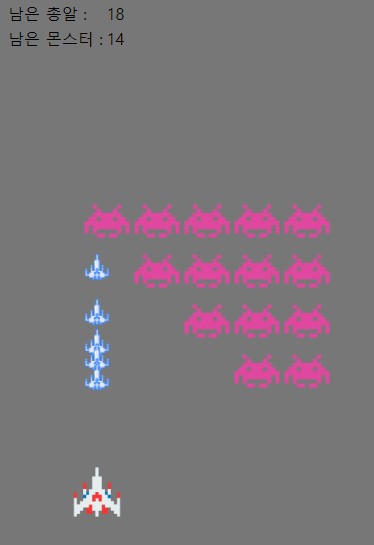
🎮space invaders game
game01.html
우선 게임을 만들기 위한 몸풀기
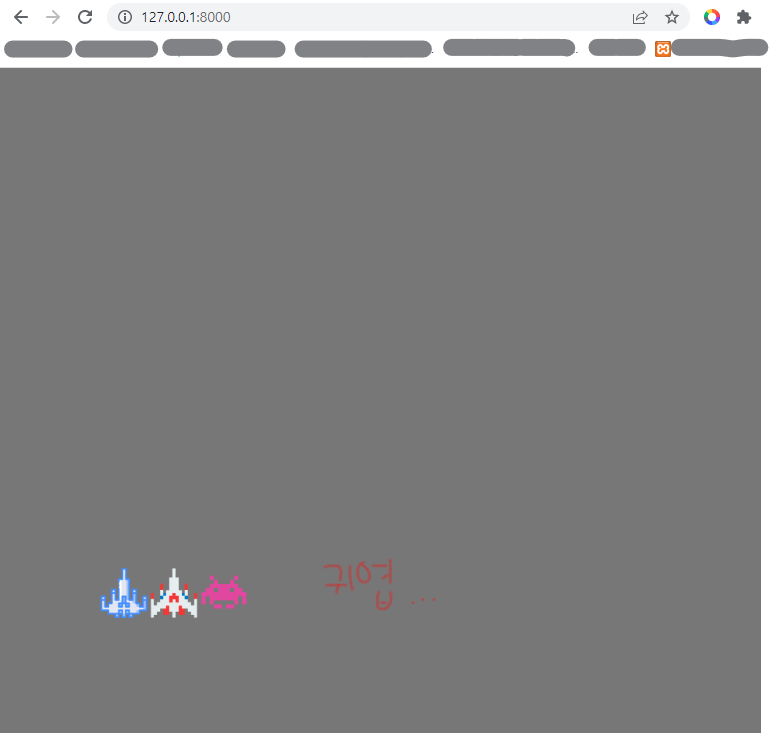
<!DOCTYPE html>
<html>
<head>
<meta charset="UTF-8">
<title>Insert title here</title>
<script src="https://ajax.googleapis.com/ajax/libs/jquery/3.6.1/jquery.min.js"></script>
<style type="text/css">
body{
	background: #777777;
}
#myimg{
	position: absolute;
}
.invader{
	position: absolute;
}
#mybull{
	position: absolute;
	z-index: -1;
}

</style>
<script type="text/javascript">
//-----------------------------------------------------------------------------------
// window.addEventListener("keydown", (event) => {
// 	   console.log(event.key);
// 	   var myimg = document.querySelector('#myimg');
// 	   var left = document.defaultView.getComputedStyle(myimg).getPropertyValue("left");
// 	   if (event.key === "ArrowLeft") {
// 	      console.log("왼쪽");
// 	      console.log("left : ", left, parseInt(left))
// 	      myimg.style.left = parseInt(left) - 20 + "px";

// 	   }

// 	   if(event.key === "ArrowRight"){
// 	      myimg.style.left = parseInt(left) + 20 + "px";

// 	   }

// });
//-----------------------------------------------------------------------------------
window.onkeydown = (e) => {
	//console.log(e.key);
	//console.log("keydown");

	var obj_ship = document.querySelector("#myimg");
	var int_left = parseInt(obj_ship.style.left.replace("px",""));
	//console.log(obj_ship.style.left.replace("px",""));
	/* parseInt 크롬 되는데 나머지는 애매 / substring / replace, replaceAll */

	if(e.key == "ArrowRight"){
		int_left += 10;
	}
	if(e.key == "ArrowLeft"){
		int_left -= 10;
	}

	obj_ship.style.left = int_left + "px";

	//myrender(); 총알이 한번나오고 누를때마다 속도 빨라짐
}

function myrender(){ //mrender 이런식으로 많이 씀
	// 반복되는 로직을 넣어준다
	var obj_bull = document.querySelector("#mybull");
	var int_top = parseInt(obj_bull.style.top.replace("px",""));
	int_top -= 10;
	obj_bull.style.top = int_top + "px";

	setTimeout(myrender, 30); // 1초마다 자동 숫자가 작아지면 부드러움

}

// 총알은 onload, ready
function myinit(){
// 	myrender();

}

</script>

</head>
<body onload="myinit()">

<img class="invader" src="static/invader2.png" width="50px" style="top:500px; left:200px;"/>
<img id="myimg" src="static/ship.png" width="50px" style="top:500px; left:150px;"/>
<img id="mybull" src="static/shadow.png" width="50px" style="top:500px; left:100px;"/>

</body>
</html>
game02.html 자바스크립트 상속
<!DOCTYPE html>
<html>
<head>
<meta charset="UTF-8">
<title>Insert title here</title>
<script src="https://ajax.googleapis.com/ajax/libs/jquery/3.6.1/jquery.min.js"></script>
<style type="text/css">

</style>
<script type="text/javascript">
class Animal {
	constructor() { /* constructor __init 파이썬과 비슷한것 */
		this.age = 0;
	}

	getOlder() {
		this.age ++;
	}

}

class Human extends Animal {
	constructor() {
		super(); /* super.__init */
		this.skill_lang = 1;
	}

	momstouch(stroke) {
		this.skill_lang += stroke;
	}

}

function myinit(){
// 	var a = new Animal();
// 	console.log(a.age);
// 	a.getOlder();
// 	console.log(a.age);

	var h = new Human();
	console.log(h.age);
	console.log(h.skill_lang);
	h.getOlder();
	h.momstouch(5);
	console.log(h.age);
	console.log(h.skill_lang);


}
</script>

</head>
<body onload="myinit()">

</body>
</html>
game03.html 진짜 인베이더게임
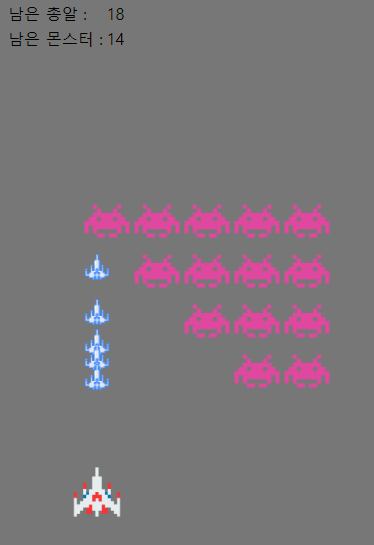
<!DOCTYPE html>
<html>
<head>
<meta charset="UTF-8">
<title>Insert title here</title>
<script src="https://ajax.googleapis.com/ajax/libs/jquery/3.6.1/jquery.min.js"></script>
<style type="text/css">

</style>
<script type="text/javascript">
class Bull { // Bull oop 생성 완!
	constructor(cx,cy) { /* constructor __init 파이썬과 비슷한것 */
		this.cx = cx; 	// 중심좌표
		this.cy = cy; 	// 중심좌표
		this.r = 12;	// 반경
		this.w = 26;
		this.h = 26;
		this.x1 = cx - (this.w/2);	// 해당 이미지의 가장자리 끝점
		this.y1 = cy - (this.h/2);	// 해당 이미지의 가장자리 끝점
	}
	moveX(d){
		this.cx += d; // d는 이동거리
		this.x1 = this.cx - (this.w/2);
	}

	moveY(d){
		this.cy += d; // d는 이동거리
		this.y1 = this.cy - (this.h/2);
	}

	toString() { // javascript class tostring 확인
		var str = "";
		str += "cx : " + this.cx;
		str += "cy : " + this.cy;
		str += "r : " + this.r;
		str += "w : " + this.w;
		str += "h : " + this.h;
		str += "x1 : " + this.x1;
		str += "y1 : " + this.y1;
		return str;
	}

}


class Inva { // Inva oop 생성 완!
	constructor(cx,cy) { /* constructor __init 파이썬과 비슷한것 */
		this.cx = cx; 	// 중심좌표
		this.cy = cy; 	// 중심좌표
		this.r = 20;	// 반경
		this.w = 50;
		this.h = 50;
		this.x1 = cx - (this.w/2);	// 해당 이미지의 가장자리 끝점
		this.y1 = cy - (this.h/2);	// 해당 이미지의 가장자리 끝점
	}
	moveX(d){
		this.cx += d; // d는 이동거리
		this.x1 = this.cx - (this.w/2);
	}

	moveY(d){
		this.cy += d; // d는 이동거리
		this.y1 = this.cy - (this.h/2);
	}

	toString() { // javascript class tostring 확인
		var str = "";
		str += "cx : " + this.cx;
		str += "cy : " + this.cy;
		str += "r : " + this.r;
		str += "w : " + this.w;
		str += "h : " + this.h;
		str += "x1 : " + this.x1;
		str += "y1 : " + this.y1;
		return str;
	}

}

class Ship { // Ship oop 생성 완!
	constructor(cx,cy) { /* constructor __init 파이썬과 비슷한것 */
		this.cx = cx; 	// 중심좌표
		this.cy = cy; 	// 중심좌표
		this.r = 20;	// 반경
		this.w = 50;
		this.h = 50;
		this.x1 = cx - (this.w/2);	// 해당 이미지의 가장자리 끝점
		this.y1 = cy - (this.h/2);	// 해당 이미지의 가장자리 끝점
	}
	moveX(d){
		this.cx += d; // d는 이동거리
		this.x1 = this.cx - (this.w/2);
	}

	moveY(d){
		this.cy += d; // d는 이동거리
		this.y1 = this.cy - (this.h/2);
	}

	toString() { // javascript class tostring 확인
		var str = "";
		str += "cx : " + this.cx;
		str += "cy : " + this.cy;
		str += "r : " + this.r;
		str += "w : " + this.w;
		str += "h : " + this.h;
		str += "x1 : " + this.x1;
		str += "y1 : " + this.y1;
		return str;
	}

}

// 전역변수
var flagRight = true;
var ship = new Ship(100,500);
var invas = [];
var bulls = [];

invas.push(new Inva(50,50));
invas.push(new Inva(100,50));
invas.push(new Inva(150,50));
invas.push(new Inva(200,50));
invas.push(new Inva(250,50));

invas.push(new Inva(50,100));
invas.push(new Inva(100,100));
invas.push(new Inva(150,100));
invas.push(new Inva(200,100));
invas.push(new Inva(250,100));

invas.push(new Inva(50,150));
invas.push(new Inva(100,150));
invas.push(new Inva(150,150));
invas.push(new Inva(200,150));
invas.push(new Inva(250,150));

invas.push(new Inva(50,200));
invas.push(new Inva(100,200));
invas.push(new Inva(150,200));
invas.push(new Inva(200,200));
invas.push(new Inva(250,200));

// 총알나가게하는 명령어
//bulls.push(new Bull(50,500));

function myinit(){
	//console.log(ship);
	myloop();
}

// 인베이더 벽에 부딪힘
function isCrashRight(){
	var ret = false;
	for(var i = 0; i < invas.length; i++){
		if(invas[i].cx>500){
			ret = true;
			break;
		}
	}
	return ret;
}

function isCrashLeft(){
	var ret = false;
	for(var i = 0; i < invas.length; i++){
		if(invas[i].cx<30){
			ret = true;
			break;
		}
	}
	return ret;
}

function isCrashDown(){
	var ret = false;
	for(var i = 0; i < invas.length; i++){
		if(invas[i].cy>450){
			ret = true;
			break;
		}
	}
	return ret;
}


function myloop(){
	//console.log("myloop", myloop)

	var flagChange = false;
	var flagDownOut = false;

	flagDownOut = isCrashDown();

	if(flagDownOut){
		alert("GAME OVER");
		return;
	}


	if(flagRight){
		flagChange = isCrashRight();
	}else{
		flagChange = isCrashLeft();
	}
	if(flagChange){
		flagRight = !flagRight;
	}

	// invader
	for(var i = 0; i < invas.length; i++){
		if(flagRight){
			invas[i].moveX(5);
		}else{
			invas[i].moveX(-5);
		}
		if(flagChange){
			invas[i].moveY(30);
		}

	}

	// 총알
	for(var i = 0; i < bulls.length; i++){
		bulls[i].moveY(-5);
	}

	killInva();

	if(invas.length==0){
		alert("YOU WIN");
		return;
	}

	myrender();
	setTimeout(myloop, 30);
}

function killInva(){
	// 총알과 인베이더의 충돌
	for(var i = 0; i < invas.length; i++){
		for(var b = 0; b < bulls.length; b++){

			var ix = invas[i].cx;
			var iy = invas[i].cy;
			var ir = invas[i].r;

			var bx = bulls[b].cx;
			var by = bulls[b].cy;
			var br = bulls[b].r;

			var rr = ir + br ;
			var dd = Math.sqrt(((ix-bx)**2)+((iy-by)**2));
			//console.log("rr dd", rr,dd);

			if(rr>dd){
				console.log("부딪쳤어");
				invas.splice(i, 1);
				bulls.splice(b, 1);

				// 잔여몬스터수
				var obj_inva = document.querySelector("#div_remain_inva");
				var int_cnt = parseInt(obj_inva.innerHTML);
				int_cnt --;
				obj_inva.innerHTML = int_cnt;

				return;
			}

		}
	}
}


function myrender(){
   var html = ``;
   var html_ship = `<img id="myimg" src="static/ship.png" width="${ship.w}px" height="${ship.h}px" style="top:${ship.y1}px; left:${ship.x1}px; position:absolute;"/>`;

   var html_invas = ``;
   var html_bulls = ``;

   for(var i = 0; i < invas.length; i++){
      html_invas +=
      `<img class="invader" src="static/invader2.png" width="${invas[i].w}px" height="${invas[i].h}px" style="top:${invas[i].y1}px; left:${invas[i].x1}px; position:absolute; "/>`;
   }

   for(var i = 0; i < bulls.length; i++){
	   html_bulls +=
      `<img src="static/shadow.png" width="${bulls[i].w}px" height="${bulls[i].h}px" style="top:${bulls[i].y1}px; left:${bulls[i].x1}px; position:absolute;"/>`;
   }

   html += html_ship;
   html += html_invas;
   html += html_bulls;

   var obj_body = document.querySelector("#mybody");
   obj_body.innerHTML = html;
   document.body.style.backgroundColor = "#777777";

}

window.onkeydown = (e) => {
	//console.log("onkeydown", e);

	if(e.key == "ArrowRight"){
		ship.moveX(5);
	}
	if(e.key == "ArrowLeft"){
		ship.moveX(-5);
	}
	if(e.key == ' '){ //if(e.keyCode == 32)

		// 잔여총알수
		var obj_bull = document.querySelector("#div_remain_bull");
		var int_bull = parseInt(obj_bull.innerHTML);
		int_bull --;

		if(int_bull < 0){
			return;
		}
		obj_bull.innerHTML = int_bull;
		bulls.push(new Bull(ship.cx,ship.cy));
	}
}

</script>

</head>
<body onload="myinit()">
<div style="z-index: 100">
<table>
	<tr>
		<td>남은 총알 :</td>
		<td>
			<div id="div_remain_bull">30</div>
		</td>
	</tr>
	<tr>
		<td>남은 몬스터 :</td>
		<td>
			<div id="div_remain_inva">20</div>
		</td>
	</tr>
</table>
</div>
<div id="mybody" style="z-index: 50"></div>
</body>
</html>
settings.py
"""
Django settings for HELLO_GAME project.

Generated by 'django-admin startproject' using Django 4.1.

For more information on this file, see
https://docs.djangoproject.com/en/4.1/topics/settings/

For the full list of settings and their values, see
https://docs.djangoproject.com/en/4.1/ref/settings/
"""

from pathlib import Path

# Build paths inside the project like this: BASE_DIR / 'subdir'.
BASE_DIR = Path(__file__).resolve().parent.parent


# Quick-start development settings - unsuitable for production
# See https://docs.djangoproject.com/en/4.1/howto/deployment/checklist/

# SECURITY WARNING: keep the secret key used in production secret!
SECRET_KEY = 'django-insecure-o^&w9s+new@%0+yj3hc%hm=8z--4_saj%!y&!mc^b=-56gwvus'

# SECURITY WARNING: don't run with debug turned on in production!
DEBUG = True

ALLOWED_HOSTS = []


# Application definition

INSTALLED_APPS = [
    'django.contrib.admin',
    'django.contrib.auth',
    'django.contrib.contenttypes',
    'django.contrib.sessions',
    'django.contrib.messages',
    'django.contrib.staticfiles',
    'HELLO_GAME'
]

MIDDLEWARE = [
    'django.middleware.security.SecurityMiddleware',
    'django.contrib.sessions.middleware.SessionMiddleware',
    'django.middleware.common.CommonMiddleware',
    'django.middleware.csrf.CsrfViewMiddleware',
    'django.contrib.auth.middleware.AuthenticationMiddleware',
    'django.contrib.messages.middleware.MessageMiddleware',
    'django.middleware.clickjacking.XFrameOptionsMiddleware',
]

ROOT_URLCONF = 'HELLO_GAME.urls'

TEMPLATES = [
    {
        'BACKEND': 'django.template.backends.django.DjangoTemplates',
        'DIRS': [],
        'APP_DIRS': True,
        'OPTIONS': {
            'context_processors': [
                'django.template.context_processors.debug',
                'django.template.context_processors.request',
                'django.contrib.auth.context_processors.auth',
                'django.contrib.messages.context_processors.messages',
            ],
        },
    },
]

WSGI_APPLICATION = 'HELLO_GAME.wsgi.application'


# Database
# https://docs.djangoproject.com/en/4.1/ref/settings/#databases

DATABASES = {
    'default': {
        'ENGINE': 'django.db.backends.sqlite3',
        'NAME': BASE_DIR / 'db.sqlite3',
    }
}


# Password validation
# https://docs.djangoproject.com/en/4.1/ref/settings/#auth-password-validators

AUTH_PASSWORD_VALIDATORS = [
    {
        'NAME': 'django.contrib.auth.password_validation.UserAttributeSimilarityValidator',
    },
    {
        'NAME': 'django.contrib.auth.password_validation.MinimumLengthValidator',
    },
    {
        'NAME': 'django.contrib.auth.password_validation.CommonPasswordValidator',
    },
    {
        'NAME': 'django.contrib.auth.password_validation.NumericPasswordValidator',
    },
]


# Internationalization
# https://docs.djangoproject.com/en/4.1/topics/i18n/

LANGUAGE_CODE = 'en-us'

TIME_ZONE = 'UTC'

USE_I18N = True

USE_TZ = True


# Static files (CSS, JavaScript, Images)
# https://docs.djangoproject.com/en/4.1/howto/static-files/

STATIC_URL = 'static/'

# Default primary key field type
# https://docs.djangoproject.com/en/4.1/ref/settings/#default-auto-field

DEFAULT_AUTO_FIELD = 'django.db.models.BigAutoField'
urls.py
from django.contrib import admin
from django.urls import path
from HELLO_GAME import views

urlpatterns = [
    path('', views.game),
    path('game', views.game),
]
views.py
from django.shortcuts import render
from django.http.response import HttpResponse, JsonResponse
from django.views.decorators.csrf import csrf_exempt


def game(request):
    return render(request, 'game03.html')

안녕하세요! 초보개발자 공부 시작!